
Introduction
This manual provides comprehensive instructions for the safe and efficient operation of your Generic HK10 Ultra 3 Smart Watch. Please read this manual thoroughly before using the device to ensure proper functionality and to prevent damage.
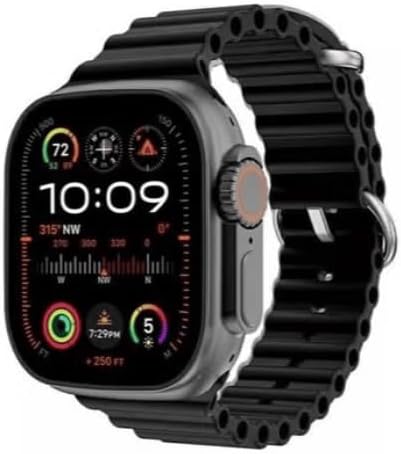
Image: The HK10 Ultra 3 Smart Watch with a black strap, displaying time, date, and various health monitoring data on its screen.
Safety Information
Observe the following safety precautions to ensure safe operation and prolong the life of your device:
- Do not attempt to disassemble or modify the watch.
- Avoid exposing the watch to extreme temperatures or direct sunlight for extended periods.
- Keep the watch away from strong magnetic fields.
- While the watch is water-resistant, avoid prolonged submersion or exposure to high-pressure water.
- Use only the provided charging cable and adapter.
Package Contents
Verify that all items are present in the package:
- HK10 Ultra 3 Smart Watch
- Magnetic Wireless Charging Cable
- Two Straps (e.g., Black silicone and Grey fabric)
- User Manual (this document)

Image: The HK10 Ultra 3 Smart Watch, two interchangeable straps (one black, one grey), and its product packaging box.
Setup
1. Charging the Device
Before initial use, fully charge your HK10 Ultra 3 Smart Watch.
- Connect the magnetic wireless charging cable to a USB power adapter (not included).
- Place the back of the watch onto the magnetic charging pad. Ensure the charging icons appear on the watch screen.
- Allow approximately 2-3 hours for a full charge.
2. Powering On/Off
- Power On: Press and hold the side power button until the screen illuminates.
- Power Off: Press and hold the side power button, then select "Power Off" on the screen.
3. Strap Installation
To attach or change the watch straps:
- Align the strap with the watch lugs.
- Slide the strap into place until you hear a click, indicating it is securely fastened.
- To remove, press the release button on the underside of the watch and slide the strap out.

Image: A close-up side view of the HK10 Ultra 3 Smart Watch worn on a wrist, highlighting the digital crown and side button, and the strap attachment mechanism.
4. Pairing with Your Smartphone (WearFit Pro App)
To unlock the full functionality of your smart watch, pair it with your smartphone using the WearFit Pro application.
- Download the WearFit Pro app from your smartphone's app store (compatible with Android 5.0+ and iOS 10.0+).
- Ensure Bluetooth is enabled on your smartphone and the watch.
- Open the WearFit Pro app, create an account or log in.
- Follow the in-app instructions to search for and connect to your HK10 Ultra 3 Smart Watch.
- Confirm the pairing request on both your phone and the watch.
Operating Instructions
Basic Navigation
- Touch Screen: Swipe left/right, up/down, and tap to navigate menus and select options.
- Digital Crown: Rotate to scroll through menus or zoom in/out. Press to return to the home screen or access the app menu.
- Side Button: Typically used for quick access to specific functions or as a back button.
Key Features
- Bluetooth Call Function: Make and receive calls directly from your watch after pairing with your phone.
- Message Notifications: Receive alerts for calls, SMS, and app notifications (WeChat, Facebook, WhatsApp) on your watch.
- Voice Assistant: Activate your phone's voice assistant through the watch.
- Music Control: Play, pause, skip tracks, and adjust volume for music playing on your connected phone.
- NFC Access Control: Use for compatible NFC access systems.
- Voice Recording: Utilize the built-in 2GB memory to record audio.
- Calculator: Access a basic calculator directly on your wrist.
- Alarm Clock: Set alarms for reminders.
- Games: Engage with pre-installed games.
- Photo Gallery: View photos on the watch screen.
- Always-on Display: Keep the time visible without needing to raise your wrist.
- Real Compass: A digital compass for navigation.
- Activity Tracking: Monitor steps, calories burned, and distance traveled.
- Sports Modes: Track various indoor (running, cycling, sit-up, push-up, free movement) and outdoor (walking, mountaineering) activities.
- Weather: Get current weather updates.
- Camera Control: Remotely trigger your phone's camera shutter.
- Language Support: Supports Arabic and other languages.

Image: The HK10 Ultra 3 Smart Watch screen showing a compass interface, indicating direction and slope.
Customizing Watch Faces
You can change the watch face directly on the device or through the WearFit Pro app.
- On Watch: Long-press the home screen, then swipe left/right to browse available watch faces. Tap to select.
- Via App: Open the WearFit Pro app, navigate to the watch face section, and choose from a wider selection or customize your own.
Maintenance
Cleaning Your Watch
- Wipe the screen and body with a soft, lint-free cloth.
- For stubborn marks, slightly dampen the cloth with water. Avoid using harsh chemicals or abrasive materials.
- Ensure the watch is dry before charging.
Water Resistance
The HK10 Ultra 3 Smart Watch is designed with "lifetime waterproof" capability, meaning it is resistant to splashes and brief exposure to water.
- It is suitable for daily use, such as washing hands or light rain.
- Avoid wearing the watch during swimming, showering, or in saunas, as steam and high-pressure water can compromise the seals.
- Do not operate buttons underwater.
Battery Care
- To preserve battery life, avoid fully discharging the battery frequently.
- Charge the watch regularly, even if not in constant use.
- Store the watch in a cool, dry place when not in use for extended periods.
Troubleshooting
| Problem | Possible Solution |
|---|---|
| Watch does not power on. | Ensure the watch is fully charged. Connect to the charger and wait a few minutes before attempting to power on again. |
| Cannot pair with smartphone. |
|
| Notifications are not received. |
|
| Inaccurate activity tracking. | Ensure the watch is worn snugly on your wrist. Calibrate settings in the WearFit Pro app if available. |
Specifications
| Feature | Detail |
|---|---|
| Model | HK10 Ultra 3 |
| Display | 5 cm (2-inch) AMOLED Display, 240MHz + 48MHz high refresh rate |
| Processor | Dual-core processor with 1.4MB operating memory, 2D graphics engine, AI neural network accelerator |
| Storage | 2GB |
| Bluetooth | Bluetooth 5.2 Low Energy |
| Battery Capacity | 220mAh |
| Charging | Magnetic Wireless Charging |
| Waterproof Level | Lifetime waterproof (splash resistant) |
| Compatibility | Android 5.0 and above; iOS 10.0 and above |
| App | WearFit Pro |
| Watch Size | 46 x 39.2 x 11 mm |
| Manufacturer | HK |
| Country of Origin | China |
Warranty and Support
The HK10 Ultra 3 Smart Watch is manufactured by HK under the Generic brand. For specific warranty terms and conditions, please refer to the documentation provided at the time of purchase or contact your retailer.
For technical support or inquiries, please contact the retailer from whom you purchased the device.


