
1. Introduction and Overview
The Samsung Galaxy A17 5G (Model SM-A176B/DS) is designed to provide a reliable and immersive smartphone experience. It features a vibrant 6.7-inch Super AMOLED display with a 90Hz refresh rate, ensuring smooth visuals and rich colors for all your content. Capture detailed photos with its versatile triple-camera system, including a 50 MP wide lens, 5 MP ultra-wide lens, and 2 MP macro lens.
Powered by a 2.4 GHz octa-core processor, the Galaxy A17 5G supports smooth HD streaming, responsive gaming, and efficient multitasking. Benefit from ultra-fast 5G connectivity for rapid downloads and seamless online interactions. The device is built for durability with IP54 splash protection and Corning Gorilla Glass Victus for scratch resistance, ensuring it withstands daily use.

Figure 1: Front and back view of the Samsung Galaxy A17 5G smartphone, showcasing its display and triple camera module.
2. What's in the Box
Upon opening your Samsung Galaxy A17 5G package, you will find the following items:
- Samsung Galaxy A17 5G Smartphone (Model SM-A176B/DS)
- USB-C to USB-C Cable (for charging and data transfer)
- SIM Ejection Pin
- Quick Start Guide and Warranty Information
Note: A power adapter (charger) is sold separately and is not included in the box.
3. Setup
3.1. Inserting the SIM Card and MicroSD Card
The Samsung Galaxy A17 5G supports Dual SIM functionality (SIM + SIM/Memory Card).
- Locate the SIM card tray on the side of your device.
- Insert the SIM ejection pin into the small hole next to the tray to open it.
- Carefully pull out the SIM card tray.
- Place your Nano-SIM card(s) and/or microSD card into the designated slots on the tray. Ensure the gold contacts are facing down.
- Gently push the tray back into the slot until it clicks into place.
Important: The memory card shares Slot 2 with a SIM card. You cannot use two SIM cards and a microSD card simultaneously. The device is not compatible with eSIM.

Figure 2: Side view of the Samsung Galaxy A17 5G, highlighting the location of the SIM card tray.
3.2. Powering On/Off Your Device
- To Power On: Press and hold the Power/Side key until the Samsung logo appears.
- To Power Off: Press and hold the Power/Side key and the Volume Down button simultaneously. Tap "Power off" on the screen. Alternatively, swipe down from the top of the screen to open the Quick Settings panel, then tap the Power icon and select "Power off".
3.3. Initial Setup
The first time you power on your device, you will be guided through an initial setup process. This includes:
- Selecting your language.
- Connecting to a Wi-Fi network.
- Signing in to your Google account.
- Setting up security features (fingerprint, PIN, pattern, password).
- Transferring data from an old device (optional).
4. Operating Your Device
4.1. Display Features
Experience stunning visuals on the 6.7-inch Super AMOLED FHD+ display. With a 90Hz refresh rate and 800 nits (HBM) brightness, content appears incredibly smooth and vibrant. The display resolution is 1080 x 2340 pixels, offering sharp and clear images.
4.2. Camera Usage
The Galaxy A17 5G is equipped with a versatile triple-camera system on the rear and a high-resolution front camera.
- Main Camera: 50MP, f/1.8 (wide) for capturing high-detail photos.
- Ultra-wide Camera: 5MP, f/2.2 for expansive landscape shots.
- Macro Camera: 2MP, f/2.4 for detailed close-up photography.
- Front Camera: 13MP, f/2.0 for clear selfies and video calls, supporting 1080p at 30fps video recording.
Features like LED flash, panorama, and HDR enhance your photography experience.
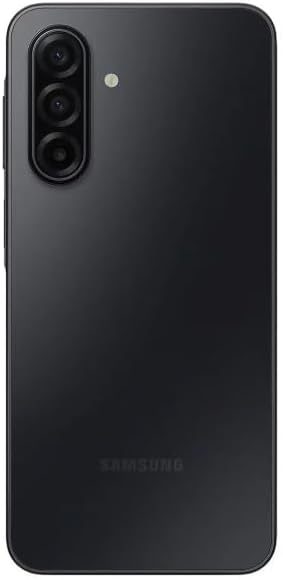
Figure 3: Rear view of the Samsung Galaxy A17 5G, highlighting the triple camera setup.
4.3. Performance and Connectivity
The device is powered by an Exynos 1330 (5nm) Octa-Core processor with a Mali-G68 MP2 GPU, ensuring smooth operation across applications and games. With 6GB of RAM and 128GB of internal storage (expandable via microSDXC), you have ample space and power for your daily tasks.
Enjoy ultra-fast 5G connectivity across global bands (1/3/5/7/8/20/28/38/40/41/66/77/78 SA/NSA/Sub6), providing reliable internet access for streaming, gaming, and communication.
4.4. Battery Life
The Samsung Galaxy A17 5G is equipped with a 5000mAh battery, designed to provide extended usage throughout your day. Actual battery life may vary based on network environment, usage patterns, and other factors.
5. Maintenance
5.1. Software Updates
Keep your device updated to ensure optimal performance, security, and access to the latest features. Samsung provides 6 generations of OS upgrades and 6 years of security updates for the Galaxy A17 5G.
- Check for Updates: Go to Settings > Software update > Download and install.
- Automatic Updates: Enable automatic updates in the software update settings to receive them seamlessly.
5.2. Device Protection
The Galaxy A17 5G offers enhanced durability features:
- IP54 Rating: Provides splash protection against water and dust. Avoid submerging the device in water.
- Corning Gorilla Glass Victus: Offers improved scratch resistance for the display.
For additional protection, consider using a protective case and screen protector.
6. Troubleshooting
If you encounter issues with your Samsung Galaxy A17 5G, try the following basic troubleshooting steps:
- Restart Your Device: A simple restart can often resolve minor software glitches.
- Check Connections: Ensure Wi-Fi, Bluetooth, and mobile data are properly enabled and connected.
- Clear App Cache: If an app is misbehaving, try clearing its cache via Settings > Apps > [App Name] > Storage > Clear cache.
- Software Update: Verify that your device is running the latest software version (see Section 5.1).
- Factory Reset (Last Resort): If problems persist, you may need to perform a factory data reset. Warning: This will erase all data on your device. Back up important information before proceeding. Go to Settings > General management > Reset > Factory data reset.
For more advanced troubleshooting or persistent issues, please refer to the Samsung support website or contact customer service.
7. Specifications
| Feature | Detail |
|---|---|
| Model Number | SM-A176B/DS |
| Display | 6.7-inch Super AMOLED FHD+, 1080 x 2340 pixels, 90Hz Refresh Rate, 800 nits (HBM) |
| Processor | Exynos 1330 (5nm) Octa-Core (2.4 GHz) |
| RAM | 6GB |
| Internal Storage | 128GB (expandable via microSDXC, uses shared SIM slot) |
| Rear Camera | 50MP (wide) + 5MP (ultrawide) + 2MP (macro) |
| Front Camera | 13MP |
| Battery | 5000mAh |
| Operating System | Android 15 (One UI 7) |
| Connectivity | 5G, Wi-Fi, Bluetooth, GPS |
| SIM Type | Dual SIM (Nano-SIM) |
| Protection | IP54 Splash Protection, Corning Gorilla Glass Victus |
| Dimensions | 6 x 4 x 2 inches |
| Weight | 9.5 ounces |
8. Warranty and Support
Your Samsung Galaxy A17 5G comes with a manufacturer's warranty. Specific warranty terms and conditions, including duration and coverage, may vary by region (e.g., Latin America warranty mentioned in product details). Please refer to the warranty card included in your product packaging or visit the official Samsung website for detailed information.
For technical support, service, or additional resources, please visit the official Samsung support website or contact their customer service. You can find contact information and FAQs on the Samsung website: www.samsung.com/support.