1. Important Safety Information
Please read this entire manual carefully before operating the treadmill. Retain this manual for future reference. Failure to follow these instructions could result in injury or damage to the product.
- Consult a Physician: Before starting any exercise program, consult your physician, especially if you have pre-existing health conditions.
- Read Instructions: Always read and understand all warnings and instructions in this manual before use.
- Children and Pets: Keep children and pets away from the treadmill at all times, especially during operation.
- Emergency Stop: Familiarize yourself with the emergency stop button and the safety key. Always attach the safety key clip to your clothing during use.
- Proper Attire: Wear appropriate athletic footwear and clothing. Avoid loose clothing that could get caught in moving parts.
- Stable Surface: Place the treadmill on a solid, level surface with adequate clearance around it (at least 2 feet on sides and 6 feet behind).
- Maximum User Weight: Do not exceed the maximum user weight of 300 pounds (136 kg).
- Unplug When Not in Use: Always unplug the treadmill from the power outlet when not in use, before cleaning, or before performing any maintenance.
- Electrical Safety: Use only a grounded outlet. Do not use extension cords. Keep the power cord away from heated surfaces.
- Maintenance: Regularly inspect the treadmill for wear and tear. Do not use if damaged.
2. Product Overview
2.1 Components
Familiarize yourself with the main parts of your Generic Model 1131 Foldable Treadmill:
- Console: Displays workout data, controls speed, incline, and programs.
- Handrails: Provide support and often include heart rate sensors and quick-access controls.
- Running Belt: The surface you walk, jog, or run on.
- Motor Cover: Protects the motor and internal components.
- Folding Mechanism: Allows the treadmill to be folded for storage.
- Transport Wheels: For easy movement of the folded treadmill.
- Safety Key: Essential safety device that stops the treadmill when removed.
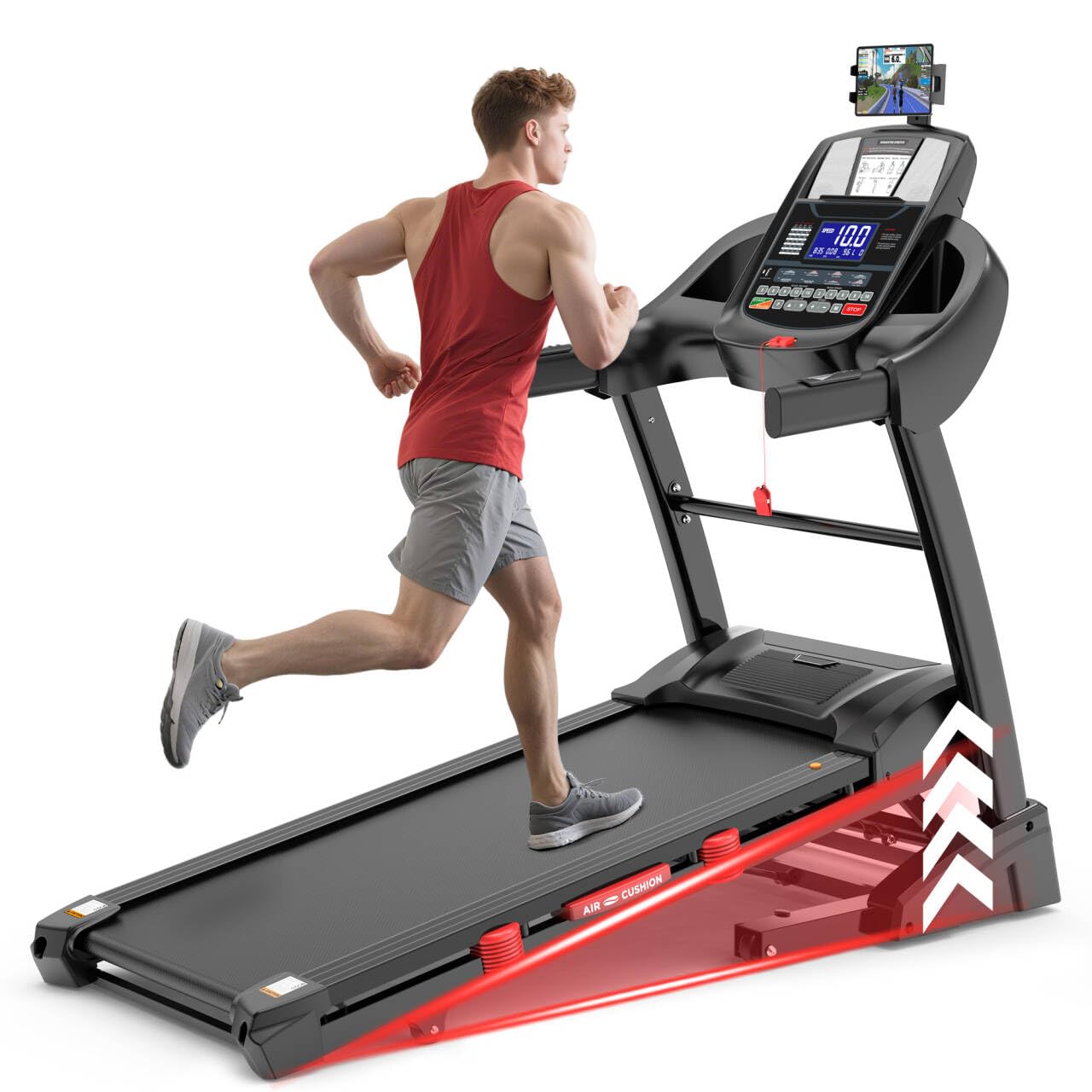
Figure 2.1: Overview of the Generic Model 1131 Foldable Treadmill. This image shows the complete treadmill unit, highlighting the main console, handrails, running deck, and base structure.
3. Setup and Assembly
3.1 Unpacking
- Carefully remove all components from the packaging.
- Place the main frame on a clear, level surface.
- Remove all packing materials and ensure no parts are missing. Refer to the parts list (not provided in this manual, typically found in a separate assembly guide).
3.2 Assembly Steps
While specific assembly steps are detailed in a separate guide, the general process involves:
- Attaching the uprights to the base frame.
- Securing the console to the uprights.
- Connecting any necessary cables.
- Ensuring all bolts and screws are tightened securely.
3.3 Unfolding and Folding for Storage
The Model 1131 treadmill features a smooth drop folding design and transport wheels for easy mobility and storage.
- To Unfold: Gently lift the running deck until the locking mechanism engages. Slowly lower the deck to the floor. Ensure it is fully locked in the down position before use.
- To Fold: Lift the running deck until it clicks into the upright, locked position. The smooth drop folding design assists in this process. Once folded, use the transport wheels to move the treadmill.
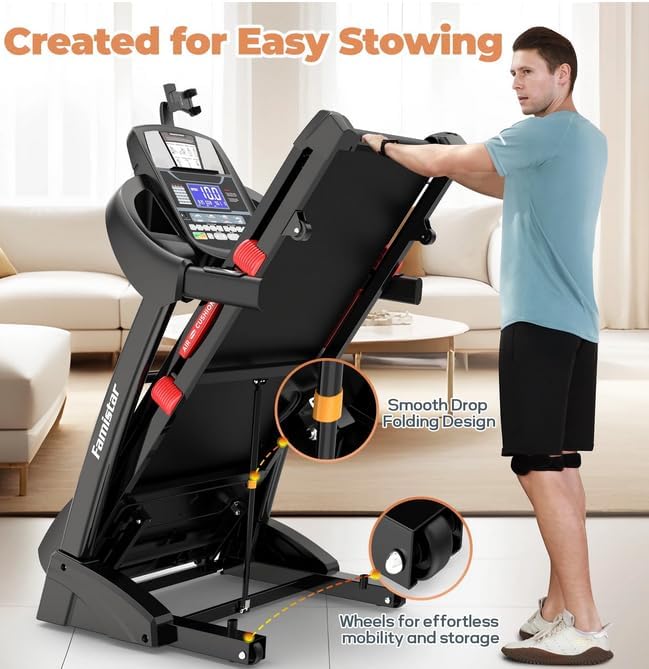
Figure 3.1: The Generic Model 1131 Treadmill in its folded position, demonstrating the smooth drop folding design and the transport wheels for easy storage and mobility.
4. Operating Instructions
4.1 Getting Started
- Plug the power cord into a grounded electrical outlet.
- Attach the safety key to the console and clip the other end to your clothing. The treadmill will not operate without the safety key in place.
- Step onto the treadmill, placing your feet on the side rails.
4.2 Console Functions
The console provides various controls and displays:
- Display Screen: Shows time, distance, speed, incline, calories burned, and heart rate.
- START/STOP Buttons: Initiates or pauses/stops your workout.
- SPEED +/- Buttons: Adjusts the running belt speed (up to 10 MPH). Quick-access speed controls may also be on handrails.
- INCLINE +/- Buttons: Adjusts the incline level (0-15 levels). Quick-access incline controls may also be on handrails.
- PROGRAM Buttons: Selects from pre-programmed workouts.
- MODE Button: Toggles through display modes or settings.
- Heart Rate Sensors: Integrated into handrails to monitor pulse.
4.3 Adjusting Speed and Incline
The treadmill offers 15 levels of auto incline and speeds up to 10 MPH.
- Use the SPEED +/- buttons on the console or handrails to increase or decrease your pace.
- Use the INCLINE +/- buttons on the console or handrails to adjust the incline. Higher incline levels simulate uphill training, enhancing muscle engagement and calorie burn.
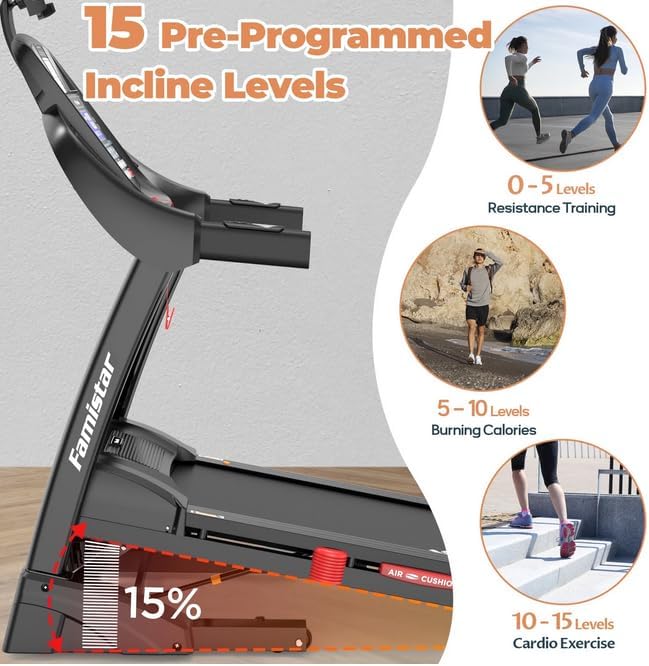
Figure 4.1: Illustration of the 15 pre-programmed incline levels available on the Generic Model 1131 Treadmill, demonstrating how different incline ranges (0-5, 5-10, 10-15) can be used for resistance training, calorie burning, and cardio exercise.
4.4 Pre-Programmed Workouts
The treadmill includes 71 pre-programmed workouts to vary your exercise routine. Select a program using the PROGRAM buttons on the console. Follow the on-screen prompts to begin.
4.5 App Control (Fitshow/Zwift)
Enhance your workout experience by connecting your treadmill to compatible fitness applications like Fitshow or Zwift. These apps offer additional courses, workout plans, music, virtual run experiences, and allow you to control your treadmill, monitor workout data, and track training history.
- Requirements: Android 8.0 or iOS 9.0+ with Bluetooth-enabled phones or tablets.
- Connection: Download the desired app (e.g., Fitshow) from your device's app store. Follow the in-app instructions to pair your device with the treadmill via Bluetooth.
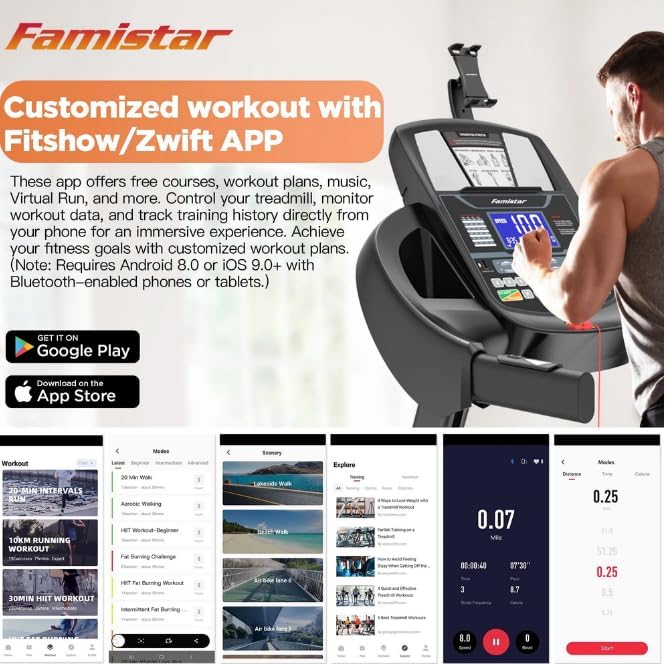
Figure 4.2: The treadmill console displaying connectivity options for Fitshow/Zwift apps, alongside examples of app interfaces showing various workout programs, virtual routes, and data tracking features.
5. Maintenance
Regular maintenance ensures the longevity and safe operation of your treadmill. Always unplug the treadmill before performing any maintenance.
5.1 Cleaning
- General Cleaning: Wipe down the console and other surfaces with a soft, damp cloth after each use. Avoid abrasive cleaners or solvents.
- Deck and Belt: Periodically vacuum under the motor cover and around the running deck to remove dust and debris.
5.2 Belt Lubrication
The running belt requires periodic lubrication to reduce friction and extend its lifespan. Refer to your separate assembly guide for specific lubrication instructions and recommended lubricant type. Typically, lubrication is needed every 3-6 months depending on usage.
5.3 Belt Adjustment
The running belt may require adjustment over time if it starts to slip or drift to one side. Refer to your separate assembly guide for detailed instructions on how to tension and center the running belt using the adjustment bolts at the rear of the treadmill.
5.4 General Care
- Inspect the power cord for damage regularly.
- Check all bolts and nuts for tightness periodically.
- Store the treadmill in a dry, climate-controlled environment.
6. Troubleshooting
If you encounter issues with your treadmill, refer to the table below for common problems and solutions. If the problem persists, contact customer support.
| Problem | Possible Cause | Solution |
|---|---|---|
| Treadmill does not start. | Power cord not plugged in; Safety key not in place; Circuit breaker tripped. | Ensure power cord is securely plugged in; Insert safety key fully; Check household circuit breaker. |
| Running belt slips or hesitates. | Belt too loose; Belt needs lubrication. | Adjust belt tension (refer to maintenance section); Lubricate the running deck (refer to maintenance section). |
| Unusual noise during operation. | Loose components; Motor cover rubbing; Belt misalignment. | Check all bolts and screws for tightness; Ensure motor cover is secure; Adjust belt alignment. |
| Heart rate monitor not reading. | Hands not properly placed; Dry hands. | Ensure both hands are firmly gripping the sensors; Lightly moisten hands if dry. |
7. Specifications
Technical specifications for the Generic Model 1131 Foldable Treadmill:
| Feature | Detail |
|---|---|
| Brand | Generic |
| Model Name | 1131 |
| Motor Horsepower | 4.48 HP (Maximum) |
| Maximum Speed | 10 Miles per Hour |
| Auto Incline Levels | 15 Levels |
| Maximum Weight Recommendation | 300 Pounds |
| Product Dimensions (LxWxH) | 64"D x 23"W x 56"H |
| Material | Acrylonitrile Butadiene Styrene (ABS) |
| Color | Black |
| Included Components | Safety Key |
8. Warranty and Support
8.1 Warranty Information
This Generic Model 1131 Foldable Treadmill comes with a 1-Year Warranty. This warranty covers manufacturing defects under normal use. Please retain your proof of purchase for warranty claims.
8.2 Customer Support
For technical assistance, parts replacement, or any questions regarding your treadmill, please contact our customer support. Contact details are typically provided on the product packaging or a separate warranty card.
When contacting support, please have your model number (1131) and purchase date available.


