
1. Introduction
Welcome to the user manual for your new INTPIHP Fitness Tracker Activity Tracker. This device is designed to help you monitor your health and fitness activities with its 1.10'' AMOLED touch color screen, 24/7 health monitoring capabilities, and various sports modes. This manual provides essential information for setup, operation, maintenance, and troubleshooting to ensure you get the most out of your device.
2. Getting Started: Setup
2.1. Charging the Device
Before first use, fully charge your fitness tracker to activate it. The device features a magnetic charging cable. Connect the magnetic end of the cable to the charging points on the back of the tracker and the USB end to a power source.

Figure 1: The fitness tracker connected to its magnetic charging cable.
2.2. App Installation and Connection
- Search for and download the "Keep Health" app from your device's app store (App Store for iOS or Google Play Store for Android).
- Ensure your phone's Bluetooth is enabled.
- Open the "Keep Health" app, create an account, and log in.
- In the app, navigate to the "Device" section and select "Add a Device" to find and connect to your fitness tracker (model C60).
- Accurately input your personal information (gender, weight, height) in the app for precise measurement results.
Video 1: Overview of the fitness tracker's features and basic operation.
2.3. Notification Setup
To receive notifications on your fitness tracker, ensure the necessary permissions are granted in your phone's settings and within the "Keep Health" app.
- In your phone's settings, allow notification permissions for the "Keep Health" app.
- Within the "Keep Health" app, go to the "Device" page and select "Message Notification."
- Enable "Notification alerts" and select the specific applications (e.g., SMS, QQ, WeChat, WhatsApp, Facebook, Twitter) from which you wish to receive notifications.
Video 2: Instructions on how to enable notifications on the smart watch.
3. Operating Your Fitness Tracker
3.1. Navigating the Device
The fitness tracker features a 1.10'' AMOLED touch color screen for intuitive navigation. Swipe up, down, left, or right to access different functions and menus. A single touch typically selects an option or confirms an action.

Figure 2: Overview of the fitness tracker's main functions and touch screen interface.
3.2. Health Monitoring
- Heart Rate Monitoring: The tracker continuously monitors your heart rate 24/7, providing data to help you understand your cardiovascular health.
- Blood Oxygen Monitoring: Track your blood oxygen levels to assess your overall well-being.
- Sleep Monitoring: The device analyzes your sleep quality, distinguishing between deep sleep, light sleep, and awake periods. This data helps you adjust your sleep habits for better rest.

Figure 3: Continuous 24/7 health monitoring for heart rate and blood oxygen.

Figure 4: Sleep tracking for better rest, showing deep sleep, light sleep, and awake time.
3.3. All-Day Activity Tracking
The fitness tracker automatically records your daily steps, distance traveled, and calories burned. This data provides a professional analysis to help improve your sports and daily habits.
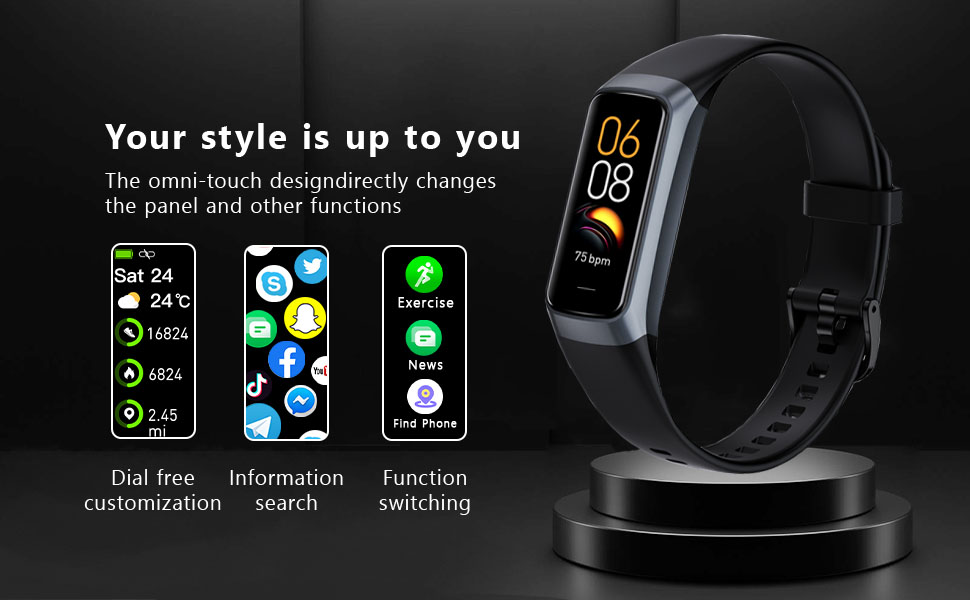
Figure 5: All-day activity tracking including calories, steps, and distance.
3.4. Sports Modes
The device offers over 20 sports modes to cover various physical activities, including walking, running, cycling, indoor running, free training, and more. It stores the last 5 exercise records to help you train more effectively.
Video 3: Demonstrating various sports modes and functions of the fitness tracker.
3.5. Smart Notifications
Stay connected with smart message notifications. The watch can receive alerts from social media apps (SMS, QQ, WeChat, WhatsApp, Facebook, Twitter) and incoming call notifications, allowing you to reject calls directly from your wrist.

Figure 6: Timely notifications for messages and calls from your smartphone.
3.6. Customizing Watch Faces
Personalize your device with over 70 cloud-based watch faces available through the app. You can also customize the dial with your favorite photos from your album to match your style and mood.
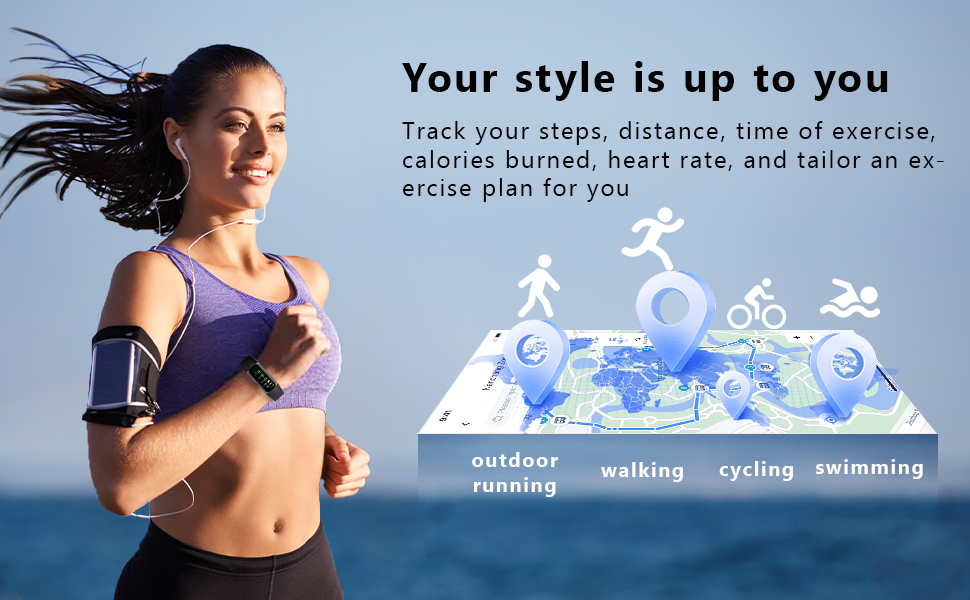
Figure 7: Customizable watch faces to suit your personal style.
4. Maintenance
4.1. Cleaning and Care
- Regularly clean your fitness tracker and wristband with a soft, damp cloth to prevent skin irritation and maintain device hygiene.
- Avoid using harsh chemicals or abrasive materials, as these can damage the device.
4.2. Water Resistance
The INTPIHP Fitness Tracker is IP68 waterproof, meaning it is resistant to dust and can withstand immersion in water up to 1.5 meters for up to 30 minutes. It is suitable for activities like swimming, running in the rain, and showering. However, it is not recommended for hot water activities, diving, or high-pressure water exposure.

Figure 8: The fitness tracker's IP68 waterproof capability.
5. Troubleshooting
5.1. Common Issues and Solutions
- Device not turning on: Ensure the device is fully charged. Connect it to the charger for at least 10-15 minutes to activate it.
- Unable to connect to the app:
- Verify that Bluetooth is enabled on your phone.
- Make sure the "Keep Health" app has Bluetooth permissions.
- Restart both your phone and the fitness tracker.
- Try reconnecting through the "Add a Device" option in the app.
- Watch not receiving SMS/App notifications:
- Check your phone's settings to ensure the "Keep Health" app has permission to access notifications, messages, and calls.
- In the "Keep Health" app, navigate to "Device" > "Message Notification" and ensure "Notification alerts" is enabled for the desired applications.
- Ensure your phone's Bluetooth is not turned off, as the watch needs to be connected to receive notifications.
- Audio playing on watch instead of phone: If you prefer audio to play only on your phone, you can adjust the settings on the watch.
Video 4: Guide on how to turn off audio playing on the smart watch.
6. Specifications
| Feature | Specification |
|---|---|
| Brand | INTPIHP |
| Model | Fitness Tracker Activity Tracker |
| Screen Size | 1.1 Inches |
| Display Type | AMOLED Touch Color Screen |
| Material | Silicone |
| Water Resistance | IP68 |
| Health Monitoring | 24/7 Heart Rate, Blood Oxygen, Sleep Monitor |
| Activity Tracking | Steps, Distance, Calories Burned |
| Sports Modes | Over 20 (Walking, Running, Cycling, etc.) |
| Battery Type | Lithium-Ion |
| Item Weight | 0.07 Kilograms |
| Included Components | Charging Cable, User Manual, Watch Band |
7. Warranty and Support
7.1. Warranty Information
This product comes with a 2-year warranty. Please retain your proof of purchase for any warranty claims.
7.2. Customer Support
For further assistance, technical support, or warranty inquiries, please refer to the contact information provided with your product packaging or visit the official INTPIHP support website.