
LIVELYGLOW Vanity Desk Set with Mirror and Light
Model: WHP-YKL
Introduction
Thank you for choosing the LIVELYGLOW Vanity Desk Set with Mirror and Light. This manual provides essential information for the safe assembly, operation, and maintenance of your new vanity desk. Please read all instructions carefully before beginning assembly and retain this manual for future reference.
This vanity desk is designed to provide a functional and elegant space for your beauty and grooming needs, featuring integrated lighting and ample storage.
Safety Information
- Read all instructions: Ensure you understand all assembly steps and safety warnings before proceeding.
- Keep children and pets away: Small parts can be a choking hazard. Keep them out of reach during assembly.
- Assemble on a soft, clean surface: This prevents scratching the product during assembly.
- Do not overtighten screws: Overtightening can damage the material.
- Use only provided hardware: Substituting hardware may compromise the desk's stability and safety.
- Secure the desk: If wall-mounting hardware is provided, use it to prevent tipping.
- Electrical safety: Ensure the mirror light is connected to a suitable power source and avoid exposing electrical components to water.
Package Contents
Before assembly, verify that all parts listed below are present and undamaged. If any parts are missing or damaged, please contact customer support.
- Vanity Desk Panels (various sizes)
- Mirror with Integrated Light
- Cushion Stool Components
- Hardware Pack (screws, dowels, cam locks, etc.)
- Assembly Tools (e.g., Allen wrench, if included)
- User Manual (this document)
Setup and Assembly
Assembly typically requires two adults. Please follow the steps in the order presented for optimal stability and safety.
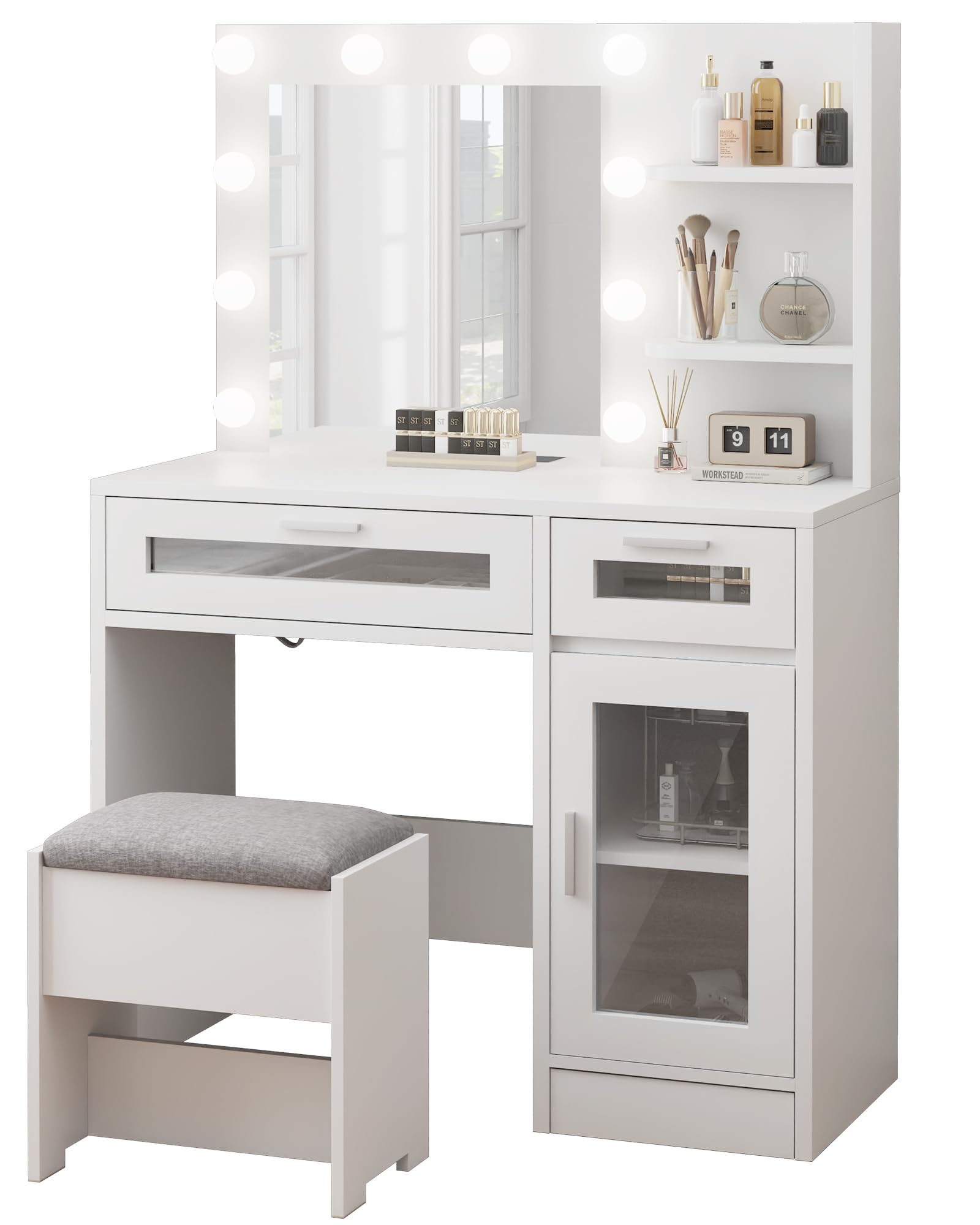
Image 1: Fully assembled LIVELYGLOW Vanity Desk Set. This image illustrates the complete product, including the desk, mirror with light, and stool.
- Prepare the Area: Clear a spacious, clean, and soft area for assembly to prevent damage to the desk components and your flooring.
- Identify Components: Unpack all parts and lay them out. Refer to the parts list (usually found on a separate sheet or within the hardware pack) to identify each piece.
- Assemble the Base Frame: Connect the main desk panels using the provided screws and dowels. Ensure all connections are snug but do not overtighten.
- Install Drawers and Shelves: Slide the drawer runners into place and assemble the drawers according to the specific instructions. Insert shelves into designated slots.
- Attach the Mirror Unit: Carefully position the mirror unit onto the desk base. Secure it using the specified hardware. Ensure the mirror is stable and level.
- Assemble the Stool: Follow the separate instructions for assembling the cushion stool, typically involving attaching legs to the seat base.
- Connect Power: Once the desk is fully assembled and stable, plug the mirror light's power cord into a standard electrical outlet.
- Final Check: Verify that all screws are tightened, and the desk is stable. Gently test the drawers and ensure the mirror is securely attached.
Operating Instructions
This section details how to use the features of your LIVELYGLOW Vanity Desk.
- Mirror Light Operation: The mirror features integrated lighting. Locate the power button, typically on the side or front of the mirror frame. Press once to turn on, and press again to turn off. Some models may offer adjustable brightness or color temperature; refer to specific mirror instructions if applicable.
- Drawer and Shelf Usage: The desk includes multiple drawers and shelves for storage. Pull drawers gently to open and push to close. Arrange your cosmetics and accessories on the shelves for easy access.
Maintenance
Proper care will extend the life and appearance of your vanity desk.
- Cleaning the Desk Surface: Wipe surfaces with a soft, damp cloth. Avoid harsh chemicals or abrasive cleaners, which can damage the finish.
- Cleaning the Mirror: Use a standard glass cleaner and a lint-free cloth. Spray cleaner onto the cloth, not directly onto the mirror, to prevent liquid from seeping into the frame or electrical components.
- Stool Cushion Care: Spot clean the cushion fabric with a mild detergent and water. Allow to air dry completely.
- Regular Checks: Periodically check all screws and connections to ensure they remain tight. Retighten if necessary.
- Avoid Direct Sunlight: Prolonged exposure to direct sunlight can cause fading or warping of the wood finish.
Troubleshooting
If you encounter any issues, refer to the following common problems and solutions.
| Problem | Possible Cause | Solution |
|---|---|---|
| Mirror light does not turn on. | Not plugged in; power outlet issue; loose connection; faulty bulb/LED. | Ensure the power cord is securely plugged into a working outlet. Check the power switch on the mirror. If the issue persists, contact customer support. |
| Desk feels wobbly or unstable. | Screws are loose; uneven floor; incorrect assembly. | Check and tighten all assembly screws. Ensure the desk is on a level surface. Review assembly steps to confirm correct installation. |
| Drawers do not slide smoothly. | Drawer runners misaligned; debris in runners; drawer assembled incorrectly. | Ensure drawer runners are correctly installed and free of obstructions. Recheck drawer assembly. |
Specifications
- Model: WHP-YKL
- Brand: LIVELYGLOW
- Material: Engineered Wood
- Product Dimensions: 15.74"D x 35.4"W x 54"H (40cm D x 90cm W x 137cm H)
- Color: White
- Features: Mirror with Light, 2 Drawers, 3 Storage Shelves, 1 Large Storage Cabinet, Cushion Stool
Warranty and Support
LIVELYGLOW products are manufactured to high-quality standards. For information regarding warranty coverage, please refer to the warranty card included with your purchase or visit the official LIVELYGLOW website.
If you require assistance with assembly, have questions about product features, or need to report missing/damaged parts, please contact LIVELYGLOW customer support. Contact details can typically be found on the brand's official website or on your purchase documentation.
Note: Always provide your product model number (WHP-YKL) and purchase date when contacting support for faster service.