
1. Introduction
Thank you for choosing the Unineo 3-Side Fireplace TV Stand. This manual provides essential information for the safe assembly, operation, and maintenance of your new entertainment center. Please read all instructions carefully before beginning assembly or operation and retain this manual for future reference.
Safety Information
- Ensure all parts are present and undamaged before assembly. Do not proceed if any parts are missing or broken.
- The electric fireplace insert is CSA certified and includes overheat protection and a child lock feature.
- Always plug the fireplace directly into a wall outlet. Do not use extension cords or power strips.
- Keep flammable materials at least 3 feet (0.9 meters) away from the front of the fireplace.
- This product is designed for indoor use only.
2. Package Contents
Your Unineo 3-Side Fireplace TV Stand will be shipped in two separate packages: one for the cabinet components and one for the electric fireplace insert. Please ensure you have received both packages and verify all components against the packing list provided in the main assembly manual before starting assembly.
If any parts are missing or damaged, please contact customer support immediately.
3. Assembly Instructions
Assembly of the Unineo 3-Side Fireplace TV Stand requires careful attention to detail. Each part is independently labeled to assist with the step-by-step instructions included in your package. We recommend two adults for assembly.
General Assembly Steps:
- Unpack all components and verify against the parts list.
- Assemble the main frame of the TV stand according to the detailed diagrams.
- Install the drawers and cabinet doors, ensuring hinges and sliding mechanisms operate smoothly.
- Insert the 36-inch electric fireplace into the designated opening.
- Connect any necessary wiring for the LED lighting and fireplace.
- Place the adjustable shelves in your desired positions.
For detailed, step-by-step instructions with diagrams, please refer to the separate assembly manual included in your packaging.

Image 3.1: Diagram illustrating the dimensions of the Unineo TV stand (70 inches wide, 31.42 inches high, 13.23 inches deep) and its weight capacity of 300 lbs. It also notes that the cabinet and fireplace ship separately.
4. Operating Instructions
4.1 Electric Fireplace Operation
The 36-inch electric fireplace features realistic 3-side flame effects and a log ember bed. It can be operated via the control panel on the unit or the included remote control.
- Flame & Ember Colors: Choose from 12 flame colors and 13 ember bed colors to match your ambiance.
- Flame Brightness & Speed: Adjust the intensity and speed of the flames to your preference.
- Heater Function: The 1500W quartz heater provides supplementary heat for rooms up to 1000 sq. ft. It includes a thermostat (60°F-99°F) and a timer (0.5-12 hours). The heater can be operated independently of the flame effects, allowing for year-round use.
- Safety Features: Equipped with overheat protection and a child lock.

Image 4.1: Infographic detailing the features of the 36-inch 3-side glass electric fireplace, including 12 flame and 13 ember color options, 5 levels of flame speed and brightness, 1500W heater, overheat protection, child lock, and CSA certification.

Image 4.2: This image illustrates that the heater and flame functions of the electric fireplace can be operated separately, highlighting features like temperature control, timer, and heating coverage.
4.2 LED Spot Lights Operation
The clear glass cabinets on either side of the fireplace feature integrated LED spot lights. These lights can be adjusted independently to create various ambiance effects.
- Color Options: Choose from 13 different colors to complement the fireplace flames or your room's decor.
- Independent Adjustment: Each light can be adjusted separately for color and brightness.
- Remote Control: The same remote control used for the fireplace also operates the LED spot lights.

Image 4.3: Close-up of the Unineo TV stand highlighting the 13-color LED spot lights in the side cabinets and the remote control used to operate both the fireplace and cabinet lights.

Image 4.4: This image showcases the ambiance-creating entertainment control center with 12 color LED spot lights, emphasizing their separate adjustment capability.
4.3 Storage Features
The TV stand offers various storage solutions to help organize your living space.
- Spacious Top: The 70-inch wide tabletop accommodates TVs up to 80 inches.
- Soundbar Shelf: A 35.2-inch by 6.3-inch open shelf is ideal for soundbars, DVD players, or game consoles.
- Drawers: Two large drawers with smooth-sliding mechanisms provide concealed storage.
- Side Cabinets: Four see-through adjustable shelves behind glass doors offer display and storage space.
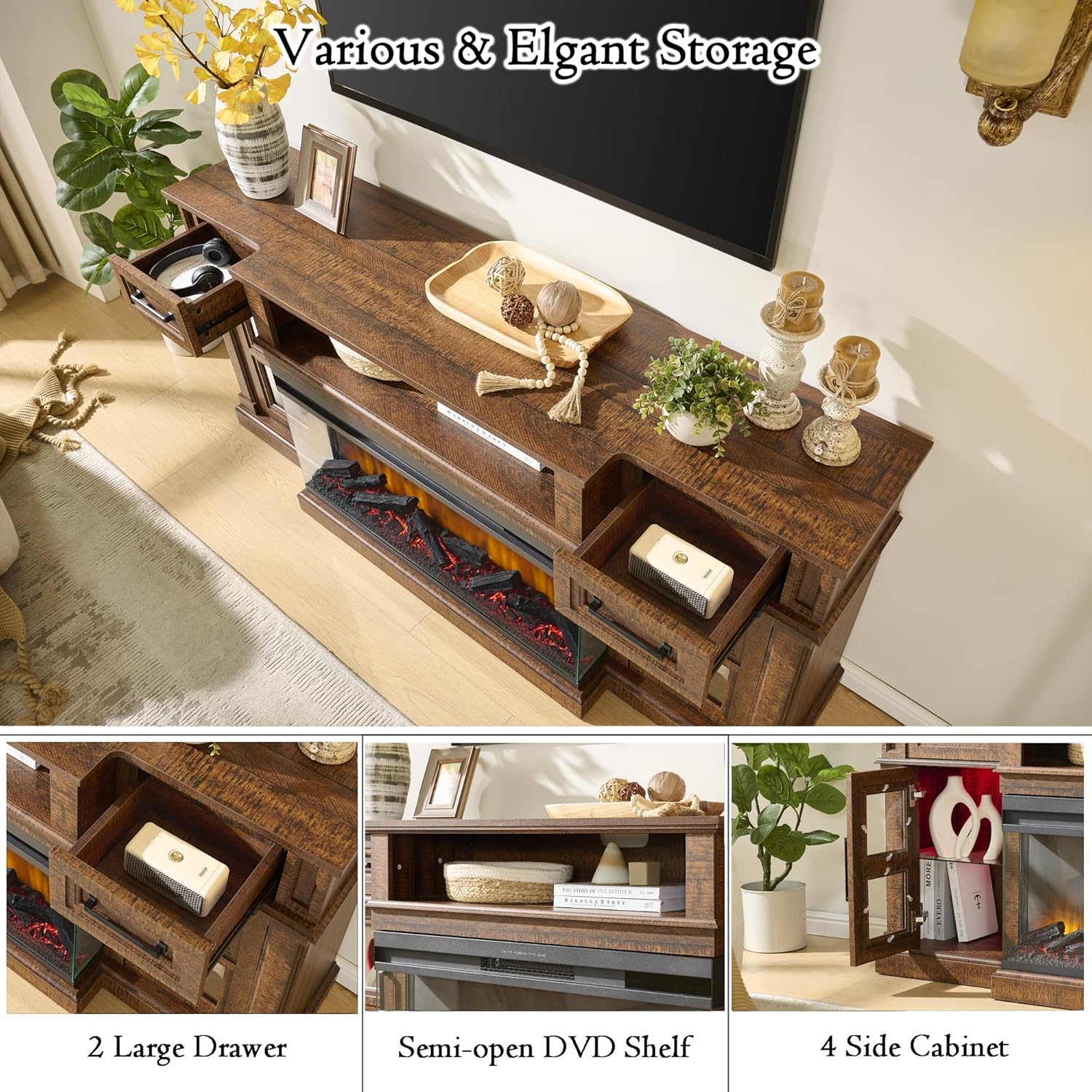
Image 4.5: Detailed view of the Unineo TV stand's storage options, including two large drawers, a semi-open DVD shelf, and four side cabinets with glass doors.

Image 4.6: This image highlights the extra-large tabletop providing more space and the smooth and quiet sliding experience of the drawers.

Image 4.7: This image displays design details such as the American country vintage style, integrated cable management, and adjustable shelves within the cabinets.
4.4 Product Overview Video
Video 4.1: An overview video demonstrating the features of the Unineo 3-Side Fireplace TV Stand, including the adjustable LED cabinet lights, the 36-inch electric fireplace with various flame and ember colors, and the storage compartments. The video highlights the remote control functionality and the overall design.
5. Maintenance
To ensure the longevity and optimal performance of your TV stand and electric fireplace, follow these maintenance guidelines:
- Cleaning the Stand: Wipe surfaces with a soft, damp cloth. Avoid harsh chemicals or abrasive cleaners that may damage the finish.
- Cleaning the Fireplace: Ensure the fireplace is turned off and unplugged before cleaning. Gently wipe the glass and exterior surfaces with a soft, lint-free cloth. Do not spray water directly onto the unit.
- Dusting: Regularly dust the unit, especially around the air intake/output vents of the fireplace, to prevent dust buildup that could affect performance.
- Inspections: Periodically check all connections and hardware to ensure they remain secure.
6. Troubleshooting
If you encounter issues with your Unineo 3-Side Fireplace TV Stand, please refer to the following common troubleshooting steps:
- Fireplace Not Turning On: Check if the power cord is securely plugged into a working outlet. Ensure the main power switch on the fireplace is in the 'ON' position. Verify that the circuit breaker has not tripped.
- No Heat Output: Confirm the heater function is activated. Check the thermostat setting; if the room temperature is above the set temperature, the heater will not activate. Ensure the air intake/output vents are not blocked.
- Remote Control Not Working: Replace the batteries in the remote control. Ensure there are no obstructions between the remote and the fireplace's receiver.
- LED Lights Not Working: Check power connections to the LED strips. Ensure the remote control is properly synced and the lights are turned on.
- Unusual Noises: A slight fan noise is normal during heater operation. If you hear unusual or loud noises, turn off the unit and contact customer support.
If these steps do not resolve the issue, please contact customer support for further assistance.
7. Specifications
| Feature | Specification |
|---|---|
| Brand | Unineo |
| Model Name | 25IN-36-20G |
| Product Dimensions (D x W x H) | 13.23" x 69.99" x 31.42" |
| Material | Engineered Wood |
| Finish Type | Laminated |
| Weight Capacity | 300 lbs |
| Item Weight | 130 lbs |
| TV Size Compatibility | Up to 80 Inch |
| Fireplace Size | 36 Inch |
| Fireplace Power | 1500W |
| Heating Coverage | Up to 1000 sq ft |
| Flame Colors | 12 |
| Ember Colors | 13 |
| LED Spot Light Colors | 13 |
| Safety Certification | CSA Certified Fireplace |
| Power Source | Corded Electric |
| Installation Type | Freestanding |
8. Warranty and Support
This Unineo product comes with a Limited Warranty. Please refer to the warranty card included in your package for specific terms and conditions.
For any questions, concerns, or assistance with assembly, operation, or troubleshooting, please contact Unineo customer support. We are committed to providing satisfactory answers and support for our products.