
1. Introduction
The NineLeaf Wireless Motion Sensor Door Entry Chime is a versatile security and alert system designed for various environments, including homes, warehouses, and villas. This system provides multiple operational modes to suit different needs, from welcoming visitors to signaling potential intrusions. This manual provides detailed instructions for the proper setup, operation, and maintenance of your NineLeaf Door Entry Chime system.

Image: The NineLeaf Door Entry Chime system demonstrating its application in various scenarios such as a retail store entrance, monitoring a patient, ensuring child safety, and alerting for courier deliveries.
2. Package Contents
Please verify that all items listed below are included in your package:
- 1 x NineLeaf Wireless Receiver Unit
- 7 x NineLeaf Wireless Motion Sensors
- Mounting Hardware (screws, wall anchors)
- 1 x USB Power Cable (for Receiver)
- 3 x AA Batteries (for Receiver)
- 7 x AAA Batteries (for Motion Sensors)
- 1 x User Manual (this document)
3. Product Overview
The NineLeaf Wireless Motion Sensor Door Entry Chime system consists of a receiver unit and multiple motion sensors. The system is designed for ease of use and expandability.
Key Features:
- Multifunctional Alert System: Offers five distinct modes: Welcome Chime, Doorbell, Alarm, Color Light, and Night Light.
- Customizable Alerts: Select from 5 welcome tones and 36 doorbell melodies.
- Adjustable Volume & Brightness: 4 volume levels for audio alerts and 20 LED brightness settings for light-only modes.
- Long Wireless Range: Up to 280 meters (918 feet) in open areas between the sensor and receiver.
- Expandable System: One receiver can connect with up to 32 wireless sensors (infrared, door, vibration) and 24 remotes. Each sensor can be assigned a unique tone or LED color.
- Flexible Power Options: Both receiver and sensors can be powered by batteries or USB (receiver only).

Image: An illustration of the system's expandable nature and its wireless signal range of up to 280 meters (918 feet) in an open area, demonstrating signal penetration through common building materials.
4. Setup
4.1 Powering the Devices
Receiver Unit:
- Battery Power: Open the battery compartment on the back of the receiver and insert 3 AA batteries, observing the correct polarity (+/-).
- USB Power: Connect the provided USB cable to the Micro USB port on the receiver and plug the other end into a standard USB power adapter (not included) or a powered USB port.
Motion Sensor:
- Open the battery compartment on the back of the motion sensor and insert 1 AAA battery, observing the correct polarity (+/-).

Image: This image illustrates the two power supply modes for the NineLeaf system: battery power for both the receiver (AA batteries) and sensor (AAA battery), and USB power for the receiver. A low battery reminder icon is also shown.
4.2 Mounting the Motion Sensor
The motion sensor is designed for indoor use and can be mounted on a wall or ceiling near an entry point. Ensure the sensor has a clear line of sight to the detection area.
- Placement: Position the sensor to detect movement within its optimal range of 2-8 meters (7-26 feet).
- Adjustability: The sensor features 180° swivel and 360° rotation for precise aiming. Adjust the sensor head to cover the desired detection zone.
- Installation: Use the provided screws and wall anchors to securely mount the sensor. Alternatively, use strong double-sided adhesive tape for non-permanent installation on smooth surfaces.
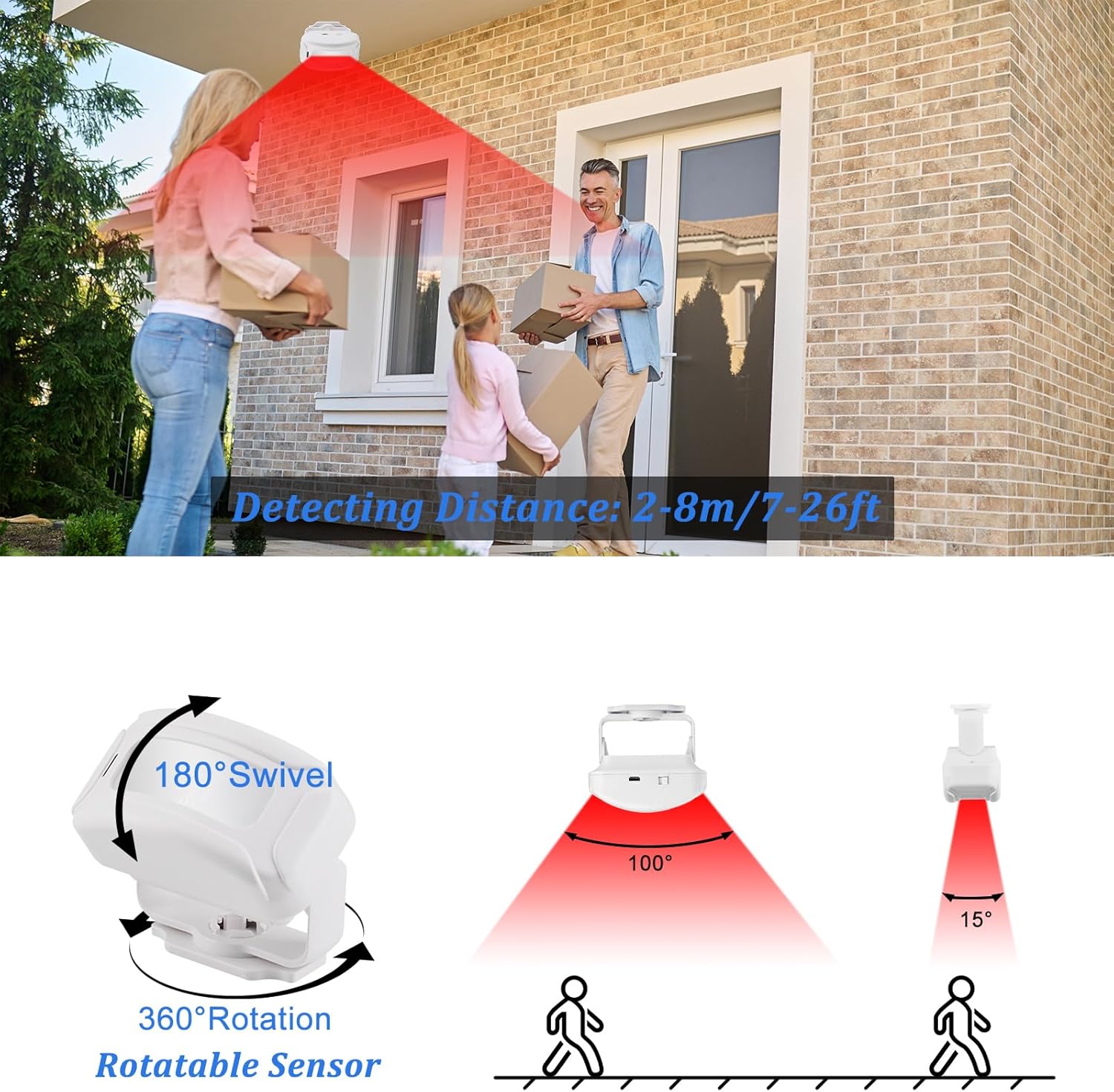
Image: This diagram illustrates the motion sensor's detection distance of 2-8 meters (7-26 feet) and its adjustable features, including 180° swivel and 360° rotation, allowing for flexible positioning and coverage.
4.3 Mounting the Receiver
The receiver unit can be placed on a flat surface or mounted on a wall.
- Desk Placement: Place the receiver on a desk, shelf, or counter in a central location within range of your sensors.
- Wall Mounting: Use the integrated mounting holes on the back of the receiver to secure it to a wall with screws.
4.4 Pairing Sensors and Remotes
Refer to the specific pairing instructions included with your remote control (if applicable) and additional sensors. Generally, the pairing process involves putting the receiver into a learning mode and then triggering the sensor or pressing a button on the remote.
5. Operating Modes
The NineLeaf Door Entry Chime offers five distinct operating modes, each with specific functions and alerts.
5.1 Mode Selection
Use the mode selection button on the receiver to cycle through the following options:
- Welcome Chime Mode: Plays a selectable welcome tone when motion is detected. Ideal for retail environments.
- Doorbell Mode: Sounds a chosen doorbell melody upon detection. Suitable for home entry alerts.
- Alarm Mode: Activates a loud alarm (up to 113 dB) when motion is detected, serving as a deterrent.
- Color Light Mode: Illuminates with a selectable color light without sound. Useful for visual alerts in quiet areas.
- Night Light Mode: Provides a soft white light for a set duration (e.g., 2 minutes) upon detection, offering illumination in dark environments.

Image: This image highlights the adjustable volume with 4 levels and demonstrates the Welcome Mode (with 5 selectable languages), Alarm Mode (113dB loud alarm), and Doorbell Mode (with 36 selectable ringtones).
5.2 Volume and Brightness Adjustment
- Volume: Use the volume control button on the receiver to cycle through 4 adjustable volume levels.
- Brightness: In Color Light or Night Light modes, adjust the LED brightness through 20 settings for silent visual alerts.
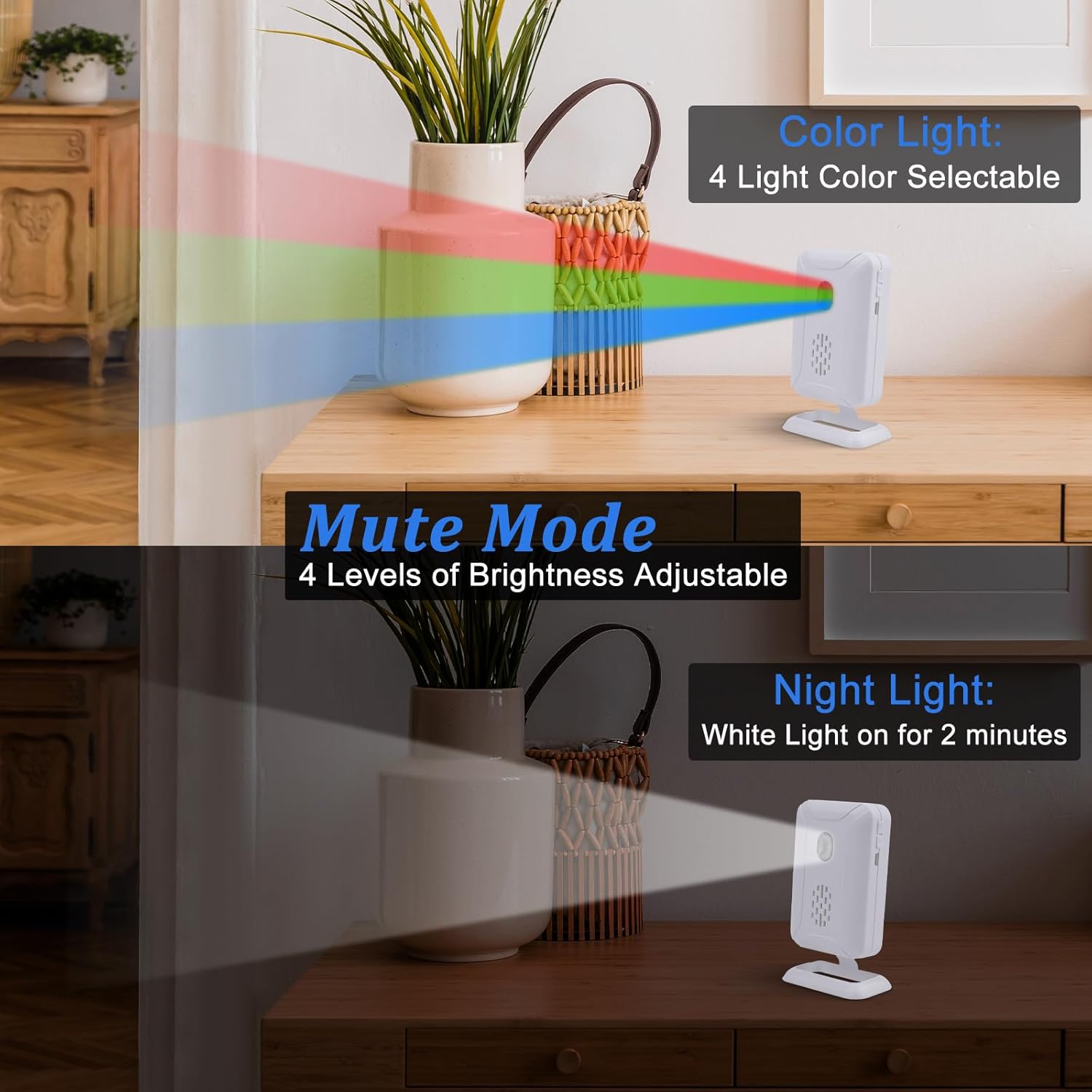
Image: This image illustrates the Color Light mode with 4 selectable colors, the Mute Mode with 4 levels of brightness adjustment, and the Night Light mode which provides a white light for 2 minutes upon activation.
5.3 Customizing Tones
To change the welcome tone or doorbell melody, refer to the specific instructions in your package. Typically, this involves pressing a tone selection button on the receiver until the desired sound is heard.
6. Maintenance
6.1 Battery Replacement
The receiver and sensors feature low battery indicators. Replace batteries promptly when indicated to ensure continuous operation.
- Receiver: Replace with 3 new AA alkaline batteries.
- Motion Sensor: Replace with 1 new AAA alkaline battery.
- Ensure correct polarity (+/-) when inserting new batteries.
6.2 Cleaning
Wipe the receiver and sensors with a soft, dry cloth. Do not use abrasive cleaners or solvents, as these can damage the device's surface or internal components. Keep the motion sensor lens clean for optimal detection performance.
7. Troubleshooting
| Problem | Possible Cause | Solution |
|---|---|---|
| Device not powering on | Low or incorrectly inserted batteries; USB cable not connected properly. | Check battery polarity and charge level. Ensure USB cable is securely connected to a working power source. |
| Sensor not detecting motion | Incorrect sensor placement; Obstruction in detection path; Low battery. | Adjust sensor angle and position. Clear any obstructions. Replace sensor battery. |
| Receiver not responding to sensor | Sensor and receiver not paired; Out of wireless range; Interference. | Re-pair the sensor with the receiver. Move receiver closer to the sensor. Avoid placing near large metal objects or other wireless devices. |
| Sound/Light too low or off | Volume/Brightness set too low; Mute mode active. | Adjust volume/brightness settings. Ensure the device is not in a silent or mute mode. |
8. Specifications
| Feature | Detail |
|---|---|
| Operating Frequency | 433.92MHz |
| Wireless Range | Up to 280m (918ft) in open area |
| Receiver Power | 3x AA batteries or Micro USB (5-7 months life, 30 triggers/day) |
| Sensor Power | 1x AAA battery (≥2 years standby time) |
| Working Temperature | -10°C to 60°C (14°F to 140°F) |
| Working Humidity | <80% |
| Maximum Alarm Volume | 113 dB |
| Color | White |
9. Warranty and Support
NineLeaf products are designed for reliability and performance. For warranty information, technical support, or assistance with your product, please refer to the contact information provided with your purchase or visit the official NineLeaf website. Please retain your proof of purchase for warranty claims.