
1. Introduction
Thank you for choosing the Eco Play Foldable 100W Solar Panel Charger Kit. This manual provides essential information for the safe and efficient operation of your solar panel. Please read it thoroughly before use and retain it for future reference.
This portable solar panel is designed to convert sunlight into electrical energy, providing a sustainable power source for compatible power stations and devices. Its foldable design, high conversion efficiency, and durable construction make it suitable for various outdoor and off-grid applications.
2. Safety Instructions
- Do not attempt to disassemble, repair, or modify the solar panel. Unauthorized modifications can lead to damage, electric shock, or fire.
- Keep the solar panel away from open flames, heat sources, and flammable materials.
- Avoid dropping or subjecting the solar panel to strong impacts.
- Ensure all connections are secure and correct before operating. Incorrect connections can cause damage to the solar panel or connected devices.
- Do not immerse the solar panel in water, despite its water-resistant properties. It is designed to withstand splashes and rain, not submersion.
- Handle the solar panel with care. The solar cells are delicate.
- Keep out of reach of children.
- When cleaning, use a soft, damp cloth. Do not use corrosive cleaners.
3. Package Contents
Please verify that all items listed below are included in your package:
- 1x Eco Play 100W Foldable Solar Panel
- 1x MC4 Cable
- 1x User Manual (this document)
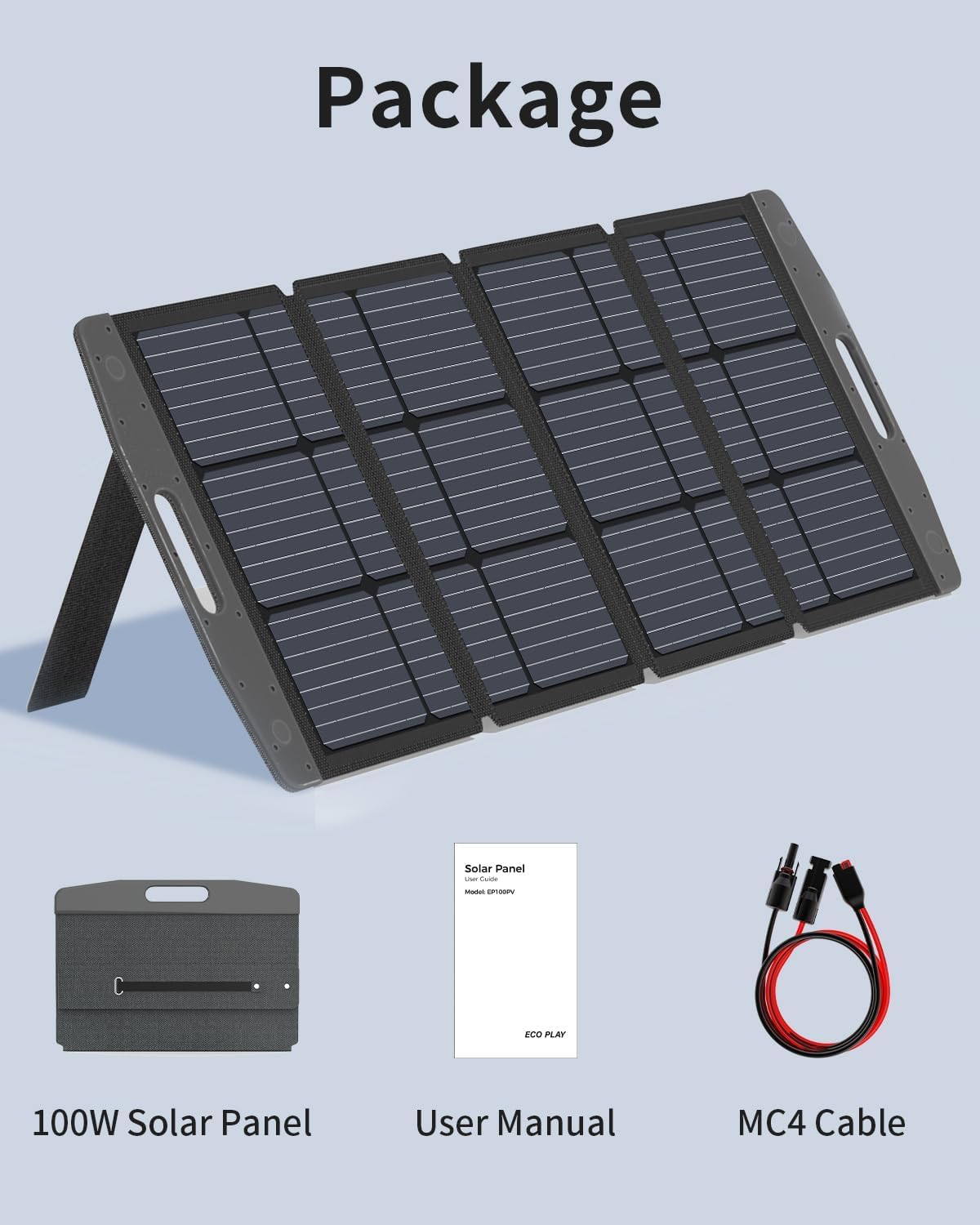
Image 3.1: The package includes the 100W solar panel, an MC4 cable, and the user manual.
4. Product Features
- High Conversion Efficiency: Achieves up to 22.5% conversion rate for faster charging.
- Portable & Foldable Design: Lightweight with a convenient handle for easy transport and storage.
- Durable & Weather-Resistant: Constructed with high-quality materials, featuring an IP67 waterproof rating, suitable for various outdoor conditions.
- Adjustable Kickstand: Integrated carrying bag doubles as a kickstand, allowing for optimal angle adjustment (e.g., 35°, 45°, 55°) to maximize sunlight exposure.
- Wide Compatibility: Equipped with MC4 connectors for compatibility with multiple brands and models of power stations.

Image 4.1: Diagram illustrating the high-efficiency solar cell technology, providing up to 22.5% conversion.
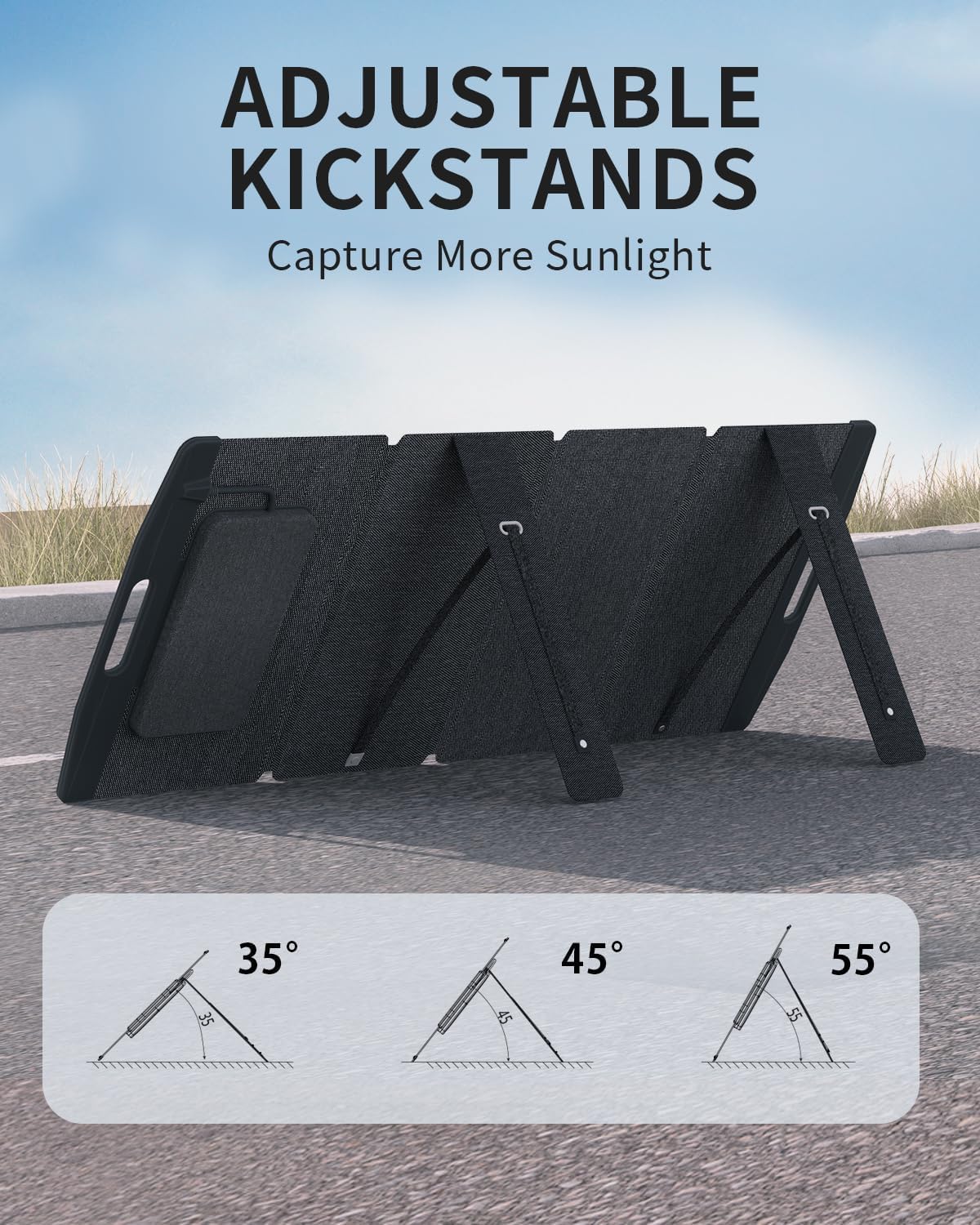
Image 4.2: The integrated kickstands allow for adjusting the panel to optimal angles like 35°, 45°, or 55° for maximum sun exposure.

Image 4.3: Visual representation of the solar panel's IP67 waterproof rating, showing its resilience against rain and splashes.

Image 4.4: The solar panel's dimensions when folded (15.4 x 21.85 inches) and unfolded (15.4 x 54.84 inches), and its weight of 8.9 lbs, highlighting its portability.
5. Setup Guide
- Unfold the Solar Panel: Carefully unfold the solar panel sections on a flat, stable surface.
- Position for Sunlight: Place the solar panel in an area with direct sunlight, free from shadows.
- Adjust Kickstand: Utilize the integrated kickstand to angle the panel towards the sun. Adjust the angle (e.g., 35°, 45°, 55°) for optimal sunlight capture. The sun's position changes throughout the day, so periodic adjustment may be beneficial.
- Connect MC4 Cable: Connect the MC4 cable from the solar panel to your compatible power station or charge controller. Ensure the positive (+) and negative (-) terminals are correctly matched. Refer to your power station's manual for specific connection instructions.

Image 5.1: The Eco Play 100W solar panel unfolded and supported by its kickstand, ready for sun exposure.

Image 5.2: The solar panel connected to a power station, demonstrating efficient charging in an outdoor environment near an RV.
6. Operating Instructions
Once the solar panel is set up and connected to your power station or device:
- The solar panel will automatically begin generating power when exposed to sufficient sunlight.
- Monitor the charging status on your connected power station or device.
- For optimal performance, ensure the panel remains in direct sunlight and adjust its angle periodically to follow the sun's path.
- Charging time will vary depending on sunlight intensity, weather conditions, and the capacity of the device being charged.
Optimal Performance Tips:
- Clear Obstructions: Ensure no shadows from trees, buildings, or other objects fall on the solar panel. Even partial shading can significantly reduce output.
- Clean Surface: Keep the solar panel surface clean from dust, dirt, leaves, or bird droppings. A clean panel absorbs more sunlight.
- Temperature: While solar panels perform well in various temperatures, extreme heat can slightly reduce efficiency. Ensure good airflow around the panel.
7. Maintenance
- Cleaning: Regularly wipe the surface of the solar panel with a soft, damp cloth to remove dust, dirt, and debris. Do not use abrasive materials or harsh chemicals.
- Inspection: Periodically inspect the solar panel and cables for any signs of damage, wear, or loose connections.
- Storage: When not in use, fold the solar panel and store it in a dry, cool place, away from direct sunlight and extreme temperatures. Use the integrated carrying bag for protection.

Image 7.1: The solar panel's dustproof and waterproof features ensure stable operation in various outdoor environments, simplifying maintenance.
8. Troubleshooting
| Problem | Possible Cause | Solution |
|---|---|---|
| No power output or low charging speed. |
|
|
| Panel gets hot during operation. | Normal operation under direct sunlight. | This is normal. Ensure adequate ventilation around the panel. |
| Panel not folding correctly. | Obstruction or misalignment. | Ensure no debris is caught in the hinges. Fold gently and align sections. |
9. Specifications
| Model Number | EP100PV |
| Maximum Power | 100 Watts |
| Conversion Efficiency | Up to 22.5% |
| Waterproof Rating | IP67 |
| Output Interface | MC4 Connector |
| Folded Dimensions (L x W x H) | 21.85 x 15.4 x 5 inches (approximate) |
| Unfolded Dimensions (L x W x H) | 54.84 x 15.4 x 5 inches (approximate) |
| Weight | 8.9 lbs |
| Color | Black |
| Included Components | Solar Panel, MC4 Cable, User Manual |
10. Warranty and Support
For warranty information or technical support, please refer to the documentation provided at the time of purchase or contact Eco Play customer service through their official website or the retailer where the product was purchased.
Please have your model number (EP100PV) and purchase details ready when contacting support.