
Introduction
Thank you for choosing the Wohh Walnut Small Vanity Desk. This manual provides detailed instructions for assembly, operation, and maintenance to ensure optimal use and longevity of your product. Please read all instructions carefully before assembly and use.

Image: The Wohh Walnut Small Vanity Desk, featuring a lighted mirror, multiple shelves, drawers, and a matching stool.
Safety Information
- Always assemble the product on a soft, flat, and clean surface to prevent scratches or damage.
- It is recommended that two people assemble this product for safety and ease.
- Ensure all screws and fasteners are securely tightened before use. Periodically check and re-tighten as necessary.
- Do not overload shelves or drawers beyond their intended capacity.
- Keep electrical components (mirror power cord, USB ports, outlets) away from water and moisture.
- Do not allow children to climb on or play with the vanity desk.
- Use only the provided power adapter for the mirror and charging ports.
Package Contents
Before beginning assembly, please verify that all parts listed below are present and undamaged. If any parts are missing or damaged, please contact customer support.
Components:
- Vanity Desk Frame (Engineered Wood & Metal)
- Lighted Mirror Unit
- Matching Stool (Padded)
- Drawers (Fabric with wooden knobs)
- Shelving Units
- Power Strip with 2 USB Ports & 2 AC Outlets
- Hair Dryer Stand
Hardware:
- Various Screws and Fasteners (A, B, C, D, E, F, G, H, N as per manual)
- Allen Wrench (N)

Image: Detail of the drawer construction and hardware.
Setup and Assembly
Follow these steps to assemble your Wohh Walnut Small Vanity Desk. It is recommended to have a second person assist with assembly.
- Unpack and Identify Parts: Carefully remove all components from the packaging. Lay them out on a clean, soft surface. Identify each part using the labels and the provided parts list.
- Assemble the Metal Frame: Connect the metal frame pieces using the designated screws and the provided Allen wrench. Ensure all connections are snug but do not overtighten until the entire frame is assembled.
- Attach Desk Panels: Secure the main desk surface and side panels to the metal frame.
- Install Drawers: Insert the fabric drawers into their designated slots. The drawers are designed to slide smoothly.
- Mount Shelving Units: Attach the upper shelving unit and the side shelves to the main desk structure.
- Position the Mirror: Place the lighted mirror unit on the designated shelf.
- Install Power Strip and Hair Dryer Stand: Secure the power strip and hair dryer stand to the side of the desk as shown in the diagrams.
- Assemble the Stool: Attach the legs to the stool seat.
- Final Tightening: Once all components are in place, carefully tighten all screws and fasteners.

Image: Various components of the vanity desk, highlighting storage and accessories.
Assembly Video:
Video: A short overview of the LIVELYGLOW Vanity Desk, demonstrating its features and compact design.
Key Features
- Integrated Lighted Mirror: Features adjustable brightness and three lighting modes (Cool White, Warm White, Warm Yellow) for optimal illumination.
- Built-in Charging Station: Includes 2 standard AC outlets (125V/12A) and 2 USB ports (5V/2.1A, 1 Type-C, 1 USB) for convenient device charging.
- Ample Storage: Equipped with two large drawers, open shelves, and a spacious desktop for organizing cosmetics, skincare, and other essentials.
- Hair Dryer Stand: A dedicated holder for your hair dryer, keeping it easily accessible and organized.
- Compact Design: Ideal for small spaces, offering functionality without occupying excessive room.
- Comfortable Stool: A matching padded stool is included for comfortable use.

Image: Overview of the vanity desk with key features labeled.

Image: The lighted mirror demonstrating its three adjustable light modes and brightness control.

Image: The integrated charging station with AC outlets and USB ports.
Operating Instructions
Lighted Mirror Operation:
- Power On/Off: Connect the mirror's power cord to an available outlet. Tap the power button on the mirror to turn the lights on or off.
- Change Light Color: Short press the "O" button on the mirror to cycle through the three light modes: Cool White, Warm White, and Warm Yellow.
- Adjust Brightness: Long press the "O" button to adjust the brightness level within the selected light mode.
Charging Station Use:
- Plug the vanity desk's main power cord into a wall outlet.
- Connect your devices to the available 125V/12A AC outlets or the 5V/2.1A USB (Type-C or standard) ports.
Maintenance
- Cleaning: Wipe the desk surfaces with a soft, damp cloth. Avoid harsh chemicals or abrasive cleaners. For the mirror, use a glass cleaner and a microfiber cloth.
- Dusting: Regularly dust all surfaces to prevent buildup.
- Hardware Check: Periodically inspect all screws and connections to ensure they remain tight. Re-tighten if necessary.
- Drawer Care: The fabric drawers can be spot cleaned with a mild detergent and damp cloth. Allow to air dry completely.
- Electrical Components: Ensure all power cords are free from kinks or damage. Do not attempt to repair electrical components yourself.
Troubleshooting
| Problem | Possible Cause | Solution |
|---|---|---|
| Mirror lights not turning on. | Power cord not connected; outlet not working; mirror switch off. | Ensure mirror power cord is securely plugged in. Test the outlet with another device. Tap the power button on the mirror. |
| Charging ports not working. | Vanity desk not plugged in; device cable faulty; device not compatible. | Ensure the vanity desk's main power cord is plugged into a working wall outlet. Try a different charging cable or device. |
| Desk feels wobbly. | Loose fasteners; uneven floor. | Check and tighten all assembly screws. Adjust the leveling feet on the bottom of the desk if applicable. |
Specifications
| Attribute | Detail |
|---|---|
| Model Number | W2699P |
| Brand | Wohh |
| Material | Engineered Wood |
| Product Dimensions (D x W x H) | 14.7" x 23.6" x 51.9" |
| Item Weight | 80 pounds |
| Color | Wood (Walnut finish) |
| Assembly Required | Yes |
| Charging Ports | 2 AC Outlets (125V/12A), 1 Type-C USB Port (5V/2.1A), 1 Standard USB Port (5V/2.1A) |
| Mirror Features | Adjustable Brightness, 3 Light Modes (Cool White, Warm White, Warm Yellow) |
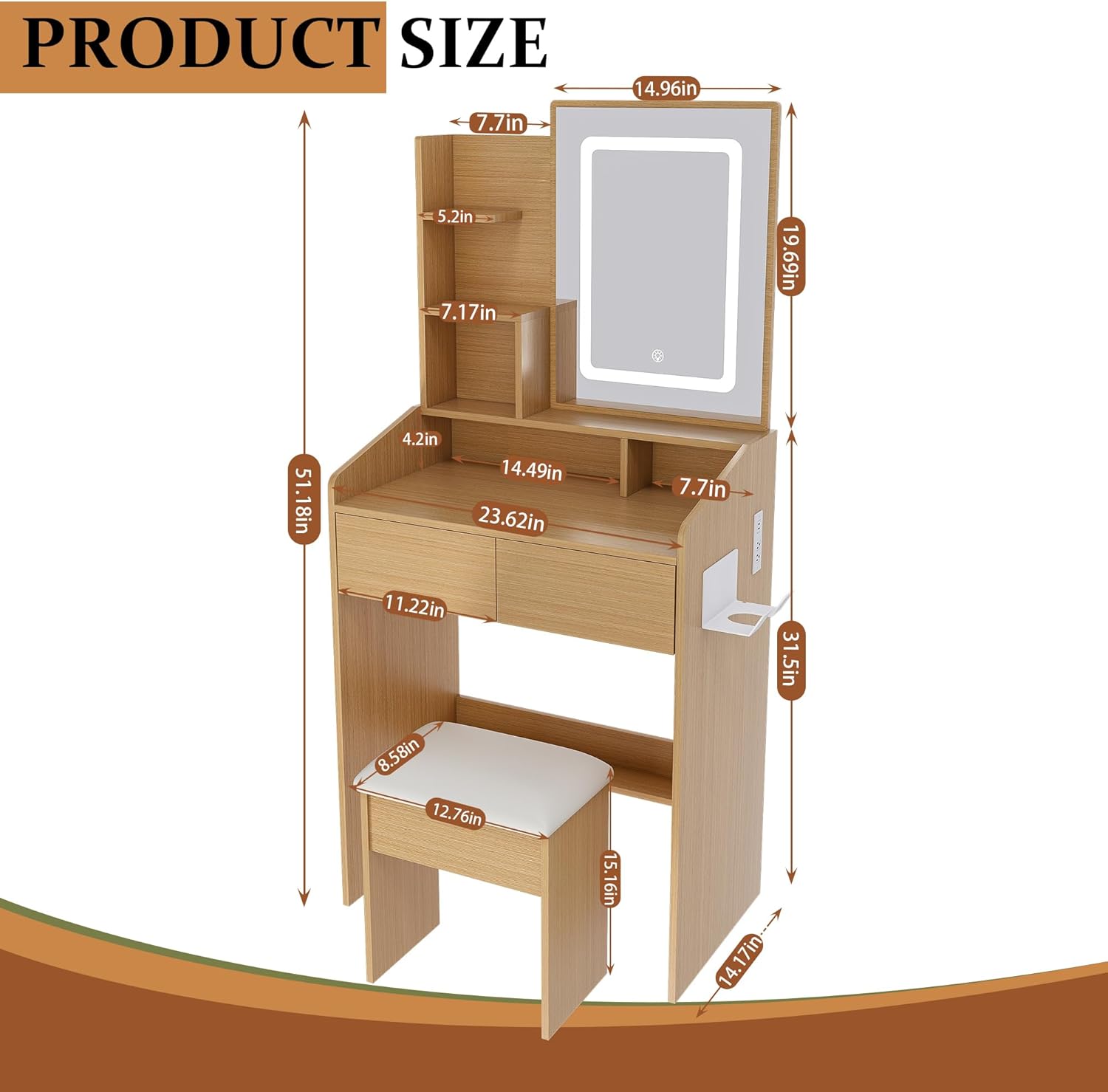
Image: Product dimensions diagram.
Warranty and Support
For warranty information or customer support, please refer to the documentation included with your purchase or contact Wohh customer service directly. Keep your purchase receipt for warranty claims.