
Introduction
Thank you for choosing the Airfish Electric Height Adjustable Desk. This manual provides essential information for the safe and efficient assembly, operation, and maintenance of your new desk. Designed for versatility and comfort, this desk features electric height adjustment, a convenient Type-C charging port, and memory presets to enhance your workspace.
The Airfish desk is built with exceptional stability, featuring 80 x 50 mm galvanized steel tube legs for superior load capacity and durability. The tabletop measures 180 x 80 cm, providing ample space for your work setup. Please note that the tabletop is composed of 4 parts, not a single piece.

Image: The Airfish Electric Height Adjustable Desk showcasing its stable structure with 80x50cm steel legs and a 70kg load capacity.
Setup Instructions
Assembly of your Airfish desk is designed to be straightforward with clear, illustrated instructions. It typically takes about 40 minutes to complete the setup.
Package Contents:
- Tabletop (4 sections)
- Desk frame components (legs, crossbar, motor)
- Multi-function controller
- Cable management tray
- 2 Desk hooks
- 4 Casters (wheels)
- Hardware kit (screws, tools)
Assembly Steps:
- Unpack all components and verify against the parts list in your included manual.
- Assemble the desk frame according to the illustrated instructions, ensuring all connections are secure.
- Attach the four tabletop sections to the assembled frame. Ensure they are aligned correctly and securely fastened.
- Install the multi-function controller to the underside of the desk.
- Connect all necessary cables (motor to controller, power supply).
- Attach the cable management tray, desk hooks, and casters as desired.

Image: An exploded diagram illustrating the components and steps for easy installation of the Airfish desk, highlighting the 4-part tabletop.
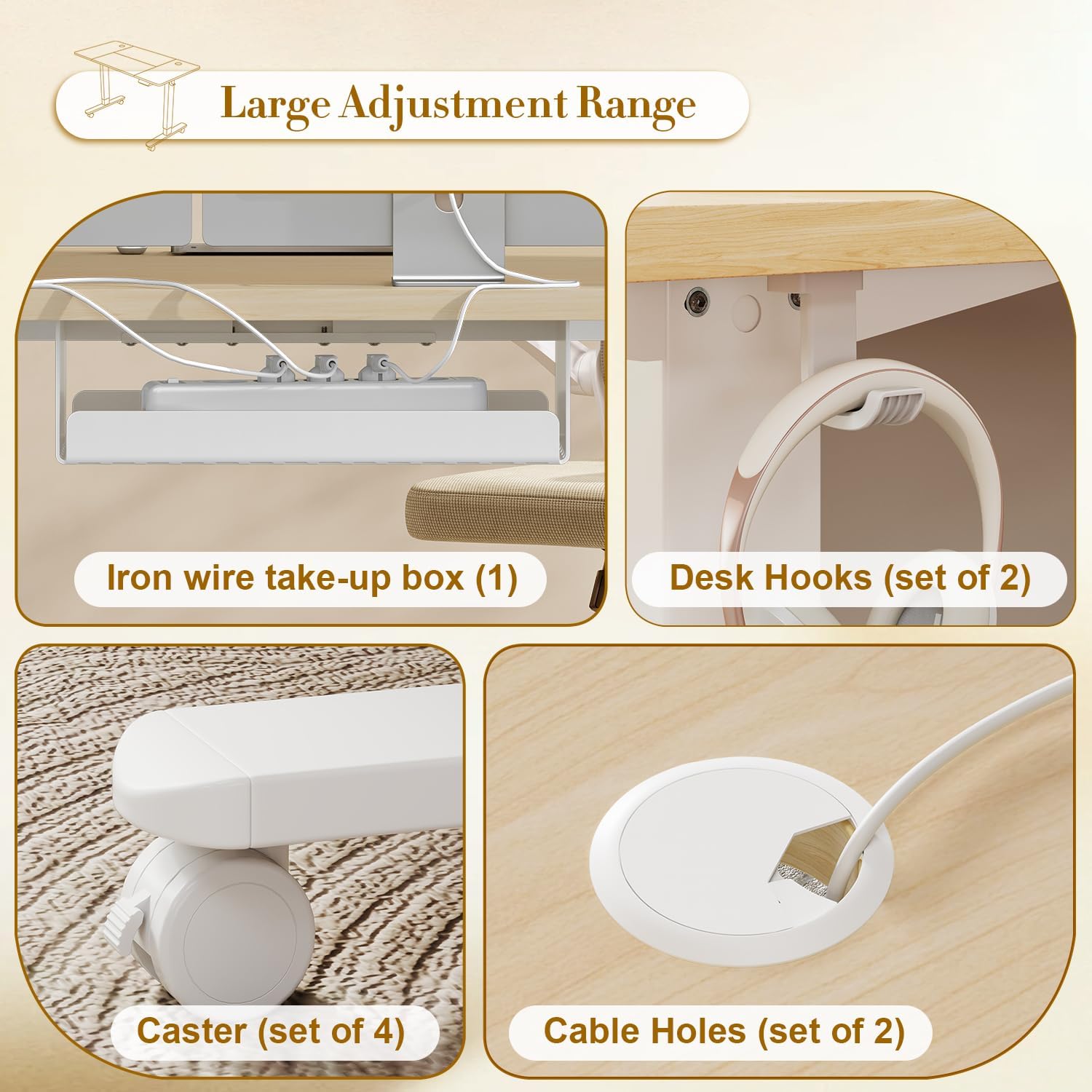
Image: Close-up view of complimentary accessories: an iron wire take-up box for cable management, two desk hooks, four casters, and two cable holes for organized wiring.
Operating Instructions
Your Airfish desk features an intuitive multi-function controller for height adjustment and other convenient features.
Height Adjustment:
- The desk has a height adjustment range from 72 cm to 118 cm.
- Use the Up (▲) and Down (▼) arrow buttons on the controller to manually adjust the desk to your desired height.
- The current height will be displayed on the LED screen.

Image: The Airfish desk demonstrating its large adjustment range, from a sitting height of 72cm to a standing height of 118cm.
Memory Presets:
The controller allows you to save up to 3 preferred height settings for quick adjustments.
- Adjust the desk to your desired height using the Up/Down buttons.
- Press the "S" button (Set) once.
- Within 3 seconds, press one of the memory buttons ("1", "2", or "3") to save the current height to that preset.
- To recall a saved height, simply press the corresponding memory button ("1", "2", or "3"). The desk will automatically move to the saved position.
Type-C Charging Port:
The multi-function controller is equipped with a Type-C charging port for convenient device charging.
- Locate the Type-C port on the side of the controller.
- Connect your compatible device (e.g., smartphone, tablet, laptop) using a Type-C cable to charge it directly from your desk.

Image: A close-up of the multi-function controller, highlighting the LED display, memory settings (1, 2, 3), up/down controls, and the integrated Type-C charging port.
Time Reminder:
The controller includes a time reminder function to encourage movement and prevent prolonged sitting. Refer to your detailed manual for instructions on how to activate and customize this feature.
Maintenance
Proper maintenance ensures the longevity and optimal performance of your Airfish desk.
Cleaning:
- For the tabletop, wipe regularly with a soft, damp cloth. Avoid abrasive cleaners or harsh chemicals that could damage the surface.
- For the metal frame, use a mild detergent and a soft cloth. Dry thoroughly to prevent rust.
- Ensure no liquids enter the motor or control unit.
General Care:
- Periodically check all screws and fasteners to ensure they are tight. Retighten if necessary.
- Avoid placing excessively heavy objects on the desk, exceeding its maximum load capacity.
- Keep the desk away from direct sunlight and extreme temperature changes to prevent material warping or discoloration.
Troubleshooting
If you encounter any issues with your Airfish Electric Height Adjustable Desk, please refer to the following common troubleshooting steps:
Desk Not Responding / No Movement:
- Check Power Connection: Ensure the power cord is securely plugged into both the desk and a working wall outlet.
- Check Cable Connections: Verify that all cables connecting the motor, controller, and power supply are firmly attached.
- Reset System: Unplug the desk from the power outlet for 10-15 seconds, then plug it back in. This can often resolve minor electronic glitches.
Uneven Height Adjustment:
- Clear Obstructions: Ensure there are no objects obstructing the desk legs or the movement mechanism.
- Even Load Distribution: Make sure the weight on the desk is evenly distributed.
Error Codes on Display:
- If an error code appears on the LED display, consult the detailed troubleshooting section in your physical instruction manual for specific solutions related to that code.
If these steps do not resolve the issue, please contact customer support for further assistance.
Specifications
| Feature | Detail |
|---|---|
| Brand | Airfish |
| Model | Electric Height Adjustable Desk |
| Dimensions (L x W x H) | 180 x 80 x 72 cm (minimum height) |
| Height Adjustment Range | 72 cm to 118 cm |
| Material | Metal frame (galvanized steel), Engineered wood tabletop |
| Color | Beige |
| Special Features | Electric height adjustable, Type-C charging port, 3 height memory presets, Cable management, Desk hooks |
| Tabletop Construction | 4-part tabletop |
Warranty Information
Specific warranty details for the Airfish Electric Height Adjustable Desk are not explicitly provided in the product data. For information regarding warranty coverage, please refer to the documentation included with your purchase or contact Airfish customer support directly.
Please note that a 30-day refund/replacement policy is typically offered for returns, but this is separate from a manufacturer's warranty.
Customer Support
Should you have any questions, require assistance with assembly, or need troubleshooting support, our professional 24-hour online customer service team is available to help. We aim to respond to all inquiries within 24 hours.
For more information or to contact support, please visit the official Airfish brand store: Airfish Brand Store