
1. Introduction
The LKAHYUIBC FY8862 is a handheld digital decibel meter designed for accurate measurement of sound levels in various environments. It features A-weighted decibel filtering, a 0.1 dB resolution, and a measurement range of 30 to 130 dB. This device is suitable for environmental noise monitoring, industrial applications, and general sound testing in homes or factories. This manual provides essential information for the proper setup, operation, and maintenance of your decibel meter.

Figure 1: The FY8862 Decibel Meter and its retail packaging, illustrating the compact design and included instruction sheet.
2. Product Features
- Accurate Measurement: A-weighted decibel filtering with 0.1 dB resolution, ranging from 30 to 130 dB.
- Portable Design: Lightweight and handheld for easy one-hand operation, ideal for various settings.
- Clear LCD Display: Provides real-time noise readings for easy identification of sound levels.
- Versatile Applications: Suitable for factories, schools, offices, construction sites, and HVAC testing.
- Quick Response Microphone: Built-in electret condenser microphone ensures reliable sound level detection.
- Data Hold Function: Allows freezing of the current measurement on the display.
- Peak Display: Shows the maximum sound level detected.
- Overload Display: Indicates when the measurement exceeds the device's range.
- High and Low Sensitivity Modes: Adaptable for different measurement requirements.
- FAST/SLOW Response Toggle: Adjusts the measurement response time.
- Low Battery Alert: Notifies the user when battery power is low.
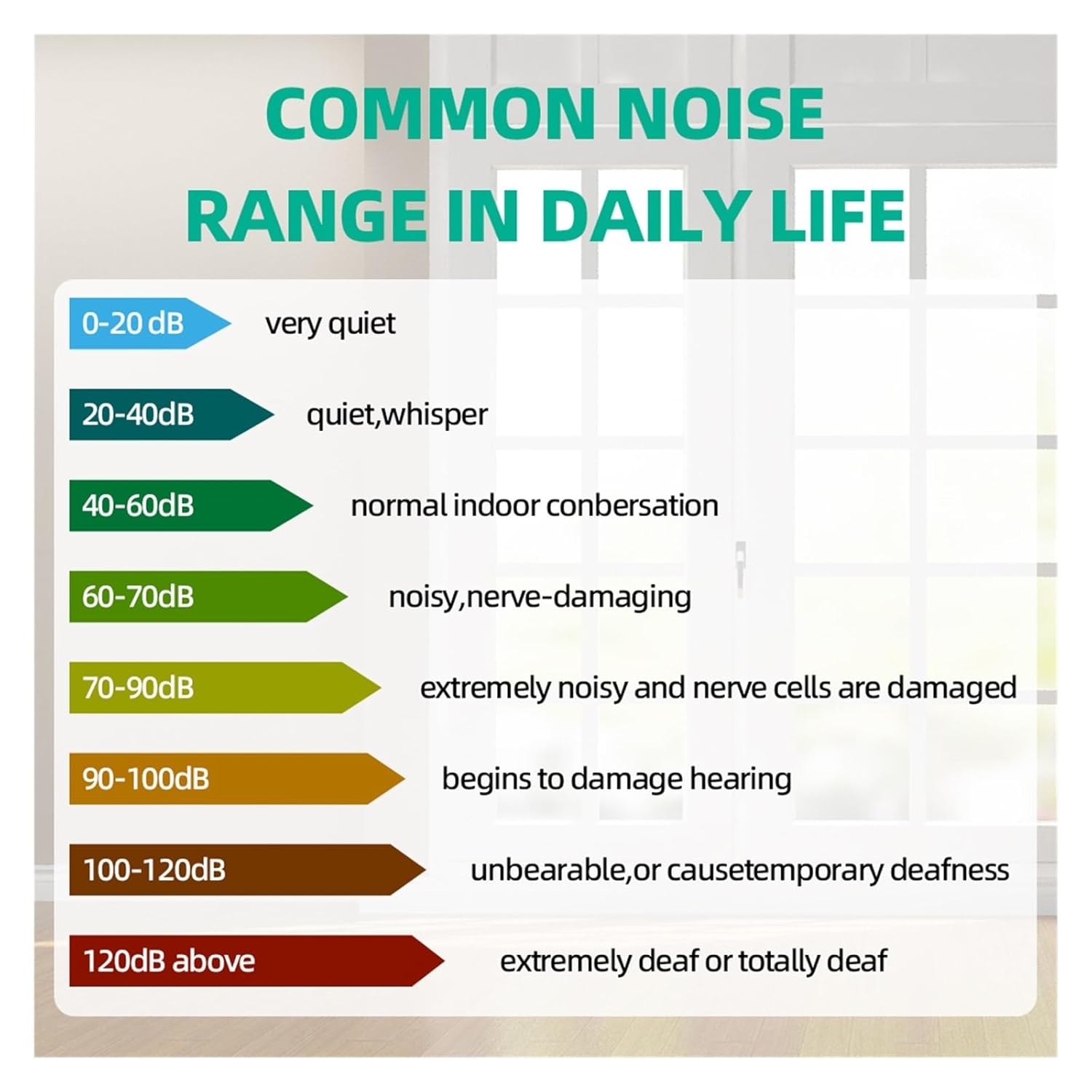
Figure 2: Key features of the FY8862 Decibel Meter, including condenser microphone, A-weighting, low battery alert, FAST/SLOW response, MAX/MIN value, and 30-130dB range.

Figure 3: Design details highlighting the windshield for accurate measurement, clear LCD display, and comfortable silicone buttons.
3. Setup
- Battery Installation: Open the battery compartment (usually located at the back or bottom of the device). Insert the required batteries, ensuring correct polarity. Close the compartment securely.
- Power On: Press and hold the power button (⏻) for a few seconds until the LCD display illuminates.
- Initial Check: The device will perform a self-test. Ensure the display shows a reading and no error messages.
4. Operating Instructions
4.1 Basic Measurement
- Power On: Press the power button (⏻) to turn on the device.
- Positioning: Hold the decibel meter with the microphone pointed towards the sound source. Ensure no obstructions are blocking the microphone.
- Reading Display: The current sound level in dB will be displayed on the LCD screen.

Figure 4: The FY8862 Decibel Meter in use, showing its ergonomic design and clear digital display.
4.2 Function Buttons
- Power Button (⏻): Press to turn on/off the device.
- MAX Button: Press to display the maximum sound level recorded since the device was powered on or the MAX function was reset. Press again to exit MAX mode.
- FAST/SLOW Button: Toggles between Fast (125ms) and Slow (1s) response times for measurement. Fast response is suitable for capturing sudden noise peaks, while Slow response provides a more averaged reading.

Figure 5: Detailed view of the decibel meter's display showing current reading, MAX indicator, and FAST/SLOW response mode.

Figure 6: Illustration of the electret condenser microphone and how the display shows maximum, real-time, and average sound values.
4.3 Alarm Lights
The device features red/green alarm lights to visually indicate sound levels:
- Green Light: Illuminates when the sound level is below a certain threshold (e.g., <60dB).
- Red Light: Illuminates when the sound level exceeds a certain threshold (e.g., >60dB), indicating potentially noisy conditions.
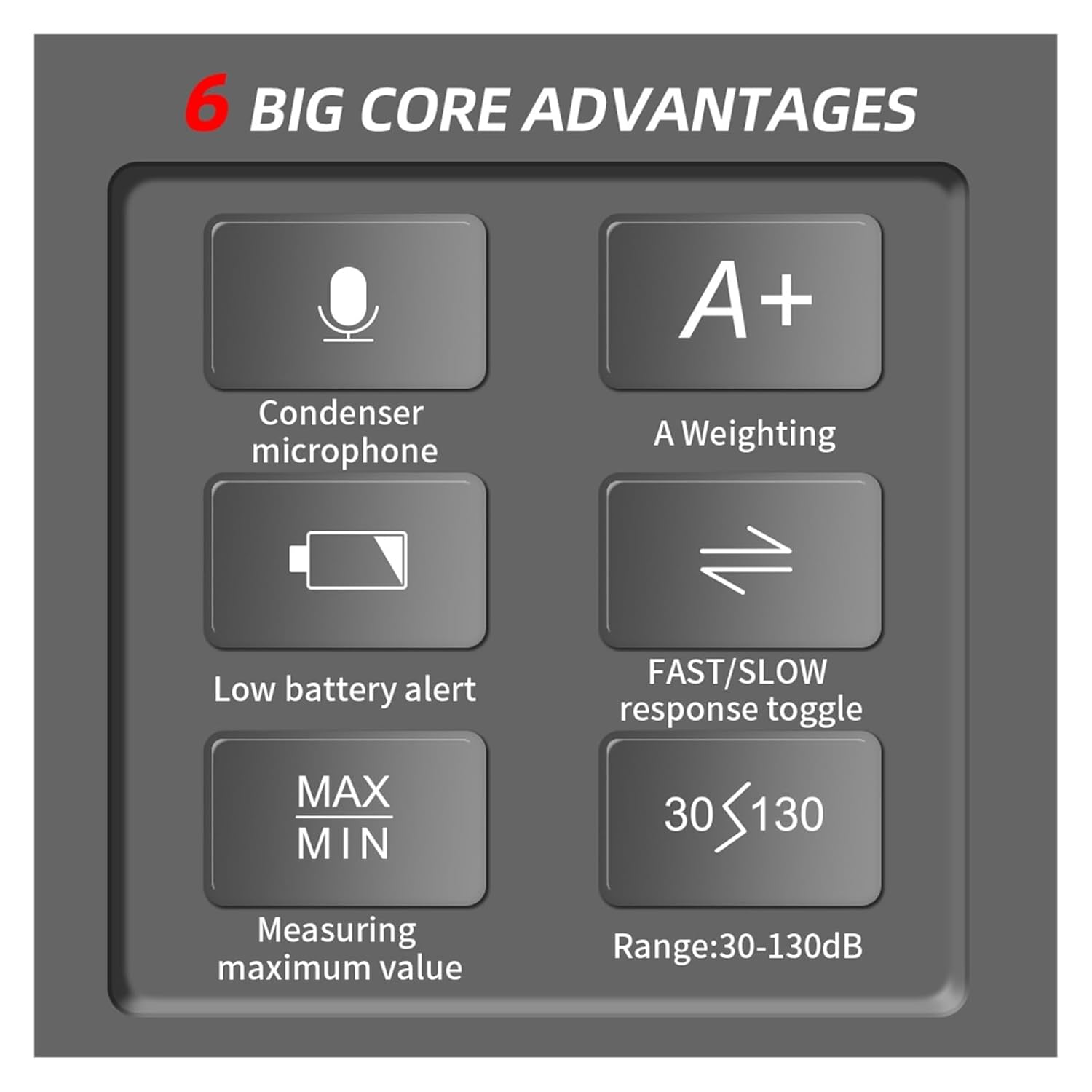
Figure 7: Visual representation of the red and green alarm lights indicating sound levels below and above 60dB.
4.4 Understanding Noise Levels
Refer to the following general guide for common noise ranges in daily life:
Figure 8: Chart detailing typical decibel ranges and their corresponding perceived loudness and potential impact.
5. Maintenance
- Cleaning: Wipe the device with a soft, dry cloth. Do not use abrasive cleaners or solvents.
- Storage: Store the decibel meter in a cool, dry place away from direct sunlight and extreme temperatures. Remove batteries if the device will not be used for an extended period.
- Microphone Care: Keep the microphone clean and free from dust or debris to ensure accurate readings. Avoid touching the microphone directly.
6. Troubleshooting
| Problem | Possible Cause | Solution |
|---|---|---|
| Device does not power on | Low or dead batteries; Incorrect battery installation | Replace batteries; Ensure correct polarity |
| Inaccurate readings | Microphone obstructed; Device not calibrated; Environmental interference | Clear microphone; Contact support for calibration; Move to a quieter area |
| Display shows "OVER" or "OL" | Sound level exceeds measurement range | Move away from the sound source or use a device with a higher range |
| Buttons unresponsive | Temporary software glitch; Low battery | Remove and reinsert batteries; Replace batteries |
7. Specifications
- Model: FY8862
- Measurement Range: 30 ~ 130 dB
- Resolution: 0.1 dB
- Weighting: A-weighted
- Response Time: FAST (125ms), SLOW (1s)
- Microphone: Electret Condenser Microphone
- Data Hold: Yes
- Peak Display: Yes
- Overload Display: Yes
- High and Low Sensitivity Modes: Yes
- Power Source: (Battery type not specified, typically AAA or 9V)
- Dimensions: Approximately 0.39 x 0.39 x 0.39 inches (Product dimensions are likely incorrect from source, refer to actual product for accurate size)
- Weight: Approximately 1.1 Pounds (Product weight is likely incorrect from source, refer to actual product for accurate weight)
- Manufacturer: LKAHYUIBC
8. Warranty and Support
For warranty information, technical support, or service inquiries, please refer to the warranty card included with your product or contact LKAHYUIBC customer service through their official website or the retailer where the product was purchased. Please have your model number (FY8862) and purchase date available when contacting support.