
1. Important Safety Information
This section outlines critical safety precautions for operating the Woxcker L2 MAX Laser Cutter and Engraver Machine. Adherence to these guidelines is essential for safe operation and to prevent injury or damage.
- Comprehensive Safety Design: The machine features a fully enclosed desktop design with a lid and laser cover for eye protection.
- Automatic Shut-off: The machine is equipped with an auto-stop function that activates when the lid is opened, or if the machine tilts beyond 15 degrees.
- Flame Sensor: An integrated flame sensor provides an additional layer of safety by detecting and responding to potential fire hazards.
- Emergency Stop: An emergency stop button is readily accessible to immediately halt all operations.
- Safety Lock: A child safety lock mechanism prevents unauthorized use.
- Enclosed Workspace: The 360° enclosed design minimizes laser exposure, contains fumes and dust, reduces operational noise, and restricts access during operation.


2. Product Overview and Features
The Woxcker L2 MAX is a versatile desktop laser cutter and engraver designed for high precision and efficiency. It offers a range of features for various crafting and professional applications.
- Ultra-Precise Engraving: Achieves 0.01mm high precision with an advanced compression laser, delivering sharp details on various materials.
- High-Speed Operation: Engraves at up to 20,000mm/min, significantly faster than many comparable machines.
- Large Engraving Area: Features a spacious 300 x 300 mm bed size, allowing for larger designs or multiple smaller items simultaneously.
- Wide Material Compatibility: Suitable for engraving and cutting wood, leather, acrylic, coated metal, plastic, glass, and even food.
- Smart Compatibility: Works with popular software like LightBurn, LaserGRBL, and CutLabX.
- Multiple Connection Options: Supports WiFi, USB, APP, and TF card for offline use.
- Modular Design: Beginner-friendly assembly with no belt adjustments required.
- Efficient Smoke Exhaust System: Equipped with a smoke exhaust fan to quickly remove smoke and reduce accumulation, improving the engraving experience.


3. Setup and Assembly
The Woxcker L2 MAX features a modular design for easy assembly. Follow these steps to set up your machine.
3.1 Unboxing
Carefully unpack all components from the box. Ensure all parts are present and undamaged before proceeding.
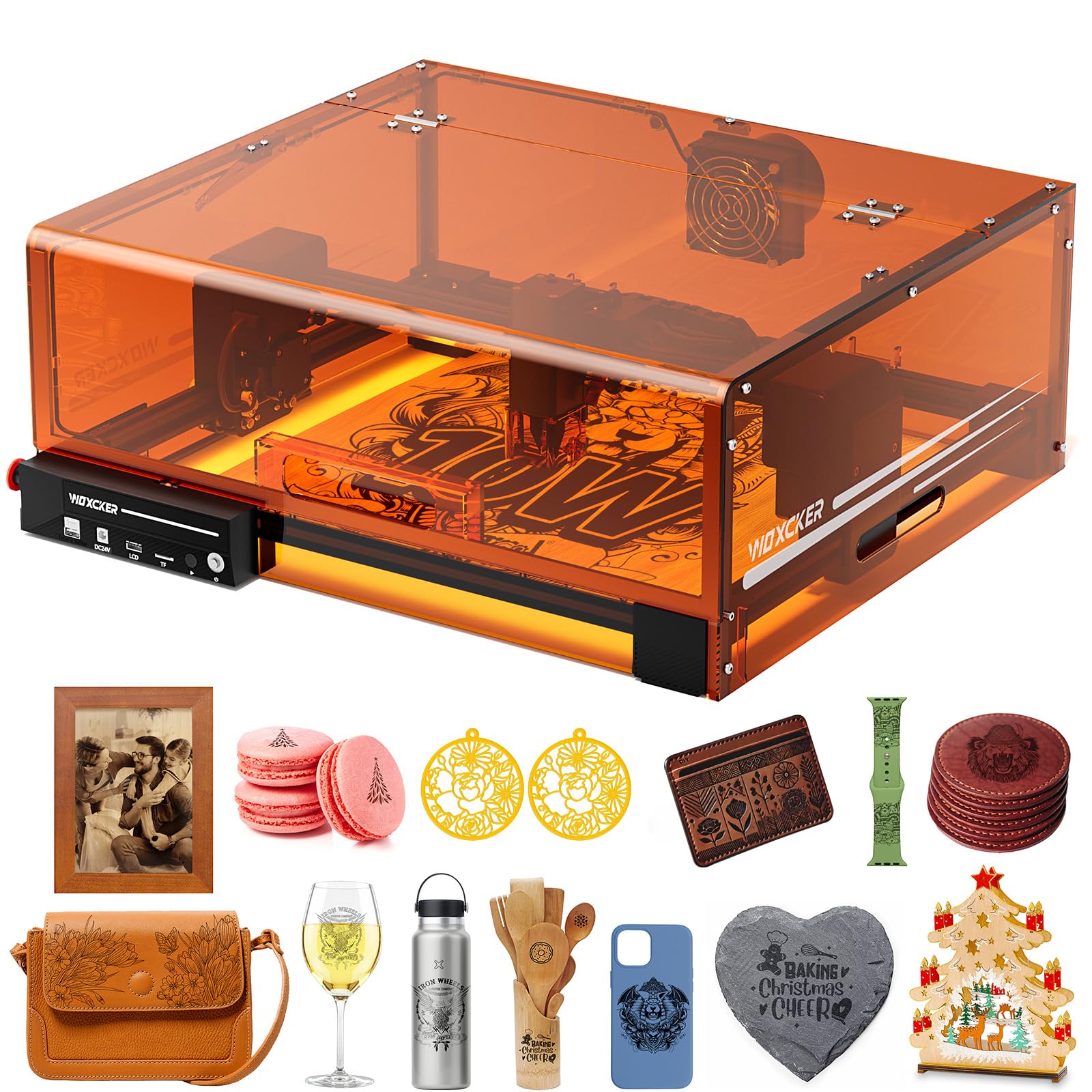
3.2 Initial Assembly
The machine comes largely pre-assembled. Follow the included quick start guide for final assembly steps, which typically involve attaching the enclosure panels and connecting the laser module.
4. Operating Instructions
This section provides general guidance on operating your Woxcker L2 MAX. Refer to the detailed software manuals for specific project creation and execution.
4.1 Software and Connectivity
The L2 MAX is compatible with various software and offers multiple connection methods.
- Supported Software: LightBurn, LaserGRBL, CutLabX.
- Supported Operating Systems: Windows 7+, macOS, Linux.
- Connection Methods: WiFi, USB, Mobile App, TF Card (for offline use).

4.2 Material Processing Capabilities
The L2 MAX can engrave and cut a variety of materials. The cutting depth varies based on laser power (5W, 10W, 20W) and material type.


4.3 Using Accessories
Enhance your engraving and cutting experience with optional accessories.
4.3.1 Air Assist
Air assist effectively blows away smoke generated during engraving, reduces high-temperature buildup, prevents dust accumulation on the laser module, and extends machine lifespan. It also improves the clarity of cuts.

4.3.2 Rotary Modules (ARot 8 & ARot 5)
Rotary modules allow for engraving on cylindrical and curved objects such as cups, bottles, pens, and rings. The ARot 8 is a 3-in-1 all-purpose rotary module, while the ARot 5 is designed for easier engraving of various cylindrical items.

5. Maintenance
Regular maintenance ensures optimal performance and extends the lifespan of your Woxcker L2 MAX.
- Clean the Lens: Periodically clean the laser lens with a soft, lint-free cloth and appropriate lens cleaner to maintain engraving precision.
- Clear Debris: Regularly remove dust and debris from the engraving area and exhaust fan to prevent buildup and ensure efficient smoke removal.
- Check Connections: Ensure all cables and connections are secure before each use.
- Lubricate Moving Parts: Refer to the detailed manual for instructions on lubricating the guide rails and other moving components, if necessary.
5.1 Honeycomb Worktable
Using a honeycomb worktable prevents damage to your work surface from high-power cutting and improves airflow for better results.

6. Troubleshooting
This section provides solutions to common issues you might encounter. For more complex problems, please contact customer support.
- Machine Not Powering On:
- Ensure the power adapter is securely connected to both the machine and a working power outlet.
- Check if the emergency stop button is disengaged (rotated counter-clockwise).
- Verify the safety lock key is in the correct position.
- Laser Not Firing/Engraving:
- Confirm the lid is fully closed.
- Check software settings to ensure the laser power and speed are correctly configured for your material.
- Clean the laser lens for any obstructions or dirt.
- Ensure the laser module is properly seated and connected.
- Poor Engraving Quality:
- Adjust laser focus according to the material thickness.
- Verify material settings (power, speed, passes) in your software.
- Ensure the material is flat and securely placed on the worktable.
- Consider using air assist for cleaner cuts and engravings.
- Connectivity Issues (WiFi/USB):
- For WiFi, ensure the machine is within range of your router and connected to the correct network.
- For USB, try a different USB port or cable.
- Restart both the machine and your computer/device.
7. Specifications
| Feature | Detail |
|---|---|
| Manufacturer | Woxcker |
| Model Number | L2 MAX |
| Laser Output Power | 10W (Class 1 Output: 10000mW) |
| Engraving Area | 300 x 300 mm (11.8 x 11.8 inches) |
| Engraving Precision | 0.01mm (Fixed Spot) |
| Engraving Speed | Up to 20,000mm/min |
| Product Dimensions | 21.57 x 18.78 x 8.43 inches |
| Item Weight | 19.16 pounds |
| Material | Metal |
| Color | Black |
| Included Components | Accessories, Engraving Material, Laser Engraver, Multi-Language Menu, Power Adapter |
| Software Compatibility | LightBurn, LaserGRBL, CutLabX |
| Connectivity | WiFi, USB, APP, TF card offline use |
8. Warranty and Support
The Woxcker L2 MAX comes with a manufacturer's warranty. For specific warranty details and duration, please refer to the documentation included with your product or contact Woxcker Official customer support.
For technical assistance, troubleshooting, or inquiries regarding your product, please contact Woxcker Official customer service. Contact information can typically be found on the manufacturer's website or in the product packaging.
Optional protection plans may be available for purchase separately to extend coverage beyond the standard warranty. Please check with your retailer for details on available protection plans.