
1. Introduction
Thank you for choosing the AirheadStorm ANENG B15 DC Voltage Tester Pen. This versatile electrical testing tool is designed for both DIY enthusiasts and professional electricians, offering a range of functionalities including non-contact AC voltage detection, DC voltage testing, wire breakpoint finding, and comprehensive component testing. This manual provides essential information for the safe and efficient operation, maintenance, and troubleshooting of your device.
2. Safety Information
Please read and understand all safety warnings and operating instructions before using this product. Failure to follow these instructions may result in electric shock, fire, or serious injury.
- Always assume that any circuit is live until proven otherwise.
- Do not use the tester if it appears damaged or is not operating correctly.
- Do not exceed the specified voltage range (24V-250V).
- Wear appropriate personal protective equipment (PPE), such as safety glasses and insulated gloves, when working with electricity.
- Keep hands and fingers away from the probe tip when testing live circuits.
- This device is intended for indoor use and in dry conditions. Avoid use in wet or damp environments.
- Keep out of reach of children.
3. Product Overview
The ANENG B15 is a compact and robust electrical tester pen. It features a non-contact voltage detection sensor, a direct contact probe, and LED indicators for clear feedback.
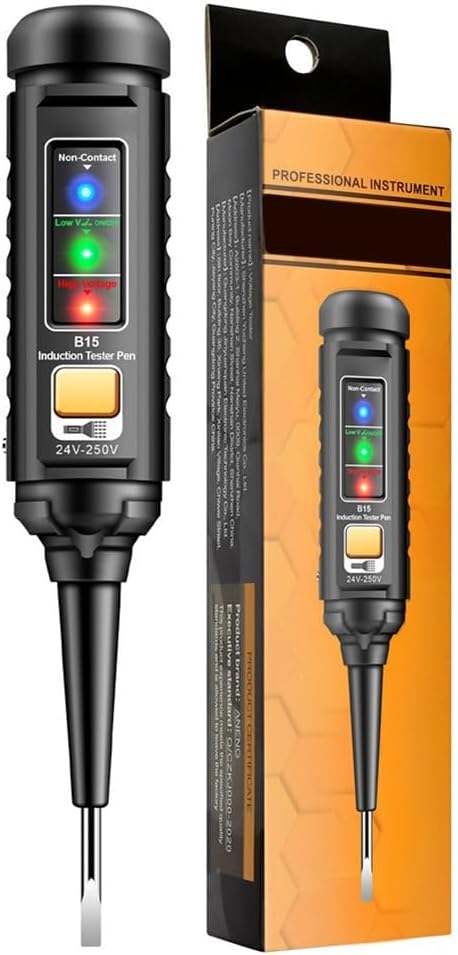
Figure 1: The AirheadStorm ANENG B15 DC Voltage Tester Pen shown with its retail packaging. The pen features a non-contact sensor, LED indicators (Low V, Zero, High Voltage), and a button for operation. The tip is a flathead screwdriver style probe.

Figure 2: This image illustrates the ANENG B15 tester pen in different operational scenarios. It shows the pen detecting voltage, with green and red LED indicators illuminating based on the detected voltage level. The NCV function is highlighted, demonstrating how the pen can detect live wires without direct contact.
Key Components:
- Non-Contact Sensor: Detects AC voltage without physical contact.
- LED Indicators: Visual alerts for voltage levels (Low V, Zero, High Voltage).
- Operation Button: Activates specific testing modes.
- Probe Tip: For direct contact testing and screwdriver functionality.
- Negative Pole Probe Socket: For connecting an external probe for DC measurements.
4. Setup
The ANENG B15 DC Voltage Tester Pen is designed for immediate use. No complex assembly is required. Ensure the device is clean and free from any damage before first use.
- Initial Inspection: Unpack the tester pen and inspect it for any visible damage.
- Battery Check: While the manual does not specify battery installation, ensure the device powers on. If it does not, refer to the troubleshooting section or contact support.
- Familiarization: Identify the non-contact sensor, LED indicators, operation button, and probe tip.
5. Operating Instructions
5.1 Non-Contact Voltage (NCV) Detection
The NCV function allows for safe detection of AC voltage without direct contact with live conductors.
- Hold the tester pen and bring the non-contact sensor end close to the wire, outlet, or circuit you wish to test.
- The device will emit escalating sound warnings and illuminate LED indicators (e.g., red for high voltage, green for low voltage) if AC voltage is detected.
- The intensity of the sound and light indicates the proximity and strength of the detected voltage.
5.2 DC Voltage Testing
For direct current (DC) voltage measurements, use the probe tip and the negative pole probe socket.
- Connect an external probe (if provided or required) to the negative pole probe socket (COM input).
- Touch the main probe tip of the tester pen to the positive point of the DC circuit.
- Touch the external probe (connected to COM) to the negative point of the DC circuit.
- Observe the LED indicators for voltage presence.
5.3 Wire Breakpoint Finder
The NCV mode can assist in locating breaks in live wires.
- Ensure the wire is live (carrying current).
- Slowly move the NCV sensor along the length of the insulated wire.
- The tester will indicate voltage presence until it reaches the point of the break, where the indication will cease.
5.4 Comprehensive Component Testing
The ANENG B15 can be used for basic checks on various electronic components for voltage presence.
- Depending on the component and circuit, use either the NCV function or the direct contact probe method.
- Apply the tester to the component's terminals or connection points.
- Interpret the LED indicators to determine voltage status.
6. Maintenance
- Cleaning: Wipe the device with a dry, soft cloth. Do not use abrasive cleaners or solvents.
- Storage: Store the tester pen in a cool, dry place, away from direct sunlight and extreme temperatures.
- Battery Replacement: If the device fails to power on or indicators are dim, replace the batteries (if user-replaceable; consult manufacturer if unsure).
7. Troubleshooting
| Problem | Possible Cause | Solution |
|---|---|---|
| No indication when testing. | No voltage present, low battery, or device malfunction. | Verify the circuit is live with a known working device. Check/replace batteries. If problem persists, contact support. |
| Inconsistent or weak indications. | Low battery, interference, or improper technique. | Replace batteries. Ensure no strong electromagnetic fields nearby. Re-attempt test with proper technique. |
| Device does not power on. | Dead batteries or internal fault. | Replace batteries. If still unresponsive, the device may be faulty; contact support. |
8. Specifications
| Feature | Detail |
|---|---|
| Part Name | DC Voltage Detection Pen |
| Material | ABS/Chrome Vanadium Steel |
| Size | Approximately 160.00x28.00x27.00mm (6.3x1.1x1.06inch) |
| Color | Black |
| Voltage Range | 24V-250V (as indicated on product image) |
| Item Weight | 1.8 ounces (51 Grams) |
| Manufacturer | AirheadStorm |
| Model Number | U1QFD0F642FU4C3NI60IKB48 |
9. Warranty and Support
Specific warranty information for the AirheadStorm ANENG B15 DC Voltage Tester Pen is not provided in this manual. For warranty details, technical support, or service inquiries, please contact the retailer or manufacturer directly using the contact information provided at the point of purchase or on the product packaging.