
1. Introduction
This manual provides comprehensive instructions for the assembly, operation, and maintenance of your new YOURLITE Makeup Vanity Desk with Flip-top Mirror and Lights. Please read this manual thoroughly before assembly and use to ensure proper function and longevity of your product. Keep this manual for future reference.
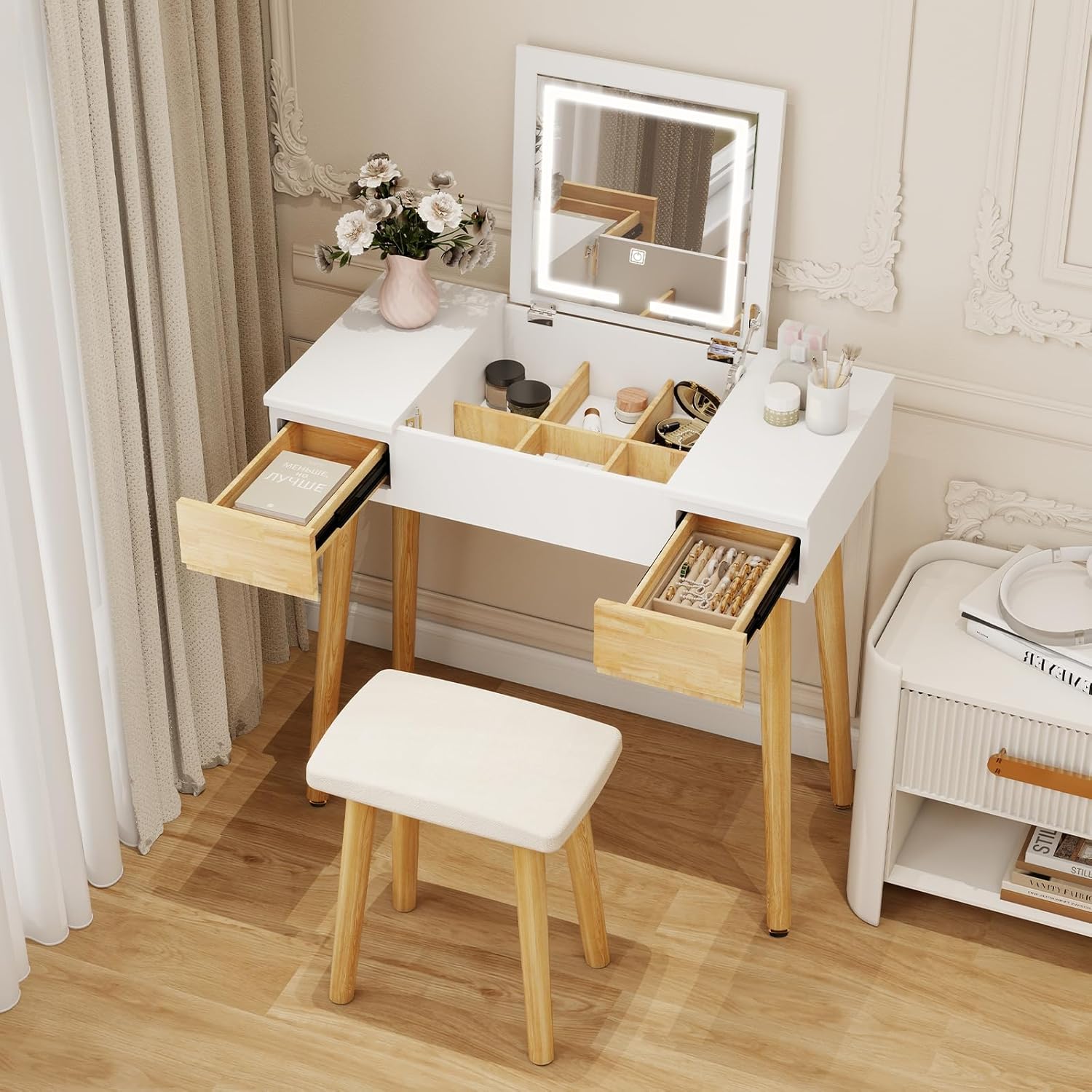
Figure 1.1: YOURLITE Makeup Vanity Desk with Flip-top Mirror and Lights.
2. Safety Information
Please observe the following safety guidelines to prevent injury or damage to the product:
- Always assemble the vanity with care, following the included instructions.
- Be aware of sharp edges and heavy weight during assembly and usage.
- Keep the vanity away from heat sources and ensure proper ventilation for the lights.
- Do not overload drawers or the desktop surface.
- Ensure all connections are secure before use.
- Unplug the vanity from the power source when not in use for extended periods to prevent dimming of lights over time.
3. Package Contents
Verify that all components are present before beginning assembly:
- Vanity Desk Main Body (with pre-assembled drawers)
- Flip-top Mirror with Integrated LED Lights
- Cushioned Stool
- Desk Legs (4 pieces)
- Stool Legs (4 pieces)
- Assembly Hardware (screws, Allen wrench, etc.)
- Instruction Manual
4. Setup and Assembly Instructions
Assembly is straightforward. The main desk body with drawers is largely pre-assembled. Follow these steps:
- Unpack Components: Carefully remove all parts from the packaging and lay them out on a clean, soft surface to prevent scratches.
- Attach Desk Legs: Secure the four desk legs to the underside of the vanity desk main body using the provided hardware. Ensure they are tightened firmly.
- Attach Stool Legs: Attach the four stool legs to the cushioned stool using the provided hardware.
- Position the Vanity: Place the assembled vanity desk in your desired location.
- Connect Power: Plug the power cord for the LED mirror into a suitable electrical outlet.

Figure 4.1: Product dimensions for planning placement.

Figure 4.2: Detail of the desk's construction and stool.
5. Operating Instructions
5.1 Flip-top Mirror
To access the mirror and internal storage, gently lift the top panel of the desk. The mirror will reveal itself, and the internal compartment with dividers will become accessible. To close, simply lower the top panel until it rests flush with the desk surface.
5.2 LED Lighting System
The built-in LED mirror features touch-controlled lighting with three distinct modes and stepless brightness adjustment.
- Power On/Off: Touch the designated power icon on the mirror surface to turn the lights on or off.
- Change Lighting Modes: With the lights on, touch the mode icon to cycle through the three color temperature settings: Cold White, Warm White, and Warm Yellow.
- Adjust Brightness: Press and hold the brightness control area on the mirror surface to steplessly adjust the light intensity. Release when the desired brightness is achieved.

Figure 5.1: LED mirror with three lighting modes and brightness adjustment.
5.3 Storage Drawers
The vanity desk includes two small external drawers and a large partitioned drawer within the flip-top compartment. Gently pull the external drawers to open and push to close. The internal partitioned drawer is accessible when the mirror is flipped open.
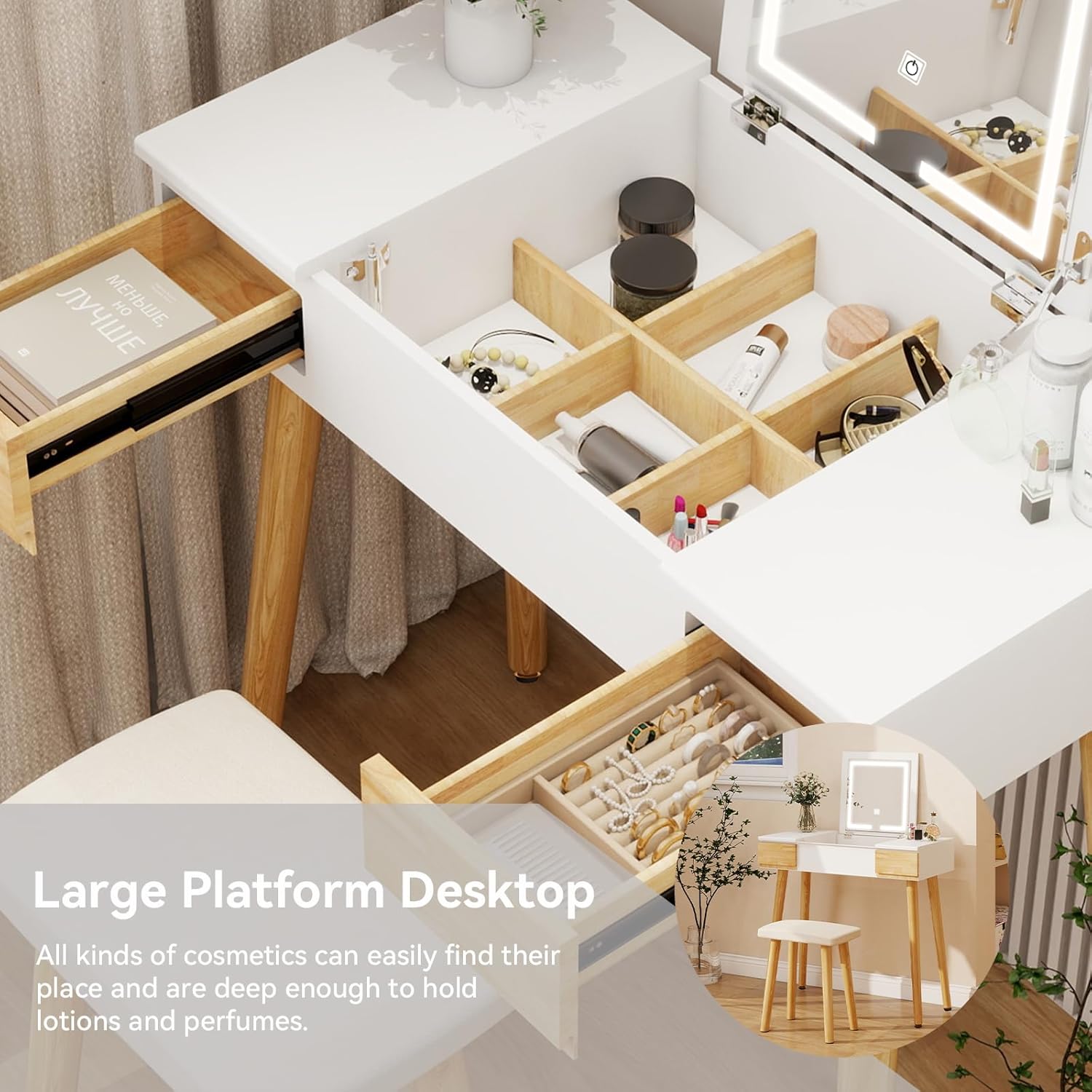
Figure 5.2: Internal storage and external drawers for organization.
6. Maintenance and Care
Proper care ensures the longevity and appearance of your vanity desk:
- Cleaning: Wipe surfaces with a dry, soft cloth. Avoid abrasive cleaners or harsh chemicals that may damage the finish.
- Spills: Immediately wipe any spills with a dry cloth to prevent staining or damage to the wood.
- Mirror Care: Clean the mirror surface with a glass cleaner and a soft, lint-free cloth.
- Environmental Conditions: Avoid placing the vanity in direct sunlight or near heat sources to prevent warping or discoloration. Maintain a stable room temperature and humidity.
- Regular Checks: Periodically check all screws and connections to ensure they remain tight.
7. Troubleshooting
Refer to this section for solutions to common issues:
- LED Lights Not Turning On:
- Ensure the power cord is securely plugged into a working electrical outlet.
- Check if the outlet itself is functional by plugging in another device.
- Verify that the touch control area on the mirror is being pressed correctly.
- LED Lights Appear Dim:
- If the lights become dim after prolonged use, unplug the vanity from the power source for a few hours, then plug it back in. This can help reset the lighting system.
- Ensure the brightness setting is not at its lowest level.
- Drawers Are Sticking or Difficult to Open/Close:
- Check for any obstructions within the drawer slides.
- Ensure the vanity is placed on a level surface. Uneven surfaces can cause misalignment.
- Verify that the drawer slides are clean and free of debris.
- Vanity Feels Unstable:
- Confirm that all desk and stool legs are securely tightened.
- Ensure the vanity is on a flat, level surface. Adjust any leveling feet if present.
8. Specifications
| Feature | Detail |
|---|---|
| Brand | YOURLITE |
| Model Name | 31.7 inch Modern |
| Product Dimensions | 15.7"D x 31.7"W x 30.3"H |
| Item Weight | 110 pounds |
| Frame Material | Engineered Wood |
| Material (General) | Wood |
| Seat Material Type | Sponge |
| Color | White |
| Assembly Required | Yes |
| Mirror Type | Flip-top with LED Lights |
| Lighting Modes | Cold White, Warm White, Warm Yellow (Stepless Brightness Adjustment) |
9. Warranty and Support
For warranty information or technical support, please refer to the contact details provided with your purchase documentation or visit the official YOURLITE website. Please retain your proof of purchase for any warranty claims.