
InnovaGoods 8435527827724
InnovaGoods Static Pedal Exerciser for Arms and Legs
Model: 8435527827724
Product Overview
The InnovaGoods Static Pedal Exerciser is designed for comfortable and effective exercise of both arms and legs from the convenience of your home. This compact and portable device is ideal for maintaining physical fitness, especially for seniors or individuals with reduced mobility. It features adjustable resistance and a digital LCD counter to track your progress.

Figure 1: Front view of the InnovaGoods Static Pedal Exerciser, showing the pedals, main unit, and LCD display.
Key Features:
- Ergonomic Design: Allows comfortable exercise while seated, suitable for use on a sofa or at a desk.
- Anti-slip Mat: Includes a mat for enhanced stability during use, preventing the exerciser from sliding.
- Adjustable Resistance: A knob allows you to increase or decrease pedaling resistance to suit your fitness level.
- Digital LCD Counter: Integrated electronic counter displays rotations, time, distance, and calories burned.
- Compact and Portable: Lightweight and easy to transport and store.
Setup Instructions
The InnovaGoods Static Pedal Exerciser requires minimal assembly. Please follow these steps:
- Unpack Components: Carefully remove all parts from the packaging. Ensure you have the main unit, pedals, and the anti-slip mat.
- Attach Pedals: Identify the left (L) and right (R) pedals. Screw each pedal into its corresponding crank arm on the main unit. Ensure they are securely tightened.
Note: The left pedal usually tightens counter-clockwise, and the right pedal clockwise. - Insert Battery (LCD Counter): The LCD counter requires 1 x AAA battery (not included). Open the battery compartment on the back of the display unit and insert the battery, observing polarity.
- Position Anti-slip Mat: Place the anti-slip mat on a flat, stable surface where you intend to use the exerciser.
- Place Exerciser: Position the pedal exerciser on top of the anti-slip mat.

Figure 2: The compact design allows for easy transport and placement on the anti-slip mat.
Operating Instructions
The InnovaGoods Static Pedal Exerciser can be used for both leg and arm exercises. Follow these guidelines for optimal use:
1. Leg Exercise:
- Positioning: Sit comfortably on a chair or sofa. Place the exerciser on the anti-slip mat in front of you, ensuring your knees are at approximately a 90-degree angle when your feet are on the pedals.
- Secure Feet: Place your feet into the pedal straps and adjust them for a snug fit.
- Adjust Resistance: Turn the resistance knob (located on the front of the unit) clockwise to increase resistance or counter-clockwise to decrease it. Start with a low resistance and gradually increase as you feel comfortable.
- Begin Pedaling: Start pedaling slowly and smoothly. Maintain a consistent rhythm.

Figure 3: User performing leg exercises with the pedal exerciser placed on the floor.
2. Arm Exercise:
- Positioning: Place the exerciser on a stable table or desk at a comfortable height.
- Secure Hands: Place your hands into the pedal straps, gripping the pedals firmly.
- Adjust Resistance: As with leg exercise, adjust the resistance knob to your desired level.
- Begin Pedaling: Rotate the pedals with your hands in a smooth, controlled motion.

Figure 4: User performing arm exercises with the pedal exerciser placed on a table.
3. Using the LCD Digital Counter:
The integrated LCD display tracks your workout data:
- SCAN: Automatically cycles through all functions.
- TIME: Displays the duration of your current exercise session.
- COUNT: Shows the total number of rotations during the current session.
- DISTANCE: Estimates the distance covered based on rotations.
- CALORIES: Estimates calories burned during the session.
Press the red button below the display to cycle through the different modes or to reset the values. The display can show two parameters simultaneously for easy monitoring.

Figure 5: Close-up view of the LCD display showing various metrics and the red control button.
Maintenance
To ensure the longevity and optimal performance of your InnovaGoods Static Pedal Exerciser, follow these simple maintenance steps:
- Cleaning: Wipe the unit with a soft, damp cloth after each use to remove dust and sweat. Do not use abrasive cleaners or solvents.
- Storage: Store the exerciser in a cool, dry place away from direct sunlight and extreme temperatures. Its compact size makes it easy to store.
- Battery Replacement: Replace the AAA battery in the LCD counter when the display becomes dim or stops functioning.
- Inspection: Periodically check all screws and connections to ensure they are tight. If any parts appear worn or damaged, discontinue use and contact customer support.
Troubleshooting
If you encounter any issues with your InnovaGoods Static Pedal Exerciser, please refer to the following common problems and solutions:
| Problem | Possible Cause | Solution |
|---|---|---|
| LCD Display Not Working | Battery is dead or incorrectly installed. | Replace the AAA battery, ensuring correct polarity. |
| Pedals are Loose | Pedals not tightened sufficiently during assembly. | Retighten the pedals. Remember, the left pedal tightens counter-clockwise, and the right pedal clockwise. |
| Unit Slides During Use | Anti-slip mat not used or placed on a slippery surface. | Ensure the anti-slip mat is correctly positioned on a stable, non-slippery surface. |
| Resistance Adjustment Not Working | Resistance mechanism may be jammed or damaged. | Check for any obstructions. If the issue persists, contact customer support. |
Product Specifications
| Brand | InnovaGoods |
| Model Number | 8435527827724 |
| Material | Alloy Steel, Acrylonitrile Butadiene Styrene (ABS), Rubber, EVA |
| Color | Grey | Black |
| Dimensions (L x W x H) | 38.5 x 41 x 30 cm |
| Item Weight | 3.8 Kilograms |
| Maximum Weight Recommendation | 100 Kilograms |
| Power Source | User Powered (LCD requires 1x AAA battery, not included) |
| Display Type | LCD |
| Included Components | Anti-slip mat |
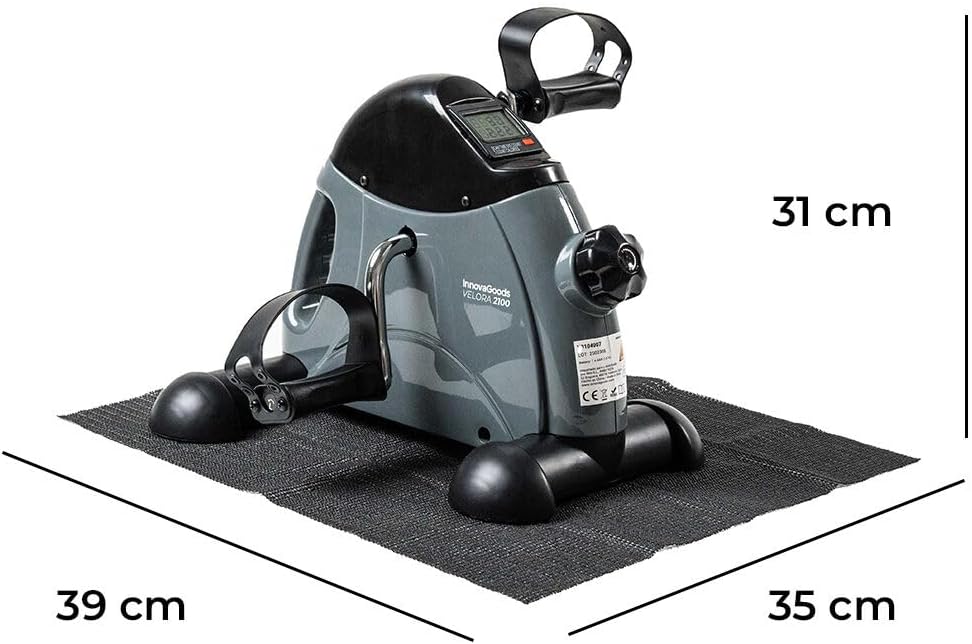
Figure 6: Dimensions of the InnovaGoods Static Pedal Exerciser.
Warranty and Support
This product comes with a standard manufacturer's warranty. For specific details regarding warranty coverage, duration, and terms, please refer to the documentation included with your purchase or contact the retailer.
For technical support, spare parts, or any questions not covered in this manual, please contact InnovaGoods customer service. Contact information can typically be found on the product packaging or on the official InnovaGoods website.
Online Resources: You may also find additional support and FAQs on the InnovaGoods Brand Store on Amazon.