
1. Important Safety Instructions
Please read all instructions carefully before using the singlehomie Portable Induction Cooktop. Retain this manual for future reference. Improper use may result in injury or damage.
- Electrical Safety: Ensure the power outlet matches the cooktop's voltage (110-120V). Do not overload the circuit. Avoid using extension cords unless absolutely necessary and ensure they are rated for the appliance's wattage.
- Placement: Place the cooktop on a stable, level, heat-resistant surface. Maintain at least 4 inches (10 cm) clearance from walls and other appliances for proper ventilation. Do not place on or near a hot gas or electric burner, or in a heated oven.
- Cookware Compatibility: Use only induction-compatible cookware (magnetic bottom). Non-compatible cookware will not heat. The minimum diameter for cookware is 5.9 inches (15 cm).
- Heat and Burns: The cooktop surface itself does not generate heat, but residual heat from hot cookware can make the surface hot. Always allow the cooktop to cool before cleaning or storing. Do not touch the hot surface immediately after use.
- Children and Pets: Keep the appliance out of reach of children and pets. The Child Lock function should be activated when not in use or when children are present.
- Ventilation: Do not block the air vents on the cooktop. Proper airflow is essential for cooling and preventing overheating.
- Liquid and Moisture: Do not immerse the cooktop in water or any other liquid. Avoid spilling liquids onto the control panel.
- Foreign Objects: Do not place metal objects such as knives, forks, spoons, lids, or aluminum foil on the cooktop surface as they can become hot.
- Medical Implants: Individuals with pacemakers or similar medical implants should consult their doctor before using an induction cooktop due to potential electromagnetic interference.
- Cleaning: Always unplug the cooktop before cleaning. Use a soft, damp cloth.

Image: Emphasizing safe cooking practices with the induction cooktop.

Image: Illustration of the flameless induction heating process, highlighting safety.
2. Product Overview
The singlehomie Portable Induction Cooktop (Model SIUS112B) is a compact and efficient cooking appliance designed for versatility and ease of use. Its ultra-thin profile and lightweight construction make it suitable for various environments, from home kitchens to RVs and dorms.
Key Features:
- Ultra-thin Design: At just 0.9 inches (23mm) thick, it offers space-saving storage and portability.
- 10 Power Levels: Adjustable power from 100W to 1200W, including a 'Boost' function for rapid heating.
- Low-Power Heating: Stable 100W heating for delicate tasks like Sous-vide, simmering, and keeping warm.
- Multi-Safety Protection: Features include automatic shut-off, overheat protection, child lock, and automatic detection of cookware removal.
- Digital Touch Controls: User-friendly interface for effortless operation.
- Timer Function: Up to 120 minutes timer for precise cooking control.
- Dual Cooling Fan: Efficient cooling system for extended lifespan and stable performance.

Image: Top view of the singlehomie Portable Induction Cooktop, showcasing its sleek design.

Image: The cooktop's ultra-thin profile, demonstrating its space-saving storage capability.

Image: Internal diagram highlighting the dual cooling fan system for efficient heat dissipation.
3. Setup
3.1 Unpacking
Carefully remove the cooktop from its packaging. Inspect for any damage. Retain packaging materials for potential future transport or return.
3.2 Placement
Place the cooktop on a dry, stable, non-metallic, and heat-resistant surface. Ensure there is adequate ventilation around the unit, maintaining at least 4 inches (10 cm) of clear space on all sides to allow for proper airflow through the cooling vents.
3.3 Power Connection
Plug the power cord into a standard 110-120V AC electrical outlet. Ensure the outlet is properly grounded.
3.4 Cookware Selection
The singlehomie induction cooktop requires induction-compatible cookware. This includes:
- Iron pot
- Stainless steel pot
- Composite bottom pot
- Enameled iron
To check if your cookware is compatible, hold a magnet to the bottom. If the magnet sticks, the cookware is suitable for induction. Cookware made of glass, aluminum, copper, or ceramic without a magnetic base is not compatible.

Image: Visual guide for selecting induction-compatible cookware, illustrating magnetic test.
4. Operating Instructions
The cooktop features intuitive digital touch controls. Ensure a suitable pot is placed on the cooking zone before operation.
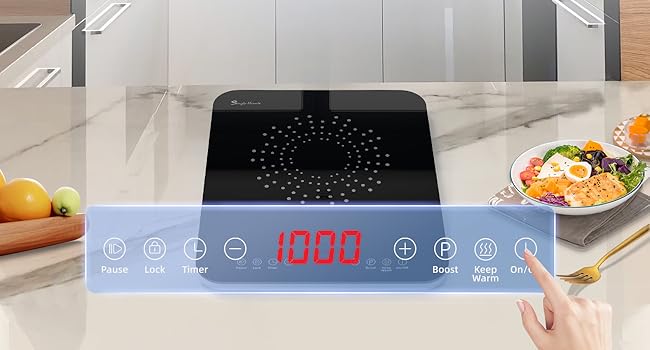
Image: Detailed view of the control panel with touch buttons and digital display.
4.1 Power On/Off
Press the On/Off button to turn the cooktop on. The display will show '0'. Press again to turn off.
4.2 Adjusting Power Levels
After placing compatible cookware and powering on, press the + or - buttons to select a power level from 100W to 1200W. There are 10 adjustable power levels.

Image: Demonstrating the versatility of 10 power levels for different cooking needs like frying, boiling, and simmering.
4.3 Boost Function
Press the Boost (P) button for maximum power (1200W) to quickly boil water or sear food. This function provides rapid heating.

Image: Cooktop in operation, showing water boiling rapidly, illustrating the Boost function.
4.4 Keep Warm Function
Press the Keep Warm button to maintain food at a serving temperature. This is ideal for keeping dishes warm without overcooking.
4.5 Timer Function
Press the Timer button. Use the + or - buttons to set the desired cooking time, up to 120 minutes. The cooktop will automatically turn off once the timer expires.

Image: Digital display showing the 2-hour timer function in use.
4.6 Child Lock Function
Press and hold the Lock button to activate the child lock. This prevents accidental operation. The display will indicate 'LOC'. To deactivate, press and hold the Lock button again.
4.7 Pause Function
Press the Pause button to temporarily stop cooking. The cooktop will pause heating and the display will flash. Press Pause again to resume cooking with the previous settings.
5. Maintenance
Regular cleaning and proper care will ensure the longevity and optimal performance of your singlehomie Portable Induction Cooktop.
5.1 Cleaning the Cooktop Surface
- Always unplug the cooktop and allow it to cool completely before cleaning.
- Wipe the ceramic glass surface with a soft, damp cloth and a mild detergent.
- For stubborn stains, use a non-abrasive ceramic cooktop cleaner.
- Do not use abrasive pads, harsh chemicals, or steel wool, as these can scratch or damage the surface.
- Dry the surface thoroughly with a clean, soft cloth.
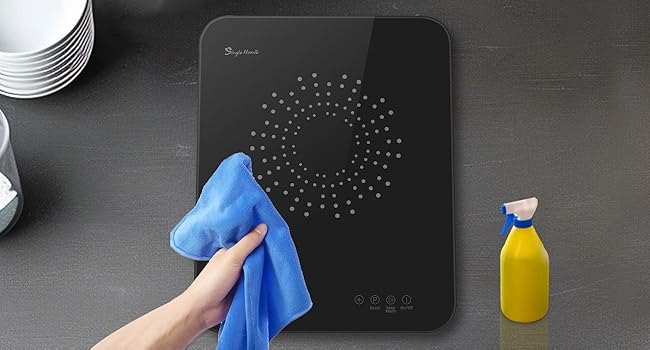
Image: Demonstrating the simple cleaning process for the cooktop surface.
5.2 Cleaning the Vents
Periodically check the air intake and exhaust vents for dust or debris. Use a soft brush or a vacuum cleaner with a brush attachment to gently clean the vents and ensure unobstructed airflow.
5.3 Storage
When not in use, store the cooktop in a dry place, away from direct sunlight and moisture. Its ultra-thin design allows for convenient vertical storage.
6. Troubleshooting
If you encounter issues with your singlehomie Portable Induction Cooktop, refer to the following common problems and solutions:
| Problem | Possible Cause | Solution |
|---|---|---|
| Cooktop does not turn on | No power supply; Power cord not plugged in; Faulty outlet. | Check power cord connection. Test outlet with another appliance. Check circuit breaker. |
| No heating / 'E0' or 'E1' error | Cookware not compatible; No cookware on surface; Cookware too small/large. | Use induction-compatible cookware. Ensure cookware is centered and within the recommended size (5.9"-9" diameter). |
| Cooktop stops heating during use / 'E2' error | Overheating (e.g., empty pot, blocked vents); Internal sensor error. | Remove pot, turn off, and allow to cool. Check for blocked vents. Ensure there is liquid in the pot. If error persists, contact support. |
| Unusual noise during operation | Normal fan operation; Cookware vibration; Electromagnetic hum. | A low hum or fan noise is normal. Some cookware may vibrate slightly. This is generally not a fault. |
| Control panel unresponsive | Child Lock activated; Moisture on panel. | Deactivate Child Lock by pressing and holding the Lock button. Wipe the control panel dry. |
If the problem persists after attempting these solutions, please contact customer support.
7. Specifications
| Feature | Specification |
|---|---|
| Model Number | SIUS112B |
| Brand | singlehomie |
| Material | Ceramic Glass |
| Heating Elements | 1 |
| Product Dimensions | 14.6"D x 11.8"W x 0.9"H (37.1cm D x 30cm W x 2.3cm H) |
| Wattage | 1200 watts |
| Controls Type | Digital Touch |
| Voltage | 110-120 Volts |
| Burner Type | Induction |
| Item Weight | 5.77 Pounds (2.62 kg) |
| Special Features | 0.9" Ultra-thin, Low noise, 100W Low-power heating, Keep warm & Boost function, Child lock, 120 Minutes timer, Pause function |

Image: The cooktop displaying its compact dimensions (0.9 inch thickness, 11.8 inch width, 14.6 inch depth).

Image: Reference chart illustrating approximate temperature ranges for different wattage settings.
8. Warranty and Support
The singlehomie Portable Induction Cooktop is designed for reliability and performance. For specific warranty details, please refer to the warranty card included with your product or visit the official singlehomie website. Keep your purchase receipt as proof of purchase for warranty claims.
Customer Support:
If you have any questions, require technical assistance, or need to report an issue, please contact singlehomie customer support through the following channels:
- Website: Visit the official singlehomie website for FAQs and contact information.
- Email: Refer to your product packaging or warranty card for the customer service email address.
- Online Retailer: For purchases made through Amazon, you can contact the seller 'Singlehomie direct' via your Amazon order history.
When contacting support, please have your product model number (SIUS112B) and purchase date ready.