
1. Introduction and Overview
Thank you for choosing the LEMBERI 70-Inch Fireplace TV Stand. This manual provides essential information for the safe assembly, operation, and maintenance of your new entertainment center. This product is designed to accommodate TVs up to 80 inches and features an integrated 36-inch electric fireplace with adjustable flame effects and LED lighting.
Please note that this product is delivered in two separate packages (one for the fireplace insert and one for the mantel/stand components). These packages may arrive on different days. Ensure you have received both packages and all components before beginning assembly.

Image 1.1: The LEMBERI 70-Inch Fireplace TV Stand in a living room setting.
2. Safety Information
Read all instructions carefully before assembly and use. Failure to follow these instructions may result in electric shock, fire, or personal injury.
- Electrical Safety: Ensure the fireplace is connected to a properly grounded outlet. Do not overload electrical circuits. Keep power cords away from heated surfaces and foot traffic areas.
- Fireplace Operation: Do not block the air intake or exhaust vents of the electric fireplace. Maintain a minimum clearance of 3 feet (0.9 meters) from combustible materials. Never leave the fireplace unattended while operating.
- Assembly Safety: Assembly requires two adults. Use appropriate tools and follow all steps in the correct order. Do not overtighten fasteners.
- Weight Capacity: The tabletop of the TV stand can support up to 250 lbs. Do not exceed this weight limit. Ensure the TV stand is placed on a level, stable surface.
- Ventilation: Ensure adequate ventilation around the TV stand and fireplace to prevent overheating.
3. Package Contents
Before beginning assembly, verify that all parts listed below are present and undamaged. If any parts are missing or damaged, contact customer support immediately.

Image 3.1: Product dimensions and indication of two packages for the fireplace and TV console table.
Package 1: TV Stand Components
- Wooden panels (top, bottom, side, back, shelves, doors)
- Metal support rods
- Hardware kit (screws, dowels, cam locks, hinges, handles)
- LED light strip and power adapter
Package 2: Electric Fireplace Insert
- 36-inch Electric Fireplace Insert
- Remote Control for Fireplace
- Instruction Manual for Fireplace (separate)
4. Assembly Instructions
Assembly typically requires two people and takes approximately 1-2 hours. Clear a spacious area for assembly and keep all hardware organized.
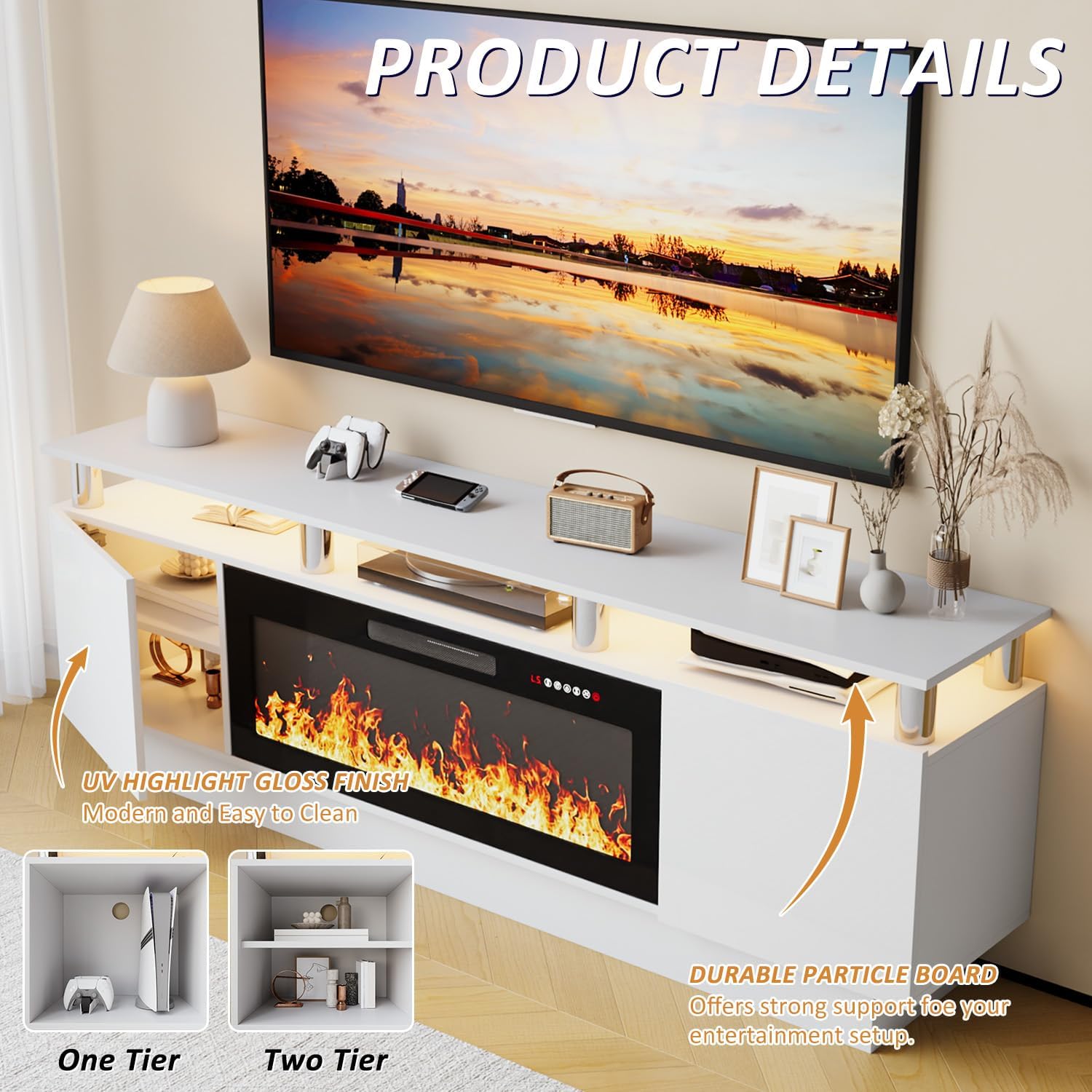
Image 4.1: Product details highlighting the UV gloss finish, durable particle board construction, and internal storage configurations.
- Prepare Components: Unpack all components from both boxes. Identify each part using the provided diagrams. Separate hardware into labeled bags if necessary.
- Assemble Base Frame: Attach the side panels to the bottom panel using the designated screws and dowels. Ensure all connections are secure.
- Install Center Support: Secure the central vertical support panel. This will create the compartment for the electric fireplace.
- Attach Top Panel: Place the top panel onto the assembled base, aligning it with the pre-drilled holes. Secure with screws.
- Install Shelves and Doors: Insert adjustable shelves into the side cabinets. Attach hinges to the cabinet doors and then mount the doors to the side panels. Adjust hinges for proper alignment.
- Integrate Electric Fireplace: Carefully slide the 36-inch electric fireplace insert into the central opening. Ensure it fits snugly and is flush with the front of the stand.
- Connect LED Lighting: Adhere the LED light strip to the designated areas (usually under the top shelf or within open compartments). Connect the LED strip to its power adapter and route the cable discreetly.
- Cable Management: Utilize the cable holes on the back panel to organize and route power cords for your TV, media devices, and the fireplace.

Image 4.2: Example of cable management through the integrated cable holes.
5. Operating Instructions
5.1 Electric Fireplace Operation
The electric fireplace can be controlled via the digital LED display on the unit or the included remote control.

Image 5.1: Remote control functions for the electric fireplace.
- Power (ON/OFF): Press the power button on the unit or remote to turn the fireplace on or off.
- Heater Settings: Adjust heat output between 750 watts and 1,500 watts. The fireplace can heat rooms up to 400 square feet. It can also operate with flames only (no heat).
- Flame Brightness (Dimmer): Cycle through 5 levels of flame brightness using the dimmer button.
- Flame Speed: Adjust the speed of the flame effect with 5 available levels.
- Flame Color: The fireplace features a captivating 3D flame effect with multiple color options. Refer to the fireplace's specific manual for detailed color adjustment.
- Timer Function: Set the operational timer from 1 to 8 hours. The fireplace will automatically turn off after the set duration.

Image 5.2: Examples of multi-color flame effects.
5.2 LED Light Operation
The integrated LED lights offer 20 color options to enhance your entertainment area.

Image 5.3: A selection of the 20 available LED light colors.
- Power: Connect the LED light strip to its power adapter and plug it into an outlet.
- Color Selection: Use the included LED remote control (if applicable) or integrated button to cycle through the 20 color options.
- Brightness/Modes: Some LED systems offer brightness adjustment or dynamic lighting modes. Refer to the LED light's specific instructions for advanced features.
6. Maintenance
Regular maintenance ensures the longevity and optimal performance of your TV stand and electric fireplace.
- Cleaning Surfaces: Wipe the engineered wood and gloss surfaces with a soft, damp cloth. Avoid abrasive cleaners or solvents that may damage the finish.
- Fireplace Glass: Clean the glass front of the fireplace with a soft cloth and a non-abrasive glass cleaner. Ensure the fireplace is off and cool before cleaning.
- Dusting: Regularly dust all surfaces, including the interior of the open compartments and around the fireplace vents, to prevent dust buildup.
- Electrical Cords: Periodically inspect all electrical cords for damage or fraying. If any damage is found, discontinue use and contact a qualified electrician or customer support.
7. Troubleshooting
If you encounter issues with your LEMBERI Fireplace TV Stand, refer to the following common problems and solutions:
| Problem | Possible Cause | Solution |
|---|---|---|
| Fireplace not turning on | No power, power switch off, remote battery dead | Check power outlet, ensure fireplace power switch is ON, replace remote batteries. |
| No heat from fireplace | Heater setting off, thermostat setting too low | Activate heater function, increase thermostat setting. Ensure vents are not blocked. |
| LED lights not working | Power adapter disconnected, LED strip damaged | Check power connection to LED adapter. If still not working, contact support. |
| Remote control not responding | Dead batteries, obstruction, out of range | Replace batteries, remove obstructions, operate within recommended range. |
| Stand feels unstable | Loose fasteners, uneven surface | Retighten all assembly fasteners. Move to a level surface. |
8. Specifications
Detailed specifications for the LEMBERI 70-Inch Fireplace TV Stand (Model PB70-8COL).

Image 8.1: Visual representation of TV size compatibility up to 80 inches.
| Feature | Detail |
|---|---|
| Brand | LEMBERI |
| Model Name | PB70-8COL |
| Product Dimensions | 11.4"D x 70"W x 24"H |
| Material | Engineered Wood |
| Finish Type | Painted (UV Highlight Gloss Finish) |
| Color | White |
| Item Weight | 110 Pounds |
| TV Size Compatibility | Up to 80 Inches |
| Tabletop Weight Capacity | Up to 250 lbs |
| Fireplace Size | 36 Inches |
| Heat Output | 750 Watts / 1500 Watts |
| Heating Coverage | Up to 400 sq ft |
| Special Features | Adjustable Flame, LED Flame, Multicolor Flame, 20-Color LED Light, Timer (1-8 hours), Remote Control, Cable Management |
| Power Source | Corded Electric |
9. Warranty and Support
The LEMBERI Fireplace TV Stand comes with a limited warranty. For specific details regarding warranty coverage, please refer to the documentation included with your product or contact LEMBERI customer support.
For technical assistance, missing parts, or warranty claims, please contact LEMBERI customer service through the retailer where the product was purchased or visit the official LEMBERI website for contact information.