
1. Introduction
This manual provides instructions for the PERFASCIN 6711R1P072D replacement remote control. This remote is designed to function as a direct replacement for the original remote controls of various Zenith DVD/VCR Combo Player models. It covers all essential functions without requiring any programming or setup.
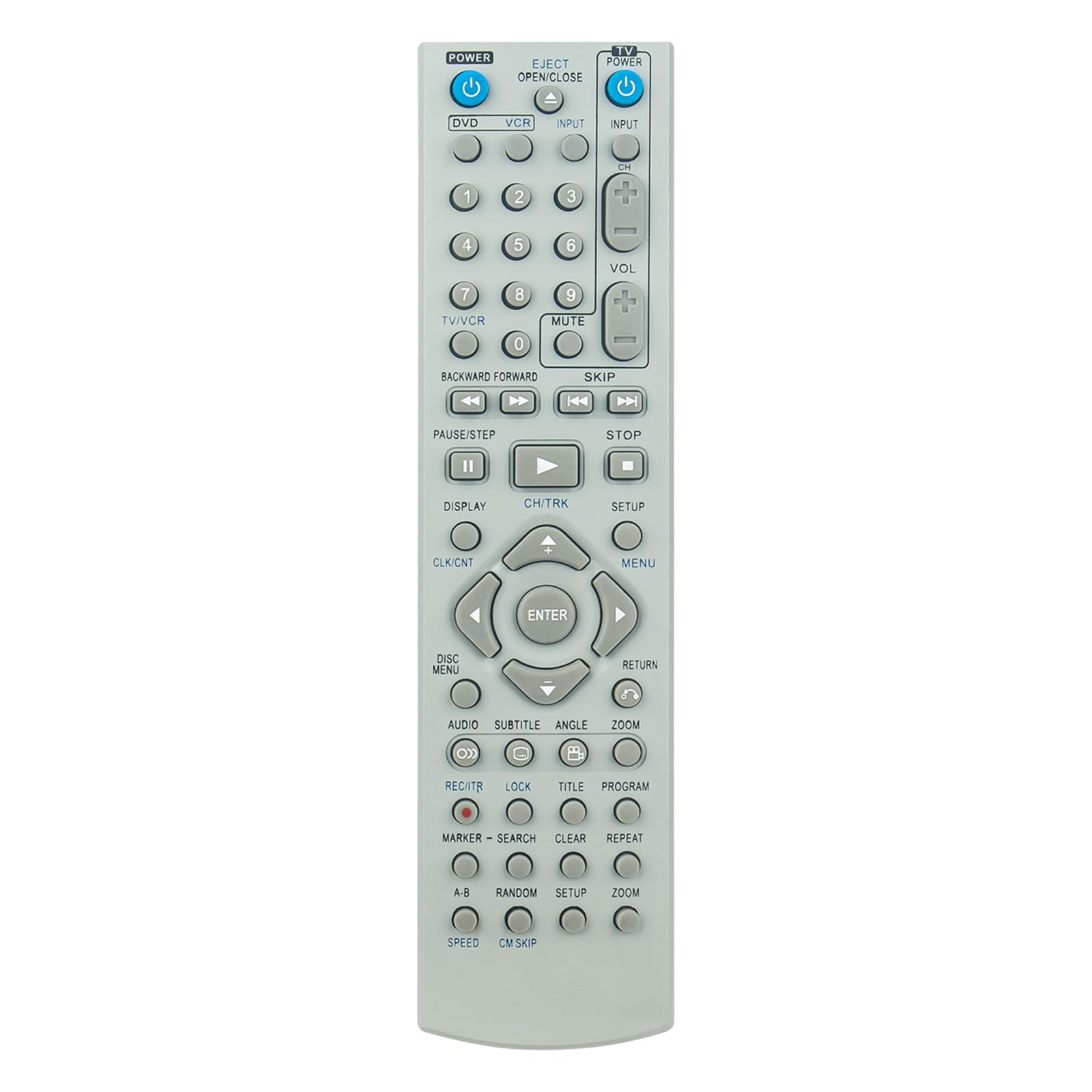
Image 1.1: Front view of the 6711R1P072D Replacement Remote Control.
2. Safety Information
- Do not mix old and new batteries.
- Do not mix alkaline, standard (carbon-zinc), or rechargeable (nickel-cadmium) batteries.
- Always remove exhausted batteries promptly to prevent leakage and damage to the remote control.
- Dispose of used batteries according to local regulations.
3. Package Contents
The package includes:
- 1 x PERFASCIN 6711R1P072D Replacement Remote Control
4. Setup
4.1. Installing Batteries
The remote control requires two AAA batteries (not included). Follow these steps to install them:
- Locate the battery compartment on the back of the remote control.
- Press down on the tab and slide the battery cover downwards to open it.
- Insert two AAA batteries, ensuring the positive (+) and negative (-) terminals align correctly with the markings inside the compartment.
- Slide the battery cover back into place until it clicks securely.

Image 4.1: Back view of the remote control with the battery cover closed.

Image 4.2: Back view of the remote control with the battery cover open, showing battery insertion.
4.2. Initial Use (No Programming Required)
This replacement remote control is pre-programmed and does not require any additional setup or programming. Once batteries are installed, it is ready for immediate use with your compatible Zenith DVD/VCR Combo Player.
5. Operating Instructions
The remote control provides access to all standard functions of your Zenith DVD/VCR Combo Player. Refer to the image of the remote control (Image 1.1) for button layout.
5.1. Key Functions Overview
- POWER (TV/VCR/DVD): Turns the respective device on or off.
- EJECT/OPEN/CLOSE: Opens or closes the disc tray or VCR tape slot.
- INPUT: Switches between input sources (e.g., TV, DVD, VCR).
- Number Buttons (0-9): Used for direct channel selection or menu input.
- VOL (+/-): Adjusts the volume level.
- MUTE: Mutes or unmutes the audio.
- CH (+/-): Changes channels up or down.
- PLAY (►): Starts playback.
- PAUSE/STEP (▐▐): Pauses playback or advances frame by frame.
- STOP (■): Stops playback.
- REWIND (◀◀): Rewinds playback.
- FAST FORWARD (►►): Fast forwards playback.
- SKIP (◀◀| / |►►): Skips tracks/chapters.
- SETUP: Accesses the system setup menu.
- MENU: Displays the main menu.
- Directional Buttons (▲ ◀ ► ▼): Navigates through menus.
- ENTER: Confirms a selection.
- DISPLAY: Shows on-screen information.
- RETURN: Returns to the previous menu or screen.
- AUDIO: Selects audio tracks or modes.
- SUBTITLE: Selects subtitle options.
- ANGLE: Changes camera angles (for compatible DVDs).
- ZOOM: Zooms in or out on the picture.
- REC/FTR (●): Initiates recording (VCR function).
- PROGRAM: Accesses program functions.
- CLEAR: Clears entries or selections.
- REPEAT: Repeats playback.
6. Maintenance
6.1. Cleaning
To clean the remote control, wipe it gently with a soft, dry cloth. Do not use liquid cleaners, sprays, or abrasive materials, as these may damage the remote's surface or internal components.
6.2. Battery Replacement
If the remote control's range decreases or it becomes unresponsive, replace the batteries. Refer to Section 4.1 for battery installation instructions.
7. Troubleshooting
- Remote not working:
- Ensure batteries are inserted correctly with the correct polarity.
- Replace old batteries with new ones.
- Ensure there are no obstructions between the remote control and the DVD/VCR Combo Player's infrared sensor.
- Point the remote directly at the device.
- Limited range:
- Replace batteries.
- Ensure the remote is within the maximum operating range (approximately 33 feet).
- Specific functions not working:
- Verify that your Zenith DVD/VCR Combo Player model is listed as compatible.
- Some advanced functions may be specific to the original remote or device model.
If the remote control continues to malfunction after following these steps, please contact customer support.
8. Specifications
| Brand | PERFASCIN |
| Model Name/Number | 6711R1P072D |
| Compatible Devices | Zenith DVD/VCR Combo Players |
| Connectivity Technology | Infrared |
| Special Feature | No Programming Required |
| Maximum Range | 33 Feet (approx. 10 meters) |
| Color | Black |
| Item Dimensions (L x W x H) | 6" x 3" x 0.5" (approx. 15.24 cm x 7.62 cm x 1.27 cm) |
| Power Source | 2 x AAA Batteries (not included) |
9. Warranty and Support
PERFASCIN is committed to providing quality products and customer satisfaction. This product is covered by our standard after-sales service.
If you encounter any issues with your remote control, such as damage upon receipt or malfunction, please do not hesitate to contact our customer support team. We are dedicated to assisting you and providing a satisfactory solution.
For support, please refer to the contact information provided with your purchase or visit the PERFASCIN official support channels.