
1. Product Overview
The Weceleh 30 Inch Gas and Induction Cooktop Combo offers a versatile cooking experience with both gas and electric heating elements. This hybrid design ensures cooking flexibility, even during power outages or when gas supply is limited. It features two gas burners and three induction burners, including a flexible bridge mode for larger cookware.

Image 1.1: Top-down view of the Weceleh 30 Inch Gas and Induction Cooktop Combo, showing two gas burners on the left and three induction zones on the right.
2. Safety Information
Always prioritize safety when operating any cooking appliance. This cooktop is equipped with several safety features:
- Child Safety Lock: Prevents accidental operation by children.
- Residual Heat Indicator: Alerts users to hot surfaces after use.
- Auto Shutdown Protection: Automatically turns off the cooktop under certain conditions (e.g., prolonged inactivity).
- Overheating Protection: Prevents damage from excessive temperatures.
- Water Overflow Protection: Shuts off the induction zones if liquid spills onto the control panel.

Image 2.1: Visual representation of the cooktop's safety features, including icons for child safety lock, residual heat indicator, auto shutdown, overheating protection, and water overflow protection.
3. Setup and Installation
3.1 Dimensions and Cutout
The product dimensions are 30 inches (width) x 20 inches (depth) x 4.3 inches (height). The recommended built-in cutout size for installation is 28.8 inches x 19 inches.

Image 3.1: Diagram illustrating the overall product dimensions (30"x20"x4.3") and the recommended built-in cutout size (28.8"x19") for the cooktop.
3.2 Fuel Type Conversion (LPG/NG)
This cooktop is compatible with both Liquefied Petroleum Gas (LPG) and Natural Gas (NG). It is pre-installed for NG use. To convert to LPG, follow these steps:
- Replace the NG nozzle with an LPG nozzle for each gas burner.
- Replace the NG elbow connector with the LPG-specific connector and use the sealing gasket.
- Change the regulator valve setting from natural gas to propane. The direction of the arrow indicates the airflow direction.
- Connect the gas stove to the propane tank using the proper propane regulator hose. Attach all components in the order listed.
Note: Regulator and Propane Regulator Hose are not included with this product and need to be purchased separately.

Image 3.2: Detailed instructions for converting the gas burners from Natural Gas (NG) to Liquefied Petroleum Gas (LPG), showing nozzle and elbow connector replacement.

Image 3.3: Instructions for adjusting the gas regulator valve and connecting the cooktop to a propane tank using a regulator hose.
3.3 Electrical Connection
The induction cooktop requires a 240 Volts electrical supply and has a wattage of 6700 watts. Ensure proper wiring according to local electrical codes. A wiring diagram is typically provided in the full installation guide.
4. Operating Instructions
4.1 Gas Burner Operation
To operate the gas burners, push down and turn the corresponding knob to the desired flame level. The burners feature automatic ignition. Adjust the flame size by rotating the knob. The gas burners provide 7000 BTU and 5000 BTU respectively.
Video 4.1: Demonstration of the gas burners being ignited and adjusted on the Weceleh cooktop.
4.2 Induction Burner Operation
The induction cooktop features intuitive slide touch controls and 9 power levels to meet various cooking needs. It includes three induction burners: one 2000W (boost 2600W), one 2000W (boost 2300W), and one 1500W (boost 1800W).
- Power On/Off: Touch the power symbol to turn the induction cooktop on or off.
- Zone Selection: Select the desired cooking zone by touching its indicator.
- Power Level Adjustment: Use the slide touch control to adjust power from level 1 to 9.
- Boost Mode: Activate Boost mode for an extra 30% power, reaching up to 3600W in bridge mode.
- Timer Function: Set a cooking timer for up to 99 minutes.
- Pause Function: Temporarily pause cooking operations.

Image 4.1: Close-up of the induction cooktop control panel, highlighting the slide control, 9 power levels, timer, pause, boost, and safety lock functions.
Video 4.2: Demonstration of the induction cooktop's touch controls, including power adjustment and timer settings.
4.3 Flexible Bridge Mode
The flexible bridge mode allows for the use of larger rectangular cookware, such as grill trays, by combining two induction zones. When activated, the boost power can reach 3600W, providing enhanced heating for larger cooking surfaces.
Image 4.2: The cooktop demonstrating the flexible bridge mode with a large rectangular grill tray, indicating a boost power of 3600W.
4.4 Cookware Compatibility
The gas zones are suitable for all cookware types, including glass, aluminum, enamel, and copper. The induction cooktop zones require magnetic cookware such as cast iron, stainless steel, and other magnetic pots.
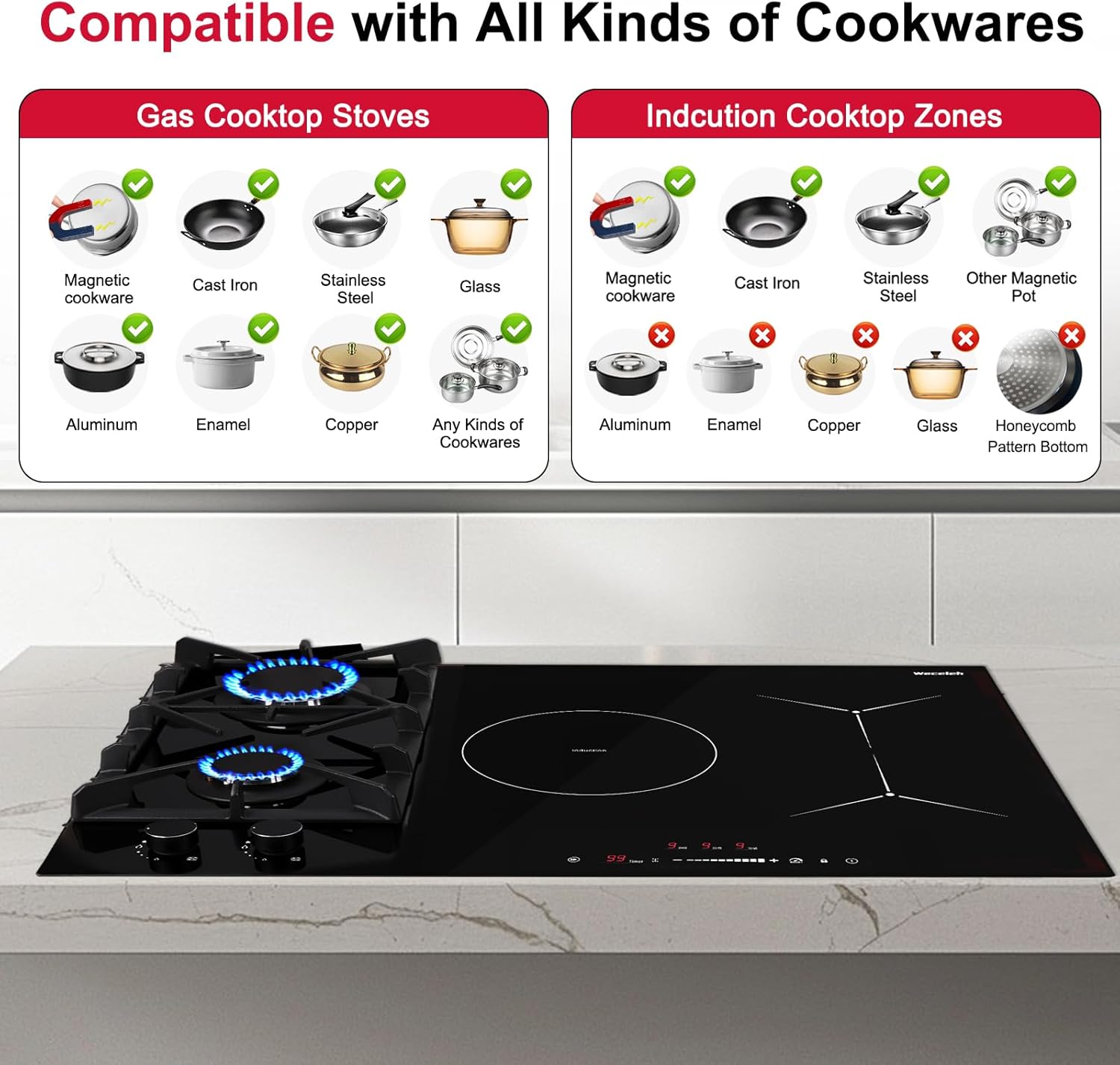
Image 4.3: A chart detailing which types of cookware are compatible with the gas cooktop stoves and the induction cooktop zones, indicating magnetic cookware for induction and all types for gas.
5. Maintenance
5.1 Cleaning
The glass surface of the cooktop is designed for easy cleaning. Use a soft cloth and mild detergent for regular cleaning. For stubborn stains, specialized ceramic cooktop cleaners can be used. Ensure the cooktop is cool before cleaning.

Image 5.1: Close-up images showcasing product features, including the heavy cast-iron grates, the easy-to-clean glass surface, gas leakage prevention device, and melt-proof & anti-slip knobs.
5.2 General Care
- Regularly check gas connections for any signs of leaks.
- Ensure gas burner caps and grates are properly seated after cleaning.
- Avoid dropping heavy objects on the glass surface to prevent cracks.
6. Troubleshooting
6.1 Gas Burner Issues
- Burner not igniting or staying lit: Ensure the burner caps and rings are correctly positioned. Check if the gas supply is open. If the issue persists, contact customer support.
- Irregular flame: Verify that the burner ports are not clogged. Clean if necessary. Ensure the gas type (NG/LPG) matches the cooktop's configuration.
6.2 Induction Cooktop Issues
- Cooktop not turning on: Check if the power cable is securely connected. Ensure the child safety lock is not activated.
- Error codes displayed: Refer to the specific error code in the comprehensive manual for detailed solutions. Common issues include incompatible cookware or overheating.
- No heating: Confirm that magnetic cookware is being used and is properly centered on the cooking zone.
7. Specifications
| Feature | Specification |
|---|---|
| Brand Name | Weceleh |
| Model Info | Weceleh |
| Item Weight | 38.6 pounds |
| Product Dimensions | 20 x 30 x 4.3 inches |
| Installation Type | Drop-In |
| Special Features | Safety Lock |
| Burner Type | 5 (2 Gas, 3 Induction) |
| Heating Elements | 5 |
| Color | black |
| Voltage | 240 Volts |
| Wattage | 6700 watts |
| Fuel Type | Electric, Gas |
| Material Type | Stainless Steel |
| Heater Surface Material | Glass Ceramic |
| Included Components | Glass stove top |
8. Warranty and Support
For warranty information, please refer to the documentation included with your purchase or contact Weceleh customer service directly. Many users have reported excellent customer service and support for installation and troubleshooting.
8.1 Protection Plans
Optional protection plans are available for purchase to extend coverage beyond the standard warranty:
- 3-Year Protection Plan
- 4-Year Protection Plan
- Complete Protect (monthly plan covering eligible purchases)
Please check with your retailer for details on purchasing these plans.