
Introduction
Thank you for choosing the HOMBCK Floating Bed Frame Queen. This modern metal platform bed features a unique floating design with hidden legs and integrated smart LED lights, providing both aesthetic appeal and practical functionality. This manual provides detailed instructions for assembly, operation, maintenance, and troubleshooting to ensure a safe and enjoyable experience with your new bed frame.

Image: The HOMBCK Floating Bed Frame Queen, showcasing its unique design with integrated blue LED lighting, creating a modern and inviting bedroom ambiance.
Safety Information
Please read all instructions carefully before assembly and use. Keep this manual for future reference.
- Ensure all parts are present and undamaged before beginning assembly.
- Assemble the bed frame on a soft, clean surface to prevent scratches.
- Do not overtighten screws during assembly to avoid damaging components.
- Periodically check all connections and tighten as necessary to maintain stability.
- Do not exceed the maximum weight capacity of 800 lbs.
- Keep children and pets away from the assembly area.
- Ensure the power adapter for the LED lights is connected to a suitable power outlet and kept away from water.
Package Contents
Verify that all components listed below are included in your package. If any parts are missing or damaged, please contact customer support.
- Headboard and Footboard sections
- Side Rails (Left and Right)
- Center Support Beam(s)
- Bed Slats
- Support Legs (9 total, including hidden legs)
- LED Light Strip with Controller and Power Adapter
- Assembly Hardware (screws, bolts, washers, Allen wrench)
- Instruction Manual
Specifications
| Feature | Detail |
|---|---|
| Model | Queen (B0FPG9953P) |
| Brand | HOMBCK |
| Size | Queen |
| Product Dimensions | 81.5"L x 60.3"W x 7.9"H |
| Color | Black |
| Finish Type | Glossy |
| Material | Metal Frame |
| Special Feature | Adjustable LED Lights, Floating Design, Noise-Free |
| Weight Capacity | Up to 800 lbs |

Image: Detailed product dimensions for the Queen size bed frame, indicating length, width, height, and a maximum weight capacity of 800 lbs.
Setup & Assembly
Assembly is designed to be straightforward. Follow these steps carefully. It is recommended to have two people for assembly.
- Unpack and Identify Parts: Lay out all components on a clean, soft surface. Refer to the parts list in the package contents section to identify each piece.
- Assemble the Main Frame: Connect the headboard, footboard, and side rails using the provided hardware. Ensure all connections are secure but do not fully tighten screws until the frame is fully assembled.
- Install Support Legs: Attach the 9 support legs to the designated points on the frame. The hidden legs should be positioned as per the diagram in your physical manual to create the floating effect.
- Insert Bed Slats: Place the bed slats across the frame. Ensure they are evenly spaced and secured if applicable. The design is noise-free, providing a stable base for your mattress without a box spring.
- Final Tightening: Once the entire frame is assembled, go back and fully tighten all screws and bolts.
- Install LED Lights: Carefully attach the LED light strip to the designated area underneath the bed frame. Connect the light strip to the controller and then to the power adapter.
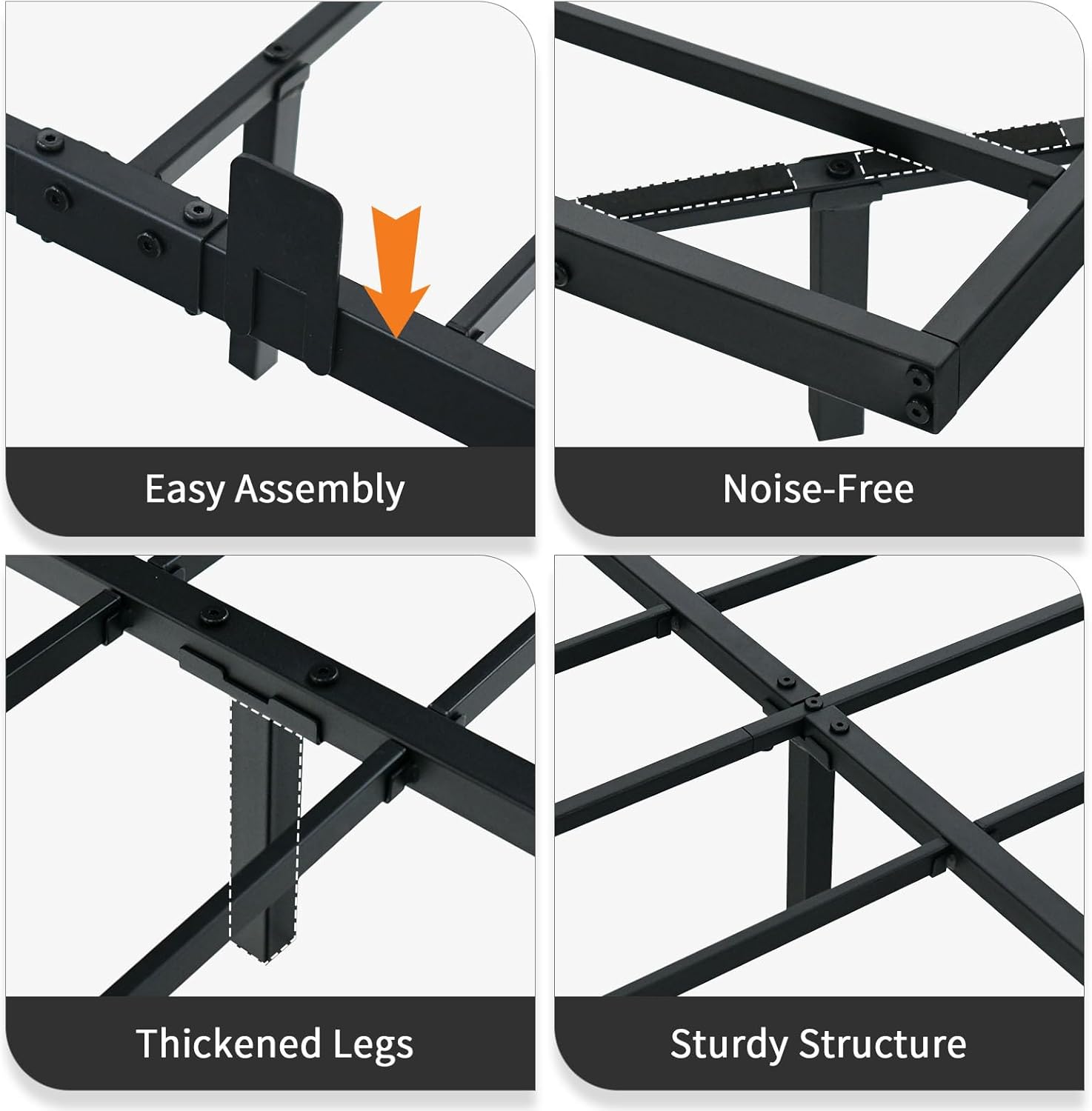
Image: A collage illustrating key assembly features: Easy Assembly, Noise-Free design, Thickened Legs for durability, and a Sturdy Structure ensuring stability.
Operating Instructions: Smart LED Lights
Your HOMBCK Floating Bed Frame is equipped with smart LED lights offering a wide range of customization options.
- Power On/Off: Connect the power adapter to a wall outlet. The lights can be turned on or off via the included remote control or a dedicated mobile application.
- Color Adjustment: Choose from over 60,000 colors to match your mood or room decor.
- Brightness Control: Adjust the brightness level to your preference.
- Modes:
- App Control: Download the specified mobile application (refer to the LED light controller manual for app name) to control all features from your smartphone.
- Mic Mode: Lights react to ambient sounds, creating a dynamic visual experience.
- Music Mode: Lights synchronize with music played through your device or the app.
- Timing Mode: Set schedules for the lights to turn on or off automatically.
- Custom Style: Create and save your own unique lighting patterns and sequences.

Image: An overview of the RGB LED lights bed frame features, including App Control, over 60,000 colors, Mic Mode, Music Mode, Timing Mode, Brightness Adjustable, and Custom Style options.
Maintenance
Proper maintenance will extend the life and appearance of your bed frame.
- Cleaning: Wipe the metal frame with a soft, damp cloth. Avoid harsh chemicals or abrasive cleaners that could damage the finish.
- Dusting: Regularly dust the LED light strips and controller to ensure optimal performance.
- Structural Check: Periodically inspect all bolts and screws to ensure they remain tight. Retighten if any looseness is detected.
- LED Care: Do not attempt to replace individual LED bulbs. If the light strip is damaged, contact customer support for replacement options.
Troubleshooting
If you encounter any issues, refer to the following common problems and solutions:
| Problem | Possible Cause | Solution |
|---|---|---|
| Bed Frame is Wobbly/Noisy | Loose connections; uneven assembly. | Ensure all bolts and screws are fully tightened. Re-check assembly steps to ensure proper alignment. |
| LED Lights Not Working | Power connection issue; faulty controller/strip. | Check if the power adapter is securely plugged into the outlet and the light strip. Ensure the controller is properly connected. Try a different outlet. If issues persist, contact customer support. |
| App Control Not Connecting | Bluetooth/Wi-Fi issue; incorrect app. | Ensure Bluetooth is enabled on your device and the bed frame's LED controller is powered on. Verify you have downloaded the correct application. Restart the app and try again. |
| Missing Parts | Packaging error. | Carefully check all packaging materials. If parts are genuinely missing, contact customer support with your purchase details. |
Warranty & Support
HOMBCK products are manufactured with quality and durability in mind. For specific warranty information regarding your bed frame, please refer to the warranty card included in your package or visit the official HOMBCK website. For any questions, technical support, or assistance with parts, please contact HOMBCK customer service through the retailer where you purchased the product or via the contact information provided on the HOMBCK brand store page on Amazon.
HOMBCK Store Link: Visit the HOMBCK Store on Amazon