1. Safety Information
- Engage Brakes: Always engage the brakes before sitting down on the rollator's seat to prevent accidental movement.
- Weight Capacity: This rollator is designed to support a maximum user weight of 380 lbs (172 kg). Do not exceed this limit.
- Stable Surface: Use the rollator on stable, level surfaces. Exercise caution on uneven terrain.
- Regular Checks: Periodically inspect all parts for wear, damage, or loose components. Ensure all screws and knobs are securely tightened before each use.
- Proper Adjustment: Ensure the handle height is correctly adjusted for your comfort and posture to maintain proper balance and control.
- Not a Transport Device: This rollator is not intended for transporting individuals while seated.
2. Package Contents
Before assembly, carefully unpack the box and verify that all components are present and undamaged. Refer to the assembly video for a visual guide to the parts.

Image: All components of the VOCIC Z11 Rollator Walker laid out for inspection.
- Main Unit (1)
- Front Leg Tubes (2)
- Rear Leg Tubes with Handle Tube (2)
- Backrest (1)
- Storage Bag (1)
- Hardware Bag (1) - Contains screws, knobs, and hex wrench.
- User Manual (1)
Video: Step-by-step guide on how to assemble the VOCIC Z11 X-Way Rollator, including unboxing and identifying parts.
3. Assembly Instructions
Follow these steps to assemble your VOCIC Z11 Rollator Walker. For detailed visual instructions, please refer to the assembly video provided above.
- Open the Main Unit: Carefully unfold the main frame of the rollator until it locks into place.
- Install Tube Decorative Covers: Insert the provided decorative covers onto the ends of the main unit's tubes.
- Attach Front Wheels: Insert the front leg tubes (with wheels) into the designated slots on the main unit. Secure them using the triangular locking knobs and M6*35 screws from the hardware bag.
- Attach Rear Wheels: Insert the rear leg tubes (with wheels and brake handles) into the designated slots. Secure them with the triangular locking knobs and M6*35 screws.
- Insert Backrest: Vertically insert the backrest into the holes on the main frame. Secure it using the M5*30 screws and M5*12 screws with the hex wrench. Ensure it is firmly tightened for stability.
- Secure Brake Cables: Route the brake cables outside the frame and secure them using the Velcro straps provided to prevent interference with the wheels or folding mechanism.
- Install Storage Bag: Lift the seat cushion and snap the storage pouch onto the frame beneath the seat.
4. Operating Instructions
4.1 Using the Brakes
The VOCIC Z11 features a high-sensitivity dual-brake system for safe and reliable control.

Image: Illustration of the dual-brake system, showing how to squeeze for braking and push down to lock.
- To Slow Down/Stop: Gently squeeze the brake levers on the handles.
- To Lock Wheels: Push the brake levers down until they click into the locked position. This is essential before sitting.
- To Unlock Wheels: Pull the brake levers up until they release from the locked position.
4.2 Sitting on the Seat
The rollator features an Ergo Arc Seat and Ergo Dual-arc Back Support for comfort.

Image: A user sitting comfortably on the rollator's ergonomic seat and backrest.
- Before Sitting: Always ensure the brakes are fully engaged and locked.
- Positioning: Turn around so your back is to the seat. Slowly lower yourself onto the seat, using the handles for support if needed.
- Comfort: The Ergo Dual-arc Back Support provides firm and reliable back support.
4.3 Walking with the Rollator
The rollator is designed for stability and ease of movement across various terrains.

Image: The VOCIC Z11 Rollator Walker in use, demonstrating its stable X-frame design.
- Posture: Stand upright with the rollator in front of you. Keep your back straight and shoulders relaxed.
- Grip: Hold the Ergo Butterfly Grips firmly. These grips are designed to be wrist-friendly and provide effortless braking.
- Movement: Push the rollator slightly ahead of you, then step forward. Maintain a steady pace.
Video: Demonstrates the 'All in One ErgoComfort' features of the VOCIC Z11 Rollator, including sitting and general use.
5. Adjustments
5.1 Adjusting Handle Height
The handle height can be adjusted to 5 different settings to fit users from 4'11" to 6'3".
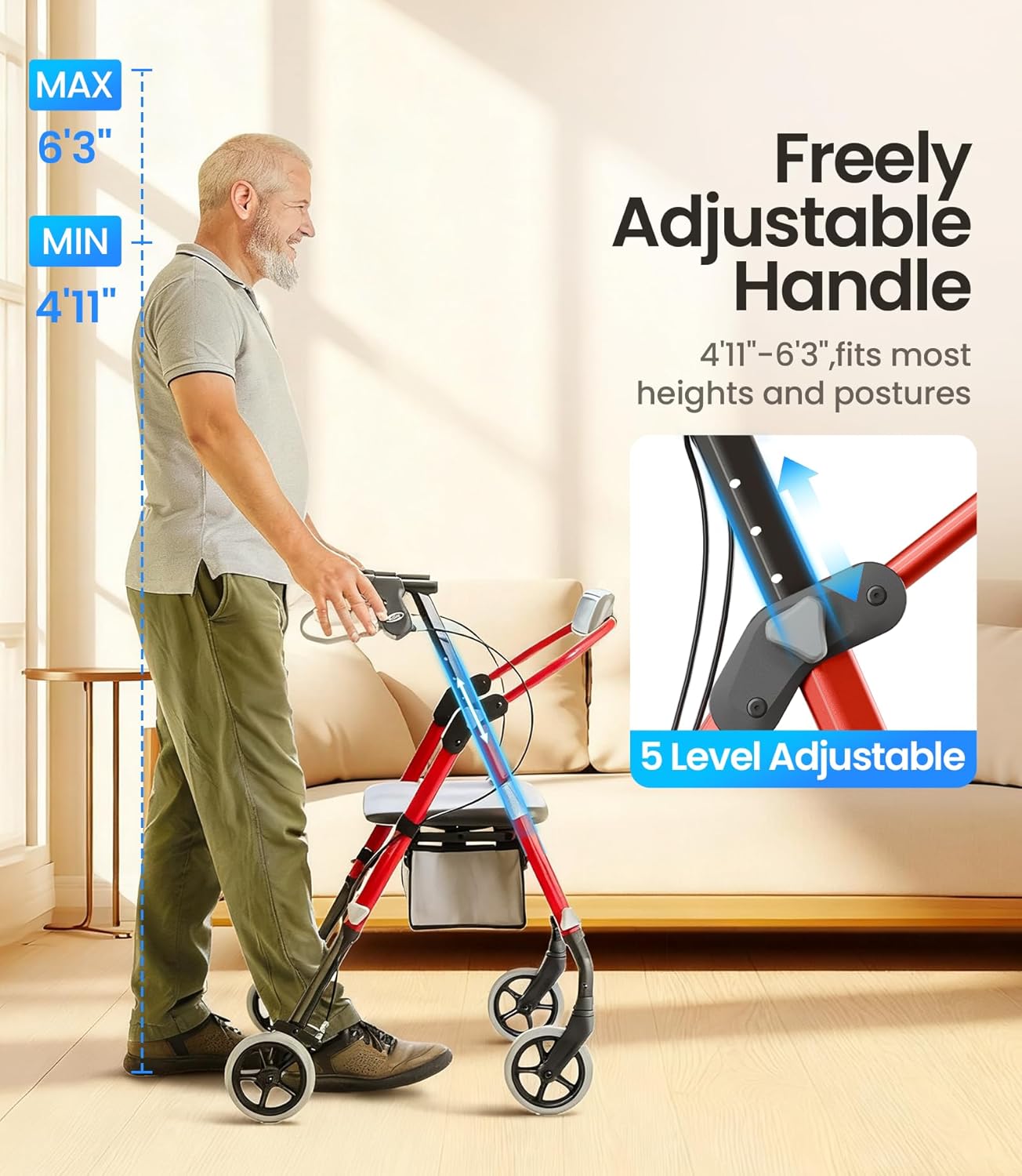
Image: A user adjusting the handle height of the rollator for personalized comfort.
- Unlock Adjustment Knob: Locate the adjustment knob on the side of the handle tube. Turn it counter-clockwise to loosen.
- Adjust Height: Press the spring-loaded button and slide the handle tube up or down to your desired height. Ensure your wrists are level with the grips when standing upright.
- Lock Adjustment Knob: Once the desired height is set, release the button and turn the knob clockwise to securely lock the handle in place. Repeat for the other handle.
6. Folding and Storage
The Z11 Rollator Walker is designed to fold easily for convenient transport and storage.

Image: The rollator folded and placed into a car trunk for easy transport.
- Lift the Seat: Pull up on the strap located under the center of the seat.
- Fold the Frame: Continue pulling the strap upwards, allowing the rollator frame to collapse inward.
- Secure for Transport: Once folded, the rollator can be easily lifted and placed in a car trunk or stored in a compact space.
Video: Shows the VOCIC Z11 X-Way Rollator in various usage scenarios, including folding for transport.
7. Maintenance
- Cleaning: Wipe down the frame and seat regularly with a damp cloth and mild detergent. Avoid abrasive cleaners.
- Wheel Inspection: Check the wheels periodically for debris, wear, or damage. Ensure they spin freely.
- Brake Check: Test the brakes regularly to ensure they engage and lock properly. If the brakes feel loose or ineffective, consult a professional for adjustment or repair.
- Fastener Tightness: Routinely check all screws, bolts, and knobs to ensure they are tight. Tighten any loose fasteners immediately.
8. Troubleshooting
- Rollator Does Not Roll Smoothly:
- Check wheels for debris (hair, lint) and remove.
- Ensure wheels are not damaged or worn. Replace if necessary.
- Verify all wheel fasteners are secure. - Brakes Are Not Effective:
- Check brake cables for kinks or damage.
- Ensure brake levers are properly adjusted and engaging the wheels. Consult a professional for brake adjustment if needed. - Rollator Feels Unstable:
- Verify all assembly screws and knobs are securely tightened.
- Ensure the frame is fully unfolded and locked into position.
- Check for any visible damage to the frame or components.
9. Specifications
| Feature | Specification |
|---|---|
| Model Number | Z11 |
| Product Dimensions | 23.8"D x 23.2"W x 36.6"H |
| Item Weight | 18.7 Pounds (8.5 kg) |
| Material | Carbon Steel |
| Maximum Weight Capacity | 380 lbs (172 kg) |
| Handle Height Adjustment | 36.6"–42.9" (5 settings) |
| Color | Red |
10. Warranty and Support
VOCIC provides professional after-sales support for the Z11 Rollator Walker.
- Warranty: Please refer to the product packaging or the official VOCIC website for specific warranty details.
- Returns and Parts Replacement: VOCIC offers no-hassle returns and parts replacement.
- Expert Support: For any issues or questions, contact VOCIC customer care. They aim to resolve issues within 24 hours.


