
1. Introduction
Thank you for choosing the HJDFGSS KMSO11M Under Desk Elliptical Machine. This manual provides essential information for the safe and effective use of your new exercise equipment. Please read it thoroughly before operation and retain it for future reference.
2. Safety Information
- Ensure the machine is placed on a stable, flat surface during use.
- Keep children and pets away from the machine during operation.
- Consult a physician before starting any new exercise program.
- Do not stand on the machine. It is designed for seated use only.
- Unplug the machine when not in use or before cleaning.
- If you experience any pain or discomfort, stop exercising immediately.
- The remote control requires separate battery purchase (not included due to logistics reasons).
3. Package Contents
Please verify that all components are present in the package:
- 1 x HJDFGSS KMSO11M Elliptical Machine
- 1 x Power Cord
- 1 x Remote Controller
- 1 x User Manual (this document)

Image: The HJDFGSS KMSO11M elliptical machine with its power cord and remote control, indicating all included components.
4. Setup and Assembly
The HJDFGSS KMSO11M Under Desk Elliptical Machine comes fully assembled and ready for immediate use. No additional installation is required.
- Placement: Place the elliptical machine on a flat, stable surface under your desk or in front of your chair.
- Power Connection: Connect the power cord to the machine and then plug it into a standard electrical outlet (100-220V, 50-60Hz).
- Remote Control Battery: Insert 2 AAA batteries (not included) into the remote control.
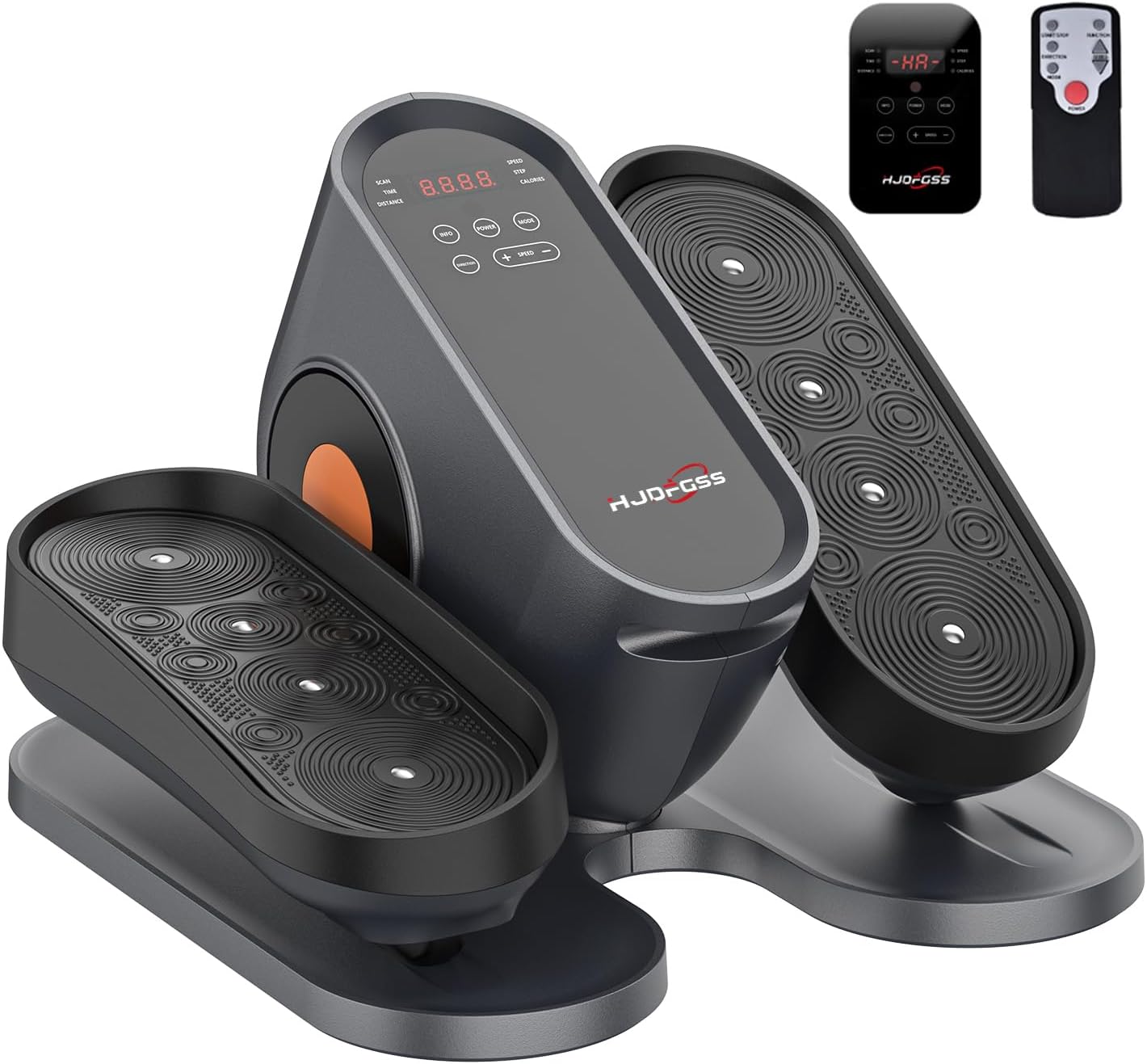
Image: The HJDFGSS KMSO11M elliptical machine in its assembled state, ready to be plugged in and used.
5. Operating Instructions
The HJDFGSS KMSO11M offers both automatic and manual exercise modes, controllable via the integrated LED display or the wireless remote control.
5.1 Control Panel and Remote Functions

Image: A close-up of the elliptical machine's control panel and remote, highlighting buttons for power, mode, speed adjustment, and direction.
- Power Button: Starts or stops the machine.
- Mode Button: Switches between automatic programs (P1-P3) and manual mode.
- Speed +/- Buttons: Adjusts the speed in manual mode (1-10 levels).
- Direction Button: Changes the pedal movement direction (forward/backward).
- Info Button: Cycles through displayed functions: Time, Distance, Speed, Step Count, Calories.
Note: When in an automatic program (P1-P3), the remote control cannot adjust time or speed. Switch to manual mode to access these adjustments.
5.2 Exercise Modes
The machine offers two primary operational modes:
- Passive (Electric) Mode: When plugged in, the machine's motor assists pedal movement. You can control speed and direction via the remote or control panel for a varied workout. This mode is ideal for low-impact, assisted exercise.
- Active (Manual) Mode: Operate the machine without plugging it in. In this mode, the movement relies solely on your leg force, providing a more active and effective leg workout.

Image: An illustration demonstrating the machine's capability for various exercise intensities, from walking to running, across 10 speed levels.
5.3 Using the Machine
- Sit comfortably in a chair with your feet placed on the elliptical pedals. The oversized footboards accommodate various foot sizes.
- Press the Power button to turn on the machine.
- Select your desired mode:
- For automatic programs, press the Mode button to cycle through P1, P2, P3.
- For manual control, press Mode until no program is selected, then use Speed +/- to adjust intensity (1-10 levels).
- Use the Direction button to change the pedal movement if desired.
- Monitor your progress using the Info button to view Time, Distance, Speed, Step Count, and Calories on the LED display.
- To stop, press the Power button.

Image: A person seated at a desk, actively using the HJDFGSS KMSO11M elliptical machine, demonstrating its under-desk functionality.
6. Maintenance and Care
Proper maintenance ensures the longevity and optimal performance of your elliptical machine.
- Cleaning: Wipe the machine with a soft, damp cloth after each use. Avoid abrasive cleaners or solvents. Ensure the machine is unplugged before cleaning.
- Storage: Store the machine in a cool, dry place away from direct sunlight and extreme temperatures.
- Inspection: Periodically check for any loose parts or unusual wear. Tighten screws if necessary.
- Protective Film: The display panel may have a protective film. This is not a scratch and can be carefully removed if desired.
7. Troubleshooting
| Problem | Possible Cause | Solution |
|---|---|---|
| Machine does not power on. | Power cord not properly connected; Power outlet issue. | Ensure power cord is securely plugged into both the machine and a working electrical outlet. |
| Remote control not working. | Batteries are dead or incorrectly inserted; Remote out of range. | Replace batteries (2 AAA, not included). Ensure remote is pointed towards the machine's sensor. |
| Machine makes excessive noise. | Internal component issue. | If the machine makes a lot of noise (above 20 decibels), please contact customer service immediately for assistance. |
| Machine moves or slips during use. | Unstable surface; Lack of grip. | Ensure the machine is on a stable, non-slip surface. Consider using a non-slip mat underneath. |
8. Specifications
| Feature | Detail |
|---|---|
| Brand | HJDFGSS |
| Model Name | KMSO11M |
| Color | Gray |
| Material | Alloy Steel |
| Product Dimensions (LxWxH) | 17.44"D x 15.55"W x 10.35"H (44.3cm x 39.5cm x 26.3cm) |
| Maximum Stride Length | 20 Inches (50.8cm) |
| Number of Resistance Levels | 10 (Manual Mode) |
| Automatic Programs | P1, P2, P3 |
| Maximum Weight Recommendation | 500 Pounds (226.8 kg) |
| Input Voltage | 100-220V, 50-60Hz |
| Working Voltage | 24V |
| Motor Power | 60W |
| Noise Level | Less than 20 decibels |

Image: A visual representation of the HJDFGSS KMSO11M elliptical machine with its key dimensions and technical specifications listed.
9. Warranty Information
The HJDFGSS KMSO11M Under Desk Elliptical Machine comes with a three-month free replacement warranty from the date of purchase. This warranty covers manufacturing defects and malfunctions under normal use. Please retain your proof of purchase for warranty claims.
10. Customer Support
For any questions, concerns, or after-sales service regarding your HJDFGSS KMSO11M Under Desk Elliptical Machine, please contact us through Amazon messages. Our customer service team is available to assist you.