1. Introduction and Overview
This manual provides essential information for the safe and efficient installation, operation, and maintenance of the Crouzet Control 88881302 M2C Delay on Break Timer. Please read this manual thoroughly before attempting to install or operate the device.
The Crouzet Control 88881302 M2C is an industrial-grade delay on break timer designed for precise control in various automation and electrical systems. It provides a timed delay after the control input is removed, ensuring specific sequences or protection functions are executed correctly.
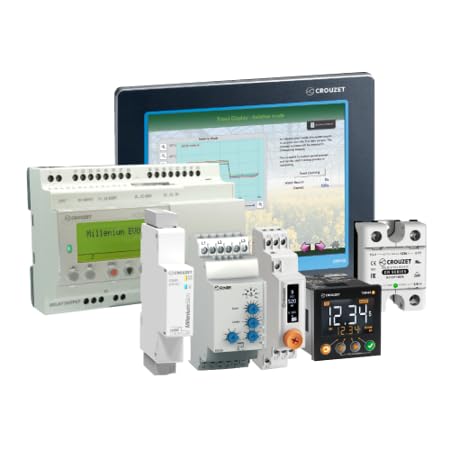
Figure 1: Example of Crouzet Control industrial devices, including the M2C Delay on Break Timer (similar to the timer shown in the image, typically a compact module with adjustment dials).
2. Safety Information
WARNING: Risk of Electric Shock. Installation and servicing should only be performed by qualified personnel.
- Always disconnect power before installing, servicing, or removing the device.
- Ensure all wiring complies with local and national electrical codes.
- Do not operate the device if it appears damaged.
- Protect the device from moisture, dust, and extreme temperatures.
- Use appropriate personal protective equipment (PPE) during installation and maintenance.
3. Product Features
The Crouzet Control 88881302 M2C Delay on Break Timer offers reliable timing functionality for industrial applications. Key features include:
- Delay on Break Function: The timer initiates its timing cycle when the control input (power) is removed. The output remains energized for the set duration before de-energizing.
- Industrial Reliability: Designed for robust performance in demanding industrial environments.
- Compact Design: Space-saving form factor for integration into control panels.
- Adjustable Timing: Allows for precise setting of the delay duration (specific range depends on model variant, refer to device markings).
4. Setup and Installation
Follow these general steps for installing the Delay on Break Timer. Specific wiring diagrams are typically provided on the device itself or in supplementary documentation.
- Power Disconnection: Ensure all power to the circuit where the timer will be installed is completely disconnected and locked out.
- Mounting: Mount the timer securely in a suitable enclosure or on a DIN rail, depending on its design. Ensure adequate ventilation.
- Wiring:
- Connect the power supply to the designated terminals (e.g., A1, A2).
- Connect the control input signal (if separate from power) to the appropriate terminal.
- Wire the load to the output contacts (e.g., 15, 16, 18 for common, normally closed, normally open).
- Double-check all connections for tightness and correct polarity.
- Verification: Before restoring power, visually inspect all wiring to ensure no loose connections or potential short circuits.
5. Operating Instructions
The Crouzet Control 88881302 M2C Delay on Break Timer operates based on its configured timing function.
- Set Timing Duration: Use the adjustment dial(s) or switches on the front of the timer to set the desired delay duration. The scale typically indicates time units (e.g., seconds, minutes).
- Apply Power: Once installed and configured, apply power to the timer. The output relay will energize immediately.
- Initiate Delay: The "delay on break" function activates when the power supply to the timer is interrupted or the control input is removed.
- Timed Output: Upon interruption of power/control, the output relay will remain energized for the preset delay duration. After the delay, the output will de-energize.
- Reset: The timer resets when power is reapplied, and the cycle can begin again.
Refer to the specific markings on your device for exact timing ranges and adjustment methods.
6. Maintenance
The Crouzet Control 88881302 M2C Delay on Break Timer is designed for minimal maintenance. However, periodic checks can ensure optimal performance and longevity.
- Visual Inspection: Regularly inspect the timer for any signs of physical damage, discoloration, or loose connections.
- Cleaning: If necessary, gently clean the exterior of the device with a dry, soft cloth. Do not use abrasive cleaners or solvents. Ensure power is disconnected before cleaning.
- Environmental Conditions: Ensure the operating environment remains within the specified temperature and humidity ranges to prevent premature failure.
7. Troubleshooting
If the timer is not functioning as expected, consider the following common troubleshooting steps:
| Problem | Possible Cause | Solution |
|---|---|---|
| Timer does not energize output when power is applied. | No power supply; incorrect wiring; faulty device. | Check power connections and voltage. Verify wiring against diagram. If power and wiring are correct, the device may be faulty. |
| Delay on break function not working. | Incorrect timing setting; control input not properly removed; faulty device. | Verify the timing setting. Ensure the control input is completely removed. Check for proper wiring of the control input. |
| Output remains energized or de-energized indefinitely. | Faulty output relay; incorrect wiring. | Check output wiring. If the issue persists, the internal relay may be damaged. |
If troubleshooting steps do not resolve the issue, contact qualified technical support.
8. Specifications
The following specifications are provided for the Crouzet Control 88881302 M2C Delay on Break Timer. For detailed technical data, refer to the product datasheet.
- Model: 88881302 M2C
- Function: Delay on Break Timer
- Manufacturer: Crouzet Control
- ASIN: B0FPDNPPFF
- First Available: September 2, 2025
- Note: Specific electrical ratings (e.g., supply voltage, current, timing range) are typically marked on the device or available in the full product datasheet.
9. Warranty and Support
For warranty information and technical support, please refer to the official Crouzet Control website or contact your authorized distributor. Keep your purchase receipt for warranty claims.
For further assistance, you may need to provide the model number (88881302 M2C) and serial number (if applicable) of your device.