
1. Introduction
Welcome to the user manual for your new Vipbear Modular Sectional Sleeper Sofa. This guide provides essential information for assembly, operation, maintenance, and troubleshooting to ensure optimal use and longevity of your product. Please read this manual thoroughly before assembly and use.
Safety Guidelines
- Ensure all components are present and undamaged before beginning assembly.
- Assemble the sofa on a soft, clean surface to prevent scratches.
- Always follow assembly instructions carefully. Two people are recommended for assembly.
- Do not exceed the maximum weight capacity of 1400 pounds.
- Keep children and pets away from the assembly area.
- Avoid standing or jumping on the sofa.
- Do not use abrasive cleaners or harsh chemicals on the fabric.
2. Product Overview
The Vipbear Modular Sectional Sleeper Sofa is designed for versatility and comfort, featuring a pull-out bed, adjustable backrests, integrated storage, and USB charging ports. Its modular design allows for flexible arrangement in your living space.
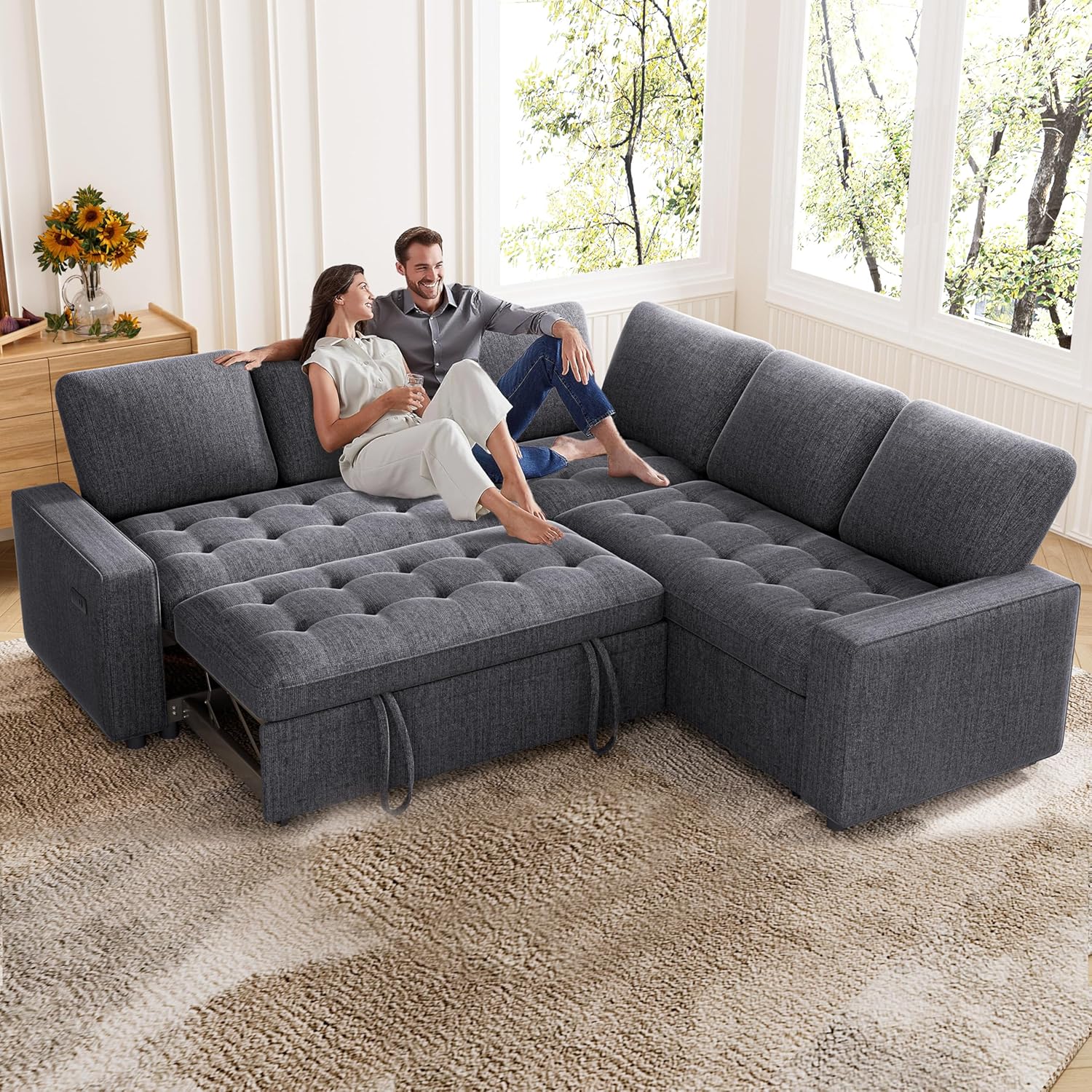
Image: The Vipbear Modular Sectional Sleeper Sofa in dark grey, configured as an L-shaped sofa with the pull-out bed partially extended, showing a couple relaxing on it.
Key Features:
- Tool-Free Assembly: Components snap together easily without additional tools.
- Versatile Sleeper Function: Converts from a sofa to a spacious bed (80"W x 53"D).
- Adjustable Backrest: Four recline angles (100° to 160°) for personalized comfort.
- Integrated Storage: Large compartments for blankets, pillows, and other items.
- USB & Type-C Charging Ports: Conveniently charge devices while relaxing.
- Durable Chenille Fabric: Soft, comfortable, and resistant to everyday wear.
3. Assembly Instructions
This sofa is designed for tool-free assembly. Please ensure you have adequate space and a second person to assist with lifting and positioning components.

Image: An exploded diagram showing the individual components of the modular sofa, illustrating how they connect for tool-free assembly.
General Assembly Steps:
- Unpack Components: Carefully remove all parts from their packaging. Verify that all pieces listed in the packing list are present.
- Connect Base Units: Align the connectors on the base units and push them together until they securely click into place.
- Attach Backrests: Slide the backrest brackets onto the corresponding slots on the base units.
- Place Cushions: Position the seat and back cushions onto the assembled frame.
- Install Legs (if applicable): Screw in any required legs to the bottom of the sofa frame.
- Final Check: Ensure all connections are secure and the sofa is stable before use.
Note: Specific assembly steps may vary slightly. Refer to the detailed instructions included in your product packaging for precise guidance.
4. Operating Instructions
4.1. Converting to Sleeper Bed
The sectional sofa features a convenient pull-out mechanism to transform it into a comfortable bed.

Image: A visual guide demonstrating the four steps to convert the sofa into a pull-out bed: 1. Pull out the hidden bed frame, 2. Lift the bed section, 3. Press down to lock, 4. Finish, revealing a flat sleeping surface.
- Pull Out: Locate the handles on the front of the sofa's chaise section. Gently pull the hidden bed frame outwards.
- Lift Up: Once fully extended, lift the front edge of the pulled-out section upwards.
- Press Down: Press the lifted section downwards until it locks into a flat, horizontal position, aligning with the main sofa seats.
- Finish: The sofa is now converted into a bed. To revert to a sofa, reverse these steps.

Image: A split image showing the sofa in its standard L-shaped configuration (Daytime Sofa) and then transformed into a bed with blankets and pillows (Nighttime Sofa).
4.2. Adjusting Backrest
The backrests can be adjusted to four different angles for customized comfort.

Image: A graphic illustrating the four adjustable backrest positions, ranging from an upright 100-degree angle to a reclined 160-degree angle, highlighting the customizable comfort feature.
To adjust the backrest, gently push the backrest forward until you hear a click, then recline it to your desired angle. Repeat this action to cycle through the available positions (100°, 120°, 140°, 160°).
4.3. Using Storage Compartments
Lift the seat cushions of the modular sections to access the integrated storage space. These compartments are ideal for storing blankets, pillows, magazines, or other living room essentials.
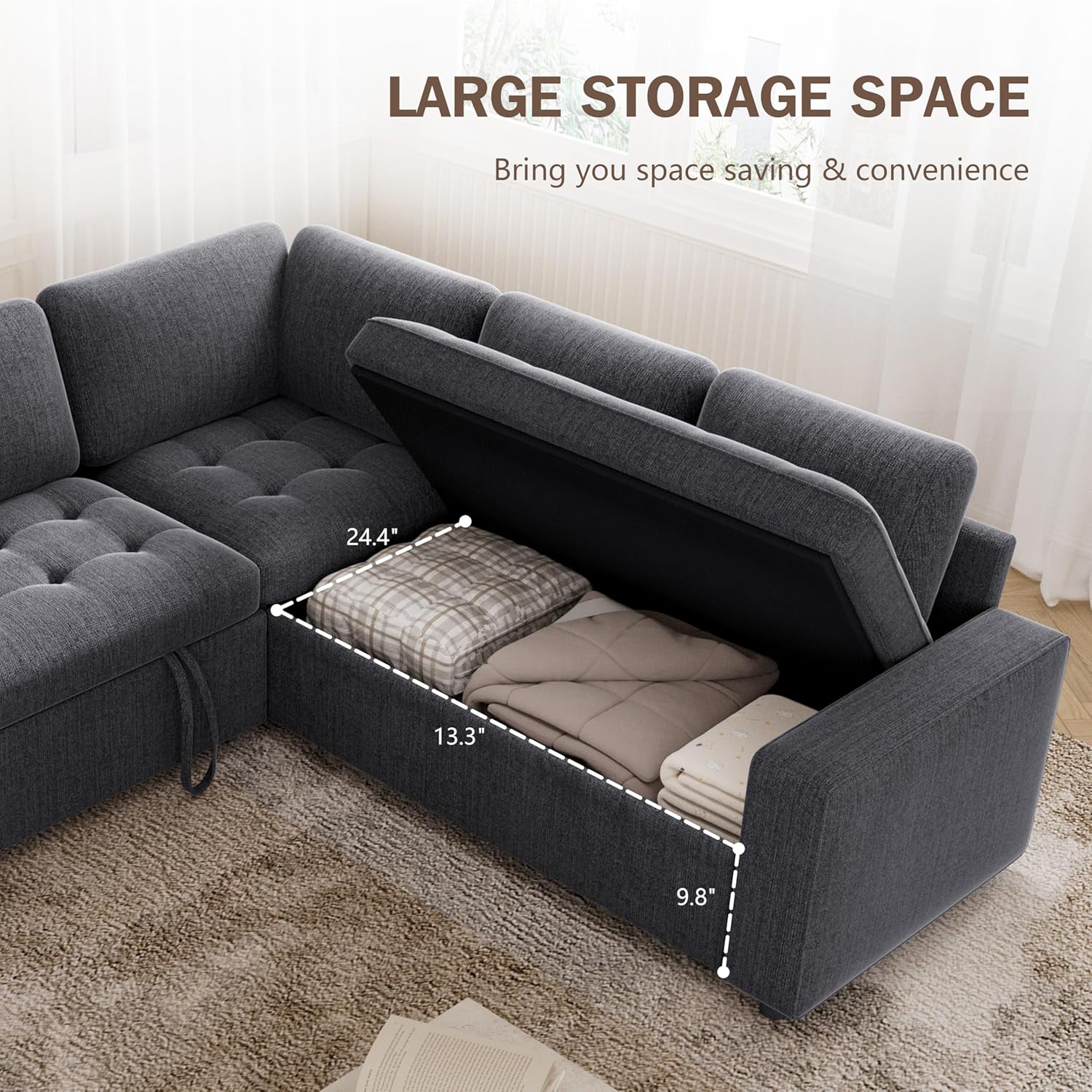
Image: A view of the sofa with a seat cushion lifted, revealing a spacious storage compartment filled with folded blankets, demonstrating its practical use.
4.4. USB Charging Ports
The sofa includes built-in USB and Type-C charging ports located on the armrest for convenient device charging.

Image: A close-up of a smartphone connected to and charging from the USB port integrated into the armrest of the sofa.
Simply plug your device's charging cable into the appropriate port to begin charging.
5. Maintenance and Care
Proper care will help maintain the appearance and extend the life of your Vipbear sofa.
Fabric Care (Chenille)

Image: A detailed close-up shot of the chenille fabric, highlighting its soft texture and weave.
- Regular Cleaning: Vacuum the sofa regularly using an upholstery attachment to remove dust and loose debris.
- Spot Cleaning: For spills, blot immediately with a clean, dry cloth. Do not rub, as this can spread the stain. For stubborn stains, use a mild fabric cleaner specifically designed for chenille, testing on an inconspicuous area first.
- Avoid Harsh Chemicals: Do not use bleach, abrasive cleaners, or solvents, as these can damage the fabric.
- Sunlight Exposure: Avoid prolonged exposure to direct sunlight to prevent fading.
- Cushion Care: Fluff and rotate cushions periodically to maintain their shape and even out wear. Back cushions are removable for easier cleaning and fluffing.
General Maintenance
- Check all connections and fasteners periodically to ensure they remain tight.
- Keep the sofa away from heat sources and excessive moisture.
6. Troubleshooting
If you encounter any issues with your Vipbear Modular Sectional Sleeper Sofa, refer to the following common solutions:
- Sofa feels unstable after assembly: Ensure all modular connectors are fully engaged and all legs (if applicable) are securely tightened. Re-check assembly steps.
- Pull-out bed mechanism is stiff: Ensure no obstructions are blocking the mechanism. Apply gentle, even pressure when pulling out or pushing in the bed. Avoid forcing the mechanism.
- Backrest not adjusting: Ensure you are pushing the backrest forward until it clicks before reclining to the next position. Check for any fabric or debris obstructing the internal mechanism.
- USB ports not charging: Verify that the sofa is properly connected to a power source (if required, though typically USB ports on furniture are powered by an internal connection to a wall outlet). Try a different USB cable or device to rule out cable/device issues.
- Cushions appear flat: Fluff cushions regularly. Removable back cushions can be rotated and patted to restore shape.
If the issue persists, please contact Vipbear customer support for further assistance.
7. Specifications
| Feature | Specification |
|---|---|
| Brand | Vipbear |
| Model | 5 Seat Sleeper Sofa |
| Color | Dark Grey |
| Product Dimensions (D x W x H) | 52.7"D x 80"W x 35"H |
| Item Weight | 198 Pounds |
| Weight Capacity | 1400 Pounds |
| Seating Capacity | 5 |
| Material Type | Chenille Fabric, Wood Frame |
| Assembly Required | Yes (Tool-Free, 2 people recommended) |
| Special Features | Adjustable Backrest, Space Saving, Storage, USB Charging Ports |
| Sleeper Bed Dimensions (W x D) | 80"W x 53"D (approximate) |
8. Warranty and Support
For warranty information and customer support, please refer to the documentation included with your purchase or contact Vipbear directly through their official channels. Keep your proof of purchase for any warranty claims.
You can visit the Vipbear Store on Amazon for more product information and contact options.


