
1. Setup and Assembly
The EasyCom Vanity Desk is designed for stress-free assembly. Your package includes HD video tutorials, detailed diagrammed instructions, and numbered parts to guide you through the setup process.
Please note that the product is shipped in two packages (Box-A and Box-B) which may arrive at different times. Kindly wait for both packages before beginning assembly.

Figure 1.1: The vanity desk is delivered in two separate packages. Ensure both 'Box-A' and 'Box-B' are received before starting assembly.
Assembly Video Tutorial
Video 1.1: Detailed installation instructions for the EasyCom Vanity Desk. Follow along for a smooth assembly process.
2. Operating Your Vanity Desk
2.1 Rotating Jewelry Organizers
The vanity desk features two rotating jewelry organizers, allowing 360° access to your skincare essentials, jewelry, and makeup brushes. Each organizer can hold over 146 items, keeping your vanity clutter-free and your items easily accessible.

Figure 2.1: The 360° rotating organizers provide convenient access to stored items, including jewelry, skincare, and makeup brushes.
2.2 LED Lighting System
The integrated mirror features 10 LED bulbs with 3 distinct lighting modes: Cool White, Warm White, and Soft Warm. Each mode offers dimmable brightness levels to simulate various real-life lighting environments, ensuring optimal makeup application.

Figure 2.2: Adjust the lighting to Cool White, Warm White, or Soft Warm modes, with dimmable brightness, for perfect illumination.
2.3 Integrated Charging Station
A side-mounted charging station is built into the vanity desk, featuring 1 USB-C port, 1 USB-A port, and 2 AC outlets. This allows you to centralize charging for your phone, hair dryer, and other devices, reducing cable clutter and enhancing safety.
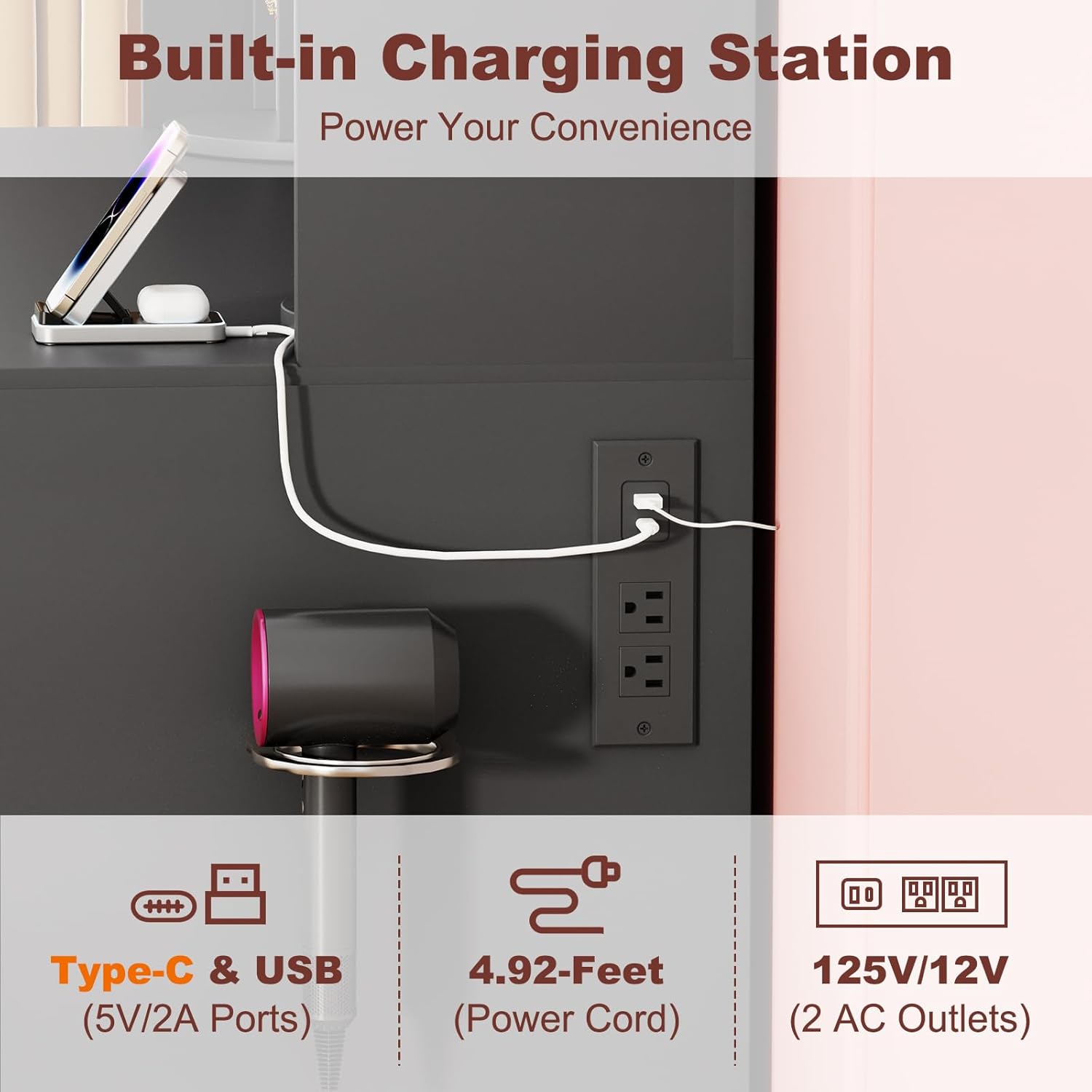
Figure 2.3: The integrated charging station provides convenient power access for multiple devices.
2.4 Storage Drawers and Cabinets
The vanity desk includes three spacious drawers and two storage cabinets. The cabinets feature door shelves for quick access to daily essentials and interior height-adjustable shelves to accommodate items of various sizes, maximizing storage space.

Figure 2.4: Three drawers and two cabinets offer ample storage for makeup, skincare, and other personal items.

Figure 2.5: Adjustable shelves and door shelves within the cabinets provide flexible storage solutions.
3. Maintenance
To ensure the longevity and appearance of your EasyCom Vanity Desk, follow these simple maintenance guidelines:
- General Cleaning: Wipe down all surfaces with a soft, damp cloth. Avoid using abrasive cleaners or harsh chemicals, as these can damage the finish.
- Mirror Care: Clean the mirror surface with a standard glass cleaner and a lint-free cloth. Do not spray cleaner directly onto the mirror; instead, apply it to the cloth first.
- Jewelry Organizers: Regularly dust the rotating organizers and velvet-lined sections with a soft brush or cloth to prevent dust buildup.
- Drawer & Cabinet Mechanisms: Periodically check that drawer slides and cabinet hinges operate smoothly. If needed, a small amount of silicone-based lubricant can be applied to the slides.
4. Troubleshooting
If you encounter any issues with your vanity desk, please refer to the following common troubleshooting tips:
- LED Lights Not Working:
- Ensure the power cord for the lights is securely plugged into a working outlet.
- Check the connection between the light bulbs and the main wiring harness. Loose connections can prevent lights from illuminating.
- Verify that the light control switch is functioning correctly and not damaged.
- Drawers or Cabinet Doors Sticking/Not Closing Smoothly:
- Inspect the drawer slides and cabinet hinges for any obstructions or misalignment.
- Ensure all assembly screws are tightened appropriately, but do not overtighten.
- Check that the items stored inside are not interfering with the closing mechanism.
- Charging Station Not Functioning:
- Confirm the main power plug for the charging station is fully inserted into a live wall outlet.
- Test the charging station with a different device and cable to rule out device-specific issues.
- If the issue persists, ensure the internal wiring connections are secure (refer to assembly instructions if necessary).
For further assistance, please contact EasyCom customer support.
5. Specifications
| Feature | Detail |
|---|---|
| Model Number | VS-115 |
| Frame Material | Engineered Wood |
| Product Dimensions (D x W x H) | 15.75"D x 45.28"W x 55.12"H |
| Item Weight | 115 pounds |
| Color | Black |
| Assembly Required | Yes |
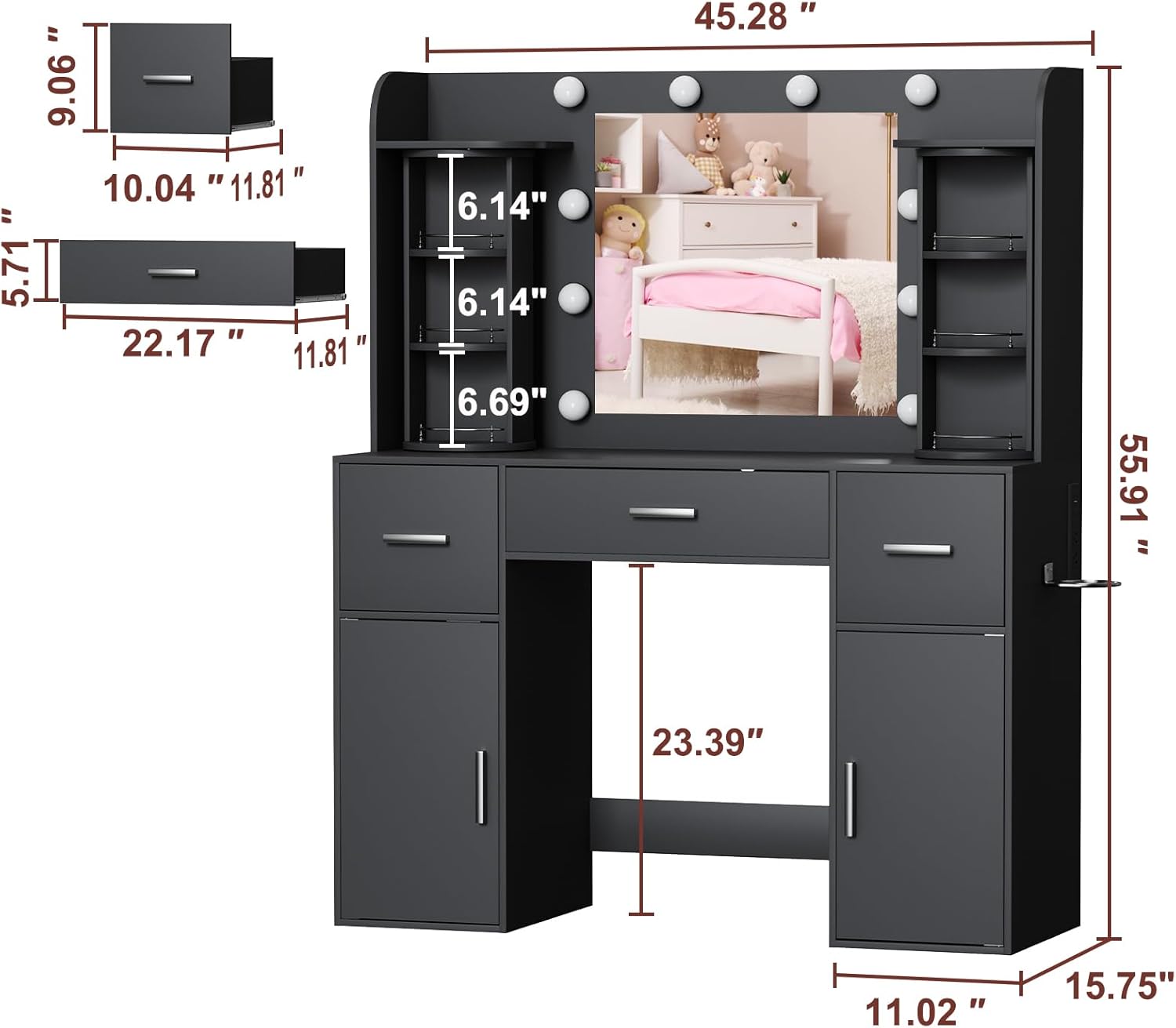
Figure 5.1: Detailed dimensions of the EasyCom Vanity Desk.
6. Warranty and Support
EasyCom is committed to your satisfaction. We offer dedicated 24/7 customer support to assist with any queries or issues you may encounter, including assembly questions, which are typically resolved within 24 hours.
This product is eligible for 30-day easy returns. Please retain your proof of purchase for any warranty claims or support requests.
For assistance, please visit the EasyCom official store or contact our customer service team directly.