1. Introduction
Thank you for choosing the Oilsky M1 MP3 Player. This device is designed to provide a portable and versatile music experience. It features Bluetooth 5.4 for wireless audio, a 2.4-inch full touch screen for easy navigation, and 128GB of internal storage, expandable via MicroSD card. Beyond music playback, it includes functions such as FM radio, voice recording, e-book reading, and picture viewing. Please read this manual thoroughly to understand the player's features and ensure optimal performance.
2. What's in the Box
Carefully unpack your Oilsky M1 MP3 Player and check for the following items:
- 1x Oilsky M1 Music Player
- 1x Earphones
- 1x USB Cable (for charging and data transfer)
- 1x Protective Case
- 1x User Manual

Image: All items included in the Oilsky M1 MP3 Player package.
3. Product Overview
The Oilsky M1 MP3 Player features a compact design with a full touch screen interface. Familiarize yourself with the device's physical components:
- 2.4-inch Full Touch Screen: Main interface for navigation and control.
- Power Button: Located on the side, used to turn the device on/off and lock/unlock the screen.
- Volume Buttons: Adjust audio output level.
- USB-C Port: For charging and connecting to a computer for data transfer.
- 3.5mm Headphone Jack: For wired earphone connection.
- MicroSD Card Slot: For expanding storage capacity (card not included).
- Built-in Speaker: Allows audio playback without headphones.
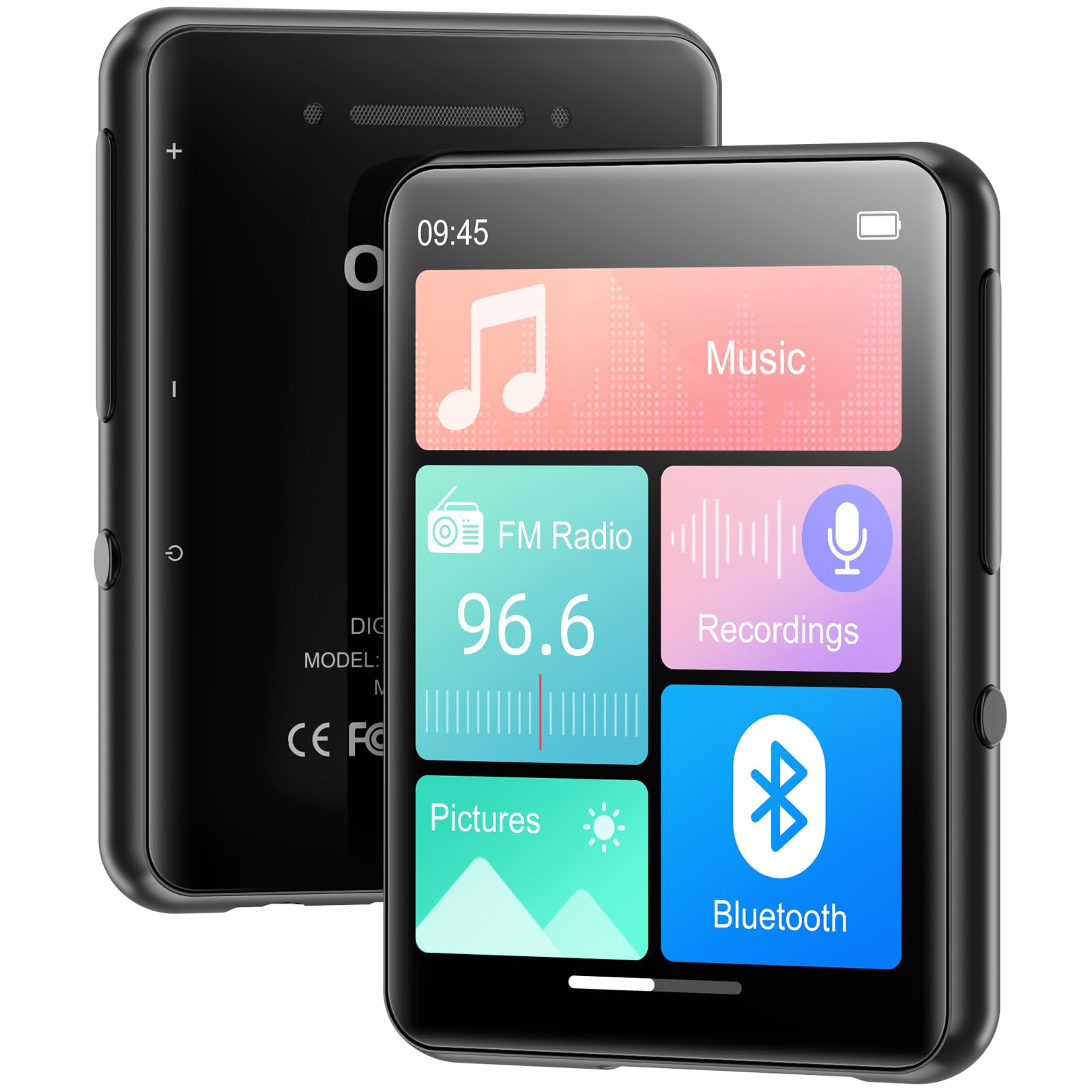
Image: Front view of the MP3 player displaying its main screen.
4. Setup
4.1 Charging the Device
Before first use, fully charge the MP3 player. Connect the provided USB cable to the device's USB-C port and the other end to a USB power adapter (not included) or a computer's USB port. The battery indicator on the screen will show charging status.
4.2 Power On/Off
- To Power On: Press and hold the Power button until the screen lights up.
- To Power Off: Press and hold the Power button, then select 'Power Off' on the screen.
- Screen Lock/Unlock: Briefly press the Power button to lock or unlock the screen during use.
4.3 Language Settings
Upon first power-on, you may be prompted to select your preferred language. If not, navigate to Settings > Language to choose from the available options.
4.4 Transferring Music and Files
The Oilsky M1 MP3 Player has 128GB of internal storage and supports MicroSD cards up to 128GB (not included).
- Connect the MP3 player to your computer using the USB cable.
- The player will appear as a removable disk drive on your computer.
- Drag and drop your music files (MP3, WMA, APE, FLAC, WAV, AAC), pictures (JPEG, BMP), or e-books (TXT) into the appropriate folders on the player or MicroSD card.
- Safely eject the device from your computer before disconnecting the USB cable.

Image: Visual representation of the 128GB internal storage and MicroSD card expansion capability.
5. Operating Instructions
5.1 Music Playback
From the main menu, tap the 'Music' icon to access your music library. You can browse by artist, album, genre, or all songs. Tap a song to begin playback. Use the on-screen controls for play/pause, skip tracks, and adjust volume. The player supports MP3, WMA, APE, FLAC, WAV, and AAC audio formats.

Image: User interacting with the touch screen for music playback.
5.2 Bluetooth Pairing
The Oilsky M1 features Bluetooth 5.4 for connecting to wireless headphones or speakers. Note: This device cannot pair with mobile phones or personal computers via Bluetooth.
- Go to Settings > Bluetooth or tap the 'Bluetooth' icon from the main menu.
- Turn Bluetooth 'On'.
- Ensure your Bluetooth headphones or speaker are in pairing mode.
- The MP3 player will scan for available devices. Select your device from the list to pair.
- Once paired, audio will be routed to your Bluetooth device.

Image: MP3 player demonstrating Bluetooth connectivity with headphones.
5.3 FM Radio
To use the FM Radio, connect wired earphones to the 3.5mm jack, as they act as the antenna. Tap the 'FM Radio' icon from the main menu. You can manually tune to stations or use the auto-scan feature to find available frequencies.
5.4 Voice Recorder
Tap the 'Recordings' icon to access the voice recorder. The built-in microphone allows you to capture audio. Start, pause, and save recordings using the on-screen controls. Recorded files are saved in the 'Recordings' folder.
5.5 Other Functions
The Oilsky M1 MP3 Player includes several other useful applications:
- Pictures: View stored image files (JPEG, BMP).
- E-book: Read text files (TXT format).
- Alarm Clock: Set alarms with your favorite music.
- Calendar: View the current date.

Image: Main menu showing various functions of the MP3 player.
Video: An overview of the Oilsky MP3 Player's features and interface, demonstrating its functionality.
6. Maintenance
- Keep the device dry. Avoid exposure to moisture or liquids.
- Clean the screen and body with a soft, dry cloth. Do not use abrasive cleaners.
- Avoid extreme temperatures.
- Do not drop or subject the device to strong impacts.
- Store the device in the provided protective case when not in use.
7. Troubleshooting
| Problem | Possible Solution |
|---|---|
| Device does not power on. | Ensure the battery is charged. Connect to a power source and try again. |
| Cannot connect to Bluetooth device. | Ensure the Bluetooth device is in pairing mode and within range. Confirm the MP3 player's Bluetooth is enabled. Remember, it cannot pair with phones or PCs. |
| No sound from headphones. | Check headphone connection. Ensure volume is not muted or too low. Test with different headphones. |
| Music files not appearing. | Verify files are in supported formats (MP3, WMA, APE, FLAC, WAV, AAC). Ensure files are transferred to the correct folders. Refresh the music library if available in settings. |
| Screen is unresponsive. | Restart the device by holding the power button. If unresponsive, allow the battery to drain completely and then recharge. |
8. Specifications
| Feature | Detail |
|---|---|
| Model Name | M1 |
| Brand | Oilsky |
| Connectivity Technology | Bluetooth 5.4, USB |
| Memory Storage Capacity | 128 GB (Internal), supports up to 128 GB Micro SD |
| Screen Size | 2.4 Inches |
| Special Features | FM Radio, Touch Screen, Built-in Speaker, Voice Recorder, E-book, Picture Viewer, Alarm Clock, Calendar |
| Compatible Devices | Headphones, Bluetooth Speakers |
| Supported Media Types | Micro SD |
| Supported Audio Formats | MP3, WMA, APE, FLAC, WAV, AAC |
| Item Weight | 5.9 ounces (approx. 167 grams) |
| Package Dimensions | 5.87 x 5.83 x 0.75 inches |
| Battery | 1 Lithium Ion battery (included) |
9. Warranty and Support
The Oilsky M1 MP3 Player comes with a standard manufacturer's warranty. Please refer to the warranty card included in your package for specific terms and conditions. For technical support, troubleshooting assistance, or warranty claims, please contact Oilsky customer service through the retailer where the product was purchased.


