
1. Introduction
This manual provides essential instructions for the assembly, operation, and maintenance of your Dianfan 150EQ Astronomical Professional Telescope. Please read this guide thoroughly before using your telescope to ensure proper setup and optimal viewing experiences. This reflector telescope is designed for both beginners and experienced stargazers, offering clear views of celestial objects.

Figure 1: The Dianfan 150EQ Astronomical Professional Telescope with included accessories.
2. What's in the Box
Verify that all components are present before beginning assembly:
- Telescope Optical Tube
- Phone Adapter
- Moon Filter
- Stainless Steel Tripod
- Carrying Bag
- 10mm Eyepiece
- 25mm Eyepiece
- 2x Barlow Lens
- Red Dot Finderscope
- Equatorial Mount
- Counterweight
- Counterweight Bar
- Latitude Adjustment Screw
- Slow Motion Cables
- Accessory Tray
3. Setup
Follow these steps to correctly assemble your telescope:
- Assemble the Tripod: Extend the stainless steel tripod legs to your desired height (48.4–66.2 inches) and secure them. Attach the accessory tray to the tripod for convenient storage of eyepieces and other small items.
- Mount the Equatorial Head: Secure the equatorial mount onto the tripod head. Ensure it is firmly attached and stable.
- Attach Counterweight Bar and Counterweight: Insert the counterweight bar into the equatorial mount and slide the counterweight onto the bar. Adjust its position to balance the telescope tube later.
- Attach Optical Tube: Carefully place the telescope optical tube onto the equatorial mount. Secure it using the provided fastening rings.
- Install Finderscope: Attach the red dot finderscope to the designated bracket on the optical tube.
- Insert Eyepiece: Insert the desired eyepiece (e.g., 25mm or 10mm) into the focuser. You may also use the 2x Barlow lens for increased magnification.
- Attach Slow Motion Cables: Connect the slow motion control cables to the equatorial mount for precise tracking adjustments.
For a visual guide on the assembly process, please watch the official installation video:
Video 1: Dianfan 150EQ Telescope Installation Guide. This video demonstrates the step-by-step assembly of the telescope, including attaching the tripod, equatorial mount, optical tube, and accessories.

Figure 2: Detail of the pre-assembled equatorial mount with intuitive dials and slow-motion control cables.

Figure 3: Visual representation of the easy assembly process, from setting up the tripod to attaching the optical tube and finderscope.
4. Operating the Telescope
Once assembled, your Dianfan 150EQ telescope is ready for observation. Here’s how to use it:
- Polar Alignment (for Equatorial Mount): For accurate tracking of celestial objects, perform a basic polar alignment. This involves aligning the equatorial mount's polar axis with the celestial pole. Refer to detailed astronomy guides for precise polar alignment procedures.
- Locate Target with Finderscope: Use the red dot finderscope to roughly aim your telescope at the desired celestial object. The red dot helps quickly center objects in the main telescope's field of view.
- Observe through Eyepiece: Look through the eyepiece and use the focuser knobs to achieve a sharp image. Start with the 25mm eyepiece for a wider field of view, then switch to the 10mm eyepiece or add the 2x Barlow lens for higher magnification.
- Tracking Objects: Use the slow motion control cables to make fine adjustments to keep celestial objects centered in your field of view as they move across the sky due to Earth's rotation.
- Using the Phone Adapter: Attach your smartphone to the phone adapter and then secure the adapter to the eyepiece. This allows you to capture photos and videos of your observations.
- Moon Filter: For comfortable viewing of the Moon, especially when it's bright, attach the moon filter to your eyepiece.

Figure 4: The telescope offers magnifications from 26x to 130x using the included 25mm and 10mm eyepieces, and a 2x Barlow lens.
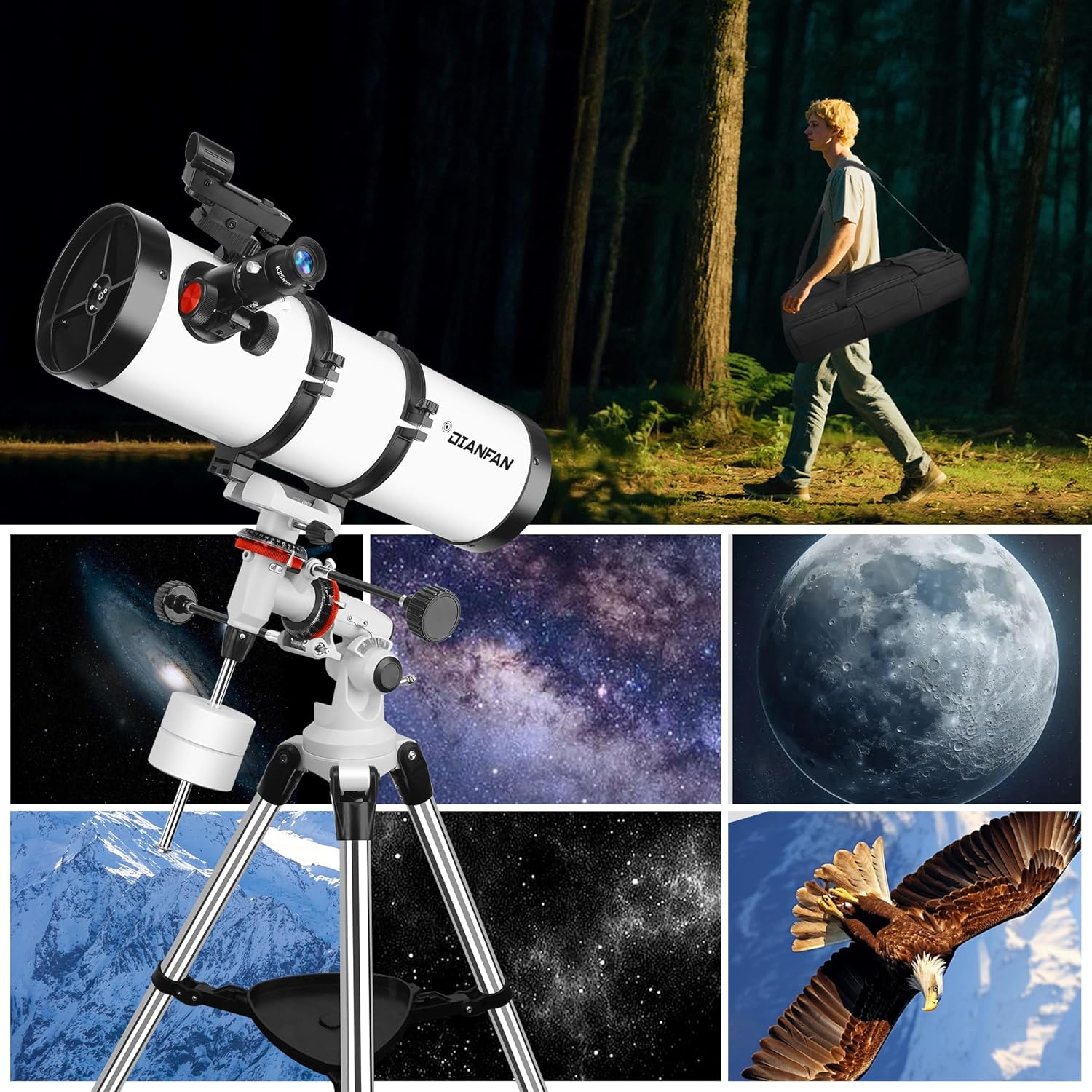
Figure 5: The included phone adapter allows users to easily attach their smartphone to the eyepiece for capturing celestial images.
Watch this video for a demonstration of the telescope's features and operation:
Video 2: Dianfan 150EQ Telescope Display. This video showcases the telescope's design, features, and how to make adjustments for observation.
For additional insights into using a telescope for astronomy, consider this video:
Video 3: Telescope for Adult Astronomy High Magnification. This video provides general information about using telescopes for high magnification astronomy.
5. Maintenance
Proper care and maintenance will extend the life and performance of your telescope:
- Cleaning Optics: Use a soft, lint-free cloth specifically designed for optical lenses to gently clean eyepieces and the main mirror. Avoid touching optical surfaces with bare hands.
- Storage: When not in use, store the telescope in its custom-fit carrying bag in a dry, dust-free environment. Ensure all caps are on the optical tube and eyepieces.
- Handling: Always handle the telescope with care. Avoid sudden movements or impacts that could misalign optical components.
6. Troubleshooting
If you encounter issues with your telescope, consider the following common solutions:
- Blurred Images: Ensure the focuser is correctly adjusted. Check that the eyepiece is clean and properly inserted. Atmospheric conditions can also affect image clarity.
- Difficulty Locating Objects: Verify that the finderscope is properly aligned with the main telescope. Practice using the finderscope to center objects before looking through the main eyepiece.
- Unstable Views: Ensure the tripod legs are fully extended and locked, and the equatorial mount is securely tightened to the tripod. Adjust the counterweight for proper balance.
- No Image: Check that all lens caps, including the main dust cover and eyepiece caps, have been removed.
7. Specifications
| Feature | Specification |
|---|---|
| Brand | Dianfan |
| Model Name | 150EQ |
| Optical Tube Length | 650 Millimeters |
| Objective Lens Diameter | 150 Millimeters |
| Telescope Mount Description | Equatorial Mount |
| Eyepiece Lens Description | Kellner (10mm, 25mm) |
| Focus Type | Manual Focus |
| Finderscope | Red Dot (Straight-Through) |
| Compatible Devices | Smartphone |
| Product Dimensions | 35.4 x 9.4 x 13.9 inches |
| Item Weight | 31 pounds |
| Adjustable Height | 48.4–66.2 inches |
8. Warranty and Support
For information regarding product warranty, returns, or technical support, please refer to the documentation included with your purchase or visit the official Dianfan website. Contact details for customer service are typically provided on the product packaging or in the warranty card.