
1. Introduction
Thank you for choosing the USKEYVISION R01 Kit Vlogging System. This all-in-one kit is designed to enhance your content creation experience with its versatile features, including an auto face-tracking tripod, wireless lavalier microphones, and adjustable LED fill lights. This manual provides detailed instructions for setup, operation, maintenance, and troubleshooting to ensure you get the most out of your device.

Figure 1: Overview of the USKEYVISION R01 Kit Vlogging System components.
2. Product Overview
2.1 What's in the Box
- Auto Face Tracking Tripod R01 *1
- LED Fill Light *2
- Remote Control *1
- Microphone Transmitter *1
- Microphone Receiver *2
- USB-C Charging Cable *2
- User Manual *2
2.2 Key Features
- All-in-One Vlogging Kit: Integrates a multifunctional face tracking tripod, professional microphone, and dual LED lights for comprehensive content creation.
- Auto Face Tracking Tripod (R01): Features smooth movement tracking for hands-free recording, controlled by simple gestures.
- Adjustable Fill Lights: Two LED lights with 3 adjustable brightness levels and switchable cold/warm color temperatures.
- Long Distance Remote Control: Detachable remote for framing shots and controlling recording/capture from a distance.
- Clear-Capture Wireless Microphones (2TX + 1 RX): Lavalier microphones with effective noise reduction for crisp audio, compatible with iPhone and Android devices up to 68 inches wirelessly.
3. Setup Instructions
3.1 Assembling the Tripod
- Unfold the tripod legs from the base until they are fully extended and stable.
- Extend the telescopic pole to your desired height. Ensure all sections are securely locked.
- If using the ground spike for outdoor stability, rotate the black plastic part clockwise at the base, remove the ground spike, insert it into the ground, and rotate the plastic part counter-clockwise to secure it.

Figure 2: Steps for inserting the ground spike for enhanced stability.
3.2 Attaching the Fill Lights
- Locate the two detachable LED fill lights.
- Slide each fill light onto the designated clips on either side of the phone holder. Ensure they click securely into place.

Figure 3: Attaching the detachable fill lights to the phone holder.
3.3 Connecting the Wireless Microphone
- Plug the microphone receiver (RX) into your smartphone's charging port (USB-C or Lightning). The receiver will automatically turn on.
- Turn on the microphone transmitter (TX). It will automatically pair with the receiver. The default mode is noise reduction.
- Clip the transmitter to your clothing, ensuring it is close to your mouth for optimal audio capture.

Figure 4: Automatic pairing of the wireless microphone system.
3.4 Mounting Your Smartphone
- Gently pull apart the phone holder clamps and insert your smartphone. Ensure it is centered and securely held. The holder supports smartphones with a width of 2.1"-2.87".
- The phone holder can be adjusted for both horizontal and vertical orientations.
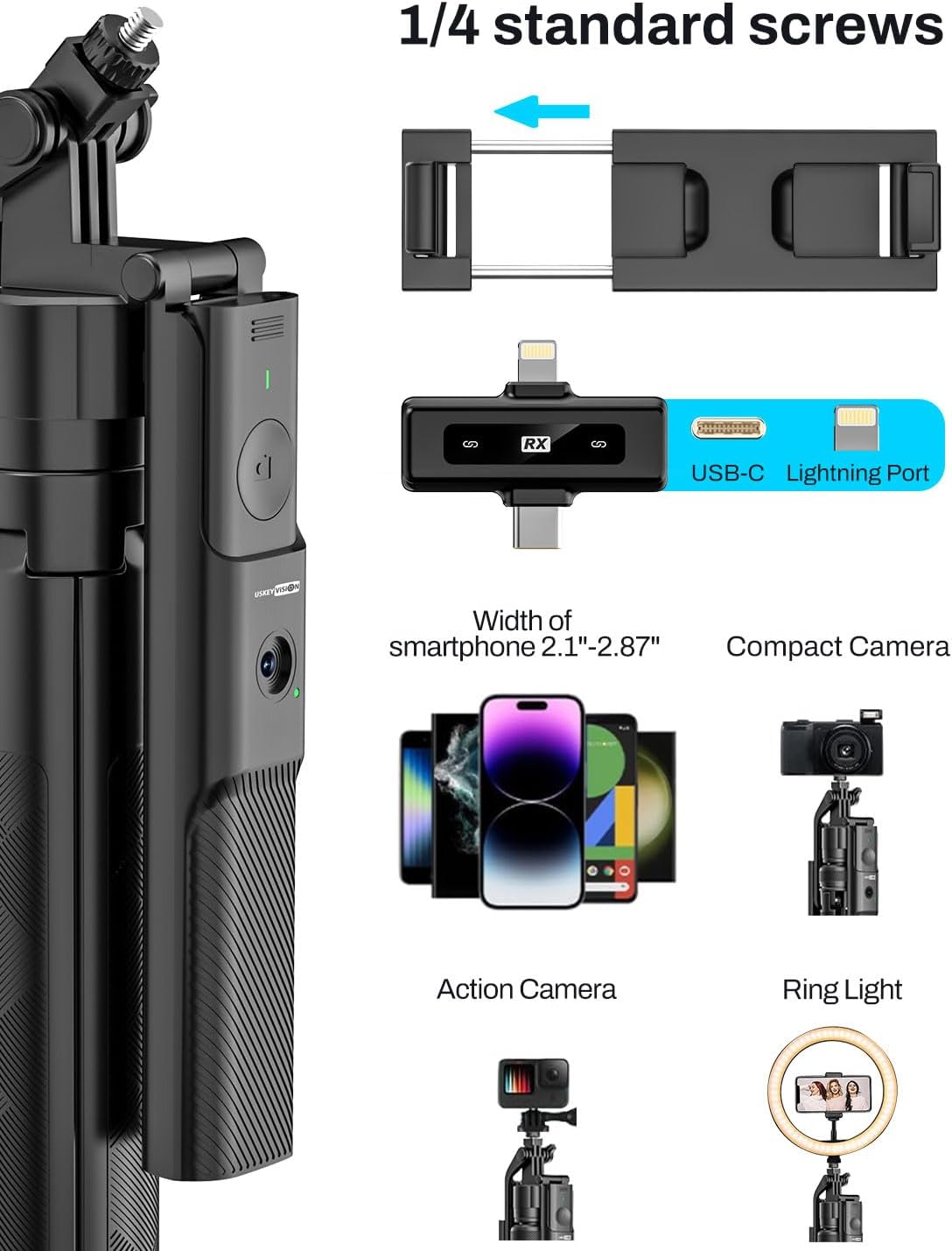
Figure 5: Wide compatibility of the phone holder and 1/4 inch screw mount.
4. Operating Instructions
4.1 Auto Face Tracking
- Power on the face tracking tripod. The AI camera will activate.
- To start face tracking, make an "OK" gesture with your hand in front of the camera. The tripod will begin to follow your movements.
- To stop face tracking, make a "Palm" gesture with your hand in front of the camera.

Figure 6: Gesture controls for initiating and stopping face tracking.
4.2 Using the Fill Lights
- Press the power button on each LED fill light to turn it on/off.
- Single-press the button to cycle through 3 brightness levels.
- Double-press the button to switch between cold, natural, and warm color modes.

Figure 7: Adjusting brightness and color temperature of the detachable LED fill lights.
4.3 Microphone Operation
- After pairing (as described in Section 3.3), the microphone defaults to noise reduction mode.
- Single-click the power button on the transmitter to switch to Original Sound mode.
- Double-click the power button to switch to Silent mode (mute).

Figure 8: Microphone status indicators and mode switching.
4.4 Remote Control Usage
- The remote control is detachable from the tripod handle.
- Pair the remote control with your smartphone via Bluetooth (look for 'Selfie' in your device's Bluetooth settings).
- Use the remote to trigger photo capture or start/stop video recording on your smartphone.

Figure 9: Detachable remote control for convenient operation.
4.5 Usage Modes
The R01 Kit supports various usage modes:
- Desktop Mode: Use the tripod on a flat surface for stable recording.
- Handheld Mode: Collapse the tripod legs and use it as a monopod for mobile shooting.
- Floor Mode: Extend the tripod to its full height for standing shots.
- Selfie Stick Mode: Extend the pole and hold it for wider selfie shots.

Figure 10: Different operational modes of the USKEYVISION R01 Kit.
4.6 Product Demonstration Video
Video 1: A comprehensive demonstration of the USKEYVISION Vlogging Kit's features and functionalities, including auto face tracking, microphone usage, and various modes.
5. Maintenance
- Cleaning: Use a soft, dry cloth to clean the device. Avoid using harsh chemicals or abrasive materials.
- Storage: Store the kit in a cool, dry place away from direct sunlight and extreme temperatures. Ensure all components are folded and packed securely.
- Battery Care: Charge the internal batteries regularly, even if not in use, to maintain battery health. Use only the provided USB-C charging cables.
6. Troubleshooting
| Problem | Possible Cause | Solution |
|---|---|---|
| Fill light falls off easily. | Loose connection or worn clips. | Ensure the light is firmly clicked into place. If the issue persists, contact customer support. |
| Face tracking is slow or unresponsive. | Insufficient lighting, rapid movement, or obstruction. | Ensure adequate lighting. Perform gestures clearly and at a moderate pace. Avoid sudden, jerky movements. |
| Microphone not connecting or poor audio quality. | Improper connection, low battery, or interference. | Ensure receiver is fully inserted into smartphone. Check battery levels of transmitter and receiver. Move away from sources of strong electromagnetic interference. |
| Smartphone not stable in holder. | Incorrect phone placement or phone case interference. | Ensure phone is centered and securely gripped by both clamps. Remove bulky phone cases if necessary. |
7. Specifications
| Feature | Detail |
|---|---|
| Package Dimensions | 14.02 x 4.8 x 3.11 inches |
| Item Weight | 2.16 pounds (0.98 Kilograms) |
| Model Number | R01 Kit |
| Batteries | 1 Lithium Ion battery required (included) |
| Manufacturer | USKEYVISION |
| Smartphone Compatibility | Width 2.1"-2.87" (65mm-919mm) |
| Microphone Wireless Range | Up to 68 inches |
8. Warranty and Support
For warranty information and customer support, please refer to the warranty card included in your product packaging or visit the official USKEYVISION website. Keep your purchase receipt for warranty claims.