
OURPIC BF019
OURPIC Twin Metal Platform Bed Frame User Manual
Model: BF019 | Brand: OURPIC
1. Introduction
Thank you for choosing the OURPIC Twin Metal Platform Bed Frame. This manual provides essential information for the safe assembly, operation, and maintenance of your new bed frame. Please read all instructions carefully before beginning assembly and retain this manual for future reference.
2. Important Safety Warnings
- Weight Capacity: Do not exceed the maximum weight capacity of 800 pounds.
- Assembly: Be cautious of sharp edges and small parts during assembly. Always follow the assembly instructions carefully to prevent instability or collapse.
- Children: Keep small parts and packaging materials away from children to prevent choking hazards.
- Stability: Ensure all bolts and connections are securely tightened before use. Periodically check and re-tighten all fasteners.
- Placement: Place the bed frame on a flat, level surface.
3. Package Contents
Before assembly, verify that all components are present and undamaged. If any parts are missing or damaged, please contact customer support.
- Metal Frame Components
- Upholstered Headboard Section
- LED Light Strip
- Charging Station (2 AC outlets + 2 USB ports)
- Remote Control for LED Lights
- Installation Manual
- Installation Tools (Allen wrench, screws)
4. Assembly Instructions
Follow the step-by-step instructions provided in the included installation manual. All parts are labeled for easy identification. Assembly typically takes less than 60 minutes with two people.
4.1. Visual Assembly Guide
For a detailed visual guide, please refer to the official installation video below. This video demonstrates the complete assembly process.
Video Description: Official installation guide for the OURPIC Twin Metal Platform Bed Frame. This video provides step-by-step visual instructions for assembling the bed frame, including attaching the headboard, side rails, and slats, as well as installing the LED lights and charging station.
4.2. Key Assembly Steps
- Unpack and Identify Parts: Lay out all components and hardware. Match them with the labels in the manual.
- Assemble Headboard Frame: Connect the vertical and horizontal bars of the headboard using the provided screws and tools.
- Attach Upholstered Panel: Secure the upholstered headboard panel to the headboard frame.
- Install Charging Station: Mount the charging station onto the designated slot on the headboard shelf and connect its power cable.
- Attach Side Rails: Connect the side rails to the headboard and footboard (if applicable) using the appropriate fasteners.
- Insert Slats: Place the metal slats into the designated slots on the side rails. Ensure they are evenly spaced and securely seated.
- Install LED Strip: Adhere the LED light strip to the underside of the headboard shelf, ensuring the cable is routed neatly to the charging station.
- Final Tightening: Double-check all screws and bolts to ensure they are fully tightened for stability.

Image Description: A diagram illustrating the easy assembly process with plastic connectors for stability and a noise-free design, highlighting the secure connections of the metal frame components.
5. Operating Instructions
5.1. Smart RGB LED Mood Lighting
The bed frame features an integrated RGB LED light strip controlled via a remote or a dedicated app. This allows for customizable lighting to suit various moods and activities.
- Remote Control: Use the provided remote to turn the lights on/off, change colors (over 60,000 options), adjust brightness, select dynamic modes, and set timers.
- App Control: Download the companion app (refer to the included LED light manual for app details) to access advanced features like music synchronization (mic mode) and voice control.
- Timer Function: Set the lights to automatically turn off after a specified duration (e.g., 1, 2, 3, or 4 hours) using the remote or app.

Image Description: A bedroom scene showcasing the bed frame with its RGB LED lights set to a purple hue, creating a dynamic and colorful ambiance. The image highlights the lighting feature for gaming or relaxation.
5.2. Smart Bedside Charging Station
The upholstered headboard includes a built-in charging station for convenient access to power.
- Power Outlets: Features 2 standard AC power outlets (120V/12A) for devices like laptops, lamps, or other electronics.
- USB Ports: Includes 2 USB ports (5V/2A) for fast charging of smartphones, tablets, and other USB-powered devices.
- Usage: Simply plug your devices into the appropriate outlets or ports on the headboard for charging.
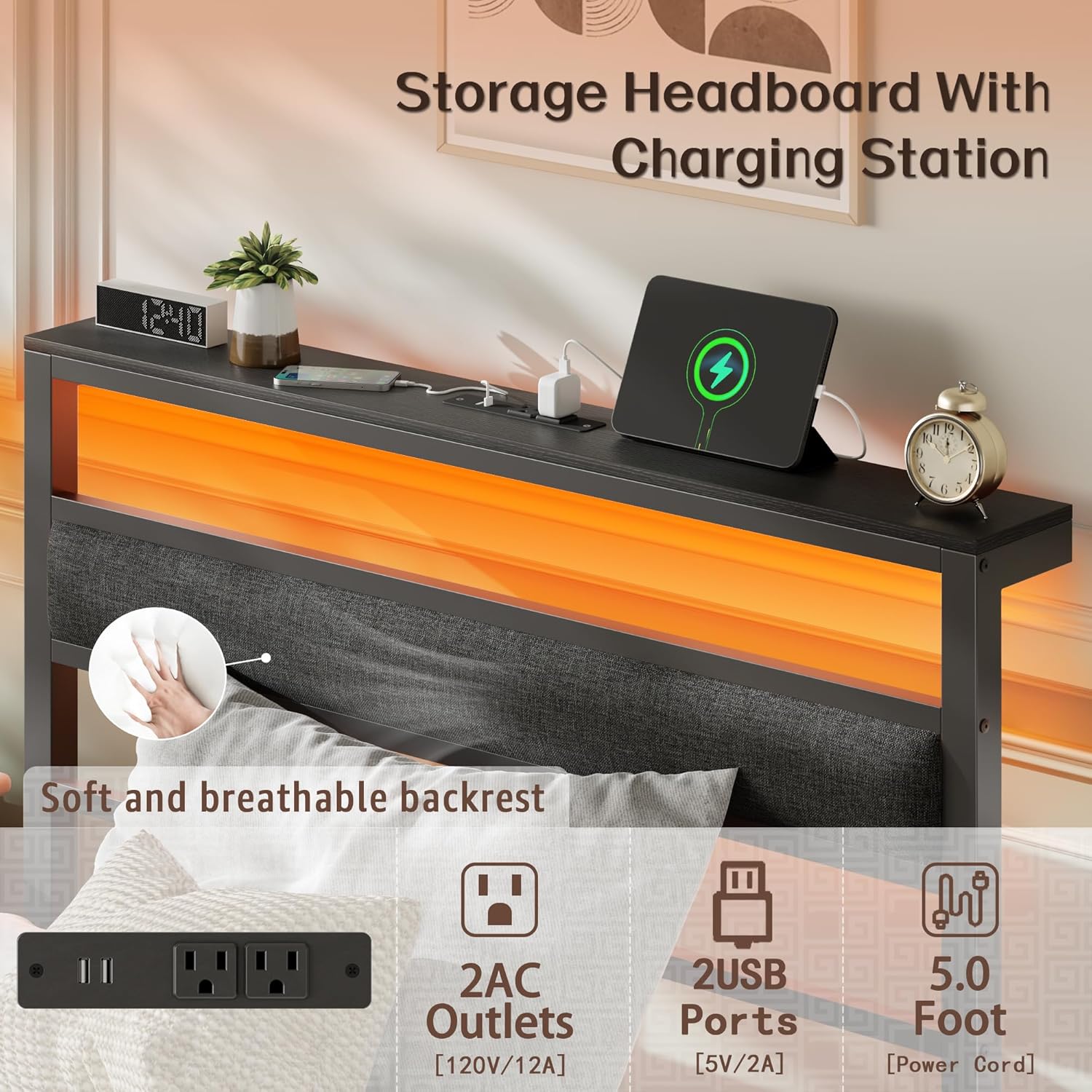
Image Description: A detailed view of the bed frame's headboard, emphasizing the integrated charging station with two AC outlets and two USB ports. The image also highlights the soft-touch upholstered backrest for comfort.
6. Maintenance
- Cleaning: Wipe the metal frame with a soft, damp cloth. For the upholstered headboard, use a mild fabric cleaner if necessary, and blot dry. Avoid harsh chemicals.
- Fasteners: Periodically check all screws and bolts to ensure they remain tight. Re-tighten as needed to maintain structural integrity and prevent noise.
- LED Lights: If the LED lights malfunction, check the connections to the charging station and ensure the remote control batteries are functional.
- Charging Station: Keep the charging ports free from dust and debris. Do not overload the outlets.
7. Troubleshooting
7.1. Common Issues and Solutions
| Issue | Possible Cause | Solution |
|---|---|---|
| Bed frame is noisy/squeaky | Loose fasteners; metal-on-metal contact. | Tighten all screws and bolts. Ensure plastic spacers are correctly installed between connecting rods and frame. |
| LED lights not working | Loose connection; remote battery dead; power outage. | Check all cable connections. Replace remote control batteries. Ensure the bed frame's power cable is securely plugged into a working outlet. |
| Charging station not providing power | Power cable unplugged; circuit overload. | Verify the bed frame's main power cable is plugged in. Reduce the number of devices connected to the charging station. |
| Mattress slides on the frame | No box spring or mattress too thin. | Ensure the mattress is properly seated within the frame. Consider using a non-slip mattress pad or a mattress with an embedded design. |
8. Product Specifications
| Feature | Detail |
|---|---|
| Size | Twin |
| Product Dimensions | 79.96"L x 39.56"W x 38.38"H |
| Weight Capacity | 800 lbs |
| Material | High-carbon steel frame, Fabric upholstered headboard |
| Color | Black |
| Special Features | Industrial Storage Headboard with Charging Station, Smart RGB LED Light, USB Ports, Upholstered Headboard |
| Charging Station | 2 AC Power Outlets (120V/12A), 2 USB Ports (5V/2A) |
| LED Lights | 60,000+ colors, Music Sync, Voice (Mic Mode), Timer Function, Remote & App Controlled |
| Ground to Item Distance | 10.82 Inches (Under-bed storage clearance) |
| Assembly Required | Yes |
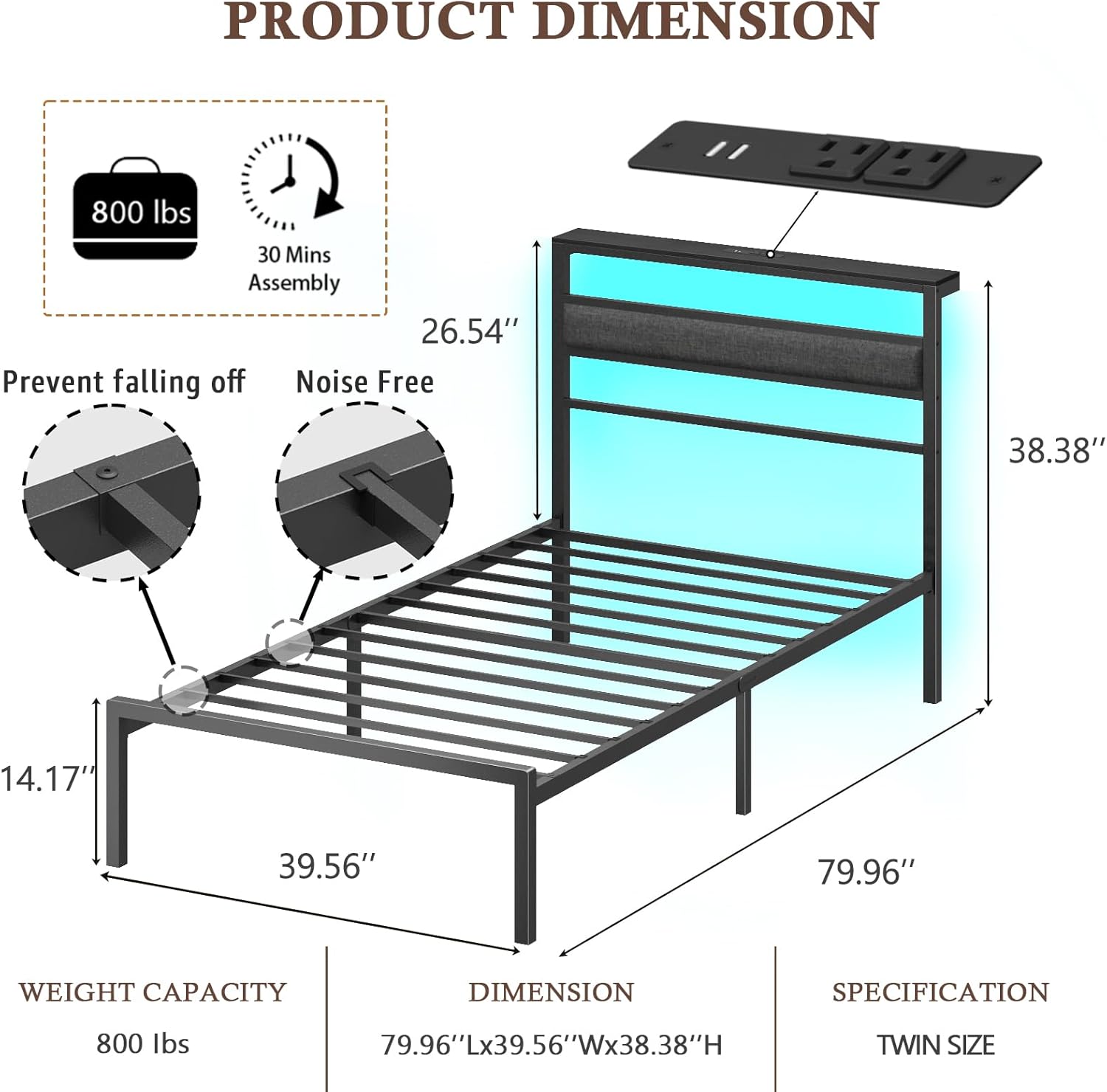
Image Description: A detailed diagram illustrating the dimensions of the Twin Metal Platform Bed Frame, including length, width, height, and under-bed clearance, along with its weight capacity and assembly time.
9. Warranty and Support
For warranty information, technical support, or to order replacement parts, please contact OURPIC customer service. Refer to your purchase documentation for specific warranty terms and contact details.
Contact Information: Please refer to the contact details provided with your product packaging or on the official OURPIC website.
Ask a question about this manual
Ask about setup, troubleshooting, compatibility, parts, safety, or missing instructions. Manuals+ will review the question and use this page’s manual context to help answer it.