Introduction
This manual provides detailed instructions for the assembly, operation, and maintenance of your SEDETA L Shaped Gaming Desk. Please read all instructions carefully before assembly and use to ensure proper function and safety.
Safety Information
For your safety and to prevent damage to the product, please observe the following:
- Follow assembly instructions carefully.
- Ensure the desk is properly anchored to the floor to prevent tipping.
- Do not overload the desk, especially with heavy items on the monitor stands or display cabinet.
- Keep small parts away from children during assembly.
- Use the desk on a level surface.
Package Contents
Before beginning assembly, verify that all components are present and undamaged. Refer to the included parts list in your packaging. Typical components include:
- Desk panels (L-shaped sections, monitor stands, cabinet panels)
- Metal frame components
- 4 Fabric Drawers
- Display Cabinet with glass doors
- CPU Stand
- Built-in Power Strip with 4 AC outlets and 2 USB ports
- LED Light Strip with remote control
- Adjustable leg pads
- Assembly hardware (screws, bolts, Allen wrench)
- Instruction manual (this document)
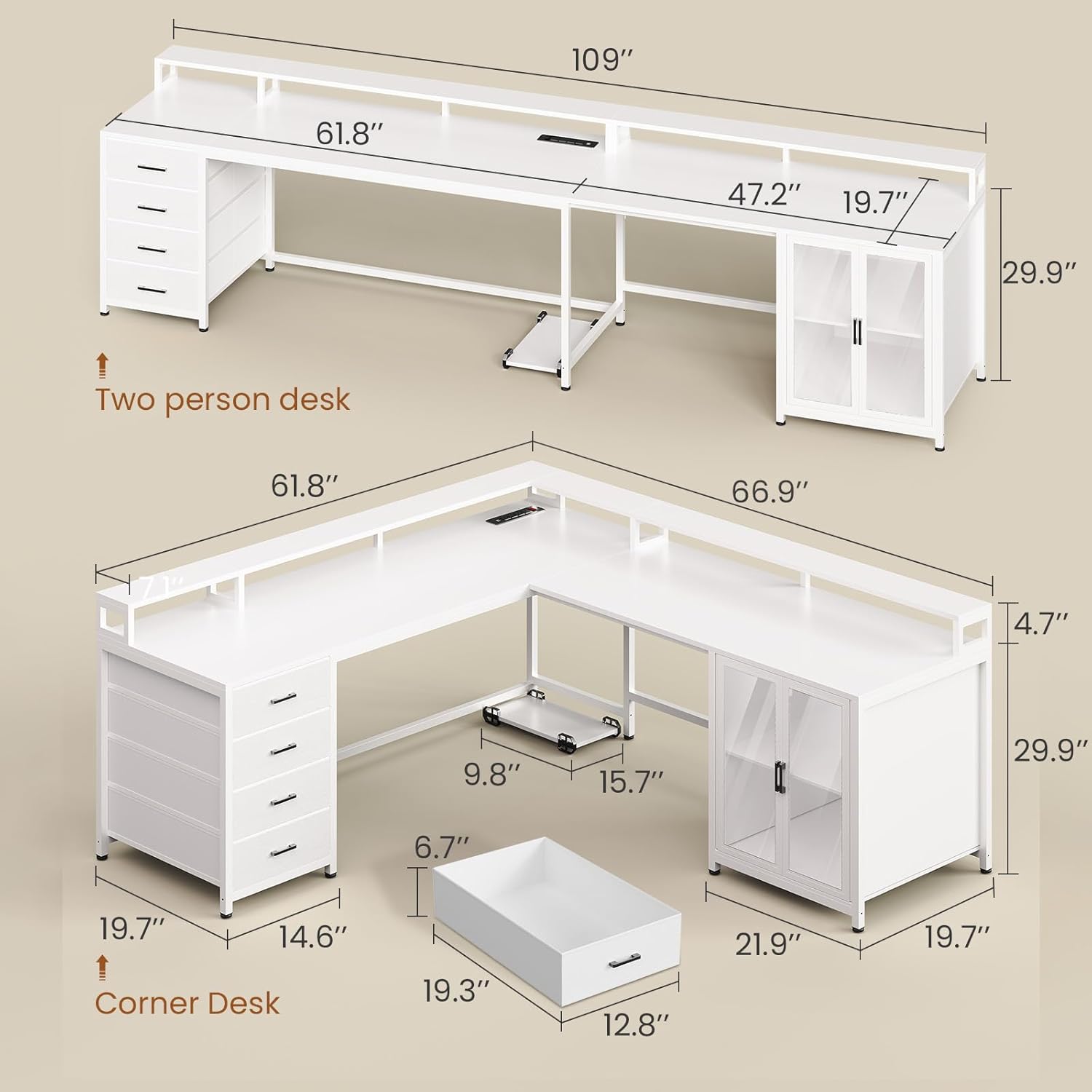
Figure 1: Desk dimensions and configurations (L-shaped and two-person desk).
Setup and Assembly
Assembly of the SEDETA L Shaped Gaming Desk requires careful attention to detail. It is recommended to have at least two people for assembly. Please follow the numbered steps provided in the separate assembly guide included with your product. Key considerations during assembly:
- Unpack and Organize: Lay out all parts and hardware. Verify against the parts list.
- Choose Configuration: Decide whether to assemble as an L-shaped desk or a two-person desk. The drawers and display cabinet can be placed on either the left or right side.
- Frame Assembly: Securely attach the heavy-coated steel tube frame components.
- Panel Attachment: Mount the engineered wood panels to the frame. Ensure all screws are tightened.
- Drawer Installation: Insert the fabric drawers into their designated slots.
- Display Cabinet: Assemble and install the display cabinet.
- Monitor Stands: Place the monitor stands on the desktop.
- CPU Stand: Position the CPU stand as desired.
- Adjustable Feet: Adjust the leg pads to ensure the desk is stable and level on uneven floors.
Important: If parts do not align, re-check the diagram and ensure components are not installed backward. Some layouts may have extra screw holes; refer to the specific diagram for your chosen configuration.

Figure 2: Assembled L-shaped desk with LED lighting and accessories.
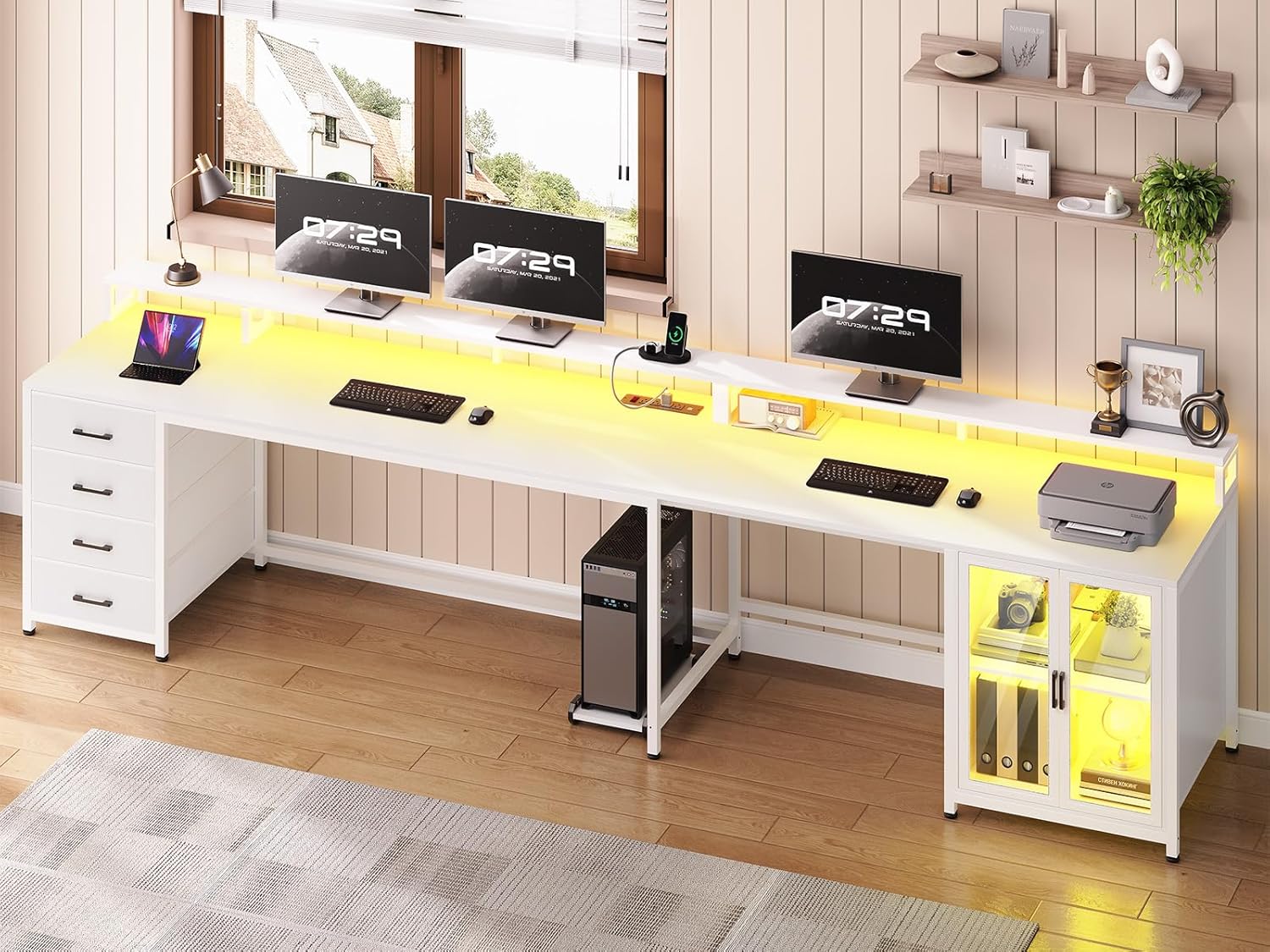
Figure 3: Assembled two-person desk configuration.
Operating Instructions
Power Strip
The desk includes a built-in power strip for convenient access to power. It features 4 AC outlets (120V/12A) and 2 USB ports (5V/2A). To activate the power strip, press the ON/OFF switch. For safety, always turn off the switch when not in use or during electrical storms.

Figure 4: Recessed power strip with charging devices.
LED Lights
The integrated RGB LED light strip can be controlled via a remote control or a dedicated mobile application. It offers over 60,000 colors and 29 flashing modes. Refer to the separate LED light instruction manual for detailed pairing and operation of the remote and app.

Figure 5: LED light control via smartphone app.
Drawers and Display Cabinet
The desk features 4 large capacity fabric drawers for storage and a display cabinet with glass doors. The cabinet doors protect items from dust while allowing visibility. The display cabinet can also be illuminated by the LED lights.

Figure 6: Four large capacity fabric drawers.

Figure 7: Display cabinet with adjustable lighting for different uses.
Monitor Stands
The two long monitor stands are designed to elevate your monitors to an ergonomic height, promoting better posture and reducing neck strain. They also provide additional storage space underneath.

Figure 8: Ergonomic benefits of the full-size monitor stand.
Maintenance
To maintain the appearance and longevity of your SEDETA L Shaped Gaming Desk:
- Cleaning: Wipe surfaces with a damp cloth for general cleaning. For spills, wipe immediately with a dry cloth. Avoid harsh chemicals or abrasive cleaners.
- Dusting: Regularly dust all surfaces, including the display cabinet and monitor stands.
- Hardware Check: Periodically check all screws and fasteners to ensure they are tight. Re-tighten if necessary.
- LED Lights: If LED lights malfunction, refer to the specific LED light manual for troubleshooting or contact customer support.

Figure 9: Demonstrating the waterproof and scratch-resistant properties of the desk surface.
Troubleshooting
If you encounter issues with your desk, refer to the following common problems and solutions:
| Problem | Possible Cause | Solution |
|---|---|---|
| Desk is wobbly/unstable | Uneven floor; loose fasteners. | Adjust the leg pads until stable. Tighten all assembly screws. |
| Parts do not align during assembly | Incorrect orientation of a component; wrong part used. | Review the assembly diagram carefully. Disassemble and re-orient the problematic part. Ensure correct parts are used for each step. |
| LED lights not working | Power connection issue; remote/app not paired; faulty strip. | Check power connections. Ensure remote/app is correctly paired (refer to LED manual). Contact support if issue persists. |
| Power strip not providing power | Power switch off; no power from wall outlet; internal fault. | Ensure the power strip's ON/OFF switch is engaged. Check the wall outlet with another device. Contact support if the issue persists. |
| Missing or damaged parts upon arrival | Shipping damage; packaging error. | Contact customer service immediately with your order details and a description of the missing/damaged parts. |
Specifications
| Feature | Detail |
|---|---|
| Brand | SEDETA |
| Model Name | L Shaped Gaming Desk |
| Product Dimensions (L-Shape) | 66.9"D x 61.8"W x 34.6"H |
| Product Dimensions (Two-Person) | 109"W (approx.) |
| Color | White |
| Material | Engineered Wood (FSC-certified), Heavy Coated Steel Frame |
| Special Features | Built-in Power Strip (4 AC Outlets, 2 USB Ports), Convertible Design, Monitor Stands, LED Lights, 4 Fabric Drawers, Display Cabinet, CPU Stand, Adjustable Leg Pads |
| Power Strip Output | AC: 120V/12A, USB: 5V/2A |
| LED Lights | RGB, APP Control, 60000+ colors, 29 flashing modes |
| Assembly Required | Yes |
| Care Instructions | Wipe with Damp Cloth, Wipe with Dry Cloth |
Warranty and Support
SEDETA stands behind the quality of its products. For specific warranty details, please refer to the warranty card included with your purchase or visit the official SEDETA website. If you have any questions, require assistance with assembly, or need to report missing/damaged parts, please contact SEDETA customer support. Contact information can typically be found on the product packaging or the brand's official website.
Customer Service: Refer to your purchase documentation or the SEDETA brand store on Amazon for contact details.
Product Video
Watch the official product video for a visual overview of the SEDETA L Shaped Gaming Desk's features and configurations.
Video: Overview of the SEDETA L Shaped Gaming Desk, showcasing its various features like the L-shaped and two-person configurations, power strip, monitor stand, storage drawers, display cabinet, and LED lighting.


