
Introduction
The Intex QS1600 Plus Krystal Clear Saltwater System is designed to provide a clean and safe swimming pool environment by converting salt into natural chlorine. This system utilizes electrocatalytic oxidation (E.C.O.) to reduce the need for traditional packaged chlorine, offering a more pleasant swimming experience. This manual provides essential information for the proper setup, operation, and maintenance of your saltwater system.

Image: Front view of the Intex QS1600 Plus Krystal Clear Saltwater System, showing its compact design and control panel cover.
Safety Information
Read and understand all instructions before installing and operating this product. Failure to follow these instructions can result in serious injury or property damage.
- Electrical Safety: Always disconnect the power supply before performing any maintenance or service. Ensure the system is connected to a properly grounded outlet. Do not operate if the power cord or plug is damaged.
- Water Safety: Never operate the system without water flowing through it. Ensure all connections are secure to prevent leaks.
- Chemical Handling: Handle pool salt according to manufacturer's instructions. Avoid direct contact with eyes and skin. Keep out of reach of children.
- Children: This appliance is not intended for use by persons (including children) with reduced physical, sensory or mental capabilities, or lack of experience and knowledge, unless they have been given supervision or instruction concerning use of the appliance by a person responsible for their safety.
Package Contents
Verify that all components are present before beginning installation:
- Saltwater System Unit (QS1600 Plus)
- Electrolytic Cell (integrated)
- Connection Hoses and Clamps
- Test Strips (for salt level)
- Instruction Manual
Setup
Follow these steps for proper installation of your Intex QS1600 Plus Saltwater System:
- Placement: Position the saltwater system on a firm, level surface near your pool and existing filtration pump. Ensure it is protected from direct sunlight and harsh weather conditions.
- Connect to Filtration System: Connect the saltwater system in line with your pool's filtration pump. Water should flow from the pool, through the filter pump, then through the saltwater system, and back to the pool. Use the provided hoses and clamps to secure all connections tightly.

Image: A person connecting the hoses to the Intex saltwater system, demonstrating the connection process.
- Add Pool Salt: Refer to the specifications for the recommended salt level (950ppm) and your pool's volume to determine the correct amount of salt. Distribute the salt evenly around the pool and allow it to dissolve completely before starting the system.
- Electrical Connection: Plug the system into a grounded 220-230V, 50Hz electrical outlet. Ensure the power cord is not damaged and is routed safely to prevent tripping hazards.
- Initial Startup: Turn on your pool's filter pump first to ensure water flow. Then, power on the saltwater system. The display will illuminate.

Image: Side view of the Intex QS1600 Plus Saltwater System with inlet and outlet hoses properly connected to a pool filtration system.
Operating Instructions
The control panel allows you to manage the system's functions. Familiarize yourself with the buttons and indicators.
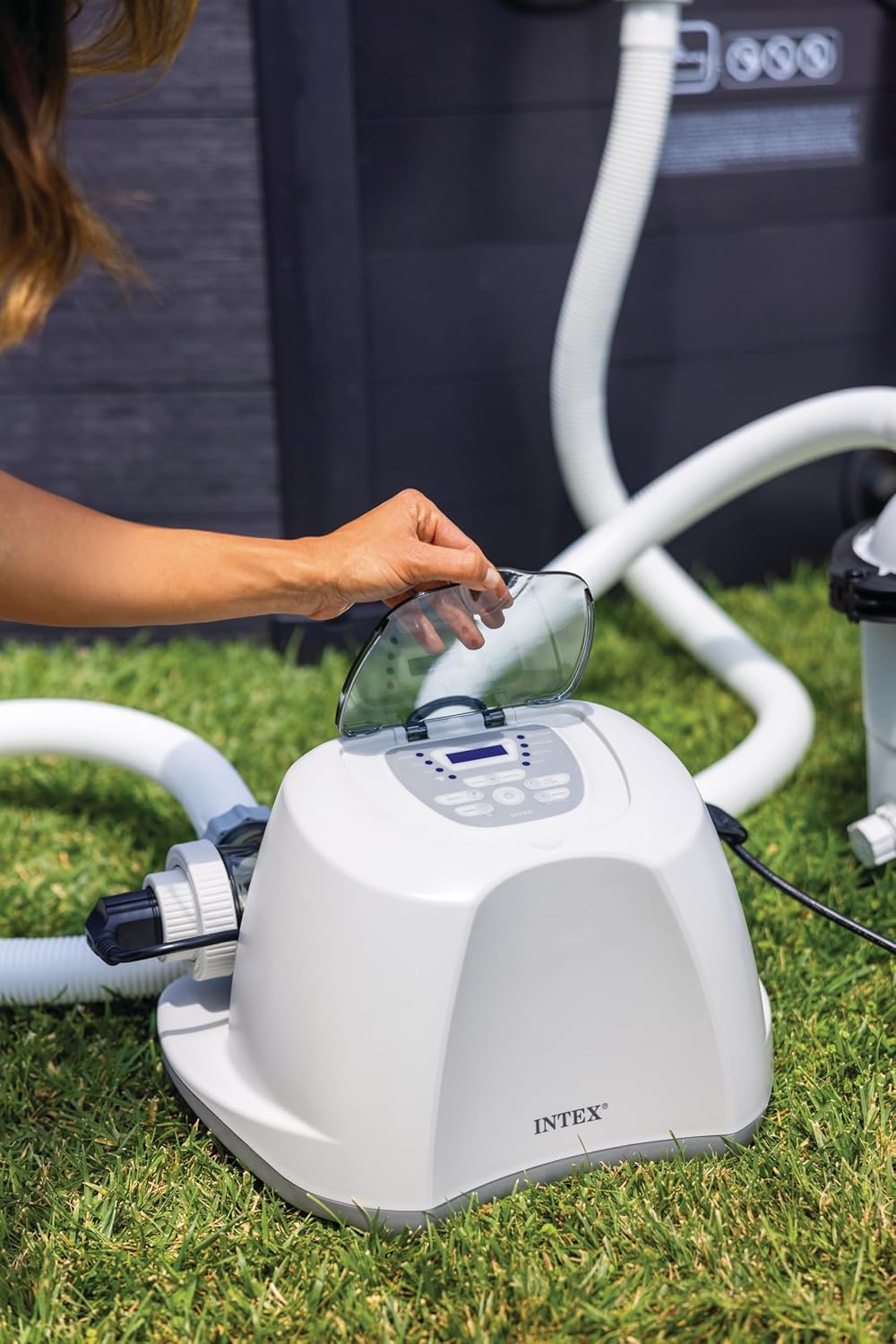
Image: A hand lifting the protective cover of the control panel on the Intex saltwater system, revealing the buttons and display.

Image: Close-up view of the Intex QS1600 Plus control panel, showing the digital display, timer, boost, lock, unlock, self-clean, and mode buttons, along with indicator lights for power, boost, sleep, pump low flow, temperature, check cell, and salinity.
- Power On/Off: Press the power button to turn the system on or off.
- Setting the Timer: Use the 'TIMER' button to set the desired operating duration. The system will operate for the set time and then automatically shut off.
- Self-Clean Mode: The system features 4 self-clean modes (2/4/6/10-hour cycles). Press the 'SELF CLEAN' button to activate and cycle through these options. This function reverses polarity to clean the electrolytic cell.
- Boost Function: For periods of heavy use or high temperatures, the 'BOOST' function can be activated to increase chlorine production temporarily.
- Monitoring Salinity: The 'SALINITY' indicator light will alert you if the salt level is too low or too high. Use test strips to verify and adjust salt levels as needed.
- Lock/Unlock: Use the 'LOCK' and 'UNLOCK' buttons to prevent accidental changes to settings.
Maintenance
Regular maintenance ensures optimal performance and longevity of your saltwater system.
- Electrolytic Cell Cleaning: The system has a self-clean function. However, periodic manual inspection and cleaning of the cell may be required, especially in hard water areas. Disconnect power, remove the cell, and clean with a mild acid solution if mineral buildup is visible. Rinse thoroughly before reinstallation.
- Salt Level Check: Regularly test your pool's salt level using the provided test strips. Maintain the recommended 950ppm for efficient operation.
- Winterization: Before freezing temperatures, drain all water from the system and store it in a dry, protected area. Do not allow water to freeze inside the unit.
- General Care: Keep the control panel clean and dry. Avoid spraying water directly onto the unit.
Troubleshooting
Refer to this section for common issues and their solutions.
| Problem | Possible Cause | Solution |
|---|---|---|
| PUMP LOW FLOW indicator light on | Insufficient water flow from the filter pump. | Check filter pump for clogs, ensure skimmer and return lines are clear, and verify pump is operating correctly. |
| CHECK CELL indicator light on | Electrolytic cell requires cleaning or is faulty. | Perform a self-clean cycle. If issue persists, manually inspect and clean the cell. If still unresolved, contact customer support. |
| SALINITY indicator light on (low) | Salt level in the pool is too low. | Add more pool salt according to pool volume and retest. Allow time for salt to dissolve. |
| SALINITY indicator light on (high) | Salt level in the pool is too high. | Partially drain the pool and refill with fresh water to dilute the salt concentration. Retest. |
| System not producing chlorine | Low salt level, dirty cell, or insufficient run time. | Check salt level, clean cell, and ensure the system is set to run for an adequate duration based on pool size and usage. |
Specifications
| Feature | Specification |
|---|---|
| Model Number | 26690 |
| Voltage | 220-230V, 50Hz (EU plug) |
| Max Pool Size | 18,000 gal (68,000 L) |
| Recommended Salt Level | 950 ppm |
| Required Pump Flow Rate | 700-3,200 gal/h (2,650-12,112 L/h) |
| Chlorine Output | 16 g/hr |
| Clean Mode Cycles | 2, 4, 6, 10-hour cycles |
| Product Dimensions (L x W x H) | 34L x 27l x 48H cm |
| Item Weight | 22.58 kg |
Warranty and Support
For warranty information or technical assistance, please refer to the warranty card included with your product or visit the official Intex website. Keep your purchase receipt as proof of purchase.


