
HIRREO EF18
HIRREO EF18 Military Smart Watch User Manual
Model: EF18
Brand: HIRREO
Introduction
This manual provides detailed instructions for the HIRREO EF18 Military Smart Watch. Please read this manual carefully before using the device to ensure proper operation and to maximize its features.

This image displays the HIRREO EF18 Military Smart Watch, showcasing its robust design, various digital watch faces, and included accessories like charging cables and different strap options.
Setup and Initial Use
Package Contents
- Smart Watch
- Stainless Steel Strap
- 2 Silicone Straps
- Strap Accessories
- Charger (USB and Type-C cables included)
- Instruction Manual
Charging the Device
The EF18 Smart Watch is equipped with a 1000mAh battery. Before first use, fully charge the device.
- Connect the provided charging cable (either USB or Type-C) to the watch's charging port and a suitable power source.
- A full charge typically takes approximately 2.5 hours.
- The watch offers 7-10 days of battery life for daily use and up to 45 days standby time.

This image shows the HIRREO EF18 Smart Watch being charged, highlighting its 1000mAh large capacity battery and charging time comparisons with other devices.
App Installation and Connection
To access all features and synchronize data, download the "FitCloudPro" app from your device's app store (iOS or Android).
- Download "FitCloudPro" from the App Store (iOS) or Google Play (Android).
- Enable Bluetooth on your phone.
- Open the app and search for "EF18". Click on it to connect.
- Follow the app instructions to pair and enable "connect".
- Allow the smartwatch to display notifications.
- Turn on Bluetooth call, text, and app notifications within the app settings.
- Use the app to choose watch faces.
- Utilize Bluetooth dial-up calls.

This image illustrates the step-by-step process of connecting the HIRREO EF18 Smart Watch to a smartphone via the FitCloudPro application, showing app download, Bluetooth pairing, and notification settings.
Operating Instructions
Display and Navigation
The watch features a 1.7-inch HD touch screen with a 60Hz refresh rate for smooth interaction.
- Swipe left/right, up/down to navigate through menus and features.
- The physical buttons on the side provide additional control for specific functions.

This image displays the 1.7-inch Ultra HD touch screen of the HIRREO EF18 Smart Watch, emphasizing its size, HD resolution, and personalized dial options.
Bluetooth Calling and Notifications
The EF18 supports Bluetooth calling with a built-in HD microphone and speaker.
- To make or answer calls directly from your wrist, ensure the watch is connected to your phone via Bluetooth.
- The watch syncs message alerts from various applications such as Facebook, text messages, and email, ensuring you stay informed.

This image demonstrates the Bluetooth calling and smart notification features of the HIRREO EF18 Smart Watch, showing a dial pad, call logs, and various app notification icons.
Sports Modes
The watch includes 8 commonly used built-in sports modes and offers access to over 100 additional sports programs via the FitCloudPro app.
- Built-in modes: Walking, Running, Hiking, Cycling, Basketball, Swimming, Badminton, Football.
- Additional modes (via app): Tennis, Rugby, Yoga, Dancing, Skiing, Rowing Machine, Elliptical Trainer, and more.
- During workouts, the watch tracks key metrics such as steps, calories, heart rate, and distance to help monitor progress.

This image highlights the extensive range of over 110 sports modes available on the HIRREO EF18 Smart Watch, showing a user cycling and the watch displaying exercise records including steps, calories, and distance.
Health Monitoring
The watch provides comprehensive health monitoring features to help you stay informed about your well-being.
- Heart Rate: Real-time heart rate tracking.
- Blood Oxygen: Measures blood oxygen saturation levels.
- Sleep Tracking: Monitors sleep patterns, including deep sleep, light sleep, and REM cycles.
- Stress Tracker: Helps monitor stress levels throughout the day.

This image illustrates the smart health monitoring features of the HIRREO EF18 Smart Watch, including heart rate, blood oxygen, and sleep tracking data displayed on the watch and a connected phone.
LED Flashlight
The EF18 smartwatch includes a built-in LED flashlight for convenience in various situations.
- Activate the flashlight by long-pressing the designated button on the watch.
- It is useful for night activities, during power outages, or when searching for items in low-light conditions.

This image showcases the powerful LED flashlight feature of the HIRREO EF18 Smart Watch, demonstrating its utility in various scenarios like outdoor activities at night, power outages, and finding things.
This video demonstrates the HIRREO EF18 military smart watch's LED flashlight function, showing how to activate it and its various modes, as well as highlighting the watch's durability against impacts and water.
Additional Functions
The watch integrates a variety of practical tools to enhance daily life management.
- Alarm clock, Stopwatch, Countdown timer
- Weather check, Music control, Remote photography
- Phone finder, Calculator, Calendar
- Voice Assistant, Drinking Water Reminder, Sedentary Reminder, Do Not Disturb Mode
Customize watch faces through the app to personalize your device according to your mood and preferences.

This image displays various additional functions of the HIRREO EF18 Smart Watch, including multiple watch faces, remote photography, stopwatch, calculator, AI assistant, music control, and weather forecast.
Care and Maintenance
Cleaning
- Regularly clean the watch and straps with a soft, dry cloth.
- For stubborn dirt, use a slightly damp cloth and mild soap, then dry thoroughly.
Water Resistance
The watch has an IP68 waterproof rating, which means it can easily handle splashes, rain in daily life, and you don’t need to take it off when washing hands or sweating during workouts.
- Note: Not suitable for hot water, seawater, or diving. Avoid prolonged submersion.
Storage
- Store the watch in a cool, dry place when not in use.
- Avoid extreme temperatures and direct sunlight.
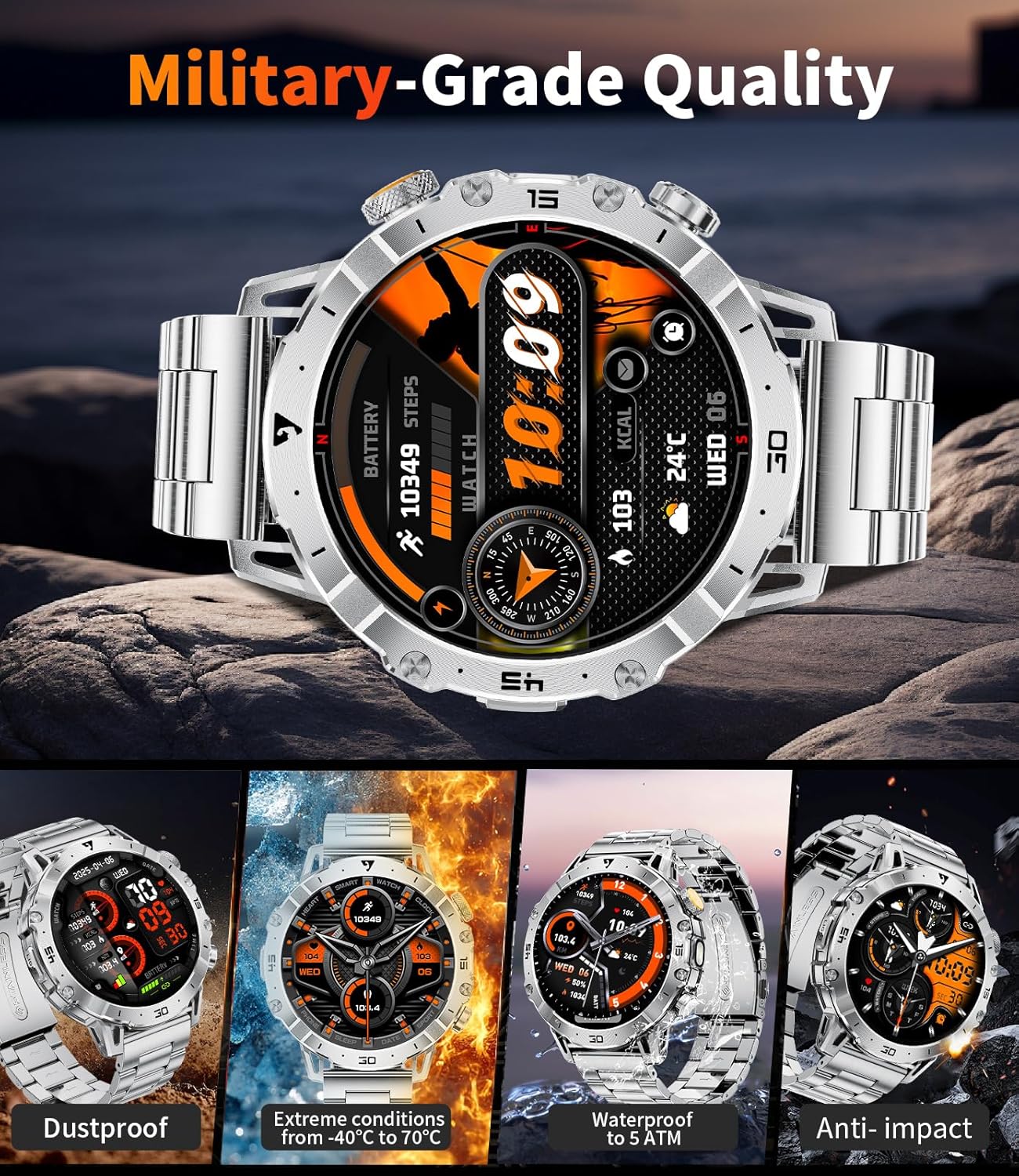
This image highlights the military-grade quality of the HIRREO EF18 Smart Watch, showcasing its dustproof, extreme temperature resistance, 5 ATM waterproof rating, and anti-impact capabilities.
Troubleshooting
Watch Not Turning On
- Ensure the watch is fully charged. Connect it to the charger for at least 30 minutes.
Connection Issues (Bluetooth)
- Make sure Bluetooth is enabled on your phone.
- Ensure the "FitCloudPro" app is open and running in the background.
- Restart both your phone and the watch.
- Try unpairing and re-pairing the watch through the app.
Inaccurate Health Data
- Ensure the watch is worn snugly on your wrist, but not too tight.
- Clean the sensors on the back of the watch.
- Environmental factors and individual physiology can affect sensor accuracy.
Notifications Not Appearing
- Check app notification settings on your phone and within the "FitCloudPro" app.
- Ensure the watch is connected via Bluetooth.
- Verify that "Do Not Disturb" mode is not active on the watch or phone.
Product Specifications
| Feature | Detail |
|---|---|
| Model Number | EF18-B-US |
| Screen Size | 1.7 Inches |
| Battery Capacity | 1000 mAh |
| Operating System | AsteroidOS |
| Connectivity | Bluetooth |
| Water Resistance | IP68 |
| Item Weight | 3.17 ounces |
| Package Dimensions | 8.11 x 3.78 x 0.87 inches |
| Memory Storage Capacity | 512 MB |
| GPS | Via Smartphone |
| Manufacturer | HIRREO |
Warranty and Customer Support
Warranty Information
The HIRREO EF18 Smart Watch comes with a 24-month warranty from the date of purchase.
Customer Support
For any issues regarding accessories, quality, operation, or charging, please contact HIRREO customer service. Online support is available 24 hours a day, and solutions will be provided within 24 hours.

This image outlines HIRREO's customer service commitments, including 24-hour online service, 6-month returns service, and a 2-year guarantee.