
1. Setup and Assembly
1.1 Package Contents
Before you begin, please ensure all components are present:
- 2 x 1/28 RC Battle Tanks (one green camouflage, one desert camouflage)
- 2 x Remote Controllers
- 4 x Rechargeable Tank Batteries
- 2 x USB Charging Cables
- 2 x Screwdrivers
- User Manual (this document)
Note: 2 AA batteries per remote controller are required and not included.
1.2 Battery Installation
For the RC Tanks:
- Locate the battery compartment on the underside of each tank.
- Use the provided screwdriver to open the battery compartment cover.
- Insert one rechargeable battery into each tank, ensuring correct polarity.
- Close the battery compartment cover and secure it with the screw.
For the Remote Controllers:
- Locate the battery compartment on the back of each remote controller.
- Use the provided screwdriver to open the battery compartment cover.
- Insert two AA batteries into each remote controller, ensuring correct polarity.
- Close the battery compartment cover and secure it with the screw.
1.3 Charging the Tank Batteries
Connect the rechargeable tank batteries to the USB charging cables. Plug the USB cables into a compatible USB power source (e.g., computer, wall adapter). Charging typically takes 2-3 hours. The indicator light on the charger will change to indicate a full charge. A fully charged battery provides approximately 60 minutes of continuous runtime.
1.4 Initial Pairing
The tanks and remote controllers operate on a 2.4GHz frequency, allowing for automatic pairing. Simply turn on both the tank and its corresponding remote controller. They should pair automatically. If you are using two tanks for battle, ensure each remote is paired with its intended tank.

Image 1.1: The Supdex 1/28 RC Battle Tank Set, featuring two tanks with distinct camouflage patterns.
2. Operating Your RC Battle Tank
2.1 Remote Controller Functions
Familiarize yourself with the remote controller layout:
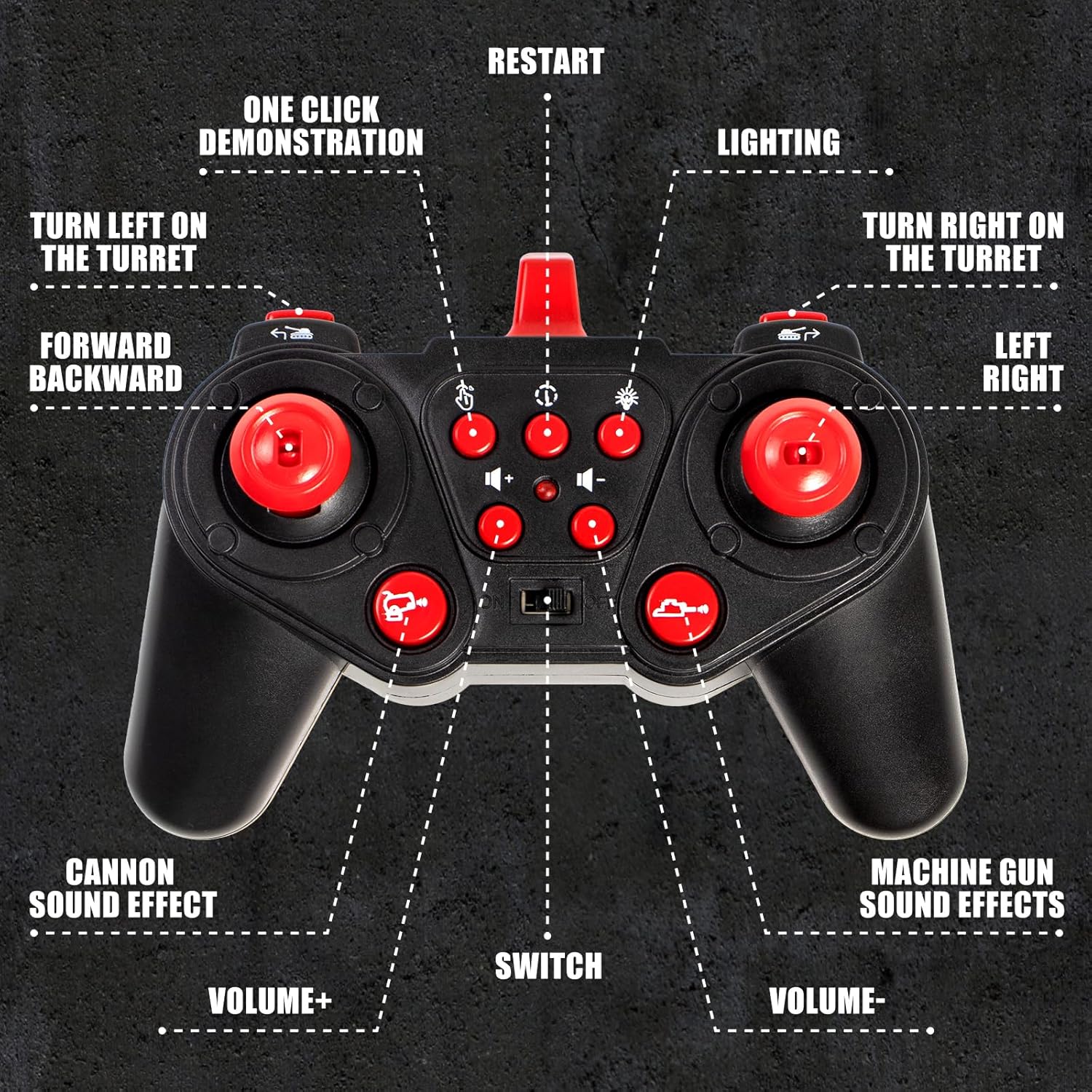
Image 2.1: Remote Controller Layout and Functions.
- Left Joystick: Controls forward and backward movement.
- Right Joystick: Controls left and right steering.
- Turret Rotation Buttons: Rotate the turret 330 degrees left or right.
- Cannon Sound Effect Button: Activates the main cannon firing sound.
- Machine Gun Sound Effect Button: Activates the machine gun firing sound.
- Volume +/- Buttons: Adjust the sound volume.
- Lighting Button: Toggles the tank's lights.
- One-Click Demonstration Button: Initiates an automatic demonstration sequence.
- Restart Button: Used to reset the battle game after a tank is defeated.
2.2 Basic Movement and Turret Control
The tank offers full-function control:
- Move the left joystick forward or backward to drive the tank.
- Use the right joystick to steer the tank left or right.
- Press the turret rotation buttons to turn the turret. The turret can rotate 330 degrees.
- The barrel angle can be manually adjusted by 30 degrees.
- The tank can perform 360-degree rotations for agile maneuvering.
2.3 Battle Mode and Life Indicator
Each tank is equipped with four life indicator lights, typically located on the rear of the tank. These lights represent the tank's health during battle:

Image 2.2: Infrared Battle Tank with Life Indicator Lights.
- A tank is defeated after receiving four hits. Each hit extinguishes one life indicator light.
- Once all four lights are off, the tank will stop functioning, indicating its defeat.
- To start a new round, press the 'Restart' button on the remote controller.
2.4 Special Features
- Sound and Lights: The tanks feature realistic sound effects (engine, cannon, machine gun) and cool built-in lights for an immersive experience, especially in low-light conditions.
- Climbing Ability: The tanks are designed to climb slopes up to 40 degrees and traverse small obstacles, enhancing play on various terrains.

Image 2.3: Tank demonstrating its 40-degree climbing capability.
2.5 Official Product Video
Watch this video for a demonstration of the Supdex 1/28 RC Battle Tank Set in action, showcasing its features and battle capabilities.
Video 2.1: Supdex 1/28 RC Battle Tank Features and Operation.
3. Maintenance and Safety
3.1 General Care
- Wipe the tanks and controllers with a dry, soft cloth to remove dust and dirt.
- Avoid exposing the product to water or excessive moisture.
- Store the product in a cool, dry place away from direct sunlight when not in use.
3.2 Battery Care
- Always remove batteries from the remote controllers if the product will not be used for an extended period.
- Do not overcharge the rechargeable tank batteries.
- Dispose of used batteries responsibly according to local regulations.
3.3 Safety Information
- Recommended for ages 6 and up. Adult supervision is advised for younger users.
- Do not play in deep grass, as it may impede tank movement and potentially damage components.
- Avoid aiming the tank's cannon directly at people or animals.
- Keep small parts away from young children to prevent choking hazards.
4. Troubleshooting
If you encounter issues with your RC Battle Tank Set, please refer to the following common solutions:
| Problem | Possible Cause | Solution |
|---|---|---|
| Tank does not move or respond. | Low battery in tank or remote; Tank/remote not paired. | Charge tank battery; Replace AA batteries in remote; Turn both on to re-pair. |
| Turret does not rotate smoothly. | Obstruction; Internal mechanism issue. | Check for debris around the turret base; If issue persists, contact support. |
| Battle hits register inaccurately at close range. | Infrared signal reflection. | Ensure tanks are not too close or in an environment with highly reflective surfaces. |
| Sound is too loud or too quiet. | Volume setting. | Use the volume +/- buttons on the remote to adjust. |
5. Product Specifications
- Model Number: TJ2068
- Product Dimensions: 12 x 6 x 4 inches
- Item Weight: 0.634 ounces
- Manufacturer Recommended Age: 6 years and up
- Tank Battery: Rechargeable (included)
- Remote Control Battery: 2 x AA batteries (not included)
- Control Frequency: 2.4GHz
- Brand: Supdex
6. Warranty and Support
6.1 Warranty Information
For specific warranty details, please refer to the documentation included with your purchase or contact Supdex customer support directly. General product warranties typically cover manufacturing defects for a limited period from the date of purchase.
6.2 Customer Support
If you have any questions, require technical assistance, or need to report an issue with your Supdex 1/28 RC Battle Tank Set, please contact Supdex customer support. Contact information can usually be found on the product packaging or the official Supdex website.