1. Introduction
Thank you for choosing the Generic 10A 12V/24V Smart Car Battery Charger Maintainer Trickle Charger. This device is designed to charge and maintain various lead-acid batteries, including those found in cars, motorcycles, and other vehicles. It features smart charging technology, multiple protection functions, and an intuitive LCD display for safe and efficient battery management. Please read this manual thoroughly before use to ensure proper operation and safety.
2. Safety Information
Always prioritize safety when operating electrical equipment. Failure to follow these instructions may result in electric shock, fire, or serious injury.
- Read all instructions: Before using the charger, read all instructions and cautionary markings on the charger, the battery, and the product using the battery.
- Ventilation: Ensure the charging area is well-ventilated. Batteries can produce explosive gases during charging.
- Eye and skin protection: Wear appropriate eye protection and clothing when working near batteries. Avoid touching eyes while working near batteries.
- Avoid sparks and flames: Do not smoke or allow a spark or flame in the vicinity of the battery or engine.
- Disconnect power: Always disconnect the AC power cord from the outlet before making or breaking the connections to the battery.
- Polarity: Connect the charger output clips to the battery terminals with correct polarity. Red clip to positive (+), Black clip to negative (-).
- Children: Keep the charger and battery out of reach of children.
- Indoor use: This charger is designed for indoor use. Do not expose it to rain or snow.
- Damaged equipment: Do not operate the charger if it has received a sharp blow, been dropped, or otherwise damaged.
- Non-rechargeable batteries: Do not attempt to charge non-rechargeable batteries.
3. Product Overview
The Generic Smart Car Battery Charger is a versatile device featuring intelligent charging and multiple safety protections. It is housed in a flame-retardant shell for enhanced safety.

Figure 3.1: Front view of the Smart Battery Charger with battery clamps.
Key Features:
- Smart Charging Technology: Automatically detects battery type and condition for optimized charging.
- Multi-Mode Charging: Supports various battery types and charging scenarios (e.g., Car, Motorcycle, Repair, 12V Supply).
- Automatic Temperature Detection: Adjusts charging voltage based on ambient temperature (Winter/Summer modes) to prevent overcharging or undercharging.
- Comprehensive LCD Display: Provides real-time information on charging voltage, current, battery status, and selected mode.
- Multiple Safety Protections: Includes polarity protection, output short circuit protection, non-battery connection protection, overvoltage protection, and overtemperature protection.
- Pulse Repair Function: Helps to restore sulfated or deeply discharged batteries.
- Cooling Fan: Integrated intelligent fan for efficient heat dissipation, prolonging the charger's service life.

Figure 3.2: Detailed view of the charger's LCD display and control buttons.

Figure 3.3: Illustration of the intelligent optimized control system within the charger.
4. Setup
Follow these steps to set up your battery charger:
- Unpack: Carefully remove the charger and all accessories from the packaging. Inspect for any damage.
- Prepare Battery: Ensure the battery terminals are clean and free of corrosion. If necessary, clean them with a wire brush and baking soda solution.
- Connect to Battery:
- Connect the RED (+) positive charger clamp to the positive (+) battery terminal.
- Connect the BLACK (-) negative charger clamp to the negative (-) battery terminal.
- Ensure connections are secure.
- Connect to Power: Plug the AC power cord into a standard 100-240V AC, 50/60Hz electrical outlet. The charger will power on and display the current battery voltage.
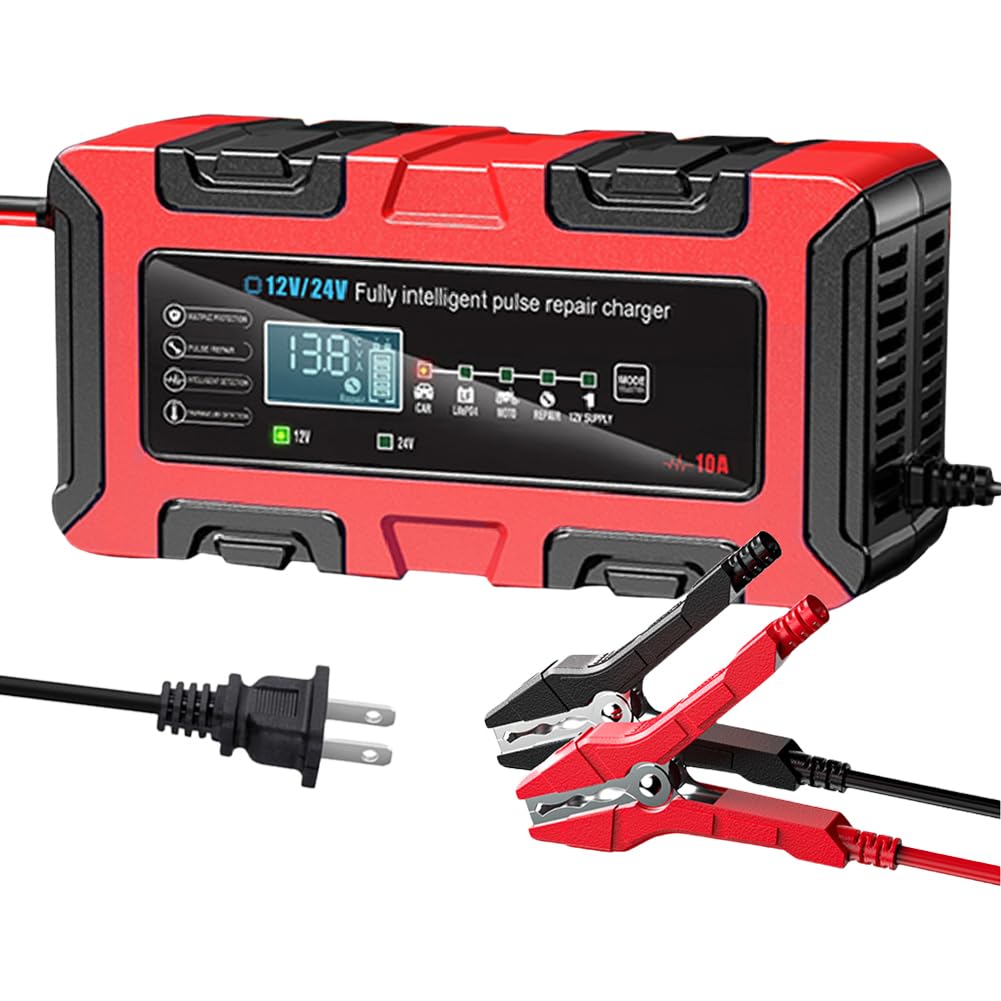
Figure 4.1: Proper connection of the charger to a vehicle battery.
5. Operating Instructions
Once connected, the charger will automatically detect the battery voltage (12V or 24V) and display it on the LCD screen.
5.1 Mode Selection
Press the MODE button to cycle through the available charging modes:
- CAR: Standard charging mode for 12V/24V car batteries.
- MOTO: Charging mode for 12V motorcycle batteries.
- REPAIR: Pulse repair mode for sulfated or deeply discharged batteries. This mode uses high-frequency and low-frequency pulse technology to restore battery performance.
- 12V SUPPLY: Provides a stable 12V power supply.
The selected mode will be indicated on the LCD display.
5.2 Automatic Temperature Detection (Winter/Summer Modes)
The charger features an intelligent temperature sensor that automatically adjusts the charging voltage based on the ambient temperature. This ensures optimal charging performance and prevents overcharging or undercharging in extreme conditions.
- Winter Mode: Automatically activates when the temperature is below +10°C (50°F).
- Summer Mode: Automatically activates when the temperature is above +28°C (82.4°F).

Figure 5.1: Charger's automatic temperature detection feature for optimized charging.
5.3 Charging Process
Once a mode is selected, the charger will begin the charging process. The LCD display will show the current voltage, charging current, and battery charge level. The charger will automatically stop charging when the battery is fully charged to prevent overcharging.
When charging is complete, disconnect the AC power cord from the outlet first, then remove the negative (-) clamp, followed by the positive (+) clamp from the battery terminals.
6. Maintenance
Proper maintenance ensures the longevity and performance of your charger.
- Cleaning: Disconnect the charger from power and battery before cleaning. Wipe the exterior with a soft, damp cloth. Do not use harsh chemicals or abrasives.
- Storage: Store the charger in a cool, dry place when not in use. Keep it away from direct sunlight, moisture, and extreme temperatures.
- Cooling Fan: The charger is equipped with an intelligent cooling fan. Ensure the fan vents are not obstructed to allow for proper heat dissipation. Regularly check for dust or debris accumulation and clean if necessary.

Figure 6.1: Illustration of the intelligent cooling fan for heat dissipation.
7. Troubleshooting
If you encounter issues with your charger, refer to the following common problems and solutions:
- Charger not turning on:
- Check if the AC power cord is securely plugged into a live outlet.
- Ensure the battery clamps are correctly connected to the battery terminals.
- Charger not charging:
- Verify that the battery clamps are making good contact with the battery terminals.
- Check if the battery voltage is extremely low (below 8V for 12V batteries). The charger may not initiate charging if the battery is too deeply discharged. Try the 'REPAIR' mode if available.
- Ensure the correct charging mode is selected for your battery type.
- Error message on display:
- "Err" or similar: This often indicates a reverse polarity connection or a short circuit. Disconnect the charger immediately, check connections, and reconnect correctly.
- Overheating symbol: The charger may be overheating. Disconnect and allow it to cool down in a well-ventilated area. Ensure cooling fan vents are clear.
- Battery not holding charge after charging:
- The battery itself may be faulty or at the end of its service life. Consider having the battery tested by a professional.
- Try using the 'REPAIR' mode if the battery is sulfated.
If the problem persists after trying these solutions, please contact customer support.
8. Specifications
Technical specifications for the Generic 10A 12V/24V Smart Car Battery Charger:
| Feature | Specification |
|---|---|
| Model Number | 1vr5ak3kp3kl6rb5ha4 |
| Input Voltage | 100-240V AC, 50/60Hz |
| Output Voltage | 12V / 24V DC (Auto-detection) |
| Output Current | 12V 10A, 24V 5A |
| Battery Range | 4-200Ah |
| Switch Mode Technology | Yes |
| Polarity Protection | Yes |
| Output Short Circuit Protection | Yes |
| Non-Battery Connection Protection | Yes |
| Overvoltage Protection | Yes |
| Overtemperature Protection | Yes |
| Cooling | Fan |
| Material | ABS |
| Color | Red |
| Dimensions (L x W x H) | 192 x 96 x 72 mm (7.56 x 3.78 x 2.83 inches) |
| Item Weight | 1.52 pounds |

Figure 8.1: Physical dimensions of the battery charger.
9. Warranty and Support
Specific warranty information for this product is not provided in the available documentation. For any product support, technical assistance, or warranty inquiries, please refer to the retailer or manufacturer's contact information provided at the point of purchase.