
Riida KR100
Riida Smart Bluetooth Wireless Meat Thermometer (Model KR100) User Manual
1. Introduction
Thank you for choosing the Riida Smart Bluetooth Wireless Meat Thermometer. This device is designed to help you achieve perfectly cooked meals by providing accurate temperature monitoring and remote control via a smartphone application. Please read this manual thoroughly before use to ensure proper operation and maintenance.
2. Product Overview
2.1 Package Contents
- 1x Riida Meat Thermometer Probe
- 1x Charging Block / Base
- 1x AAA Battery (included, for charging block)
- 1x USB Type-C Charging Cable
- 1x User Manual
2.2 Key Features
- Wireless Range: Up to 500 feet Bluetooth connectivity for remote monitoring.
- Accurate & Fast: Equipped with 1 internal and 1 ambient sensor for precise temperature readings.
- Versatile Usage: Pre-set options for various meats and doneness levels, suitable for grilling, roasting, smoking, baking, air frying, and more.
- Durable Design: Ultra-thin 0.22-inch food-grade stainless steel probe with a heat-resistant, shatterproof ceramic handle.
- Waterproof: 100% IP67 waterproof for easy cleaning.
- Long Battery Life: Up to 60 hours of operation on a single charge (30 minutes charging time for 48 hours working time).
- Magnetic Case: Charging block features a strong magnetic back for convenient storage.
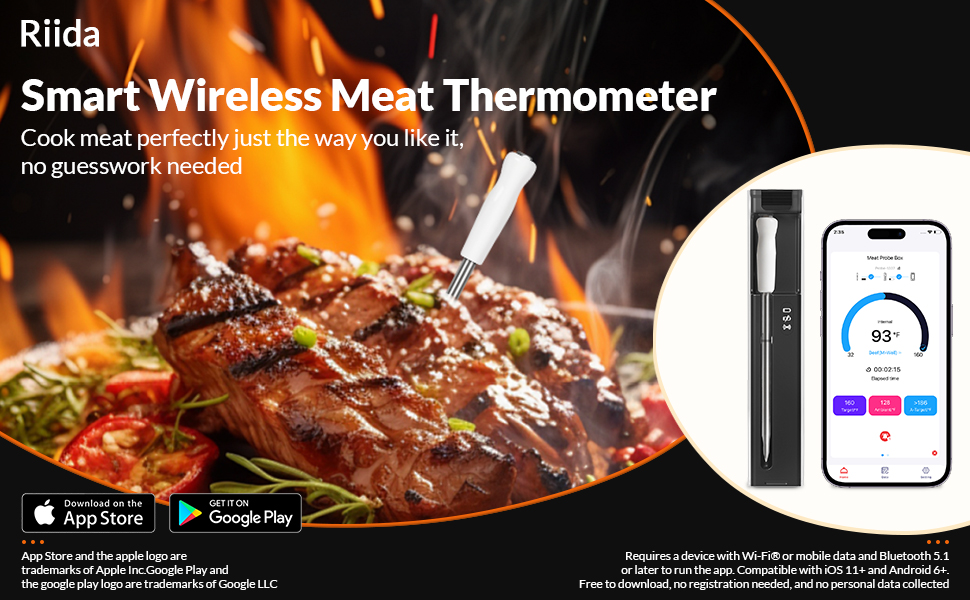
Image: Riida Smart Wireless Meat Thermometer showing the probe, charging case, and the accompanying smartphone application interface.
3. Setup
3.1 Initial Charging
- Insert the included AAA battery into the charging block.
- Place the meat thermometer probe into the charging block.
- Connect the charging block to a power source using the provided USB Type-C cable. The indicator light on the charging block will show charging status.
- Allow the probe to fully charge before first use. A full charge takes approximately 30 minutes.
3.2 App Download and Pairing
- Download the companion application (e.g., 'AIBBQ' or similar as indicated on packaging) from the App Store (iOS) or Google Play Store (Android).
- Ensure Bluetooth is enabled on your smartphone.
- Open the application. The app will guide you through the pairing process.
- Remove the probe from the charging block to activate it. The probe will automatically attempt to connect to the app via Bluetooth.
- Confirm the connection within the app.

Image: The Riida meat thermometer probe, its charging case, and a smartphone screen showing the connected app with temperature readings.

Image: Diagram showing the wireless connection flow from the probe to the charging block (acting as a booster) and then to the smartphone app, highlighting the 500-foot range.
4. Operating Instructions
4.1 Probe Insertion
- Ensure the probe is clean and fully charged.
- Insert the pointed end of the probe into the thickest part of the meat, avoiding bones.
- The probe must be inserted beyond the safety notch on the probe shaft to ensure accurate internal temperature readings and to protect the ceramic handle from direct high heat.

Image: Detailed view of the smart temperature dual sensor probe, indicating the internal temperature range sensor, ambient temperature range, ceramic handle, FDA 304 stainless steel, and safety notch.
4.2 Using the Application
- Once the probe is inserted and connected, open the Riida app on your smartphone.
- Select the type of meat you are cooking (e.g., poultry, beef, pork, lamb, fish, or other).
- Choose your desired doneness level (e.g., rare, medium, well-done). The app will display the target internal temperature.
- The app will show real-time internal and ambient temperatures.
- You can customize cooking settings, view estimated cooking time, and receive alert notifications when the target temperature is reached.
- The app also provides a temperature graph for monitoring progress.

Image: Screenshots of the multi-functional app, demonstrating customized cooking settings, estimated cooking time, alert notifications, and temperature data graphs.
4.3 Cooking Environments
The Riida Smart Bluetooth Wireless Meat Thermometer is suitable for a wide range of cooking methods:
- Outdoor Cooking: Smoker, Grill, Rotisserie.
- Indoor Cooking: Oven, Pan, Air Fryer, Roasters, Deep Fryers, Slow Cookers, Sous-vide, Convection Ovens.

Image: Illustrations of the thermometer being used for indoor cooking in an oven, frying pan, and air fryer, with the app displaying real-time temperatures.

Image: Illustrations of the thermometer being used for outdoor cooking in a smoker, on a grill, and with a rotisserie setup.
5. Maintenance and Care
5.1 Cleaning
- The meat thermometer probe is 100% IP67 waterproof and can be hand-washed or placed in a dishwasher.
- Important: Allow the probe to cool completely before washing to avoid damage from rapid temperature changes.
- Ensure the probe is fully cool, dry, and clean before placing it back into the charging block.
- The charging block should be wiped clean with a damp cloth only. Do not submerge the charging block in water.

Image: The thermometer probe being rinsed under a faucet and shown inside a dishwasher, illustrating its waterproof design for easy cleaning.
5.2 Storage
Store the probe in its charging block when not in use. The magnetic back of the charging block allows for convenient storage on metallic surfaces like a refrigerator or oven.

Image: The magnetic charging case for the thermometer attached to the side of an oven, demonstrating its convenient storage feature.
6. Troubleshooting
- No Power/Not Charging:
Ensure the AAA battery is correctly inserted into the charging block. Verify the USB Type-C cable is securely connected to both the charging block and a working power source. - Connectivity Issues (Bluetooth Disconnection):
Ensure your smartphone's Bluetooth is enabled and the app is open. Move closer to the charging block/probe to improve signal strength, especially if exceeding the 500ft range or if there are significant obstructions. Restart the app and re-pair if necessary. - Inaccurate Temperature Readings:
Ensure the probe is inserted correctly into the thickest part of the meat, past the safety notch, and not touching any bones. Verify the probe is clean and free of debris. If calibration issues persist, contact customer support. - App Not Functioning Correctly:
Ensure your app is updated to the latest version. Try closing and reopening the app. For persistent issues, uninstall and reinstall the app. - Probe Not Holding Charge:
Ensure the probe is properly seated in the charging block. If battery life significantly degrades, contact customer support for assistance.
7. Specifications
| Feature | Detail |
|---|---|
| Model Number | KR100 |
| Product Dimensions | 5.98 x 0.2 x 0.2 inches (Probe) |
| Weight | 0.74 oz (Probe); 3.14 oz (Charging Block) |
| Internal Temperature Range | 32°F - 212°F (0°C - 100°C) |
| Ambient Temperature Range | 32°F - 572°F (0°C - 300°C) |
| Connectivity | Bluetooth (up to 500ft) |
| Waterproof Rating | IP67 |
| Battery Life | Up to 60 hours (after 30 mins charge) |
| Materials | Food-grade Stainless Steel, Ceramic |
| Certifications | CE, FCC, FDA |

Image: Dimensional drawing of the Riida meat thermometer probe and its charging case, indicating length, width, and probe diameter.
8. Warranty and Support
The Riida Smart Bluetooth Wireless Meat Thermometer comes with a worry-free 12-month warranty. For any product-related inquiries, technical support, or warranty claims, please contact our customer service team. We aim to provide friendly customer service within 24 hours.
Please refer to the contact information provided on the product packaging or the official Riida website for the most up-to-date support details.