
Introduction
This manual provides detailed instructions for the installation, operation, and maintenance of your Soundstream VRCA1-78W 7-inch Flip-Out Car Stereo. This unit features a motorized touchscreen, Wireless Apple CarPlay, Android Auto, Bluetooth 5.0, USB/SD playback, AM/FM radio, and backup camera support. Please read this manual thoroughly before use to ensure proper operation and to maximize your enjoyment of the product.
Safety Information
Observe the following safety precautions to prevent injury or damage to the unit:
- Do not operate the unit in a manner that distracts you from driving. Always prioritize road safety.
- Ensure proper wiring and installation to prevent electrical shorts or fire hazards. Consult a professional if unsure.
- Keep the volume at a level that allows you to hear outside traffic sounds.
- Avoid exposing the unit to extreme temperatures, direct sunlight for prolonged periods, or excessive moisture.
- Do not attempt to disassemble or modify the unit. This may void the warranty and cause damage.
Package Contents
Verify that all items are present in the package:
- Soundstream VRCA1-78W Car Stereo Unit
- User Manual
- Wiring Harness
- Installation Hardware
- GPS Antenna

Setup and Installation
The VRCA1-78W is designed for single DIN dashboard openings. Professional installation is recommended.
Wiring Connections
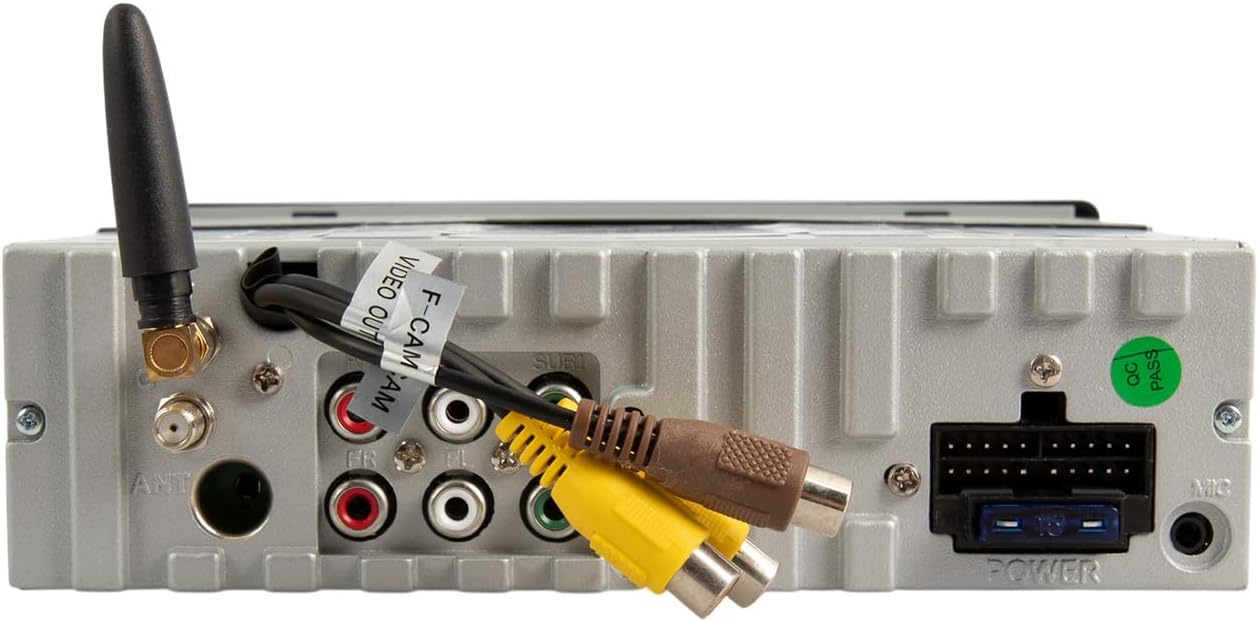
Refer to the included wiring harness diagram for specific connections. Key connections include:
- Power: Connect to vehicle's constant 12V, accessory 12V, and ground.
- Speakers: Connect to vehicle's speaker wires (front left/right, rear left/right).
- Antenna: Connect the vehicle's radio antenna.
- Backup Camera Input: Connect an optional backup camera for enhanced parking safety.
- RCA Outputs: For connecting external amplifiers (front, rear, subwoofer).
- USB/AUX Inputs: For external media devices.
Mounting
Secure the unit into the single DIN opening using the provided installation hardware. Ensure the unit is firmly seated and does not obstruct any vehicle controls or vents. The motorized screen requires adequate clearance for deployment and retraction.
Operating Instructions
Front Panel Controls

- Power/Mode Button: Press to turn the unit on/off. Short press to cycle through audio sources (AM/FM, USB, SD, Bluetooth, AUX).
- Volume Knob: Rotate to adjust volume. Press to mute/unmute.
- MENU Button: Access system settings or menu options.
- BAND Button: In radio mode, cycles through FM1, FM2, FM3, AM1, AM2 bands.
- AMS Button: Auto Store/Preset Scan for radio.
- OPEN/TILT Button: Controls the motorized 7-inch display. Press to open or close the screen. Hold to adjust the screen tilt angle.
- Microphone (MIC): Built-in microphone for hands-free calling.
- USB Port: Connect USB devices for media playback or smartphone connection.
- AUX Input: 3.5mm jack for external audio devices.
Motorized Display Operation
Press the OPEN/TILT button to extend the 7-inch touchscreen. Press it again to retract the screen. To adjust the viewing angle, press and hold the OPEN/TILT button while the screen is extended, then release when the desired angle is reached.

Wireless Apple CarPlay and Android Auto
This unit supports wireless connectivity for both Apple CarPlay and Android Auto. To connect:
- Ensure your smartphone's Bluetooth and Wi-Fi are enabled.
- On the stereo, select the CarPlay or Android Auto source.
- Follow the on-screen prompts to pair your phone via Bluetooth. Once paired, the system will establish a Wi-Fi connection for CarPlay/Android Auto functionality.
- Access navigation, music, calls, and messages directly from the touchscreen or via voice commands.
Bluetooth Connectivity (Hands-Free Calling & Audio Streaming)
To pair your phone for Bluetooth audio and calls:
- Turn on Bluetooth on your smartphone.
- On the stereo, select the Bluetooth source.
- Search for available devices on your phone and select "Soundstream VRCA1-78W" (or similar name).
- Confirm the pairing code if prompted.
- Once connected, you can make/receive calls and stream audio wirelessly.
Media Playback (USB/SD/AM/FM)
- USB/SD: Insert a USB drive into the front USB port or an SD card into the designated slot. The unit will automatically detect and play compatible audio/video files.
- AM/FM Radio: Select the radio source. Use the seek buttons to find stations or the BAND button to switch between frequency bands.
Mirror Link
The Mirror Link feature allows you to mirror your smartphone's screen onto the stereo display. Refer to the on-screen instructions or the full manual for specific setup steps, as this often requires a wired connection and specific app installation on your phone.
Backup Camera Support
When a compatible backup camera is connected to the dedicated input, the display will automatically switch to the camera view when the vehicle is put into reverse. On-screen parking guidelines may be available to assist with maneuvering.
Maintenance
- Cleaning the Screen: Use a soft, lint-free cloth to gently wipe the touchscreen. For stubborn smudges, slightly dampen the cloth with water or a screen-safe cleaner. Avoid harsh chemicals.
- General Cleaning: Keep the unit free from dust and debris. Use a soft brush or compressed air for hard-to-reach areas.
- Avoid Obstructions: Ensure the motorized screen mechanism is free from obstructions to prevent damage during opening and closing.
Troubleshooting
If you encounter issues with your VRCA1-78W, refer to the following common problems and solutions:
| Problem | Possible Cause | Solution |
|---|---|---|
| No power | Incorrect wiring, blown fuse | Check power connections and vehicle fuses. Consult installation guide. |
| No sound | Volume muted, incorrect source, speaker wiring issues | Check volume, ensure correct audio source is selected. Verify speaker connections. |
| CarPlay/Android Auto not connecting wirelessly | Bluetooth/Wi-Fi off, phone not paired, software glitch | Ensure phone's Bluetooth and Wi-Fi are active. Re-pair phone. Restart phone and stereo. |
| Screen not opening/closing | Obstruction, motor issue, power issue | Check for obstructions. Ensure unit has power. If issue persists, seek professional service. |
| Screen glare in sunlight | Environmental factor, screen angle | Adjust screen tilt using the OPEN/TILT button. |
| Slow startup or occasional lag | System initialization, heavy processing | This can be normal during startup. If persistent, ensure firmware is updated (if applicable) or perform a system reset. |
If the problem persists after attempting these solutions, contact Soundstream customer support or a qualified service technician.
Specifications
- Model: VRCA1-78W
- Display: 7-inch Motorized LCD Touchscreen
- Compatibility: Single DIN Dashboards
- Smartphone Integration: Wireless Apple CarPlay, Wireless Android Auto, Mirror Link
- Bluetooth: Version 5.0 (Hands-Free Calling, Audio Streaming)
- Media Inputs: USB, SD Card, AUX (3.5mm)
- Radio: AM/FM Tuner
- Camera Support: Backup Camera Input with Parking Guidelines
- Audio Output Mode: Stereo
- Output Power: 200 Watts (Peak)
- Item Weight: 4.3 pounds
- Package Dimensions: 10.5 x 9 x 4.5 inches
Warranty and Support
For warranty information and technical support, please refer to the warranty card included with your product or visit the official Soundstream website. Keep your proof of purchase for warranty claims.
