
1. Introduction
Thank you for purchasing the OYDL RC ERA A60 Mini Bell206 RC Helicopter. This manual provides essential information for the safe operation, setup, maintenance, and troubleshooting of your new remote-controlled aircraft. Please read this manual thoroughly before operating the helicopter to ensure a safe and enjoyable experience. This product is recommended for users aged 16 years and above.
2. Safety Information
Operating remote-controlled aircraft requires caution. Adhere to the following safety guidelines:
- Age Recommendation: This product is suitable for individuals aged 16 years and older.
- Flight Environment: Operate the helicopter in open areas, away from people, animals, buildings, power lines, and water. Avoid flying in strong winds.
- Battery Safety: Use only the provided charger and battery. Do not overcharge or short-circuit batteries. Discontinue use if batteries show signs of damage or swelling.
- Propeller Safety: Keep hands, face, and loose clothing away from rotating propellers. The helicopter features locked rotor protection, but caution is always advised.
- Supervision: Younger users should always be supervised by an experienced adult.
- Moisture: Do not expose the helicopter or remote controller to moisture or rain.
- Low Voltage Alarm: Pay attention to the low voltage alarm to land the helicopter safely before the battery is fully depleted.
- Out-of-Control Protection: The helicopter is equipped with out-of-control protection. If signal is lost, the helicopter will attempt a controlled landing.
3. Package Contents
Verify that all items are present in your package:
- RC ERA A60 Mini Bell206 RC Helicopter (1)
- Remote Controller (1)
- 3.7V 220mAh Lithium Battery (Quantity may vary based on purchase, e.g., 3 batteries)
- Charging Cable (1)
- Instruction Manual (1)
- Spare Propellers (Quantity may vary)
- Tools (e.g., screwdriver, hex wrench)

4. Product Overview
The RC ERA A60 Mini Bell206 is a 1:42 scale, 6-channel RC helicopter designed for stable and precise flight. Key features include:
- Stable Flight Control: Equipped with 6-channel gyro stabilization and altitude hold for smooth hovering and precise movements.
- Compact Design: Portable size with a rotor diameter of 227mm, fuselage length of 238mm, and height of 80mm.
- Reliable Safety Features: Includes low-voltage alarm, locked rotor protection, and out-of-control protection.
- Easy One-Key Operation: Features one-key takeoff/landing and a modular battery system for convenience.
- Three-Speed Adjustment: Allows selection of flight gear based on proficiency.
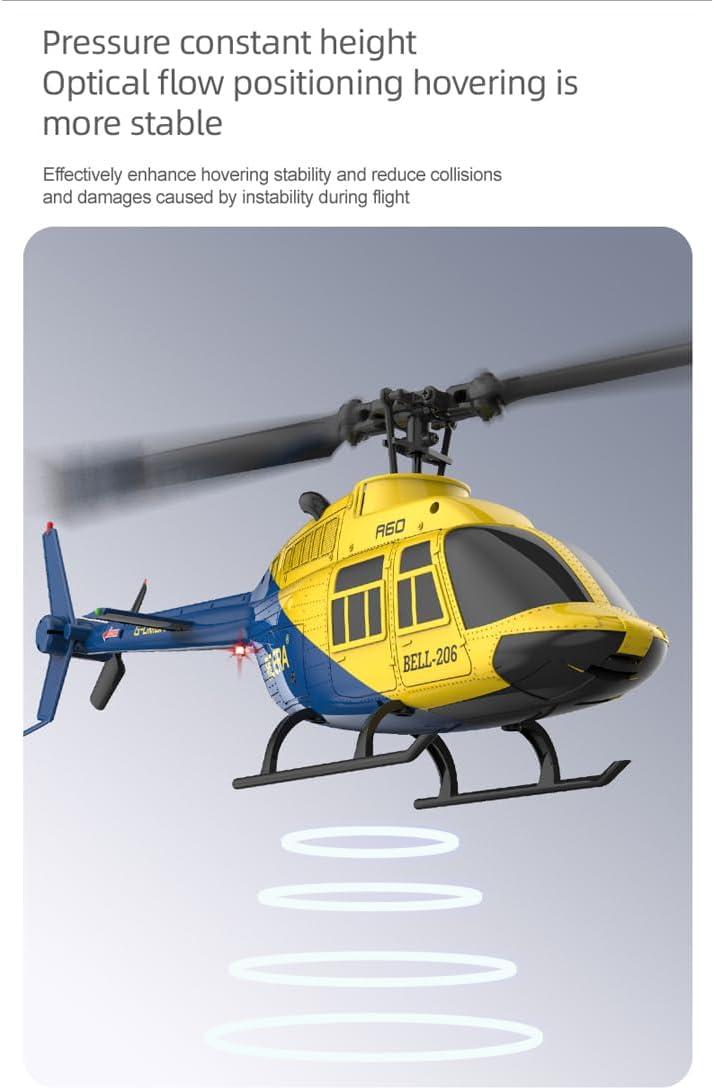
- Optical Flow Positioning (Optional): Enhances hovering stability and reduces collisions.


5. Setup
5.1 Battery Installation and Charging
- Charge the Helicopter Battery: Connect the provided USB charging cable to the 3.7V 220mAh lithium battery. Plug the USB end into a suitable USB power source (e.g., computer USB port, USB wall adapter). The charging indicator will show the charging status. Charging typically takes about 40 minutes.
- Install Helicopter Battery: Once fully charged, carefully insert the modular battery into the designated compartment on the helicopter. Ensure it clicks securely into place.
5.2 Remote Controller Setup
- Install Remote Controller Batteries: Open the battery compartment on the back of the remote controller and insert the required batteries (typically AA, not included). Ensure correct polarity.
- Power On: Turn on the remote controller first, then the helicopter. The indicator lights on both devices will flash and then become solid once paired.
6. Operating Instructions
6.1 Pre-Flight Check
- Ensure both helicopter and remote controller batteries are fully charged.
- Check that all propellers are securely attached and free from damage.
- Verify that the flight area is clear of obstacles and people.
6.2 Takeoff and Landing
The helicopter features a convenient one-key takeoff and landing function:
- One-Key Takeoff: Place the helicopter on a flat surface. After pairing, press the one-key takeoff button on the remote controller. The helicopter will automatically ascend to a stable hovering height.
- One-Key Landing: During flight, press the one-key landing button. The helicopter will slowly descend and land automatically.

6.3 Flight Controls
The 6-channel remote controller allows for comprehensive flight maneuvers:
- Throttle Stick (Left Stick): Controls altitude (up/down).
- Directional Stick (Right Stick): Controls forward/backward, left/right side flight, and turning left/right.
- Altitude Hold: The helicopter maintains a stable altitude automatically, allowing you to focus on directional control.
- Multi-Directional Flight: Once activated, the helicopter can be maneuvered in all directions with ease.


6.4 Speed Adjustment
The helicopter offers three-speed settings to match your skill level:
- Low Speed: Ideal for beginners and indoor flight.
- Medium Speed: For intermediate pilots and light outdoor conditions.
- High Speed: For experienced pilots and more dynamic flight.
Refer to your remote controller manual for specific button assignments to switch between speed modes.

6.5 Optical Flow Positioning (If Applicable)
For models equipped with optical flow positioning, this feature enhances hovering stability, especially in indoor environments, by using a downward-facing camera to detect ground patterns and maintain position. This effectively reduces collisions and damages caused by instability during flight.

7. Maintenance
Regular maintenance ensures the longevity and optimal performance of your helicopter:
- Cleaning: After each flight, gently wipe the helicopter with a soft, dry cloth to remove dust and debris. Avoid using water or chemical cleaners.
- Propeller Inspection: Regularly check propellers for any cracks, bends, or damage. Replace damaged propellers immediately using the provided spare parts.
- Battery Care: Store batteries in a cool, dry place. Do not store fully charged or fully depleted batteries for extended periods. Charge them to about 50% for long-term storage.
- Storage: When not in use, store the helicopter and remote controller in a safe place, away from direct sunlight and extreme temperatures.
- Easy to Maintain: The design of the A60 allows for straightforward maintenance and part replacement.
8. Troubleshooting
If you encounter issues, refer to the table below for common problems and solutions:
| Problem | Possible Cause | Solution |
|---|---|---|
| Helicopter does not respond to remote. | Not paired; low battery in remote or helicopter. | Ensure both devices are powered on and paired. Charge/replace batteries. |
| Helicopter flies erratically or drifts. | Uncalibrated gyro; damaged propeller; strong wind. | Perform gyro calibration (refer to remote manual). Check/replace propellers. Fly in calm conditions. |
| Propellers stop rotating unexpectedly. | Propeller obstruction; locked rotor protection activated. | Remove any obstruction. Power cycle the helicopter and remote. The intelligent anti-jamming protection automatically stops rotation if blocked. |
| Short flight time. | Battery not fully charged; aging battery. | Ensure battery is fully charged. Consider replacing old batteries. |
| Low voltage alarm sounds too early. | Battery issue. | Ensure battery is fully charged. If problem persists, battery may need replacement. |
9. Specifications
| Feature | Detail |
|---|---|
| Product Name | A60 Remote-Control Helicopter |
| Product Scale | 1:42 |
| Product Material | Engineering materials/electronic components |
| Recommended Age | 16 years and up |
| Remote Control Distance | 80 - 120 meters |
| Rotor Diameter | 227mm (8.9 inches) |
| Fuselage Length | 238mm (9.4 inches) |
| Fuselage Height | 80mm (3.1 inches) |
| Flight Time | About 8 - 10 minutes |
| Battery Capacity | 3.7V 220mAh lithium battery |
| Charging Time | About 40 minutes |
| Item Weight | 1.75 pounds |
| Product Dimensions | 9.37 x 2.09 x 3.15 inches |
10. Warranty and Support
For warranty information, technical support, or assistance with your OYDL RC ERA A60 Mini Bell206 RC Helicopter, please refer to the contact information provided at the point of purchase or visit the official OYDL website. Keep your purchase receipt as proof of purchase for any warranty claims.