1. Introduction
This manual provides essential instructions for the safe and efficient operation, maintenance, and troubleshooting of your ZapRun ZW9 Electric Scooter. Please read this manual thoroughly before your first ride to ensure proper usage and to maximize the lifespan of your scooter.

Image 1.1: The ZapRun ZW9 Electric Scooter, showcasing its design and included accessories like the security lock.
2. Safety Guidelines
Your safety is paramount. Always adhere to the following guidelines:
- Always wear a helmet and appropriate safety gear (knee pads, elbow pads) when riding.
- Familiarize yourself with local laws and regulations regarding electric scooter usage.
- Perform a pre-ride check: ensure brakes are functional, tires are properly inflated, and all components are secure.
- Do not ride under the influence of alcohol or drugs.
- Avoid riding in heavy rain, on icy surfaces, or through deep puddles. The scooter has an IPX4 waterproof rating, meaning it is resistant to splashing water from any direction, but not submersion.
- Maintain a safe distance from other vehicles and pedestrians.
- Children under the age of 16 should not operate this scooter.
3. Setup and Assembly
The ZapRun ZW9 Electric Scooter arrives largely pre-assembled. Follow these steps for initial setup:
- Unfolding the Scooter: Carefully unfold the scooter from its compact state. Ensure the main stem is securely locked into its upright position using the dual safety lock mechanism.
- Handlebar Adjustment: Adjust the handlebar height to a comfortable position for your height (adjustable range: 44.5" - 52.8"). Securely fasten the quick-release clamp.
- Initial Charge: Before your first ride, fully charge the scooter's battery. Connect the charger to the charging port and a power outlet. The indicator light on the charger will change when fully charged.
- Tire Check: Verify that both 10-inch pneumatic off-road tires are inflated to the recommended pressure.

Image 3.1: The foldable design of the ZapRun ZW9 Electric Scooter, demonstrating its portability for storage or transport.
4. Operating Instructions
4.1 Powering On/Off
- To power on, press and hold the power button on the display panel.
- To power off, press and hold the power button again until the display turns off.
4.2 Riding Modes
The scooter features three speed modes, selectable via the display panel or the mobile application:
- ECO Mode: Approximately 10 MPH for maximum battery efficiency and relaxed cruising.
- STD Mode: Approximately 18 MPH for balanced performance.
- TURBO Mode: Up to 28 MPH for maximum speed and power.

Image 4.1: Illustration of the 1000W motor and its three speed settings for varied riding experiences.
4.3 Braking System
The ZapRun ZW9 is equipped with front and rear disc brakes, complemented by electronic braking for reliable stopping power. Apply both brakes gently and simultaneously for controlled deceleration.
4.4 Lighting and Signals
Ensure visibility and communicate your intentions with the integrated lighting system:
- LED Headlights: For illumination during low-light conditions.
- Taillights: For rear visibility.
- Turn Signals: Activate to indicate turns.
- Pedal Light / Ambient Light: Enhances side visibility.

Image 4.2: Overview of the scooter's comprehensive lighting systems designed for enhanced safety and visibility.
4.5 Mobile Application Control
Download the ZapRun mobile application to access advanced features and monitor your ride:
- View current speed mode and real-time speed.
- Monitor battery level.
- Control cruise control status.
- Manage lighting system settings.
- Utilize anti-theft features including a buzzer alarm and APP positioning.

Image 4.3: The scooter's smart app and LED digital display, showing features like speed, battery, and cruise control.
5. Maintenance
Regular maintenance ensures optimal performance and longevity of your scooter.
- Battery Care: Charge the battery regularly, even if not in use, to maintain its health. Avoid completely draining the battery.
- Tire Pressure: Check tire pressure before each ride. Proper inflation improves ride quality and extends tire life.
- Brake Inspection: Periodically inspect brake pads and cables for wear. Adjust brakes as needed to ensure responsive stopping.
- Cleaning: Clean the scooter with a damp cloth. Avoid using high-pressure water jets directly on electronic components. The scooter has an IPX4 waterproof rating, protecting against splashes.
- Fasteners: Regularly check and tighten all screws and bolts to prevent loosening due to vibrations.
6. Troubleshooting
If you encounter issues with your ZapRun ZW9, refer to the following common problems and solutions:
| Problem | Possible Cause | Solution |
|---|---|---|
| Scooter does not power on. | Low or depleted battery. | Charge the battery fully. Ensure charger is properly connected. |
| Loss of full power mode / Red flashing light on display. | Motor or battery overheating. | Allow the scooter to cool down. Reduce continuous high-speed or uphill riding. If persistent, contact support. |
| Scooter is "stuck in park" or will not move. | Safety lock engaged, electronic fault, or app lock activated. | Check the physical folding lock mechanism. Verify no error codes on the display. Check the mobile app to ensure the anti-theft lock is disengaged. If the issue persists, contact customer support. |
| Reduced range or speed. | Low tire pressure, heavy load, riding uphill, or cold weather. | Ensure tires are properly inflated. Reduce load. Range and speed are affected by riding conditions. |
7. Specifications
| Feature | Detail |
|---|---|
| Brand | ZapRun |
| Model Name | ZW9 |
| Motor Power | 1000W |
| Max Speed | Up to 28 MPH |
| Max Range | Up to 28 Miles (depending on riding conditions) |
| Tires | 10-inch Pneumatic Off-Road Tires |
| Suspension | Dual Suspension (Front & Rear) |
| Braking System | Front & Rear Disc Brakes, Electronic Braking |
| Weight Limit | 264 lbs |
| Product Weight | 48.5 lbs |
| Waterproof Rating | IPX4 |
| Handlebar Height | Adjustable (44.5" - 52.8") |
| Material | Aluminum |
| Certification | UL2272 |
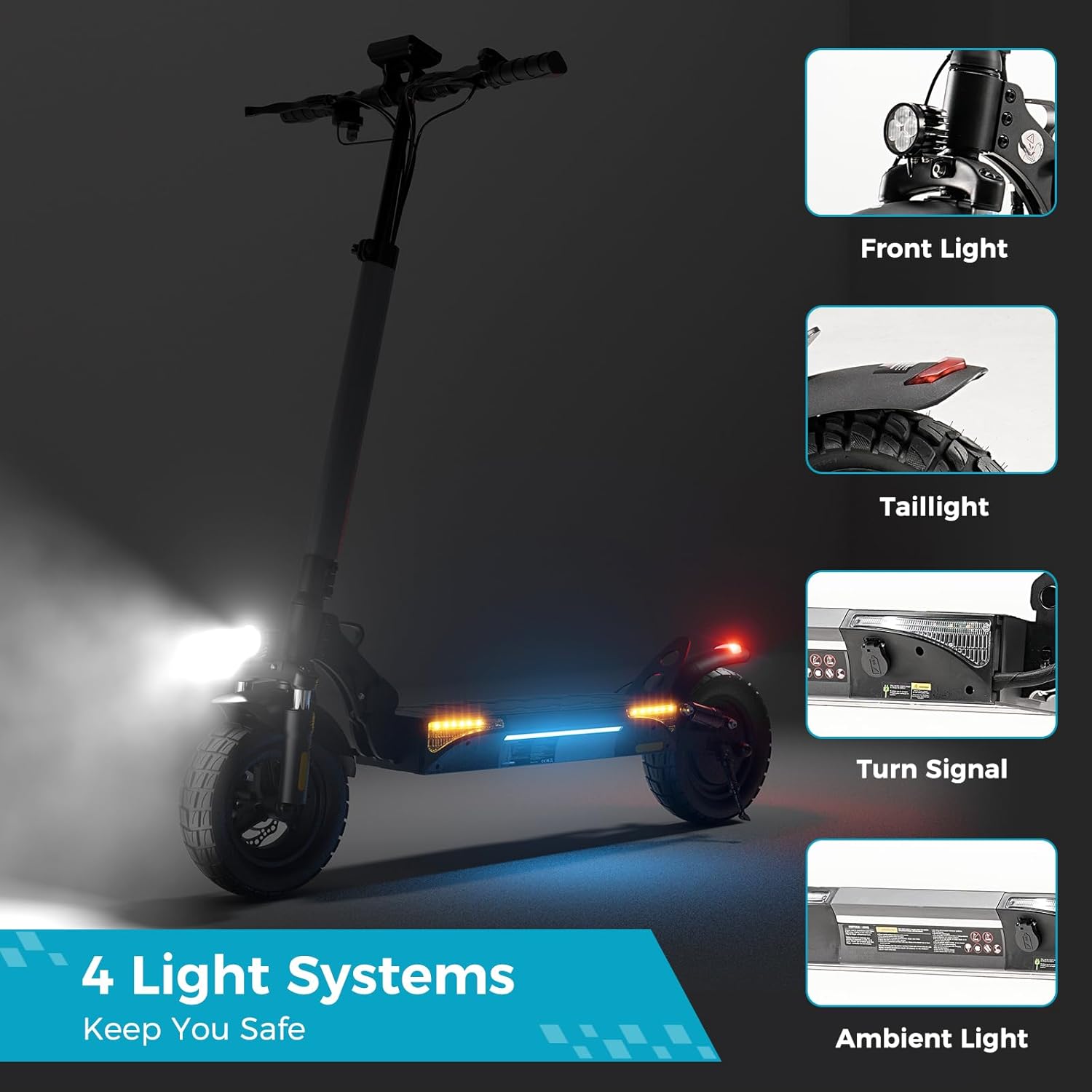
Image 7.1: Visual representation of the scooter's key dimensions and weight specifications.
8. Warranty and Support
ZapRun provides a comprehensive warranty for your electric scooter:
- Warranty Period: 365 days or 180 days warranty for different components. Please refer to your purchase documentation for specific component warranty details.
- Customer Support: Our professional support team is available to assist you with any questions or concerns.
- Contact: If you have any questions or require assistance, please contact ZapRun customer service through the retailer's platform or the official ZapRun website.