
1. Introduction
Thank you for choosing the CubiCubi Electric Standing Desk. This manual provides essential information for the safe and efficient assembly, operation, and maintenance of your new desk. Please read these instructions carefully before use and retain them for future reference.
2. Safety Information
- Child Safety Lock: This product includes a child safety lock feature. Always ensure the lock is engaged when the desk is not in use to prevent accidental operation and potential injuries, especially around children.
- Weight Capacity: Do not exceed the recommended weight capacity of the desk. Overloading can cause instability and damage.
- Clearance: Ensure there are no obstructions above or below the desk when adjusting its height to prevent damage to the desk or other objects.
- Power Supply: Use only the provided power adapter and ensure it is connected to a grounded outlet.
- Liquid Spills: Although the desk surface is water-resistant, avoid excessive liquid spills and clean them immediately to prevent damage to electronic components.
3. Setup and Assembly
The CubiCubi Electric Standing Desk is designed for straightforward assembly, typically taking about 30 minutes. All necessary assembly tools are included, and parts are labeled for easy identification.
Assembly Steps:
- Unpack Components: Carefully remove all parts from the packaging and verify against the parts list in the included paper instructions.
- Assemble Frame: Follow the step-by-step instructions to connect the steel frames and leg bases.
- Attach Desktop: Secure the desktop to the assembled frame.
- Connect Power: Plug in the power cable to the control box and then to a power outlet.
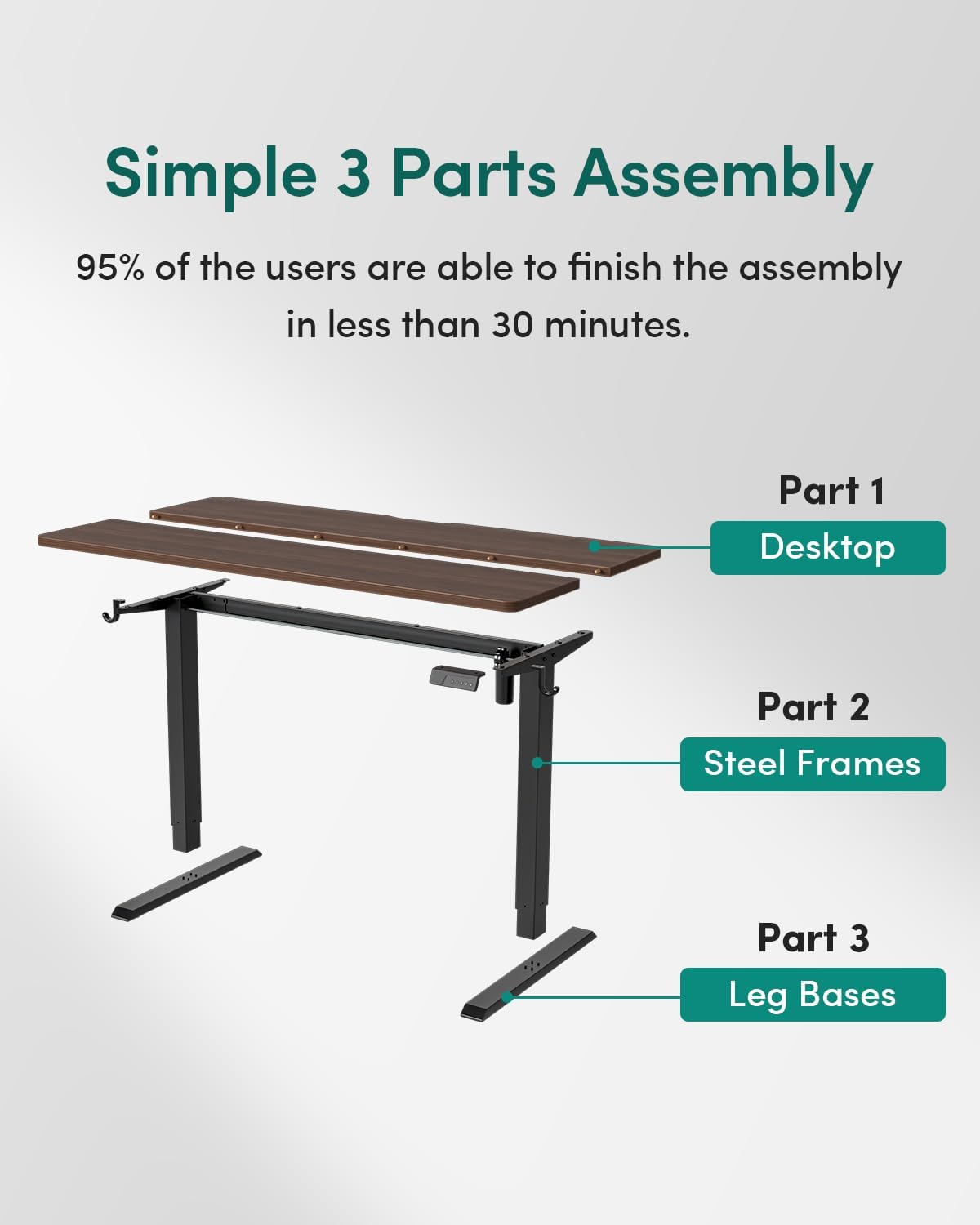
For detailed visual guidance, refer to the step-by-step video instructions available via the QR code or link provided in your paper manual.
4. Operating Instructions
Height Adjustment:
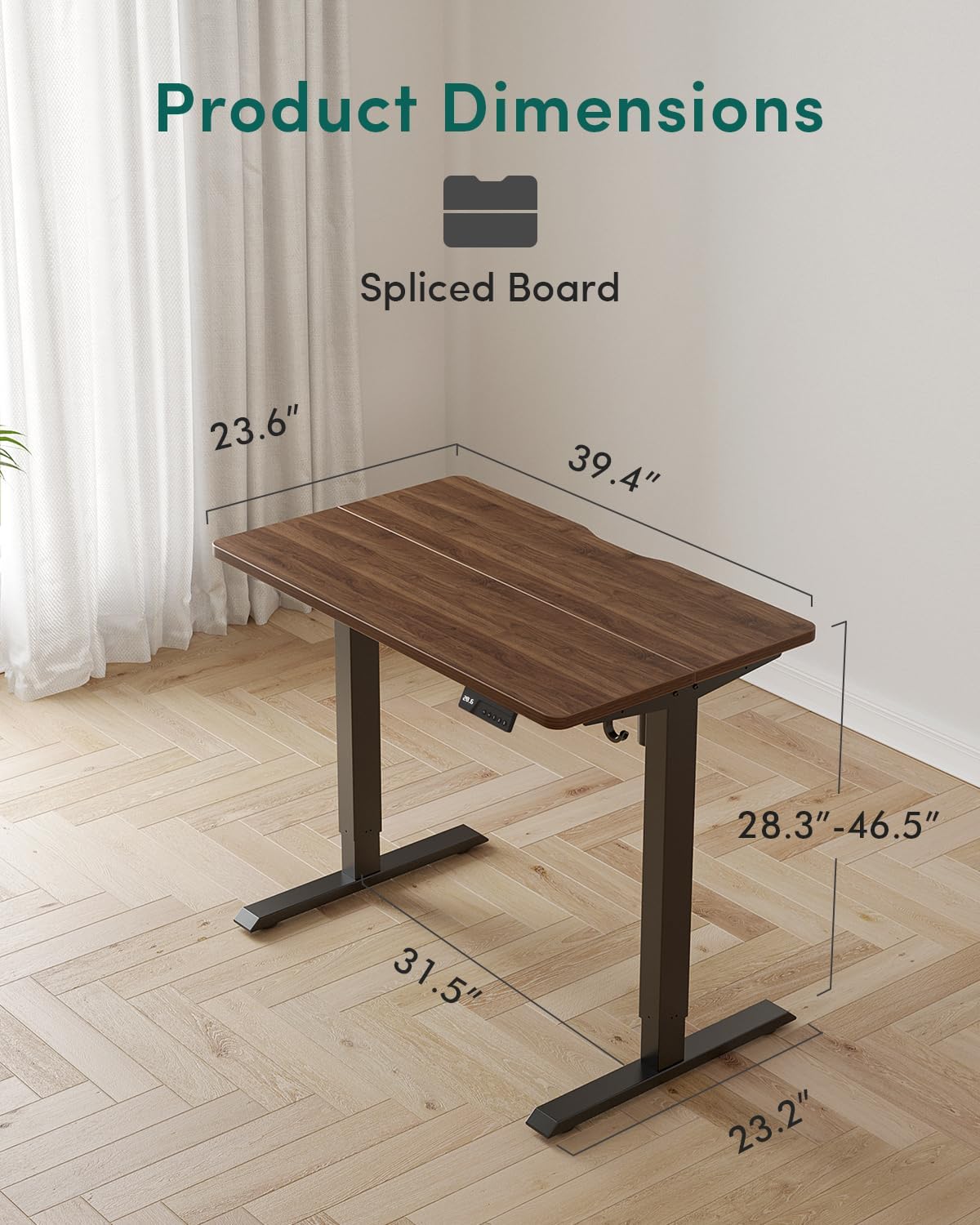
The desk features a 6th generation electric lift system for smooth and quiet height adjustments. The height can be adjusted from 28.3 inches to 46.5 inches.
- To Raise: Press and hold the 'Up' button on the control panel until the desired height is reached.
- To Lower: Press and hold the 'Down' button on the control panel until the desired height is reached.

Child Safety Lock:
To activate or deactivate the child safety lock, refer to the specific instructions in your paper manual. This feature prevents unintended height adjustments.
Memory Presets:
The control panel may include memory preset buttons (e.g., 1, 2, 3) to save and recall your preferred sitting and standing heights. Consult your paper manual for programming instructions.

Convenient Desk Hooks:
The desk includes two convenient hooks, ideal for hanging headphones, bags, or other accessories, helping to keep your workspace tidy.

5. Maintenance
Cleaning the Desk Surface:
The desk surface is designed to be water-resistant. For routine cleaning, wipe the surface with a soft, damp cloth. For spills, wipe immediately with a dry cloth. Avoid abrasive cleaners or harsh chemicals that may damage the finish.

General Care:
- Regularly check all screws and bolts to ensure they are tight.
- Avoid placing extremely hot or cold items directly on the desk surface without protection.
- Keep the desk away from direct sunlight and extreme humidity to prevent material degradation.
6. Troubleshooting
If you encounter any issues with your CubiCubi Electric Standing Desk, please refer to the following common troubleshooting tips:
- Desk Not Moving: Check if the power cable is securely plugged into both the desk and the wall outlet. Ensure the child safety lock is not engaged.
- Uneven Movement: Verify that the desk is placed on a level surface and that all feet are properly adjusted.
- Unusual Noises: While the desk operates quietly (below 45 dB), any unusual noises may indicate loose components. Check all connections and tighten if necessary.
- Control Panel Not Responding: Unplug the desk from the power outlet for 10-15 seconds, then plug it back in to reset the system.
If problems persist after attempting these solutions, please contact CubiCubi customer support for further assistance.
7. Specifications
Below are the key specifications for the CubiCubi Electric Standing Desk 40x24:
| Feature | Specification |
|---|---|
| Brand | CubiCubi |
| Model | Electric Standing Desk 40x24 |
| Product Dimensions (D x W x H) | 24"D x 40"W x 28"H (Minimum Height) |
| Height Adjustment Range | 28.3" to 46.5" |
| Color | Black Walnut |
| Top Material Type | Engineered Wood (Laminated) |
| Base Material | Alloy Steel |
| Noise Level (Operation) | Below 45 dB |
| Assembly Time (Estimated) | 30 minutes |
| Certifications | FSC, ISED, ETL, EPA, TSCA Title VI, CARB, CE |

8. Warranty and Support
Limited Warranty:
The CubiCubi Electric Standing Desk comes with a limited warranty. Please refer to the warranty card included with your product for specific terms, conditions, and duration of coverage.
Customer Support:
For any questions, technical assistance, or warranty claims, please contact CubiCubi customer support. Contact information can typically be found on the CubiCubi official website or in your product packaging.