
1. Setup
This section provides instructions for the initial setup of your LAOPAO T24053-EU Desk Lamp.
1.1 Unpacking and Assembly
Carefully remove all components from the packaging. The lamp consists of a base, an adjustable arm, and the LED light bar. Ensure all parts are present before proceeding.

Image: The LAOPAO desk lamp showing its easy installation and sturdy metal base. The image highlights the flexible gooseneck and the stable base design.
- Attach the Arm to the Base: Insert the adjustable arm into the designated slot on the heavy metal base. Ensure it is securely fitted.
- Position the Lamp: Place the lamp on a stable, flat surface. The heavy metal base (40% of total weight) ensures stability and prevents tipping.
- Adjust Height and Angle: The flexible arm allows for 360° adjustment. Adjust the height from 35 cm to 65 cm (14 to 25.5 inches) and position the light bar to your desired angle.

Image: The LAOPAO desk lamp demonstrating its 360° adjustable gooseneck and height adjustment from 35cm to 65cm.
1.2 Power Connection
Connect the provided power cable to the lamp's power input port and then plug it into a suitable power outlet. The lamp is powered via an electrical cable.
2. Operation
Learn how to use the various functions of your LAOPAO T24053-EU Desk Lamp.
2.1 Power On/Off and Basic Lighting Controls

Image: Detailed view of the LAOPAO desk lamp's control panel, showing buttons for clock, Pomodoro timer, power, auto-off, brightness level, and color temperature.
- Power Button: Press the power button (usually indicated by a circle with a vertical line) to turn the lamp on or off.
- Brightness Adjustment: Use the brightness control buttons (often marked with '+' and '-') to cycle through 5 levels of brightness, up to 1600 lumens.
- Color Temperature Adjustment: Use the color temperature control button (often marked with a sun or color spectrum icon) to switch between 5 color modes (e.g., cool daylight to warm light, 3000K-6000K).

Image: The LAOPAO desk lamp illustrating its 5 distinct color temperatures and 5 brightness levels, ranging from 20% to 100% brightness.
2.2 Smart LCD Display and Pomodoro Timer
The lamp features an intuitive LCD screen that displays time and countdowns.

Image: The LAOPAO desk lamp demonstrating the 25-minute Pomodoro Technique, showing a child reading before and after the timer, with the lamp dimming to signal a break.
- Pomodoro Timer: Activate the Pomodoro timer function. It divides tasks into 25-minute work blocks. After 25 minutes, the lamp automatically dims to remind you to take a break.
- Clock Function: The LCD screen displays the current time. Refer to the detailed control panel image for setting instructions.
2.3 Memory Function and Automatic Shut-off
- Memory Function: The lamp remembers your last brightness and color settings, so you don't need to readjust them each time you turn it on.
- Automatic Shut-off: The smart LED desk lamp automatically turns off after 1 hour. This feature is useful for those who forget to turn off the lamp after long study sessions or when falling asleep while reading.

Image: The LAOPAO desk lamp illustrating its 1-hour automatic shut-off function, showing a user falling asleep with the lamp on, and then off after 60 minutes.
2.4 USB Charging Port
The lamp includes a USB charging port (5V/1A) to conveniently charge your devices.
Video: This video demonstrates the LAOPAO desk lamp's features, including its smart LCD display, time settings, and various lighting modes and brightness levels. It also shows the USB charging port in use.
3. Key Features
The LAOPAO T24053-EU Desk Lamp is designed with several features to enhance your lighting experience.
3.1 Eye-Caring LED Technology
Our reading lamp utilizes flicker-free and glare-free LED beads, significantly reducing eye fatigue during prolonged use. This makes it ideal for various activities such as home office work, studying, classroom use, and crafting.

Image: The LAOPAO eye-caring LED desk lamp, highlighting features like CRI>90, 1600 lumens, eye care, no glare, and no flicker, with a visual representation of optimal lighting angle.
3.2 Adjustable Design
The LAOPAO office lamp features a flexible arm that allows you to control the lighting angle with a 360° flexible adjustment. You can also adjust the height from 35 cm to 65 cm (14 to 25.5 inches).
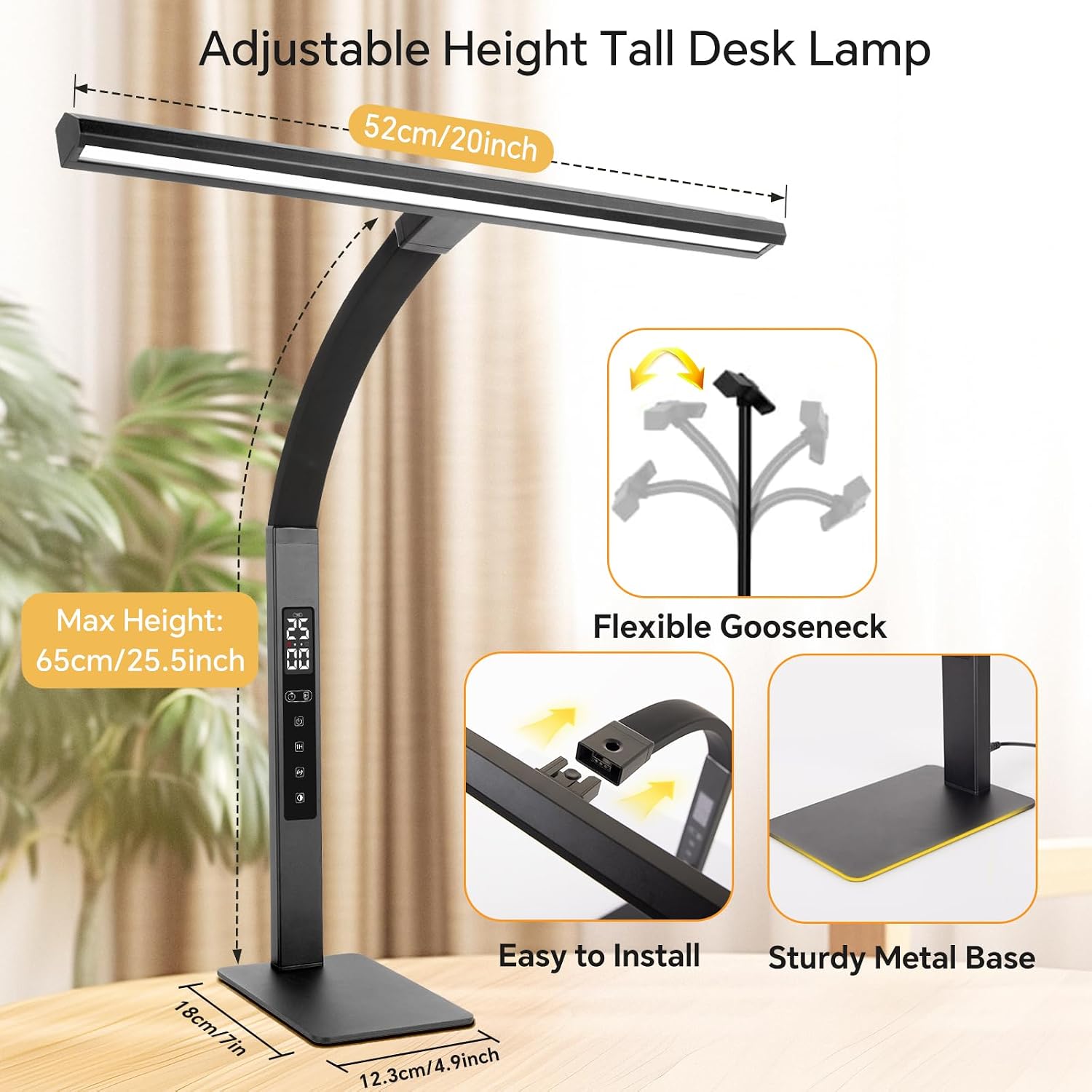
Image: The LAOPAO desk lamp showcasing its adjustable height and flexible gooseneck, allowing for versatile positioning.
3.3 Sturdy and Versatile
Unlike standard clip-on desk lamps, our desk lamp features a heavy metal base that maintains stability on any surface, preventing the lamp from falling off the table. Its minimalist style integrates perfectly into any space.
Video: This video demonstrates the flexibility and features of a similar LED desk lamp, including its adjustable angles, built-in rechargeable battery, 5 color temperatures, 10 brightness levels, memory function, auto-off timer, and USB port.
4. Maintenance
Proper care will ensure the longevity and optimal performance of your LAOPAO T24053-EU Desk Lamp.
4.1 Cleaning
- Always unplug the lamp from the power source before cleaning.
- Use a soft, dry cloth to wipe down the lamp's surfaces.
- For stubborn marks, a slightly damp cloth with mild soap can be used, followed by a dry cloth.
- Avoid using abrasive cleaners, solvents, or harsh chemicals, as these can damage the finish or electronic components.
4.2 Storage
If storing the lamp for an extended period, ensure it is clean and dry. Store it in a cool, dry place away from direct sunlight and extreme temperatures.
5. Troubleshooting
If you encounter any issues with your LAOPAO T24053-EU Desk Lamp, please refer to the following common problems and solutions.
- Lamp does not turn on:
- Check if the power cable is securely plugged into both the lamp and the power outlet.
- Ensure the power outlet is functional by testing it with another device.
- Verify that the power button on the lamp has been pressed.
- Light flickers or is inconsistent:
- Ensure the lamp is connected to a stable power source.
- If using an extension cord, try plugging the lamp directly into a wall outlet.
- The lamp is designed to be flicker-free; if flickering persists, contact customer support.
- Brightness or color temperature cannot be adjusted:
- Ensure the lamp is powered on.
- Gently press the control buttons. If unresponsive, try unplugging and re-plugging the lamp to reset it.
- USB charging port not working:
- Verify the lamp is powered on.
- Check the charging cable and the device being charged. Try a different cable or device.
- Pomodoro timer or clock display issues:
- Refer to the operation section for setting the clock and timer.
- If the display is blank or incorrect, try resetting the lamp by disconnecting and reconnecting power.
If these steps do not resolve the issue, please contact LAOPAO customer support for further assistance.
6. Specifications
| Feature | Specification |
|---|---|
| Model Number | T24053-EU |
| Brand | LAOPAO |
| Dimensions (L x W x H) | 15 x 15 x 10 cm (5.9 x 5.9 x 3.9 inches) |
| Weight | 1.48 kg (3.26 lbs) |
| Light Source Type | LED |
| Brightness | Up to 1600 Lumens |
| Color Temperature | 5 Modes (3000K-6000K) |
| Brightness Levels | 5 Levels |
| Special Features | Pomodoro Timer, Clock, Automatic Shut-off (1 hour), Memory Function, Eye-Caring (flicker-free, glare-free) |
| Adjustability | 360° Flexible Arm, Height Adjustable (35cm to 65cm) |
| Base Material | Metal |
| Power Source | Corded Electric |
| USB Output | 5V/1A (for charging devices) |
| Included Components | Light Dimmer (integrated) |
| Country of Origin | China |
7. Warranty & Support
LAOPAO products are manufactured with high-quality standards. For any warranty claims or technical support, please refer to the following information:
7.1 Warranty Information
This product comes with a standard manufacturer's warranty. Please retain your proof of purchase for any warranty claims. The warranty typically covers defects in materials and workmanship under normal use.
7.2 Customer Support
If you have any questions, require assistance with setup, operation, or troubleshooting, or need to make a warranty claim, please contact LAOPAO customer support through the retailer where you purchased the product or visit the official LAOPAO website for contact details.
Please provide your product model number (T24053-EU) and a detailed description of the issue when contacting support to ensure a prompt resolution.
