1. Introduction
This manual provides essential information for the safe and effective operation of your Jumplushion FS899S Smart Digital Multimeter. Please read this manual thoroughly before use and retain it for future reference. This device is designed for measuring AC/DC voltage, current, resistance, capacitance, frequency, continuity, and ambient temperature in various electrical applications.
2. Safety Information
Always adhere to the following safety precautions to prevent personal injury or damage to the multimeter:
- Do not exceed the maximum input values specified for each measurement range.
- Exercise extreme caution when working with voltages above 30V AC RMS, 42V peak, or 60V DC. These voltages pose a shock hazard.
- Ensure the test leads are in good condition, without any damage to the insulation.
- Do not operate the multimeter if it appears damaged or if the casing is open.
- Always disconnect power to the circuit and discharge all high-voltage capacitors before measuring resistance, continuity, or capacitance.
- Use the correct function and range for each measurement.
- Keep fingers behind the finger guards on the test probes during measurements.
- The device is designed with impact-resistant housing and protection mechanisms to prevent current flow during falls, enhancing user safety.
3. Product Overview
Familiarize yourself with the components of your Jumplushion FS899S Digital Multimeter:

Image: Labeled diagram of the Jumplushion FS899S Digital Multimeter, showing the NCV induction search light, USB charging port, backlit digital display, indicator light, voltage analog bar, flashlight/NCV button, temperature/frequency display, data hold/backlit button, voltage button, current port, public port, and function port. Dimensions are also indicated: 0.91in (2.2cm) thickness, 74mm/2.91in width, and 137mm/5.39in length.
- Backlit Digital Display: 4.8-inch large LCD color screen for clear readings, even in low-light conditions.
- Function Buttons: For selecting measurement modes, data hold, backlight, and NCV/flashlight.
- Input Jacks: For connecting test leads (Current port, Public port, Function port).
- USB Charging Port: For recharging the internal battery.
- NCV Induction Search Light/Flashlight: For non-contact voltage detection and illuminating dark areas.
4. Setup
4.1 Charging the Multimeter
The FS899S features a rechargeable USB-C battery. Connect the provided USB-C cable to the multimeter's charging port and to a standard USB power source (e.g., computer, wall adapter). The indicator light will show charging status.
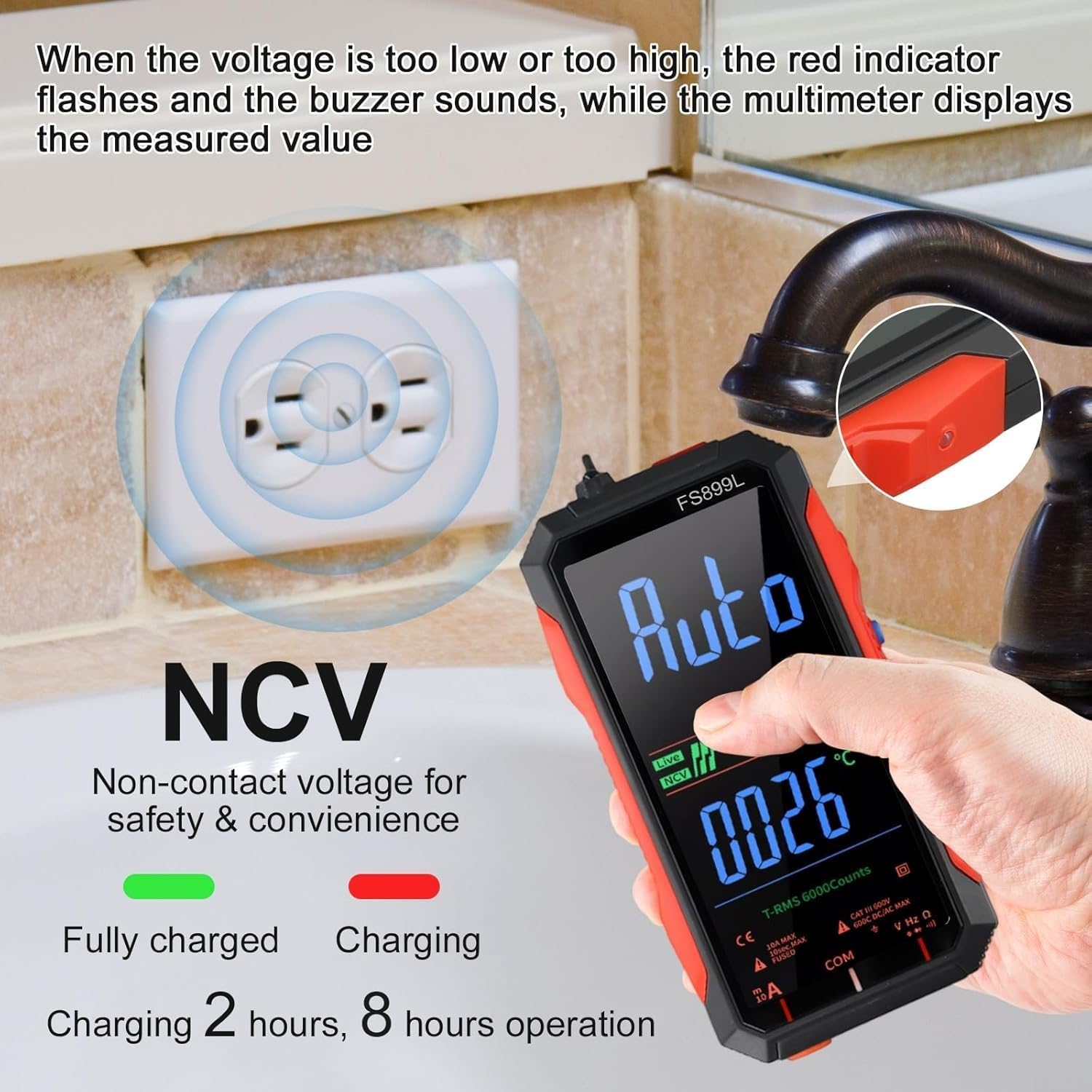
Image: The Jumplushion FS899S Multimeter displaying 'Auto' mode and 'NCV' detection. The image also illustrates the charging status with 'Fully charged' (green) and 'Charging' (red) indicators, noting 2 hours of charging provides 8 hours of operation. An NCV measurement is shown near an electrical outlet.
A full charge takes approximately 2 hours and provides up to 8 hours of continuous operation.
4.2 Connecting Test Leads
Insert the red test lead into the 'VHzΩ' (Function) input jack and the black test lead into the 'COM' (Public) input jack for most voltage, resistance, continuity, capacitance, and frequency measurements. For current measurements, refer to the specific current measurement section.
5. Operating Instructions
5.1 Power On/Off
Press and hold the power button (usually marked with ⑂) to turn the multimeter on or off. The device features an auto shut-down function to conserve battery life after a period of inactivity.
5.2 Automatic Ranging
The FS899S features automatic ranging, which automatically selects the appropriate measurement range. This simplifies operation, as you do not need to manually select ranges.

Image: The Jumplushion FS899S Multimeter displaying '6000 Counts True RMS' and various measurement icons including AC Voltage, DC Voltage, Auto shut-down, Auto Range, Resistance, Continuity, Live Wire, and Non-Contact Voltage (NCV).
5.3 AC/DC Voltage Measurement
- Ensure test leads are correctly connected (red to VHzΩ, black to COM).
- Select the voltage measurement mode (AC or DC, often auto-detected).
- Connect the test probes in parallel to the circuit or component you wish to measure.
- Read the voltage value on the display.

Image: Two scenarios showing the Jumplushion FS899S Multimeter in use. On the left, it measures AC voltage on a circuit board, displaying '225.3 V' and '50.08 kHz'. On the right, it measures DC voltage in an electrical panel, displaying '09.53 V' and '00.28'.
5.4 Resistance, Continuity, Live Wire, and Temperature Measurement
- Ensure test leads are correctly connected (red to VHzΩ, black to COM).
- Select the desired measurement mode (Resistance, Continuity, Live Wire, or Temperature).
- For resistance and continuity, ensure the circuit is de-energized. Connect probes across the component.
- For live wire detection, use the NCV function or specific live wire mode.
- For temperature, the multimeter uses an ambient temperature sensor.

Image: A collage of four images demonstrating the Jumplushion FS899S Multimeter performing different measurements: Resistance (on a circuit board, displaying '1.453 KΩ'), Continuity (with probes touching, displaying '000.1 Ω'), Live wire detection (hand touching a wire, displaying 'Auto'), and Temperature measurement (on a circuit board, displaying '1.453 KΩ' and '00.28°C').
5.5 Non-Contact Voltage (NCV) Detection
The NCV function allows for safe detection of AC voltage without direct contact. Activate the NCV mode and bring the top of the multimeter near the conductor. The device will indicate voltage presence through visual (indicator light) and audible (buzzer) alerts.
5.6 Data Hold and Backlight
Press the 'HOLD' button to freeze the current reading on the display. Press it again to release. The backlight button (often integrated with data hold) illuminates the display for use in dark environments. The built-in torch function can also be activated for additional lighting.

Image: A close-up view of the Jumplushion FS899S Multimeter's 4.8-inch large LCD color screen, displaying various readings and indicators clearly. The text 'EASY TO READ 4.8" Large LCD Color Screen' and 'Even in low-light conditions, data can be easily read' are overlaid.
6. Maintenance
6.1 Cleaning
Wipe the multimeter casing with a damp cloth and mild detergent. Do not use abrasives or solvents. Ensure the device is powered off and disconnected from any circuits before cleaning.
6.2 Battery Care
The internal USB-C rechargeable battery requires no user maintenance. Recharge the device when the battery indicator shows low power. Avoid fully discharging the battery for extended periods to prolong its lifespan.
6.3 Storage
Store the multimeter in a cool, dry place, away from direct sunlight and extreme temperatures. If storing for an extended period, ensure the battery is partially charged (around 50%) to maintain battery health.
7. Troubleshooting
- No Display/Power On: Ensure the battery is charged. Connect the USB-C charger and try again.
- Inaccurate Readings: Check test lead connections. Ensure the correct measurement mode is selected. Verify the circuit is de-energized for resistance/continuity.
- NCV Not Detecting: Ensure NCV mode is active. The NCV sensor needs to be close to the AC voltage source.
- Display 'OL' (Overload): The measured value exceeds the selected range. The auto-ranging feature should typically prevent this, but if it occurs, ensure the input is within the device's maximum specifications.
8. Specifications
| Feature | Specification |
|---|---|
| Brand | Jumplushion |
| Model | FS899S (also R74G0N79H7109634I0674S) |
| Display | 4.8-inch Large LCD Color Screen, 6000 Counts |
| Measurement Type | True RMS |
| AC/DC Voltage Range | 60mV - 600V |
| Current Range | 300mA - 10A |
| Resistance Range | 600Ω - 60MΩ |
| Capacitance Range | 10nF - 60mF |
| Frequency Measurement | Yes |
| Continuity Test | Yes |
| Ambient Temperature | Yes |
| Non-Contact Voltage (NCV) | Yes |
| Power Source | USB-C Rechargeable Battery |
| Battery Life | Up to 8 hours continuous operation (2 hours charge time) |
| Item Weight | 279 Grams |
| Item Dimensions (L x W x H) | 4.72 x 2.36 x 1.18 inches (120 x 60 x 30 mm) |
9. Warranty and Support
For warranty information or technical support, please refer to the product packaging or contact Jumplushion customer service through the retailer where the product was purchased. Please have your model number (FS899S) and purchase details available when contacting support.