
Introduction
Thank you for choosing the CHOEZON 29.5" Narrow Console Table. This manual provides detailed instructions for assembly, operation, maintenance, and safety to ensure proper use and longevity of your product. Please read all instructions carefully before assembly and use.
Safety Information
To prevent tipping, secure the table to the wall using the provided anti-tip kit. Ensure the table is level and stable before use. Do not place heavy items on the table that could cause it to tip over.
Always follow these safety guidelines:
- Keep small parts away from children during assembly.
- Do not overtighten screws, as this may damage the material.
- Ensure all connections are secure before placing items on the table.
- Do not stand or sit on the table.
Package Contents
Before beginning assembly, verify that all parts listed below are present and undamaged.
- Assembly Instructions
- Installation Tool (Allen Key, Screwdriver)
- Anti-Tip Kit
- Table Components (Particleboard panels, Metal frame parts, Power outlet unit)
Setup and Assembly
Follow these steps for proper assembly. Each part is clearly numbered for easy identification.
- Unpack and Identify Parts: Carefully remove all components from the packaging. Lay them out on a clean, soft surface to prevent scratches. Refer to the assembly instructions for a complete list of parts and hardware.
- Assemble the Frame: Attach the metal frame components according to the diagrams in the included assembly instructions. Ensure all screws are finger-tightened initially.
- Attach Tabletop: Secure the particleboard tabletop to the assembled metal frame. Fully tighten all screws once the tabletop is in place.
- Install Power Outlet: Integrate the power outlet unit into the designated slot on the tabletop. Secure it with the provided screws.
- Attach Adjustable Feet: Screw the four adjustable feet into the bottom of the table legs. These can be rotated to level the table on uneven floors.
- Install Anti-Tip Kit: For safety, attach the anti-tip kit to the table and secure it to a wall stud using appropriate hardware. This prevents accidental tipping.
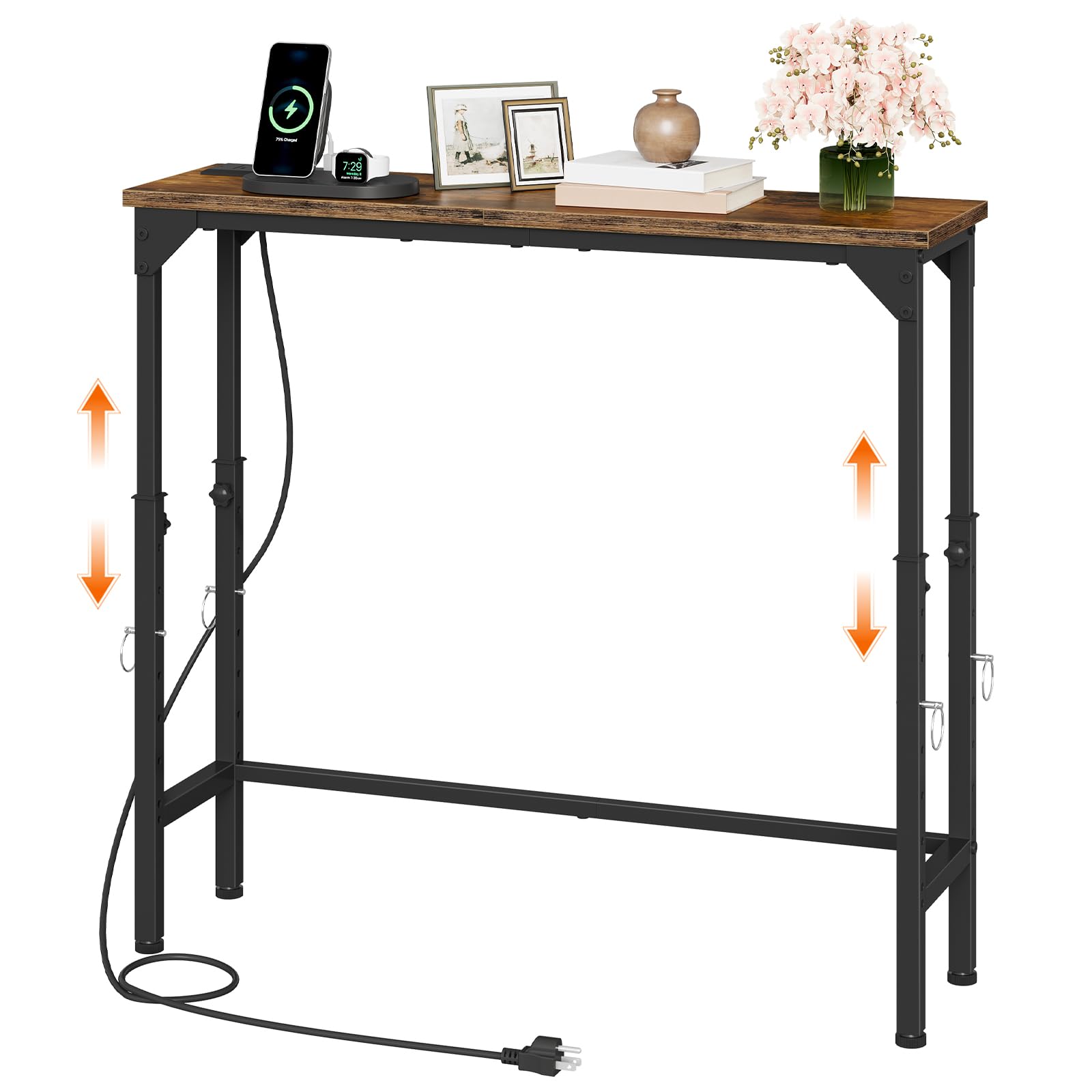

Operating Instructions
Adjustable Height Mechanism
The console table features an adjustable height range from 21.1 inches to 29.9 inches. To adjust the height:
- Locate the rotating knobs and locking bolts on each leg.
- Loosen the rotating knobs.
- Pull out the locking bolts.
- Slide the inner leg section up or down to the desired height.
- Re-insert the locking bolts into the corresponding holes at the desired height.
- Tighten the rotating knobs to secure the legs in place. Ensure both sides are adjusted to the same height for stability.

Integrated Charging Station
The table is equipped with a power outlet unit for convenient device charging.
- 2 AC Outlets: Provides 125V/12A power for standard electronics.
- 2 USB Ports: Provides 5V/2A power for charging smartphones, tablets, and other USB-powered devices.
- Power Cord: The integrated 4.9-foot power cord connects the charging station to a wall outlet.
To use, simply plug the table's power cord into a wall outlet, then connect your devices to the AC outlets or USB ports on the tabletop.

Video 1: Demonstration of the CHOEZON Console Table's adjustable height feature and general use.
Maintenance
To keep your console table in optimal condition:
- Cleaning: Wipe surfaces with a soft, damp cloth. Avoid harsh chemicals or abrasive cleaners that may damage the finish.
- Inspection: Periodically check all screws and bolts to ensure they remain tight. Retighten as necessary.
- Spills: Clean up spills immediately to prevent staining, especially on the engineered wood top.
- Environment: Avoid prolonged exposure to direct sunlight or extreme humidity, which can affect the material's integrity.
Troubleshooting
| Problem | Possible Cause | Solution |
|---|---|---|
| Table is wobbly | Uneven floor; loose connections | Adjust the leveling feet; tighten all screws and bolts. |
| Height adjustment is difficult | Knobs not fully loosened; bolts stuck | Ensure knobs are completely loose; gently wiggle legs while adjusting. |
| Power outlets not working | Table not plugged in; wall outlet issue; faulty unit | Check if the table's power cord is securely plugged into a working wall outlet. Test the wall outlet with another device. If issues persist, contact customer support. |
| Missing parts during assembly | Packaging oversight | Review the package contents list. Contact customer support for replacement parts. |
Specifications
| Feature | Detail |
|---|---|
| Brand | CHOEZON |
| Model | TXG10UBF |
| Product Dimensions (D x W x H) | 7.9" x 29.5" x 29.9" |
| Adjustable Height Range | 21.1" - 29.9" |
| Frame Material | Metal |
| Top Material Type | Engineered Wood (Particleboard) |
| Color | Rustic Brown, Black |
| Power Outlets | 2 AC Outlets (125V/12A) |
| USB Ports | 2 USB Ports (5V/2A) |
| Power Cord Length | 4.9 feet |
| Special Features | Adjustable Height, Charging Station, Anti-Tip Kit, Adjustable Feet |
| Assembly Required | Yes |
| Included Components | Assembly Instructions, Installation Tool, Anti-Tip Kit |
Warranty and Support
CHOEZON products are designed for quality and durability. For warranty information, replacement parts, or technical support, please contact CHOEZON customer service through the retailer where the product was purchased or visit the official CHOEZON website.
Please retain your proof of purchase for warranty claims.