
1. Introduction
This manual provides comprehensive instructions for the MZ S666 Retro Radio Speaker. Please read this manual thoroughly before operating the device to ensure proper use, optimal performance, and longevity. Keep this manual for future reference.
2. Product Overview
2.1 Key Features
- High-Power Audio: Integrated 5W speaker for clear and loud sound.
- Long-Lasting Battery: 1500mAh rechargeable battery providing up to 4 hours of continuous playback.
- Multi-Band Radio: Supports FM, AM, and SW frequencies.
- Versatile Playback: Compatible with TF (MicroSD) cards, USB drives, and Bluetooth connectivity.
- TWS Functionality: Allows for True Wireless Stereo pairing with another MZ S666 speaker.
- Modern Charging: Equipped with a Type-C charging port.
2.2 Controls and Ports

Image 1: Front view of the MZ S666 speaker, highlighting the main controls. On the left is the Volume knob, which also serves as the power switch. On the right is the Tuning knob for radio frequency selection. Below the main grille are buttons for Mode selection (SW AM FM MP3) and Playback control (Previous, Play/Pause, Next).
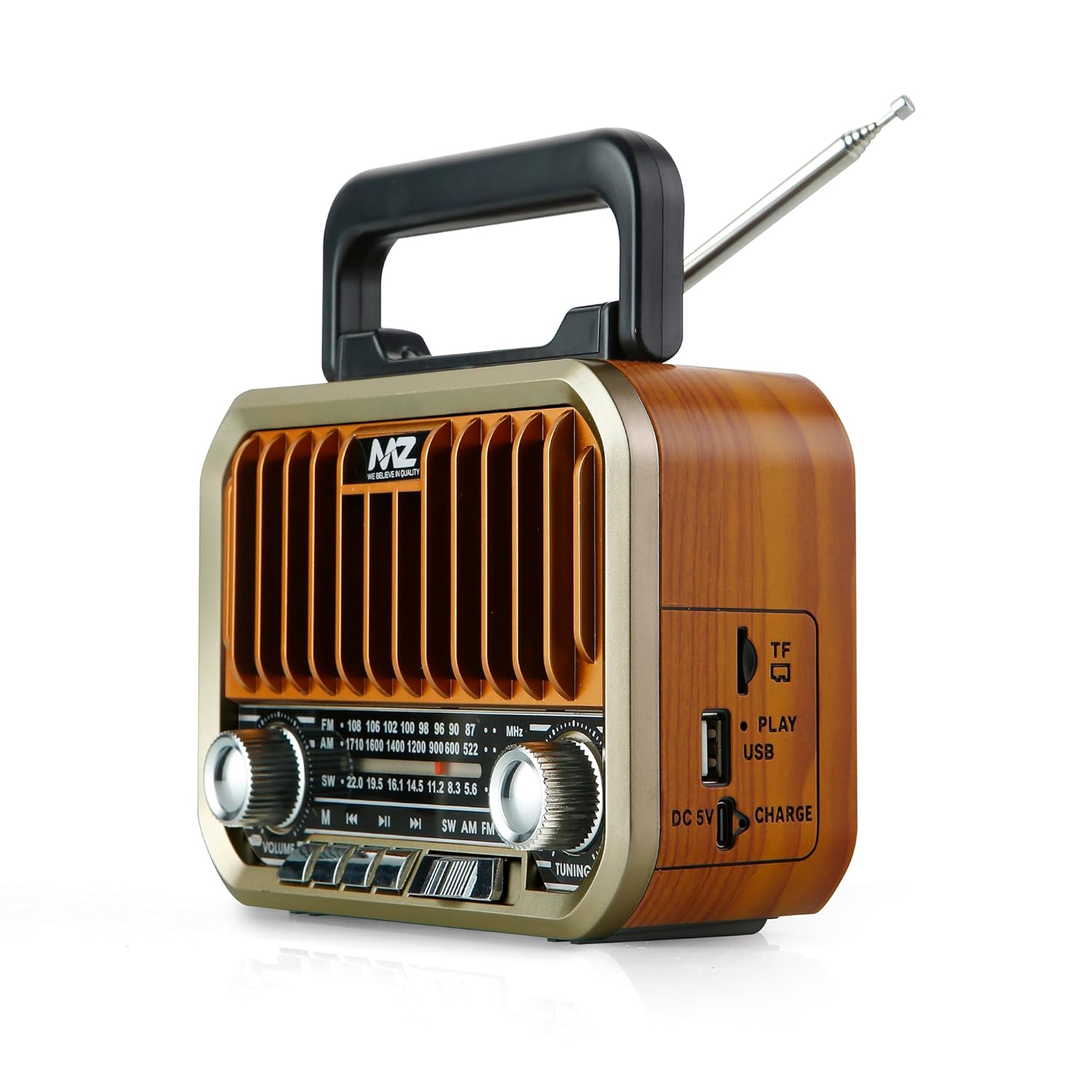
Image 2: Side view of the MZ S666 speaker, illustrating the connectivity ports. From top to bottom, these include the TF card slot, USB port, and the DC 5V Type-C charging port. A 'Charge' indicator light is also visible.

Image 3: Back view of the MZ S666 speaker, showing the removable cover for the battery compartment. The telescopic antenna is also visible at the top.
3. Setup
3.1 Battery Installation
- Locate the battery compartment on the back of the speaker (refer to Image 3).
- Slide the battery compartment cover downwards to open it.
- Insert the provided 1500mAh Lithium-Ion battery, ensuring correct polarity (+/-).
- Close the battery compartment cover securely.
3.2 Initial Charging
Before first use, fully charge the speaker for approximately 3-4 hours.
- Connect the provided Type-C charging cable to the DC 5V port on the side of the speaker (refer to Image 2).
- Connect the other end of the cable to a standard USB power adapter (not included) or a computer USB port.
- The 'Charge' indicator light will illuminate during charging and turn off when fully charged.
4. Operating Instructions
4.1 Power On/Off
- To power on, rotate the Volume knob clockwise until you hear a click and the speaker powers on.
- To power off, rotate the Volume knob counter-clockwise until you hear a click and the speaker powers off.
4.2 Mode Selection
Press the Mode button (labeled SW AM FM MP3) repeatedly to cycle through available modes: FM Radio, AM Radio, SW Radio, Bluetooth, USB, and TF Card.
4.3 Radio Operation (FM/AM/SW)
- Extend the telescopic antenna for better reception.
- Select the desired radio band (FM, AM, or SW) using the Mode button.
- Rotate the Tuning knob to search for radio stations.
- Adjust the volume using the Volume knob.
4.4 Bluetooth Mode
- Switch the speaker to Bluetooth mode using the Mode button. The speaker will indicate it is ready for pairing (e.g., a voice prompt or flashing indicator).
- On your mobile device, enable Bluetooth and search for available devices.
- Select "MZ S666" from the list of devices to pair.
- Once paired, you can play audio from your device through the speaker.
- Use the playback control buttons on the speaker (Previous, Play/Pause, Next) to manage your music.
4.5 USB/TF Card Playback
- Insert a USB drive into the USB port or a TF (MicroSD) card into the TF card slot (refer to Image 2).
- The speaker will automatically switch to USB or TF card mode and begin playing audio files. If not, use the Mode button to select the correct mode.
- Use the playback control buttons (Previous, Play/Pause, Next) to navigate tracks.
4.6 TWS (True Wireless Stereo) Pairing
To achieve stereo sound, you can pair two MZ S666 speakers together:
- Ensure both MZ S666 speakers are powered on and in Bluetooth mode, but not yet connected to any device.
- On one of the speakers (this will be the primary speaker), press and hold the Play/Pause button for a few seconds until you hear an indication that TWS pairing has begun.
- The two speakers will automatically search for and connect to each other. Once connected, you will hear a confirmation sound.
- Now, connect your mobile device to the primary speaker via Bluetooth as described in section 4.4.
- Audio will now play in stereo through both speakers.
5. Charging
- When the battery is low, the speaker may emit an audible warning or the indicator light may change.
- Connect the Type-C charging cable to the speaker's DC 5V port and a power source.
- The 'Charge' indicator light will show charging status.
- A full charge typically takes 3-4 hours. Avoid overcharging to prolong battery life.
6. Maintenance
- Cleaning: Use a soft, dry cloth to clean the speaker's exterior. Do not use abrasive cleaners or solvents.
- Storage: Store the speaker in a cool, dry place away from direct sunlight and extreme temperatures.
- Battery Care: If not used for extended periods, charge the battery at least once every three months to maintain its health.
- Water Exposure: This speaker is not waterproof. Avoid exposure to water or high humidity.
7. Troubleshooting
| Problem | Possible Cause | Solution |
|---|---|---|
| Speaker does not power on. | Battery is depleted or not installed correctly. | Charge the speaker. Ensure the battery is correctly inserted with proper polarity. |
| No sound from speaker. | Volume is too low, incorrect mode selected, or device not connected. | Increase volume. Verify correct mode (Bluetooth, Radio, USB/TF). Re-pair Bluetooth device. |
| Poor radio reception. | Antenna not extended, weak signal, or interference. | Fully extend the telescopic antenna. Try repositioning the speaker. |
| Bluetooth device cannot pair. | Speaker not in pairing mode, device too far, or already connected to another device. | Ensure speaker is in Bluetooth pairing mode. Move device closer. Disconnect from other devices. |
| USB/TF card not playing. | Card/drive not inserted correctly, unsupported file format, or corrupted media. | Reinsert media. Ensure files are in a supported format (e.g., MP3). Try another USB/TF card. |
8. Specifications
| Feature | Specification |
|---|---|
| Model | MZ S666 |
| Speaker Output Power | 5 Watts |
| Battery Capacity | 1500mAh (Lithium Ion) |
| Playback Time | Up to 4 hours (at moderate volume) |
| Radio Bands | FM, AM, SW |
| Connectivity | Bluetooth, USB, TF Card, TWS |
| Charging Port | Type-C (DC 5V) |
| Material | ABS Plastic |
| Dimensions (D x W x H) | 6D x 16.5W x 12H Centimeters |
| Item Weight | 502 Grams |
| Included Components | 1 Speaker, 1 Charging Cable |
9. Warranty and Support
For warranty information or technical support, please refer to the documentation provided at the time of purchase or contact your retailer. Keep your proof of purchase for any warranty claims.