
1. Introduction
Thank you for choosing the Huuger L-Shaped Standing Desk. This manual provides essential information for the assembly, operation, and maintenance of your new desk. Please read these instructions carefully before use to ensure proper function and safety. Keep this manual for future reference.
2. Product Features
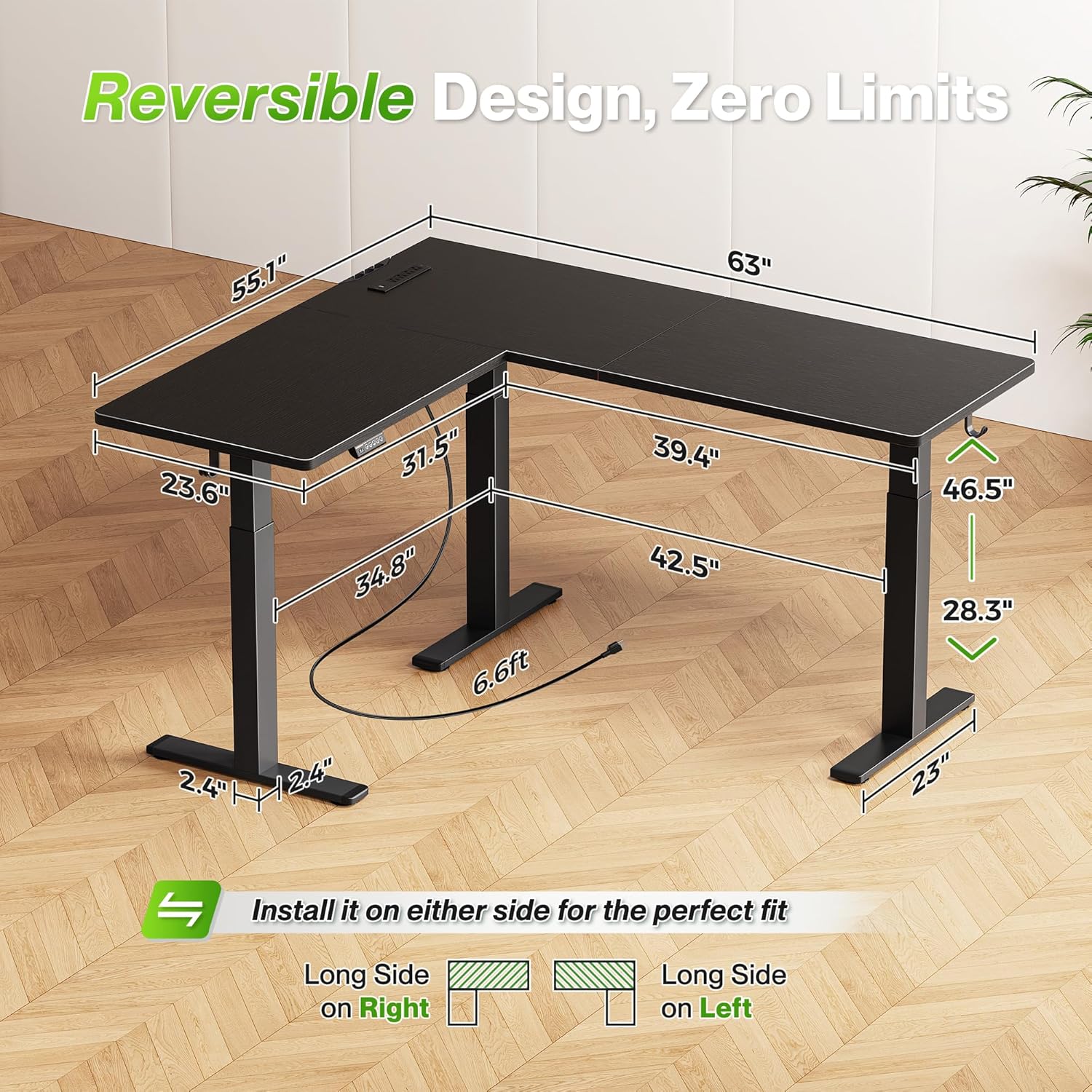
- Adjustable Height: Electrically adjustable height from 28.3 inches to 46.5 inches (71.9 cm to 118.1 cm) for comfortable sitting or standing positions.
- Reversible L-Shaped Design: The L-shaped desktop (63 x 55.1 inches / 160 x 140 cm) can be installed with the long side on either the left or right to fit various room layouts.
- Integrated Charging Station: Features a built-in power strip with 4 AC outlets, 1 USB-A port, and 1 USB-C port for convenient device charging.
- Memory Presets: Control panel with an LED display and 3 programmable memory height presets for quick adjustments.
- Cable Management: Includes a cable management tray to keep wires organized and two side hooks for headphones or other accessories.
- Quiet Operation: Motor operates at less than 45dB for a focused work environment.
- Safety Features: Anti-collision design prevents damage during height adjustments.
- Durable Construction: Crafted from sturdy particleboard and solid steel legs, providing a load-bearing capacity of up to 260 lbs (118 kg).
3. Package Contents
Your Huuger L-Shaped Standing Desk package includes all necessary components for assembly, clearly numbered parts, an easy-to-follow instruction manual, and installation tools. Please verify all parts are present upon unboxing.
4. Setup and Assembly
Assembly is designed to be straightforward with numbered parts and included tools. For optimal experience, consider assembling with another person.
- Unpack and Verify: Carefully unpack all components and compare them against the parts list in the included manual. Report any missing or damaged parts to customer service immediately.
- Frame Assembly: Assemble the desk frame according to the detailed instructions provided. Ensure all screws are tightened securely.
- Desktop Installation: Attach the desktop panels to the frame. Decide whether you want the longer section of the L-shape on the left or right side before securing the panels.
- Motor and Control Panel: Install the motor and connect it to the control panel. Ensure all electrical connections are secure.
- Power Strip and Accessories: Install the built-in power strip, cable management tray, and side hooks as indicated in the manual.
- Cable Management: Route all cables neatly through the cable management tray to prevent clutter and ensure safe operation.

5. Operating Instructions
5.1 Height Adjustment
The desk features an electric motor for smooth height adjustments. Use the control panel to raise or lower the desk to your desired position.
5.2 Control Panel
The control panel allows precise height adjustments and includes memory presets.
- Up/Down Buttons: Press the up or down arrow buttons to adjust the desk height. The LED display will show the current height.
- Memory Presets (1, 2, 3): To save a height, adjust the desk to the desired level, then press and hold one of the numbered memory buttons (1, 2, or 3) until you hear a beep or see the display flash. To recall a saved height, simply press the corresponding numbered button.

5.3 Built-in Charging Station
The integrated power strip provides convenient access to power for your electronic devices.
- AC Outlets: Use the 4 AC outlets for monitors, laptops, and other powered devices.
- USB Ports: Utilize the 1 USB-A port and 1 USB-C port for charging smartphones, tablets, and other USB-powered accessories.

6. Maintenance
- Cleaning: Wipe the desk surfaces with a damp cloth. Avoid harsh chemicals or abrasive cleaners that may damage the finish.
- Cable Management: Periodically check and reorganize cables to ensure they are not pinched or tangled, which can affect desk movement or cause damage.
- Fasteners: Occasionally check all screws and bolts to ensure they remain tight. Retighten if necessary.
- Motor Inspection: Ensure the motor and lifting mechanisms are free from obstructions.

7. Troubleshooting
| Problem | Possible Cause | Solution |
|---|---|---|
| Desk does not adjust height. | Power cable disconnected, motor issue, or control panel malfunction. | Check power connections. Ensure the power adapter is correctly plugged in. If the issue persists, contact Huuger customer service. |
| One leg is stuck or uneven. | Obstruction in the lifting mechanism or internal component issue. | Ensure no objects are obstructing the legs. Try lowering the desk to its lowest setting and then raising it again. If the problem continues, contact customer service. |
| Missing parts or damaged components upon arrival. | Shipping damage or packaging error. | Immediately contact Huuger customer service with details of the missing or damaged parts. |
| Power outlets not working. | Desk not powered, internal wiring issue, or tripped circuit. | Ensure the desk is properly powered. Check if any circuit breakers on the power strip (if applicable) have tripped. If not resolved, contact customer service. |
8. Specifications
| Feature | Detail |
|---|---|
| Brand | Huuger |
| Model | B0FNWG7FM2 |
| Shape | L-Shaped (Rectangular sections) |
| Product Dimensions (D x W x H) | 55.12"D x 63"W x 28.35"H (140cm D x 160cm W x 72cm H) |
| Adjustable Height Range | 28.3" - 46.5" (71.9 cm - 118.1 cm) |
| Color | Black |
| Material Type | Engineered Wood, Metal |
| Base Material | Metal |
| Load-bearing Capacity | Up to 260 lbs (118 kg) |
| Power Outlets | 4 AC outlets, 1 USB-A port, 1 USB-C port |
| Noise Level | Under 45dB |
| Special Features | Built-In USB Outlet, Reversible Design, Memory Presets, Anti-Collision |
| Required Assembly | Yes |


9. Safety Information
- Always ensure the desk is placed on a level surface.
- Do not overload the desk beyond its maximum weight capacity of 260 lbs (118 kg).
- Keep hands and objects clear of the lifting mechanism during height adjustments to prevent injury. The desk features an anti-collision design for added safety.
- Ensure all electrical cables are properly routed and secured to prevent tripping hazards or damage.
- Do not attempt to disassemble or repair the motor or electrical components yourself. Contact qualified personnel for service.
- Unplug the desk from the power outlet before cleaning or if it will be unused for an extended period.
10. Warranty and Support
Huuger is committed to providing quality products. While specific warranty details are not provided in this manual, if you encounter any issues with your desk, including missing parts, operational malfunctions, or defects, please contact Huuger customer service. Provide your product model number (B0FNWG7FM2) and a detailed description of the issue for prompt assistance.
For customer support, please refer to the contact information provided with your purchase or visit the official Huuger website.