Introduction
This manual provides essential information for the proper installation, use, and maintenance of your Smartwatch Protective Case for Ultra 2. This case is designed to offer protection and enhance the aesthetic of your smartwatch, featuring a hollow border design and a slim, lightweight profile suitable for various occasions.
Product Overview
The protective frame case is engineered to fit the Ultra 2 smartwatch, providing a practical cover for daily use. Its lightweight and slim shell ensures a comfortable wearing experience without adding bulk. The stylish hollow border design offers a sophisticated finish that complements both modern and classic attire, protecting the watch face from accidental scratches.

Figure 1: Key features of the protective case, highlighting shockproof capabilities, natural touch sensitivity, comprehensive protection, and comfortable wear.
Setup and Installation
The protective case is designed for easy, tool-free installation and removal. Ensure your smartwatch is clean and free of debris before installation.
- Verify Compatibility: This case is specifically designed for the Ultra 2 smartwatch with dimensions of 50mm x 44mm. Please check the back of your watch to confirm its size (compatible with 49mm watch models).
- Align the Case: Carefully align the protective case with your smartwatch, ensuring that all cutouts for buttons, crown, and sensors match the watch's features.
- Snap On: Gently press the case onto the smartwatch until it snaps securely into place. Ensure there are no gaps and the watch is fully seated within the case.
- Removal: To remove the case, gently pry it off from one corner, working your way around the edges until it detaches from the watch.
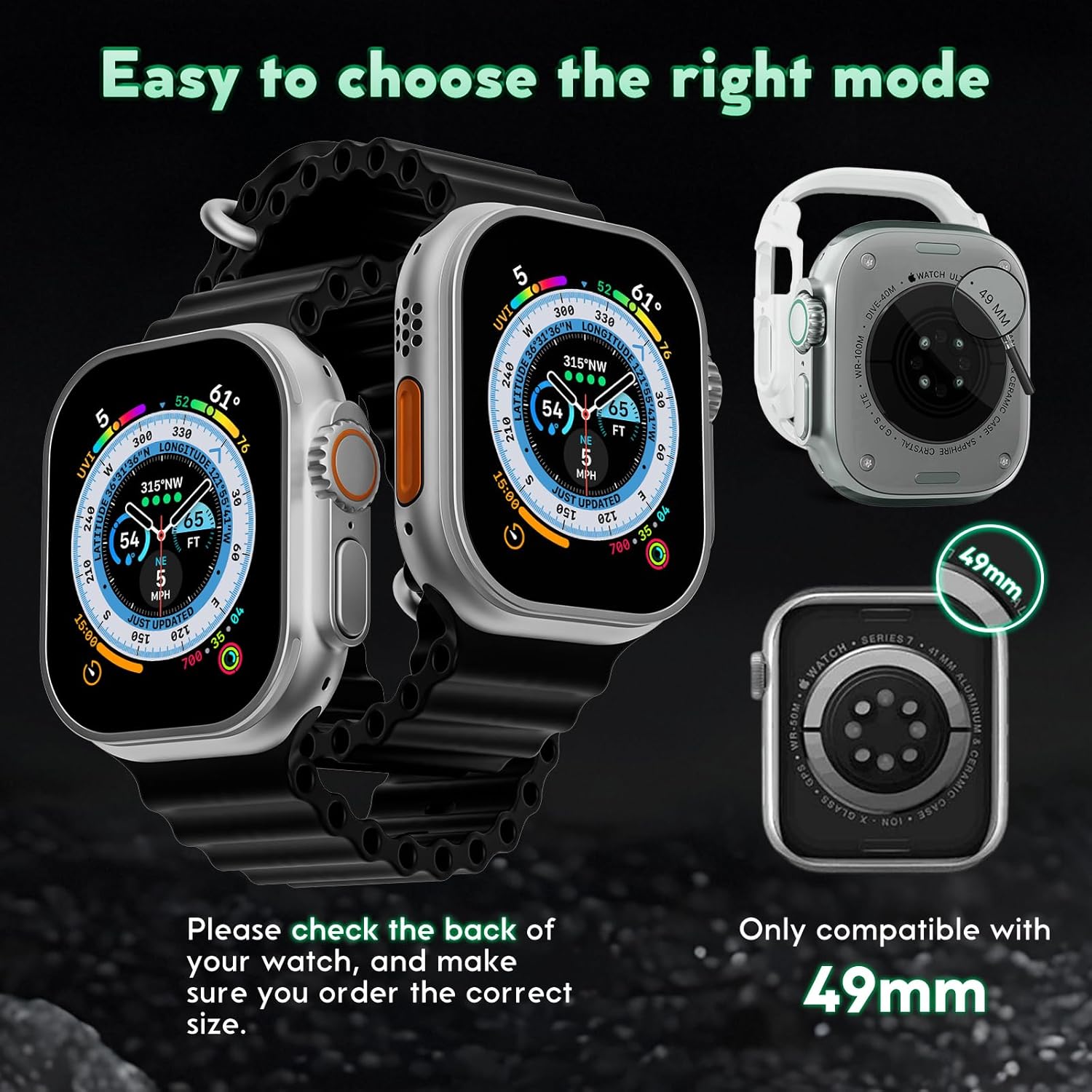
Figure 2: Compatibility check for the smartwatch case, confirming it is designed for 49mm watch models.

Figure 3: The protective case securely installed on a smartwatch, demonstrating its seamless fit.
Operating Instructions
Once installed, the protective case requires no special operation. It functions as a passive protective layer for your smartwatch. All watch functions, including button access, digital crown rotation, and screen touch sensitivity, should remain fully accessible and responsive.
The case is suitable for various daily activities, including office work, travel, sports, and social events, providing protection without hindering usability.
Maintenance
To ensure the longevity and appearance of your protective case, follow these maintenance guidelines:
- Cleaning: Wipe the case regularly with a soft, damp cloth to remove dust, fingerprints, and smudges. Avoid using harsh chemicals or abrasive materials, as these can damage the finish.
- Storage: When not in use, store the case in a clean, dry place away from direct sunlight and extreme temperatures.
- Inspection: Periodically inspect the case for any signs of wear or damage. If the case is cracked or severely damaged, it may compromise its protective capabilities and should be replaced.
Troubleshooting
If you encounter any issues with your protective case, consider the following:
- Case Does Not Fit: Ensure you have the correct size case for your smartwatch model. This case is designed for Ultra 2 (50mm x 44mm) and compatible with 49mm watch models. Refer to Figure 2 for compatibility.
- Reduced Touch Sensitivity: If you experience reduced touch sensitivity, ensure the case is properly seated and there is no debris trapped between the case and the screen. Remove the case, clean both surfaces, and re-install.
- Buttons or Crown Not Accessible: Check that the case is correctly aligned with the smartwatch. Misalignment can obstruct access to buttons or the digital crown. Re-adjust the case if necessary.
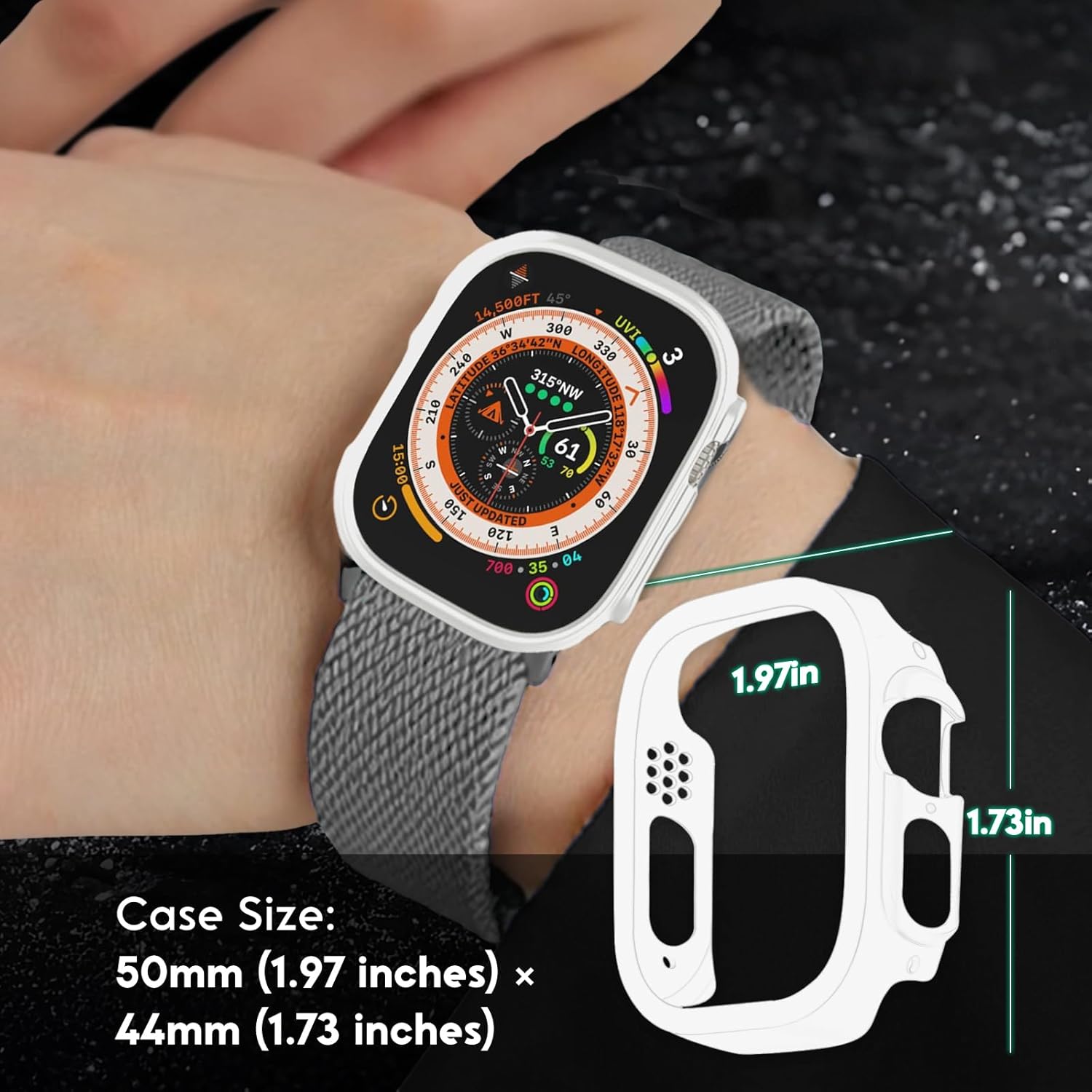
Figure 4: Detailed dimensions of the protective case: 50mm (1.97 inches) x 44mm (1.73 inches).
Specifications
| Brand | Generic |
| Color | White Ultra2 |
| Compatible Devices | Smartwatch (Ultra 2, 49mm models) |
| Form Factor | Case |
| Shell Type | Hybrid |
| Case Dimensions | 50 mm (1.97 inches) x 44 mm (1.73 inches) |
| Origin | China |
Warranty and Support
Specific warranty information is not provided with this product. For any support inquiries or issues not covered in this manual, please contact the retailer or the manufacturer directly through their official support channels. Keep your purchase receipt for potential warranty claims.