
1. Introduction
Thank you for choosing the vilicert Video Walkie Talkie Toys. This manual provides essential information for the safe and effective use of your new two-way radio system. These walkie talkies feature real-time video communication, long-range transmission, and fun voice effects, designed for children aged 3-12 years.

Figure 1: vilicert Video Walkie Talkie Toys (Model JK200)
2. Safety Information
Please read and understand all safety instructions before use. Keep this manual for future reference.
- Age Recommendation: Suitable for children aged 3 to 12 years.
- Battery Safety: The device contains a built-in rechargeable lithium-ion battery. Do not attempt to replace the battery. Use only the provided Type-C charging cables.
- Water Resistance: This product is not water resistant. Avoid exposure to water or moisture.
- Choking Hazard: Small parts may be included (e.g., lanyards). Adult supervision is recommended for younger children.
- Hearing Protection: Do not place the speaker directly against the ear at maximum volume.
3. Package Contents
The vilicert Video Walkie Talkie package includes:
- 2 x Video Walkie Talkie units (Blue+Pink)
- 2 x Type-C Charging Cables
- 2 x Lanyards
- 1 x User Manual (this document)
4. Product Overview
Familiarize yourself with the main components of your vilicert Video Walkie Talkie:
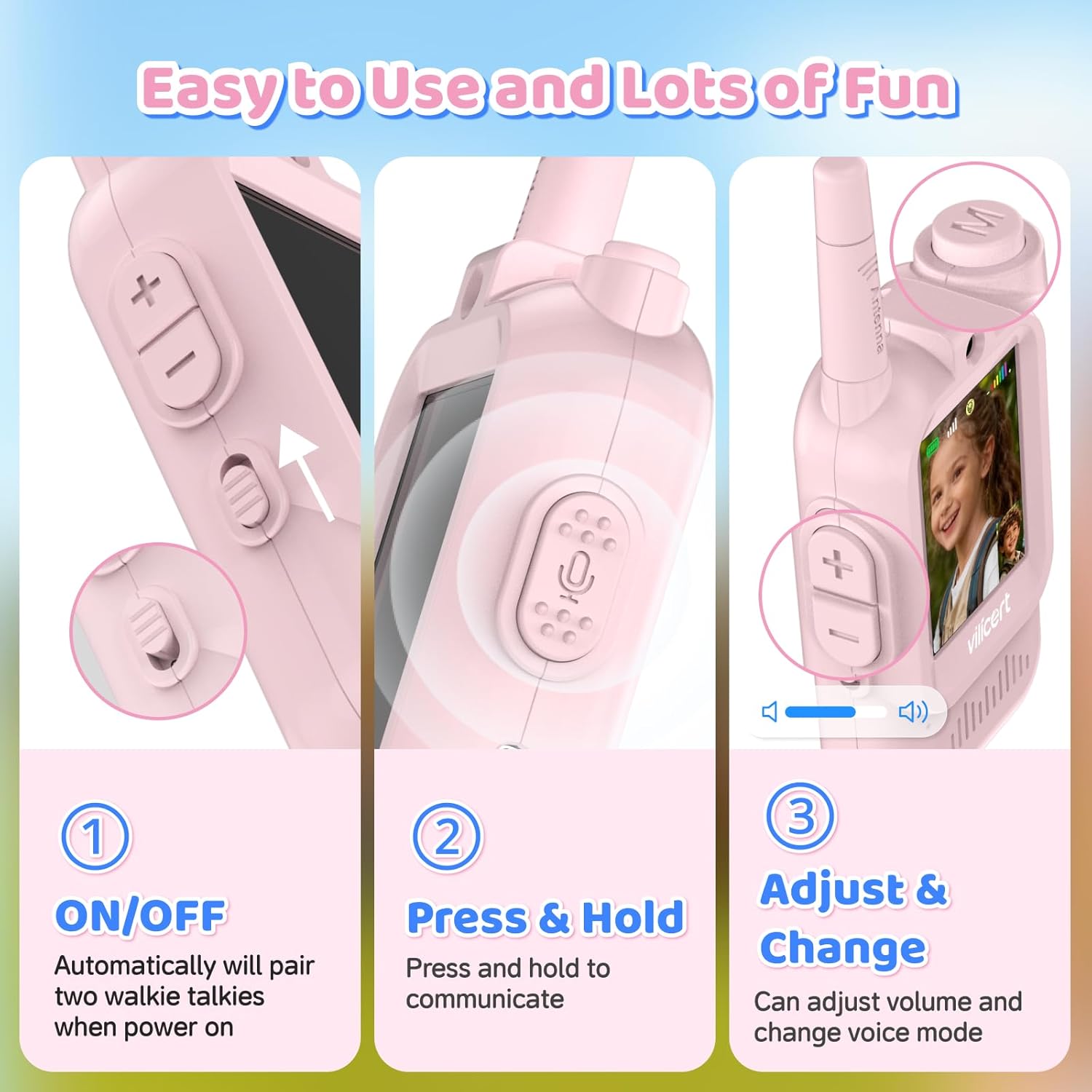
Figure 2: Side view of the vilicert Video Walkie Talkie controls
- Antenna: For signal transmission and reception.
- Camera: Located above the screen for video calls.
- Screen: Displays video feed, battery status, and other indicators.
- Speaker/Microphone: For audio input and output.
- Power Switch: Located on the side to turn the device ON/OFF.
- Volume Buttons (+/-): Adjusts speaker volume.
- Push-to-Talk (PTT) Button: Press and hold to transmit audio/video.
- Mode/Menu Button (M): For accessing settings and voice effects.
- Type-C Charging Port: For recharging the device.
5. Setup
5.1 Charging the Devices
Before first use, fully charge both walkie talkies.
- Connect the provided Type-C charging cable to the charging port on the side of each walkie talkie.
- Connect the other end of the cable to a compatible USB power source (e.g., 5V/1A adapter, computer USB port).
- The battery indicator on the screen will show charging status. A full charge typically takes approximately 3.5 hours for a working time of 3.5 hours and 7 days standby.

Figure 3: Charging the Walkie Talkie
5.2 Powering On/Off
To turn the walkie talkies ON or OFF, use the slide switch located on the side of each unit. When powered on, the two walkie talkies will automatically pair with each other.
5.3 Attaching Lanyards
Attach the provided lanyards to the designated loop on each walkie talkie to prevent accidental drops and for easy carrying.
6. Operating Instructions
6.1 Basic Communication (Push-to-Talk)
The vilicert Video Walkie Talkies support one-to-one transmission.
- Ensure both walkie talkies are powered on and within range.
- To speak, press and hold the Push-to-Talk (PTT) button on the side of your walkie talkie. Speak clearly into the microphone.
- Release the PTT button to listen for a response.
6.2 Real-time Video Calls
Experience face-to-face communication with the built-in video screen.
- When communicating, the screen will display the live video feed from the other connected walkie talkie.
- The camera resolution is 640x480 pixels on a 2-inch screen.
Video 1: Demonstration of vilicert Video Walkie Talkie features, including real-time video communication.
6.3 Voice Changer Modes
Add fun to your conversations with four different voice effects:
- Press and hold the 'M' (Mode) button for 2 seconds to activate voice change mode.
- Briefly press the 'M' button to cycle through the available voice effects: Original, Child, Robot, Alien.
- The selected voice effect will remain active until the device is shut down, reverting to the original sound mode upon restart.

Figure 4: Voice Changing Effects
6.4 Volume Adjustment
Use the '+' and '-' buttons on the side of the walkie talkie to increase or decrease the speaker volume.
6.5 Transmission Range
The walkie talkies offer a significant communication range:
- Up to 100 meters (300 feet) in indoor/neighborhood conditions.
- Up to 400 meters (1000 feet) in open outdoor conditions.
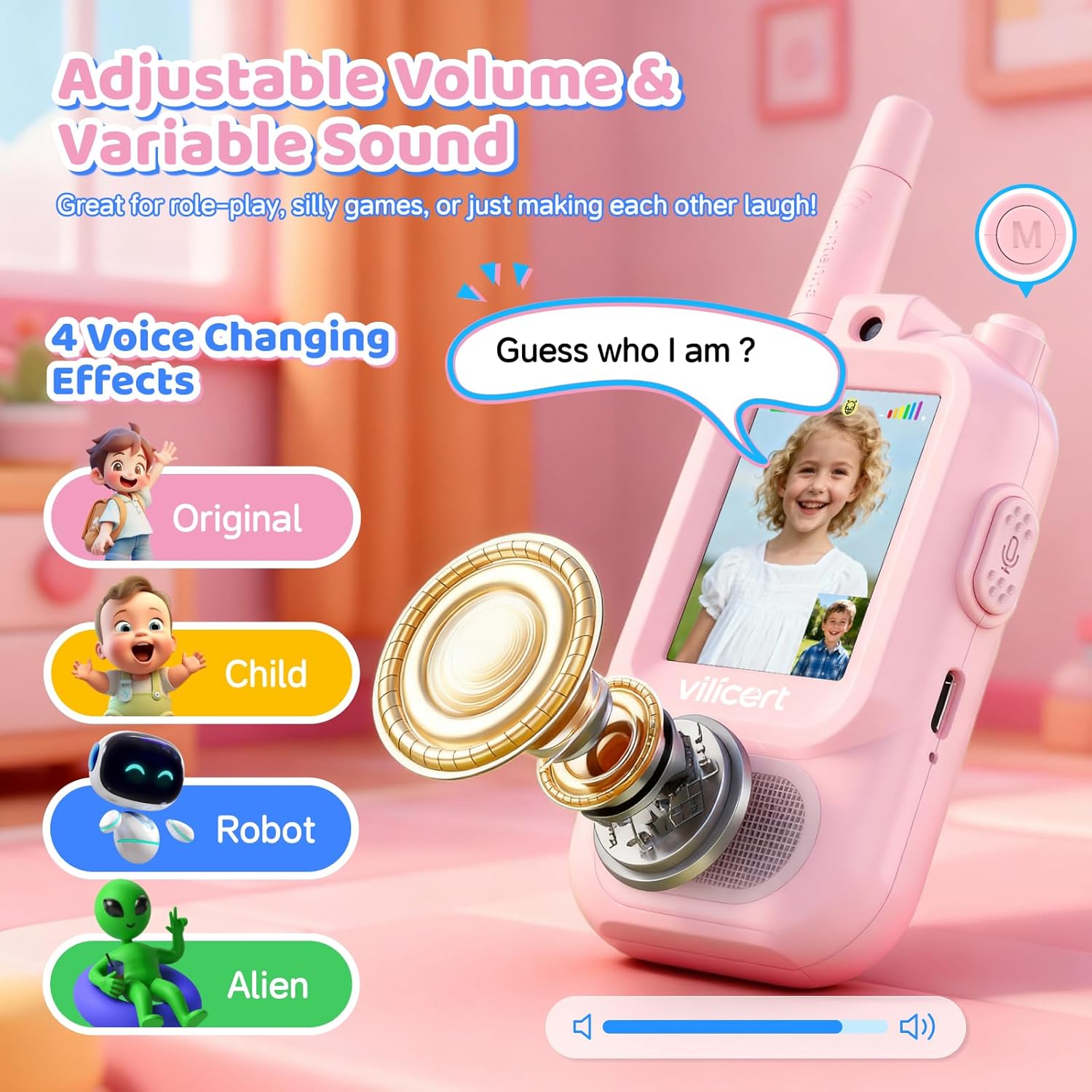
Figure 5: Transmission Range
7. Maintenance
- Cleaning: Wipe the devices with a soft, dry cloth. Do not use abrasive cleaners or solvents.
- Storage: Store in a cool, dry place away from direct sunlight and extreme temperatures.
- Battery Care: To prolong battery life, avoid fully discharging the battery frequently. Recharge regularly, even if not in active use.
8. Troubleshooting
| Problem | Possible Cause | Solution |
|---|---|---|
| Device does not power on | Low battery | Charge the device using the provided Type-C cable. |
| No communication between units | Out of range, devices not paired, or interference. | Ensure both units are ON and within range. They should pair automatically. Move closer if necessary. |
| Poor audio/video quality | Weak signal, interference, or distance. | Move closer to the other unit. Avoid obstacles like thick walls. |
| Voice changer not working | Incorrect activation. | Press and hold the 'M' button for 2 seconds to activate. Briefly press to cycle modes. |
9. Specifications
| Feature | Detail |
|---|---|
| Model Number | JK200 |
| Brand | vilicert |
| Item Weight | 7.7 ounces |
| Package Dimensions | 5.83 x 5.55 x 1.65 inches |
| Batteries | 1 x 12V Lithium-ion battery (included) |
| Number of Channels | 11 |
| Talking Range (Outdoor) | Up to 1000 Feet (approx. 300 meters) |
| Talking Range (Indoor/Neighborhood) | Up to 300 Feet (approx. 100 meters) |
| Special Features | Lightweight, Long Range, Rechargeable, Voice Operated Transmission |
| Water Resistance Level | Not Water Resistant |
| Compatible Devices | Vilicert walkie talkies using the same frequency band or channel |
10. Warranty and Support
This product comes with a 1-Year Warranty from the date of purchase, as per manufacturer's terms.
For technical support, warranty claims, or further assistance, please refer to the contact information provided with your purchase or visit the official vilicert website.