
1. Introduction
This manual provides essential instructions for assembling, operating, maintaining, and troubleshooting your Petoi Bittle X V2 Alloy Servo Robot Dog. This kit is designed for users interested in robotics, coding, and STEM education, offering a hands-on experience in building and programming a quadruped robot.
The Petoi Bittle X V2 is an open-source, programmable robot dog capable of performing over 35 lifelike actions. It supports control via a mobile app, voice commands, and various programming languages including block coding, Arduino C++, and Python.

Image: The Petoi Bittle X V2 Robot Dog, demonstrating its compact and portable design.
2. Setup and Assembly
The Petoi Bittle X V2 Alloy Servo Robot Dog is a construction kit, requiring assembly. The process typically takes 2-3 hours. Online assembly instructions are available and recommended for detailed guidance.
2.1 Kit Contents
Your construction kit includes:
- Alloy servo motors
- Plastic body pieces
- 12V battery
- Bluetooth and Wi-Fi modules
- Arduino motion controller (Nyboard)
- Necessary tools and fasteners for assembly
2.2 Assembly Steps
- Carefully remove all components from the packaging.
- Follow the detailed online assembly instructions provided by Petoi. Pay close attention to the placement of components, especially the servo motors.
- Assemble the body pieces and attach the alloy servos. Note that installing the leg springs might require precision; a 3D printable tool for this purpose can be found on the Petoi website.
- Install the 12V battery into its designated compartment.
- Connect the Bluetooth, Wi-Fi, or USB modules to the main circuit board (Nyboard). One of these connections is essential for initial calibration.
- Download the Petoi app to your mobile device (iOS or Android) or the Codecraft App to your PC/Mac for programming and control.
- Perform initial calibration of the robot using the connected app or software. This step is crucial for proper functionality.

Image: A user engaged in the assembly process of the Petoi Bittle X V2 kit.
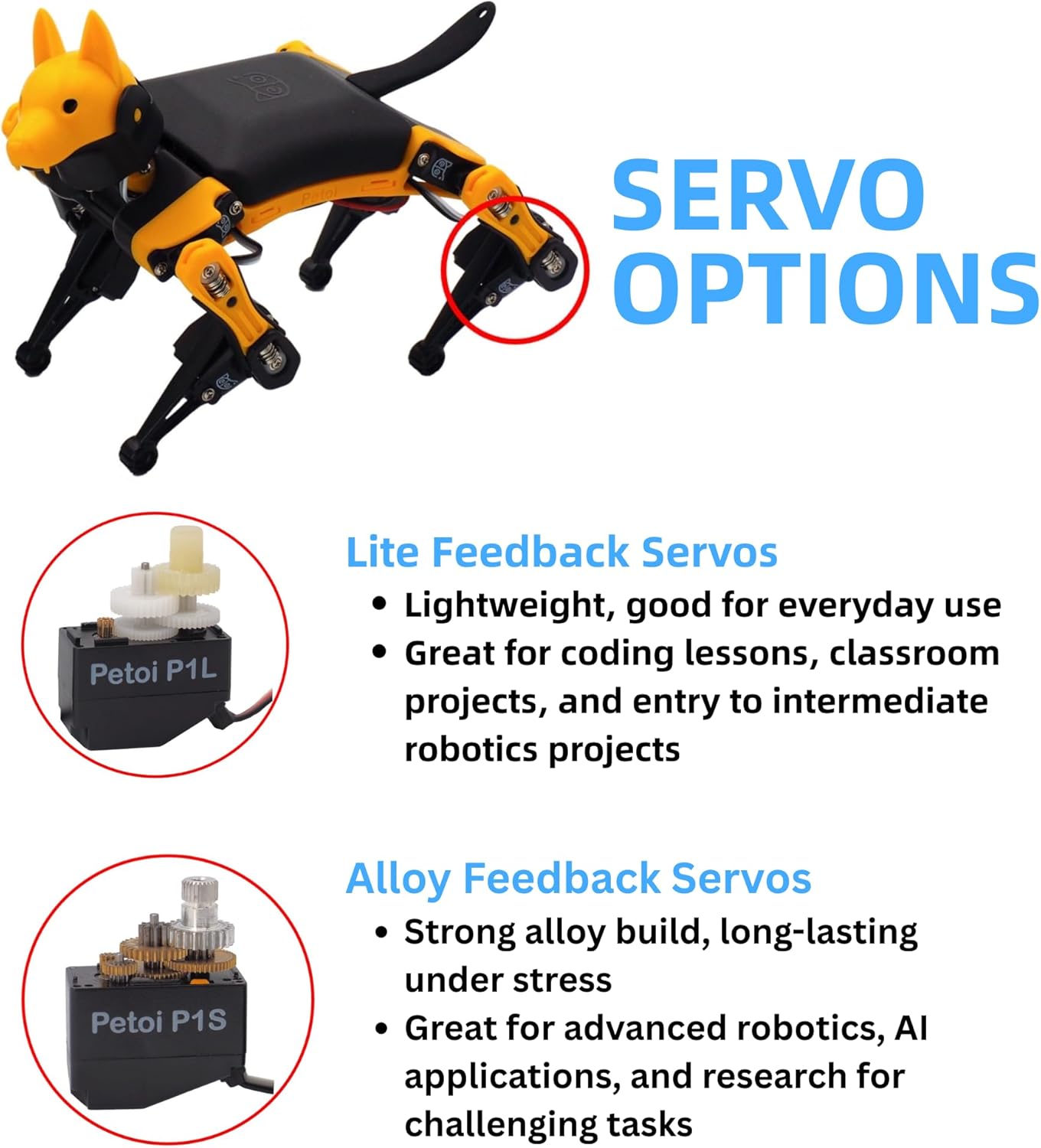
Image: Illustration of the Alloy Feedback Servos, known for their strong build and durability under stress, included in this kit.
3. Operating Instructions
The Petoi Bittle X V2 offers multiple ways to interact and control its movements and behaviors.
3.1 Control Methods
- Mobile App Control: Use the Petoi mobile app to control the robot's preprogrammed actions, such as walking, sitting, stretching, and backflips. The app provides a control panel for various functions.
- Voice Control: The robot responds to over 35 built-in voice commands. You can also customize up to 10 additional voice commands using C++.
- Coding: Program new skills and behaviors using block coding, Arduino C++, or Python. The Codecraft App (for PC/Mac) facilitates this programming.

Image: Mobile app interface for controlling the robot dog, showing various function keys.

Image: The robot dog exhibiting high-performance, lifelike behaviors and movements.

Image: Programming new skills for the robot dog using block coding, C++, or Python.
3.2 Advanced Features
- AI Integration: Program the robot to interact with its environment using optional sensors (e.g., PIR motion sensor, IR distance sensor) for realistic behaviors and navigation.
- Open-Source Framework: Leverage the OpenCat open-source framework on ESP32 for extensive customization and development.
- Educational Curriculums: Access free project-based robotics curriculums covering programming, robot movement, skill programming, and IoT applications.

Image: Developing IoT and AI robotics applications with optional sensors and modules.
3.3 Official Product Videos
Video: Detailed overview of the Petoi Bittle X V2 robot dog's features and capabilities.
Video: Demonstration of programming and customizing the robot dog's actions.
4. Maintenance
Proper maintenance ensures the longevity and optimal performance of your Petoi Bittle X V2 Robot Dog.
- Cleaning: Keep the robot clean and free from dust and debris. Use a soft, dry cloth for cleaning. Avoid using liquids directly on electronic components.
- Surface Use: The robot is optimized for flat concrete and hardwood surfaces. To ensure smooth traction and prevent wear, avoid operating it on carpets, grass, mud, snow, or uneven surfaces.
- Battery Care: Ensure the 12V battery is charged according to manufacturer guidelines. Disconnect the battery when the robot is not in use for extended periods.
- Connection Checks: Periodically inspect all electrical connections and servo cables to ensure they are secure and free from damage.
5. Troubleshooting
If you encounter issues with your Petoi Bittle X V2, consider the following troubleshooting steps:
- Robot Not Responding:
- Check the battery level and ensure it is fully charged and properly connected.
- Verify all servo connections are secure. Loose or faulty servo connections can prevent movement.
- Ensure the robot is correctly calibrated. Recalibration via the app or software is often necessary after assembly or if movements become erratic.
- Connection Issues (Bluetooth/Wi-Fi):
- Confirm that the Bluetooth or Wi-Fi module is correctly installed and powered.
- Restart the robot and your controlling device (phone/PC).
- Ensure your device's Bluetooth/Wi-Fi is enabled and attempting to connect to the correct robot.
- Programming Errors:
- Review your code for syntax errors or logical flaws.
- Consult the Petoi online community and documentation for common programming issues and solutions.
- Electronic Component Damage:
- Exercise caution when handling the Nyboard and other electronic components. Accidental contact with metal objects while powered on can cause damage.
- If a component is suspected to be damaged, contact Petoi support for assistance.
6. Specifications
| Feature | Detail |
|---|---|
| Model Number | PTBSTK1 |
| Product Dimensions | 7.6 x 5.8 x 3.9 inches |
| Item Weight | 1.4 pounds |
| Battery | 1 x 12V battery (included) |
| Playtime (approx.) | 1 hour |
| Servos | Alloy Feedback Servos |
| Control Methods | App, Voice, Coding (Block, C++, Python) |
| Recommended Age | 10+ (Manufacturer recommended age 50 years and up is likely a misprint, typical for complex kits) |
7. Warranty and Support
For warranty information, please refer to the official Petoi website or contact their customer service directly. Petoi is known for providing strong customer and community support, offering resources and solutions for various inquiries.
Additional support and learning resources, including free robotics curriculums and visual skill design tools, are available through the OpenCat community and Petoi's official channels. These resources are invaluable for both beginners and advanced users looking to explore the full potential of their robot dog.
Contact Information: Please visit the official Petoi website for the most up-to-date support and contact details.

