
1. Introduction
Thank you for choosing the Mregb TY66 PRO Solar Charger Power Bank. This device is designed to provide portable power for your electronic devices, featuring both USB charging and an integrated solar panel for emergency power replenishment. Please read this manual thoroughly before using the product to ensure safe and optimal operation.
Package Contents:
- Mregb TY66 PRO Solar Charger Power Bank
- USB Charging Cable
- Instruction Manual
2. Safety Information
To prevent injury, damage to the product, or damage to property, please observe the following safety precautions:
- Do not expose the power bank to extreme temperatures (above 60°C / 140°F or below -10°C / 14°F), direct sunlight for prolonged periods, or fire.
- Do not immerse the power bank in water or expose it to heavy rain.
- Do not disassemble, modify, or attempt to repair the device. Contact qualified service personnel if repair is needed.
- Keep out of reach of children.
- Use only certified charging cables and adapters.
- Avoid dropping or subjecting the power bank to strong impacts.
- Dispose of the power bank according to local regulations for electronic waste. Do not dispose of it in household waste.
3. Product Overview
Familiarize yourself with the components of your Mregb TY66 PRO Solar Charger Power Bank.
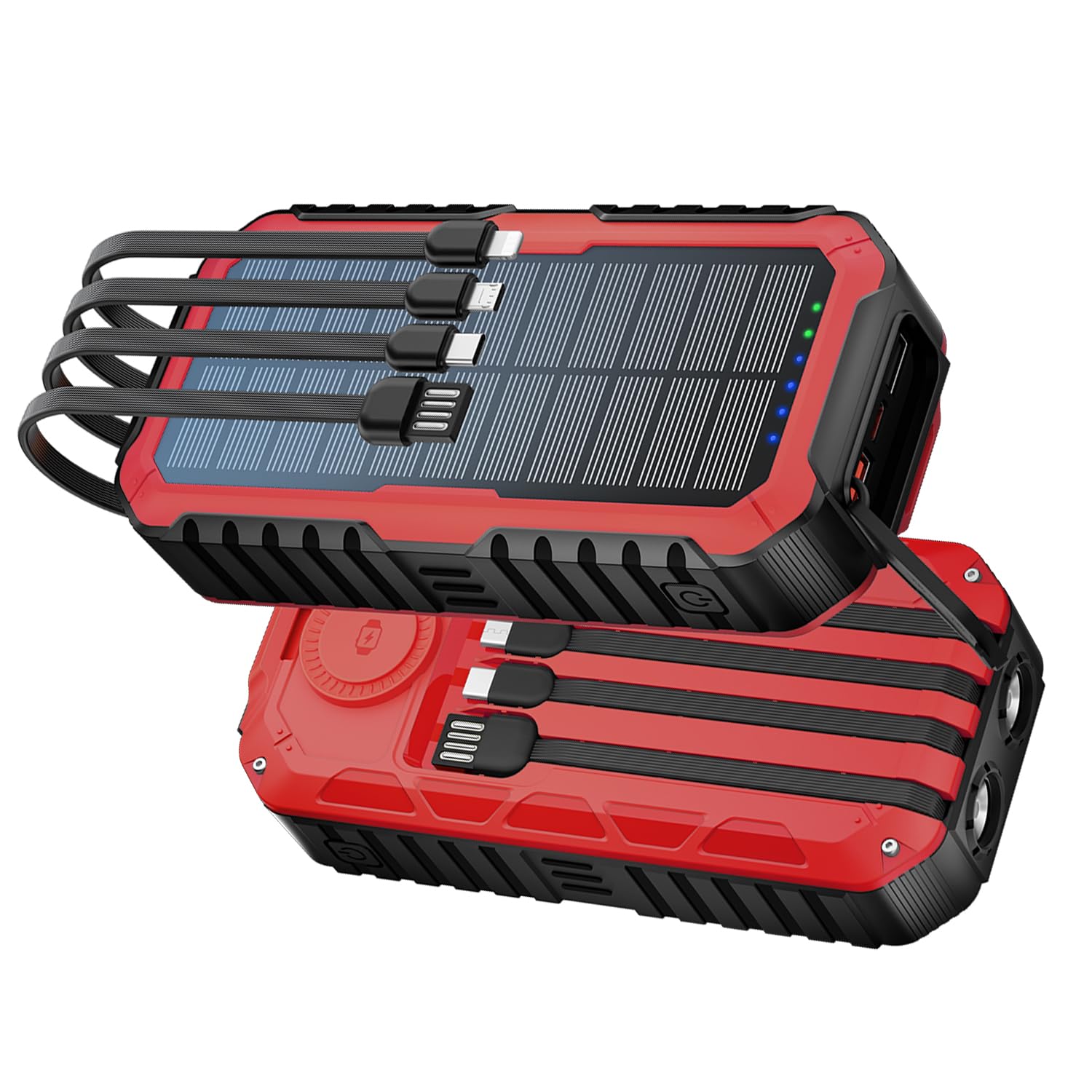
Image 1: Front view of the Mregb TY66 PRO Solar Charger Power Bank. This image displays the main body of the power bank, highlighting the integrated solar panel on the front surface. It also shows the various input and output ports, typically located on the sides or bottom, and LED indicator lights for battery status.
Key Components:
- Solar Panel: Located on the front surface, used for emergency solar charging.
- USB Output Ports: For charging external devices. (e.g., USB-A, USB-C)
- Input Ports: For charging the power bank itself. (e.g., Micro-USB, USB-C)
- LED Indicator Lights: Display battery level and charging status.
- Power Button: To turn the device on/off or check battery status.
4. Setup
Initial Charging of the Power Bank:
Before first use, it is recommended to fully charge the power bank via a wall adapter. This ensures the internal battery is properly conditioned and provides maximum capacity from the start.
- Connect the provided USB charging cable to the input port (e.g., Micro-USB or USB-C) on the power bank.
- Connect the other end of the cable to a USB wall adapter (not included) or a computer's USB port.
- The LED indicator lights will illuminate to show the charging progress. Once all lights are solid, the power bank is fully charged.
5. Operating
Charging External Devices:
To charge your smartphone, tablet, or other USB-powered devices:
- Connect your device's charging cable to one of the USB output ports on the power bank.
- Connect the other end of the cable to your device.
- Press the power button on the power bank (if necessary) to initiate charging. The LED indicators will show the remaining battery level.
- Disconnect your device once it is fully charged or when you no longer need to charge it.
Solar Charging the Power Bank:
The integrated solar panel is designed for emergency charging and maintaining battery life, not as a primary charging method due to its slower speed.
- Place the power bank in direct sunlight with the solar panel facing upwards.
- Ensure there are no obstructions blocking the sunlight.
- A dedicated solar charging indicator light (if present) or the main LED indicators will show that solar charging is active.
- For faster and more efficient charging, always use a wall adapter when available.
LED Indicator Guide:
- Solid Lights: Indicate remaining battery capacity (e.g., 4 lights = 75-100%, 3 lights = 50-75%, etc.).
- Flashing Lights: Indicate that the power bank is being charged.
- Solar Charging Indicator (if applicable): A specific light may illuminate when solar charging is active.
6. Maintenance
Cleaning:
Wipe the power bank with a soft, dry cloth. Do not use abrasive cleaners, solvents, or immerse in water.
Storage:
Store the power bank in a cool, dry place away from direct sunlight and extreme temperatures. For long-term storage, it is recommended to charge the power bank to about 50-75% every 3-6 months to maintain battery health.
7. Troubleshooting
- Power bank not charging:
Ensure the charging cable is securely connected to both the power bank's input port and the power source. Try a different cable or wall adapter. - External device not charging:
Ensure the power bank has sufficient charge. Press the power button to activate output. Try a different USB output port or charging cable. Ensure your device is compatible with the power bank's output specifications. - Solar charging is slow or not working:
Solar charging is supplementary and slower than wall charging. Ensure the solar panel is in direct, unobstructed sunlight. Clean the solar panel surface. Solar charging efficiency is affected by weather conditions and panel angle. - LED indicators not working:
Try charging the power bank to see if the lights react. If the device is completely unresponsive, it may require service.
8. Specifications
| Item Model Number | TY66 PRO |
| Brand | Mregb |
| Battery Cell Composition | Lithium Polymer |
| Power Source | Battery Powered |
| Batteries Required | 1 A batteries (included) |
9. Warranty and Support
The Mregb TY66 PRO Solar Charger Power Bank comes with a standard manufacturer's warranty. Please refer to the warranty card included in your package or visit the official Mregb website for detailed warranty terms and conditions.
For technical support, troubleshooting assistance, or warranty claims, please contact Mregb customer service through the contact information provided on the product packaging or the official Mregb website.