
Introduction
The HiFiGo DUNU x KOTO ITO In-Ear Monitor (IEM) is a high-fidelity audio device designed for musicians and audiophiles. This hybrid IEM features a sophisticated 2DD+2BA driver configuration, a versatile Q-Lock Mini Plug System, and a premium LEO cable for exceptional sound quality and user experience. Its design is inspired by the traditional Japanese musical instrument "KOTO", blending tranquil aesthetics with modern vitality.
What's in the Box
Your HiFiGo DUNU x KOTO ITO In-Ear Monitor package includes the following components:
- IEM Units (Left and Right)
- Detachable Silver-Plated OCC Copper IEM Cable
- Interchangeable 3.5mm Single-Ended Plug
- Interchangeable 4.4mm Balanced Plug
- Various Sizes of Dunu S&S Eartips
- Carrying Case

Setup
1. Connecting the Detachable Cable
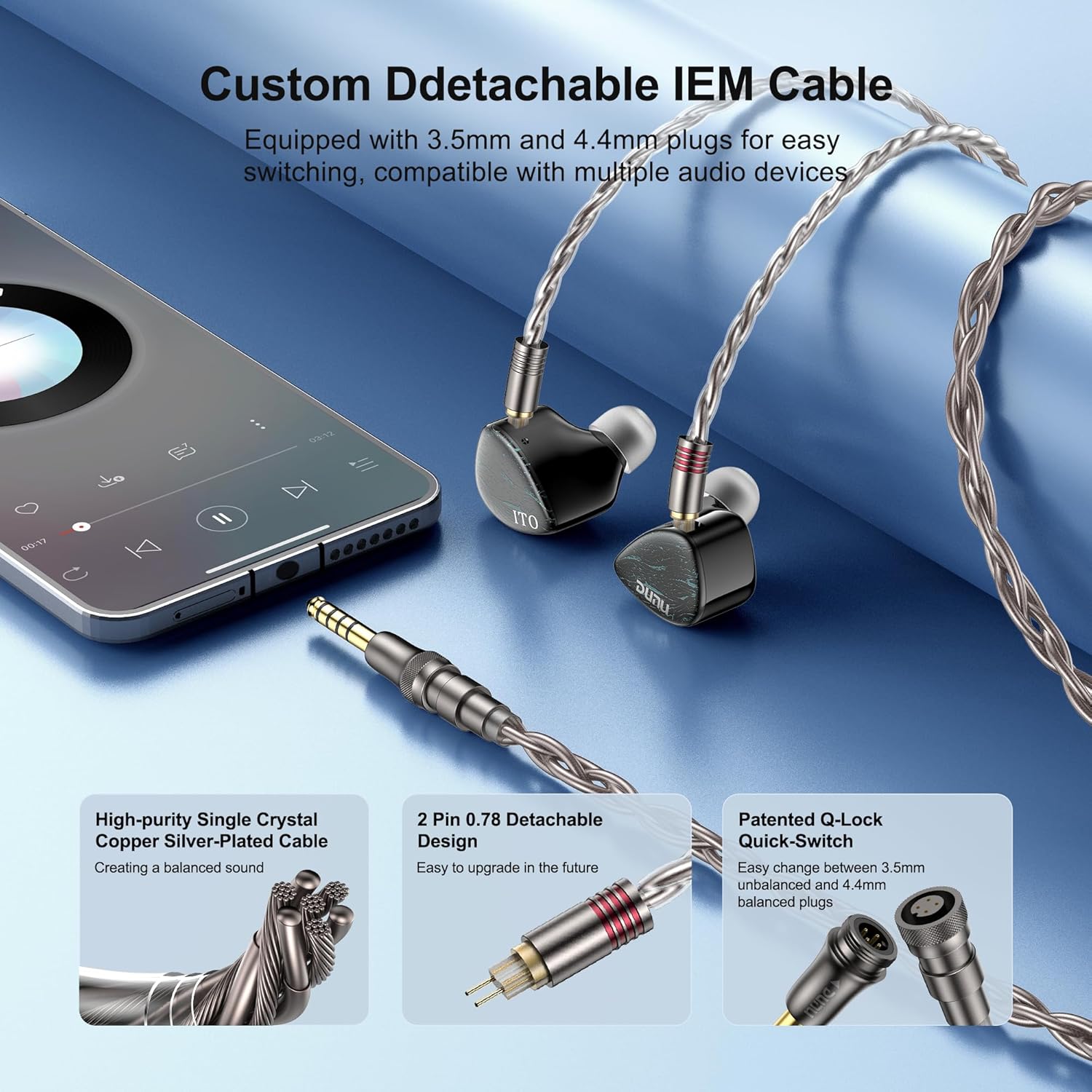
- Identify the left (L) and right (R) IEM units and the corresponding cable connectors. The cable features a 2-pin 0.78mm design.
- Align the 2-pin connectors on the cable with the receptacles on the IEM units. Ensure the correct orientation (red for right, blue for left, if marked).
- Gently push the connectors firmly into place until they are secure. Do not force them.
2. Choosing and Attaching Eartips
- Select the appropriate size of Dunu S&S eartips for your ears. A proper fit is crucial for optimal sound quality and noise isolation.
- Gently roll the eartip onto the nozzle of the IEM unit until it is securely seated.
- Experiment with different eartip sizes to find the most comfortable and best-sealing fit.

Operating Instructions
1. Wearing the IEMs
- Insert the IEM units into your ears, ensuring a snug and comfortable fit. The lightweight resin body and ergonomic design are crafted for extended listening sessions without discomfort.
- Route the cable over your ears for a secure fit and to minimize microphonics (cable noise).
2. Connecting to an Audio Source
- Attach either the 3.5mm single-ended or 4.4mm balanced plug to the detachable cable, depending on your audio source's output.
- Connect the chosen plug to your compatible device (e.g., cellphone, desktop, portable media player).
Features
Hybrid 2DD+2BA Driver System
The IEMs incorporate a hybrid driver configuration with two dynamic drivers (10mm + 8mm) and two balanced armatures. This setup is engineered to deliver a wide frequency response, providing powerful bass, natural midrange, and clear, extended treble.

Overwhelming Bass with Smooth & Detailed Vocals
The 10mm biocellulose dynamic driver provides deep sub-bass response, while the 8mm LCP dynamic driver enhances mid-bass punch and vocal richness. Precision-tuned balanced armatures ensure highlighted yet sibilant-free vocals with excellent extension, suitable for various music genres.

Q-Lock Mini Plug System & Premium LEO Cable
The IEMs feature a Q-Lock Mini Plug System, allowing easy switching between 3.5mm single-ended and 4.4mm balanced plugs for broad compatibility. The upgraded LEO Cable utilizes high-purity single-crystal copper silver-plated wires (22AWG) for minimal signal loss and pure sound transmission.
Professionally Tuned & Validated
The tuning of the DUNU x KOTO ITO IEMs has undergone extensive listening sessions and multiple rounds of verification, incorporating feedback from audiophiles to ensure refined and critically acclaimed sound quality.
Specifications
| Model Name | ITO |
| Brand | HiFiGo |
| Audio Driver Type | Hybrid Driver (2DD+2BA) |
| Audio Driver Size | 10 Millimeters (Dynamic Driver) |
| Impedance | 37 Ohms |
| Sensitivity | 105 dB |
| Headphones Jack | Interchangeable 3.5+4.4mm Plug |
| Connectivity Technology | Wired |
| Cable Feature | Detachable |
| Material | Resin |
| Ear Placement | In Ear |
| Noise Control | Active Noise Cancellation |
| Item Weight | 0.34 Kilograms (12 ounces) |
Maintenance
To ensure the longevity and optimal performance of your HiFiGo DUNU x KOTO ITO IEMs, follow these maintenance guidelines:
- Cleaning: Regularly wipe the IEM units and eartips with a soft, dry cloth. For eartips, you may use a mild soap solution and rinse thoroughly, ensuring they are completely dry before reattaching.
- Storage: Store the IEMs in the provided carrying case when not in use to protect them from dust, moisture, and physical damage.
- Cable Care: Avoid sharp bends or excessive pulling on the cable. When detaching the cable, always grip the connector firmly, not the cable itself.
- Avoid Extreme Conditions: Do not expose the IEMs to extreme temperatures, high humidity, or direct sunlight for prolonged periods.
Troubleshooting
If you encounter any issues with your HiFiGo DUNU x KOTO ITO IEMs, please refer to the following common troubleshooting steps:
- No Sound/Intermittent Sound:
- Ensure the cable connectors are securely attached to both the IEM units and the audio source.
- Check the audio source's volume level and ensure it is not muted.
- Test the IEMs with a different audio source or cable to identify if the issue lies with the IEMs, cable, or source.
- Poor Sound Quality/Lack of Bass:
- Verify that the eartips are properly seated and forming a good seal in your ear canal. Try different sizes of eartips.
- Ensure the audio source is playing high-quality audio files.
- Uncomfortable Fit:
- Experiment with all provided eartip sizes to find the most comfortable and secure fit for your ears.
- Adjust the cable over your ears to find a comfortable routing.
Warranty and Support
For warranty information, technical support, or service inquiries regarding your HiFiGo DUNU x KOTO ITO In-Ear Monitor, please refer to the warranty card included in your package or visit the official HiFiGo website. Keep your proof of purchase for warranty claims.


