
1. Introduction
Welcome to the GarveeHome 2 Zone Mini Split AC/Heating System user manual. This document provides essential information for the safe and efficient operation, installation, and maintenance of your new air conditioning and heating system. This system is designed to provide year-round comfort with its versatile AC, heat pump, dehumidifier, fan, and turbo modes, ideal for multi-room control in homes or commercial spaces.
Please read this manual thoroughly before installation and operation, and keep it for future reference. Professional installation is required for this product.
2. Safety Information
Your safety and the safety of others are paramount. Please observe all safety warnings and precautions outlined in this manual. Failure to do so may result in property damage, personal injury, or death.
- Professional Installation Required: This system operates on 208-230V and contains pre-charged refrigerant (R454B). Installation must be performed by a qualified HVAC professional to ensure proper setup, electrical connections, and refrigerant handling, and to comply with local codes and regulations.
- Electrical Safety: Ensure the power supply is disconnected before any installation, maintenance, or repair work. Use appropriate circuit breakers and wiring as specified.
- Refrigerant Handling: The system contains R454B refrigerant. Only certified technicians should handle refrigerant to prevent environmental damage and personal injury.
- Clearances: Maintain adequate clearances around both indoor and outdoor units for proper airflow and maintenance access.
- Children and Pets: Keep children and pets away from the units, especially during operation and maintenance.
- Unit Placement: Do not install the unit in areas with flammable gases or liquids, or near heat sources.
3. Product Overview
3.1 Components Included
The GarveeHome 2 Zone Mini Split AC/Heating System includes the following main components:
- 2 x Indoor Wall-Mounted Units (12,000 BTU each)
- 1 x Outdoor Condenser Unit (28,000 BTU total capacity)
- 2 x Remote Controls
- 2 x 16.4-foot Line Sets (for connecting indoor units to outdoor unit)
- Installation Kit (basic components for mounting)
Note: Extra copper tubing and power cords may be required depending on your specific installation needs and are not included in the standard kit.

Figure 3.1: Overview of the GarveeHome 2 Zone Mini Split AC/Heating System components.
3.2 Key Features
- Multi-Room Control: Independently control temperatures in two separate zones with individual indoor units.
- All-Climate Cooling & Heating: Equipped with an inverter heat pump, providing powerful performance in temperatures ranging from -4℉ to 122℉.
- 4-in-1 Functionality: Offers Cooling, Heating, Dehumidification (Dry mode), and Fan-only operation.
- Energy-Saving Efficiency: Features inverter technology for up to 30% energy savings. ETL & AHRI certified with a 20 SEER2 rating.
- Ultra-Quiet Operation: Indoor units operate at a low noise level of 28-45 dBa, ensuring a peaceful environment.
- Advanced Airflow: Features 4-way swing and 4D air surround technology, capable of distributing air up to 50 feet.
- Smart Features: WiFi 2.0 connectivity allows control via a smartphone app and integration with Amazon Alexa and Google Home.
- Convenience Functions: Includes Auto-Defrost, Sleep Mode, Mute Function, and Timer settings (0.5-24 hours).

Figure 3.2: The 4-in-1 functionality of the GarveeHome Mini Split System, highlighting smart home integration.

Figure 3.3: Illustration of the ultra-quiet operation, ideal for bedrooms and quiet spaces.

Figure 3.4: Depiction of the 4D Air Surround feature, illustrating wide and long-distance airflow.
4. Setup and Installation
IMPORTANT: Installation of this GarveeHome Mini Split System requires specialized knowledge and tools. It must be performed by a certified HVAC professional to ensure safety, proper function, and compliance with all applicable electrical and building codes.
4.1 Pre-Installation Checklist
- Verify power supply (208-230V, 60Hz, 1PH) matches unit requirements.
- Ensure adequate space and structural support for both indoor and outdoor units.
- Confirm availability of necessary additional materials (e.g., copper line sets if longer than 16.4 ft, electrical wiring, drainage).
- Review local building codes and regulations for HVAC installations.
4.2 Unit Dimensions
Consider the following dimensions for planning your installation:
- Indoor Machine Size: 31.92 inches (W) x 11.49 inches (H) x 7.99 inches (D)
- Outdoor Machine Size: 38.5 inches (W) x 31.6 inches (H) x 16.6 inches (D)
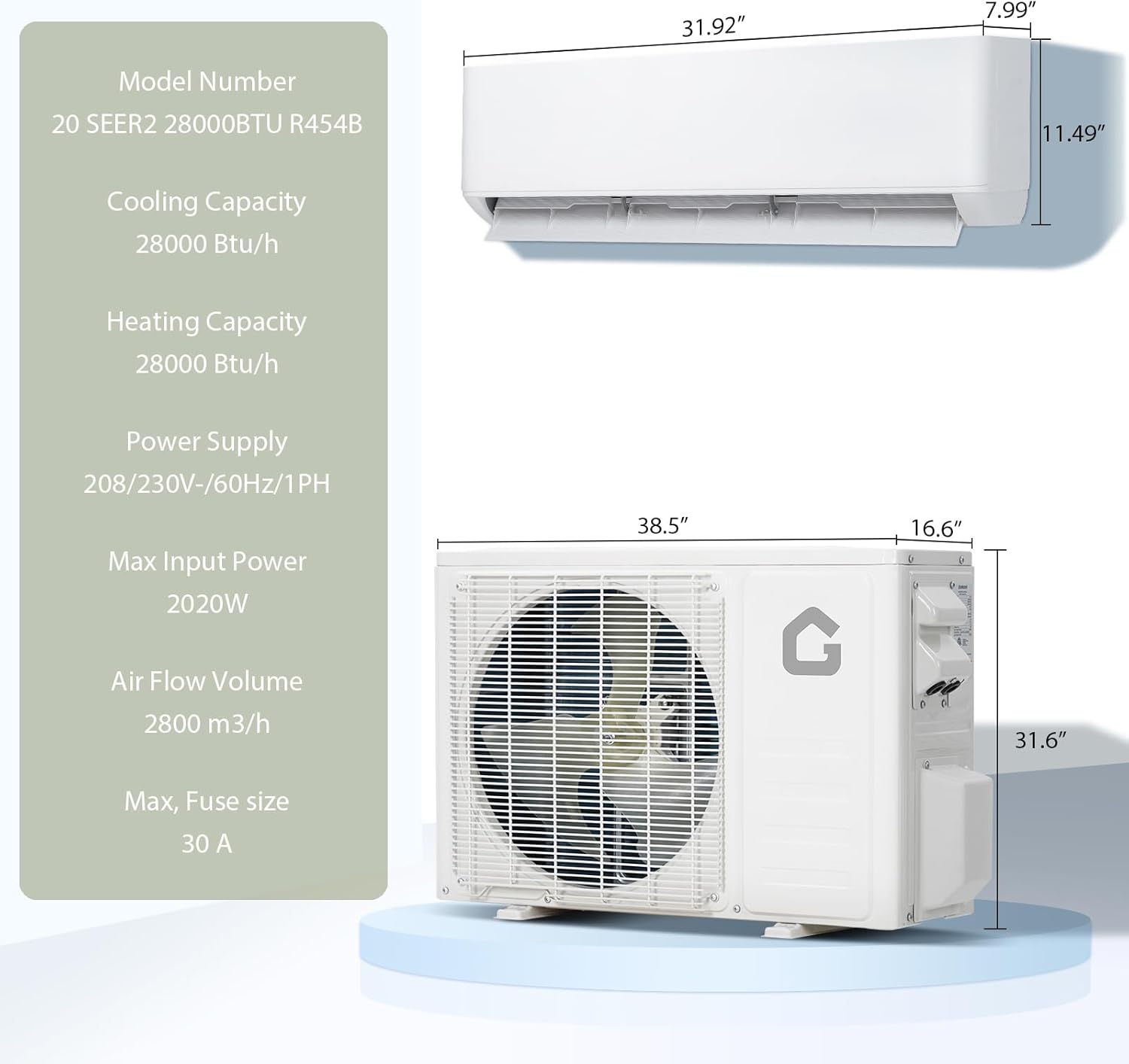
Figure 4.1: Detailed dimensions of the indoor and outdoor units for installation planning.
4.3 Installation Steps (Summary for Professional)
- Mount indoor units securely on the wall, ensuring proper drainage.
- Position the outdoor condenser unit on a stable, level surface with adequate clearance.
- Connect refrigerant lines (pre-charged condenser, but professional connection and leak checks are crucial).
- Perform electrical wiring connections according to local codes and wiring diagrams.
- Evacuate the system to remove air and moisture.
- Test the system for proper operation in all modes.
5. Operating Instructions
Once installed, your GarveeHome Mini Split System can be operated using the included remote controls or via the smartphone app (WiFi 2.0) for smart home integration.
5.1 Remote Control Functions
Each indoor unit is controlled by its dedicated remote. Common functions include:
- Power On/Off: Activates or deactivates the unit.
- Mode Selection: Cycle through Cool, Heat, Dry (Dehumidify), Fan, and Auto modes.
- Temperature Adjustment: Set desired temperature within the operating range.
- Fan Speed: Adjust fan speed (Low, Medium, High, Auto).
- Swing Function: Activate 4-way swing for optimal air distribution.
- Sleep Mode: Adjusts temperature and fan speed for comfortable sleep and energy savings.
- Timer: Set the unit to turn on or off automatically after a set period (0.5-24 hours).
- Mute Function: Reduces operational sounds for quieter performance.
- Turbo Mode: Provides rapid cooling or heating for quick temperature changes.
5.2 Smart Control (WiFi 2.0)
Download the GarveeHome app from the App Store or Google Play to connect your system to your home WiFi network. This enables remote control and integration with voice assistants.
- App Control: Manage modes, temperature, fan speed, and schedules from your smartphone.
- Voice Control: Compatible with Amazon Alexa and Google Home for hands-free operation. Follow the instructions in the app to link your device.
6. Maintenance
Regular maintenance ensures optimal performance, energy efficiency, and longevity of your GarveeHome Mini Split System. Always disconnect power before performing any maintenance.
6.1 Indoor Unit Maintenance
- Air Filter Cleaning: Clean the air filters every 2-4 weeks, or more frequently depending on usage and air quality. Remove filters, wash with lukewarm water and mild detergent, rinse thoroughly, and allow to air dry completely before reinserting.
- Surface Cleaning: Wipe the exterior of the indoor unit with a soft, damp cloth. Do not use harsh chemicals or abrasive cleaners.
6.2 Outdoor Unit Maintenance
- Clear Debris: Regularly remove leaves, dirt, and other debris from around the outdoor unit to ensure proper airflow.
- Coil Cleaning: Periodically clean the outdoor coil fins. This should ideally be done by a professional to avoid damaging the delicate fins.
- Drainage: Ensure the condensate drain line is clear and free of obstructions.
6.3 Professional Servicing
It is recommended to have your system inspected and serviced by a qualified HVAC technician annually. This includes checking refrigerant levels, electrical connections, and overall system performance.
7. Troubleshooting
Before contacting customer support, please review the following common issues and their potential solutions. For complex problems or issues not listed here, contact a qualified HVAC professional or GarveeHome customer support.
| Problem | Possible Cause | Solution |
|---|---|---|
| Unit does not turn on. | No power, remote control batteries dead, circuit breaker tripped. | Check power supply, replace remote batteries, reset circuit breaker. |
| Insufficient cooling/heating. | Dirty air filters, blocked outdoor unit, wrong mode selected, low refrigerant. | Clean filters, clear outdoor unit, select correct mode, contact professional for refrigerant check. |
| Unusual noise from unit. | Loose parts, fan obstruction, compressor issue. | Check for loose covers or debris. If noise persists, contact professional. |
| Water leaking from indoor unit. | Clogged drain line, improper installation. | Check and clear drain line. If issue persists, contact professional. |
| Remote control not working. | Dead batteries, obstruction between remote and unit, remote malfunction. | Replace batteries, ensure clear line of sight, try resetting the unit. |
8. Specifications
Detailed technical specifications for the GarveeHome 2 Zone Mini Split AC/Heating System (Model: 6PIcquejWGDoevXbkmyDJg).
| Attribute | Value |
|---|---|
| Brand | GarveeHome |
| Model Number | 6PIcquejWGDoevXbkmyDJg |
| System Type | 2 Zone Mini Split AC/Heating System |
| Cooling Capacity | 28000 BTU/h (Total) |
| Heating Capacity | 28000 BTU/h (Total) |
| SEER2 Rating | 20 SEER2 |
| Refrigerant Type | R454B |
| Voltage | 208-230V, 60Hz, 1PH |
| Max Input Power | 2020 Watts |
| Annual Energy Consumption | 1980 Watts |
| Indoor Unit Noise Level | 28-45 dBa |
| Outdoor Unit Noise Level | 62 dB |
| Indoor Unit Dimensions (W x H x D) | 31.92 x 11.49 x 7.99 inches |
| Outdoor Unit Dimensions (W x H x D) | 38.5 x 31.6 x 16.6 inches |
| Item Weight | 172 pounds (total system) |
| Air Flow Volume | 2800 m³/h |
| Max Fuse Size | 30 A |
| Color | White |
| Special Features | Heating & Cooling Function, WiFi 2.0, Smart Home Integration (Alexa, Google Home), Auto-Defrost, 4-Way Swing, Sleep Mode, Mute Function |

Figure 8.1: Energy efficiency and refrigerant type comparison.
9. Warranty and Support
GarveeHome is committed to customer satisfaction. For any questions, technical assistance, or warranty inquiries, please contact our customer support team.
- Customer Support: We offer 24/7 service for your satisfaction. Please refer to the contact information provided with your product packaging or visit the official GarveeHome website for support details.
- Warranty Information: Specific warranty terms and conditions may vary. Please retain your proof of purchase. For detailed warranty coverage, contact GarveeHome customer support or refer to the warranty card included with your product.
For the latest information and support resources, please visit the GarveeHome Store on Amazon.
